

Have you ever asked yourself these questions?
I'd like to put the Buy Me a Coffee robot on my Discord server
I'd like to give a role automatically to a Discord user as soon as he makes a donation on Buy Me a Coffee
The Buy Me a Coffee Discord bot is offline, what can I do?
The Discord bot doesn't give a role?
You're in the right place!
How do I install the Buy Me a Coffee Discord bot?
Login to your Buy Me a Coffee (BMC) account
Click to "Connect"

Choice the Discord server and click to "Continue", accept with needed permissions
Now, the Discord bot is on your server and marked as offline, but don't worry about that, he work!

To setup role rewards, go to Membership section (levels)
Select the membership/level on the one you want to add a reward role
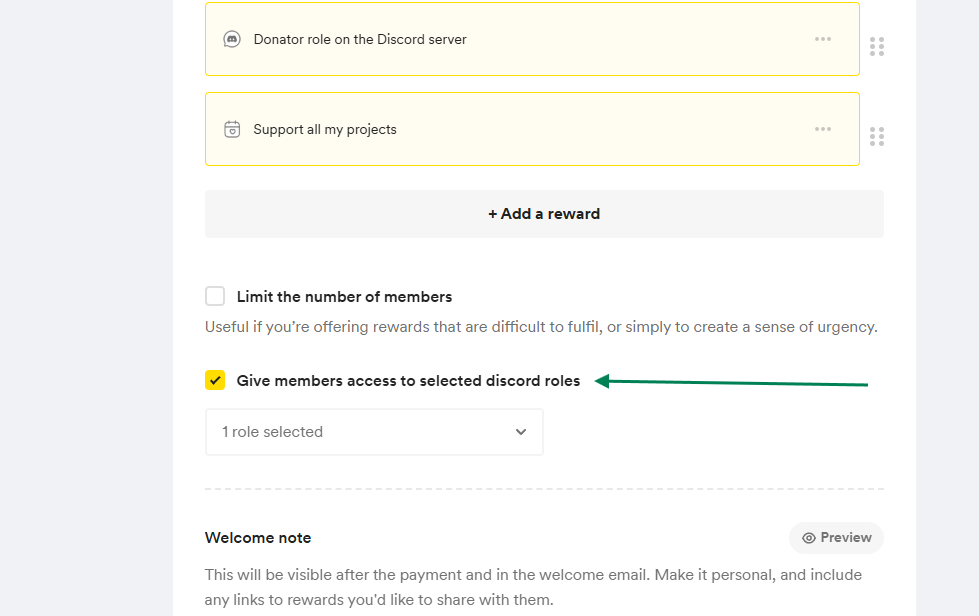
Click to "Update" to save your membership!

Well done!