

iOS applications are increasingly sophisticated, incorporating multiple frameworks, advanced security layers, and innovative features. This complexity makes identifying vulnerabilities before release a challenging task. This post series focuses on iOS penetration testing practice for uncovering security flaws that may lead to severe vulnerabilities.
iOS penetration testing is a fundamental component of any security audit due to the nature of iOS devices and the high dependence on their applications. Throughout this course, you will learn how to assess the security of iOS applications, identify potential loopholes, and ensure your apps are robust against attacks.
iOS Operating System Architecture
iOS is a Unix-based operating system that inherits security features from macOS but is specifically adapted for mobile devices. It is organized into hierarchical layers that interact with each other to ensure a balance between functionality and security. These layers include:
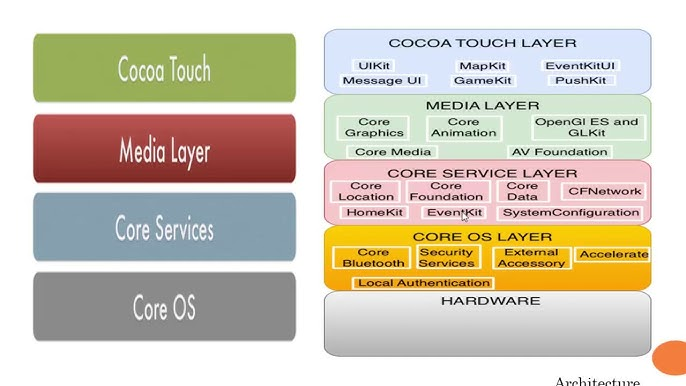
Core OS: The lowest layer, responsible for managing direct interaction with hardware. It includes:
XNU Kernel: Handles processes, memory management, and hardware drivers.
Sandboxing: Ensures application isolation to limit the scope of potential attacks.
Memory Protection: Prevents unauthorized access between applications.
Core Services: Provides frameworks for fundamental operations such as database access, networking, and location services. For example, Keychain is used for securely storing credentials.
Media Layer: Responsible for handling graphics, video, and audio. While less critical for security, improper use can create attack vectors, such as exploiting malicious image files.
Cocoa Touch: The highest layer, where developers interact directly. It includes UIKit for building interfaces and high-level APIs for functionalities like multitouch gestures.
Lifecycle of an iOS Application
Every iOS application follows a lifecycle managed by the operating system through the UIApplicationDelegate. This lifecycle consists of several states, each representing the application's status in memory and interaction with the user:
Not Running: The application is not loaded into memory.
Inactive: The application is in memory but not responding to user events (e.g., during an incoming call).
Active: The application is in the foreground and fully interactive with the user.
Background: The application runs in the background, performing limited tasks without user interaction.
Suspended: The application remains in memory but does not consume CPU resources.
Native Security Measures in iOS
Apple enforces stringent security measures to make iOS less susceptible to attacks than other platforms.
1. App Sandbox
Each application operates in its own isolated environment, preventing access to other apps’ data or system resources.
Security Benefits: Limits the impact of a compromised app.
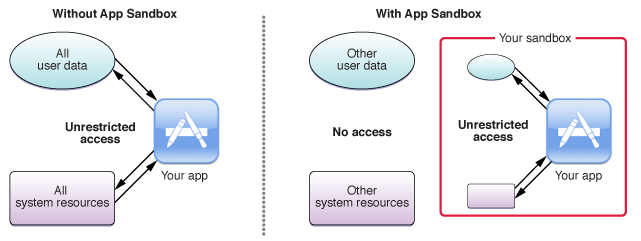
On iDevices, sandboxing isolates applications and processes to protect system integrity and user data. Within this framework, there are three primary types of sandbox directories, each serving a distinct purpose for organizing and securing app-related files:
Pre-installed App Directory
Path: /var/Application
Contains system or pre-installed applications.
These apps are part of iOS and are tightly integrated with the operating system.
Limited to pre-defined functionality and configurations set by Apple.
Bundle Directory
Path: /var/containers/Bundle/Application
Houses third-party application bundles.
Contains executable code, resources, and metadata required for the app's operation.
Data Directory
Path: /var/mobile/Containers/Data/Application
Stores app-specific user data and files, such as caches, databases, and preferences.
Each app has its own data directory, segregated from others.
2. Keychain
A secure API for storing credentials and sensitive data.
Common Issues:
Storing data without adequate access controls.
Failing to encrypt sensitive information.
3. Secure Boot and Code Signing
iOS validates the integrity of the operating system and applications before execution. Applications must be signed with a trusted developer certificate to run on non-jailbroken devices.
Security Benefits: Prevents unauthorized or tampered applications from running.}
Types of Attacks on Mobile Applications
Reverse Engineering: Extracting source code or uncovering internal logic to identify vulnerabilities.
Network Traffic Analysis: Intercepting unencrypted communications to access sensitive data.
Logic Modification: Altering the application’s behavior at runtime, often using tools like debuggers or memory editors.
Security Bypass: Circumventing protection mechanisms such as Jailbreak Detection or SSL Pinning.
Impact of Attacks
Sensitive Data Theft: Compromising credentials, session tokens, or personal information.
Unauthorized Access: Exploiting authentication flaws to gain illegitimate entry.
Fraud and Abuse: Manipulating payment processes or critical app functionalities to carry out malicious activities.
OWASP Mobile Top 10 2024 - Final Release
When conducting a penetration test on mobile applications, a fundamental tool to guide our approach is the OWASP Mobile Top 10. This framework provides a list of the most critical security risks in the development and use of mobile applications. It serves as a reference for identifying, analyzing, and mitigating vulnerabilities that could compromise the security of users and associated systems.
M1: Improper Credential Usage
Description: Mishandling or improper management of user credentials, such as storing passwords in plaintext or hardcoding credentials within the application.
Impact: Enables attackers to access user accounts or backend systems, leading to data breaches and unauthorized actions.
M2: Inadequate Supply Chain Security
Description: Risks introduced by insecure third-party libraries, SDKs, or dependencies used in mobile applications.
Impact: Exploits vulnerabilities in third-party components to compromise the app or inject malicious behavior.
M3: Insecure Authentication/Authorization
Description: Weak or flawed mechanisms for verifying users or granting access, such as insecure session handling or lack of multi-factor authentication.
Impact: Allows unauthorized access, privilege escalation, and identity theft.
M4: Insufficient Input/Output Validation
Description: Failure to properly validate or sanitize user input or app-generated output, leading to vulnerabilities such as injection attacks or data manipulation.
Impact: Enables SQL injection, command injection, or buffer overflow attacks, compromising app functionality and data.
M5: Insecure Communication
Description: Use of unencrypted or poorly configured communication channels, such as HTTP instead of HTTPS, or weak TLS implementations.
Impact: Exposes sensitive data to interception, man-in-the-middle (MITM) attacks, and eavesdropping.
M6: Inadequate Privacy Controls
Description: Poor management of user data, including excessive data collection, failure to comply with privacy regulations, or inadequate anonymization.
Impact: Leads to data leaks, regulatory non-compliance, and breaches of user trust.
M7: Insufficient Binary Protections
Description: Lack of protection against reverse engineering or tampering, such as missing obfuscation or debugging protections.
Impact: Allows attackers to extract sensitive information, modify app behavior, or create malicious clones.
M8: Security Misconfiguration
Description: Misconfigured app settings, such as exposing sensitive APIs, enabling debug mode in production, or insufficient server hardening.
Impact: Creates entry points for attackers to exploit or access sensitive app components.
M9: Insecure Data Storage
Description: Storing sensitive data insecurely, such as in unencrypted files, shared preferences, or databases.
Impact: Allows attackers to access user data directly from the device or backups.
M10: Insufficient Cryptography
Description: Poor or incorrect implementation of cryptographic algorithms, such as using outdated encryption methods or hardcoded keys.
Impact: Weakens the protection of sensitive data, enabling attackers to decrypt and misuse it.
OWASP MASVS (Mobile Application Security Verification Standard)
The OWASP Mobile Application Security Verification Standard (MASVS) is a comprehensive framework that establishes baseline security requirements for mobile applications. It is designed to guide developers, security testers, and organizations in implementing and verifying robust mobile app security measures. The MASVS is widely used as a foundation for security testing, secure development practices, and risk management.
MASVS Levels
The MASVS includes two levels of security requirements based on the app's complexity and risk profile:
MASVS-L1 (Standard Security):
Focuses on basic security hygiene applicable to most mobile applications.
Covers general vulnerabilities and ensures fundamental protections.
MASVS-L2 (Defense-in-Depth):
Designed for high-risk applications requiring advanced security measures.
Includes in-depth protections against reverse engineering, tampering, and advanced attacks.
Categories of MASVS
The MASVS groups security requirements into the following categories:
Architecture, Design, and Threat Modeling (MASVS-A):
Ensures that security considerations are incorporated during the design phase.
Data Storage and Privacy (MASVS-DP):
Covers secure handling of sensitive user data and compliance with privacy standards.
Cryptography (MASVS-CR):
Focuses on the proper implementation and use of cryptographic mechanisms.
Authentication and Session Management (MASVS-Auth):
Ensures secure authentication processes and session handling.
Network Communication (MASVS-NC):
Verifies the security of data transmitted between the app and its backend.
Platform Interaction (MASVS-PL):
Validates secure interaction with mobile platform features and permissions.
Code Quality and Build Settings (MASVS-CODE):
Promotes secure coding practices and appropriate configuration of build environments.
Resiliency Against Reverse Engineering (MASVS-RES):
Focuses on protections against reverse engineering and app tampering.
URL: https://mas.owasp.org/MASVS/
OWASP MASTG (Mobile Application Security Testing Guide)
The OWASP Mobile Application Security Testing Guide (MASTG) is an open-source, community-driven framework that provides detailed methodologies, best practices, and tools for security testing of mobile applications. It serves as a companion to the OWASP MASVS, focusing on practical steps for evaluating and verifying the security of mobile applications across various platforms, including iOS and Android.
Structure of MASTG
The MASTG is organized into multiple chapters, each focusing on a specific aspect of security testing, such as:
iOS and Android Basics: Explains platform-specific architecture and security features.
Testing Techniques: Covers methodologies for identifying vulnerabilities in areas like authentication, cryptography, and data storage.
Advanced Topics: Delves into reverse engineering, obfuscation bypassing, and jailbreak/root detection.
Components of MASTG
Testing Methodology:
A structured approach to assessing mobile app security, covering design, implementation, and deployment phases.
Includes detailed instructions for analyzing application architecture, reverse engineering, and testing APIs.
Static Analysis:
Examines the app’s codebase (source or binary) for vulnerabilities without executing it.
Focus areas: insecure data storage, cryptographic flaws, and hardcoded secrets.
Dynamic Analysis:
Involves testing the app during runtime to observe its behavior and interactions with the system and network.
Focus areas: insecure communication, runtime tampering, and improper API usage.
Network Testing:
Evaluates the security of data transmitted between the app and external services.
Focus on encryption protocols, certificate pinning, and resistance to man-in-the-middle (MITM) attacks.
Platform-Specific Testing:
Tailored guidance for iOS and Android applications, addressing platform-specific risks and features.
Examples: Keychain analysis on iOS, and secure use of Android Keystore.
Reverse Engineering:
Techniques to decompile and analyze app binaries for sensitive information or vulnerabilities.
Tools: JADX, Frida, and IDA Pro.
Tools and Techniques:
Extensive documentation of tools for pentesting, including frameworks for automated and manual assessments.
Categories: network proxies, reverse engineering tools, fuzzers, and debuggers.
URL: https://mas.owasp.org/MASTG/
Mobile Application Security Weakness Enumeration (MASWE)
The Mobile Application Security Weakness Enumeration (MASWE) is a comprehensive, community-driven initiative created by OWASP to catalog common security weaknesses in mobile applications. It is designed to complement existing mobile security frameworks like the OWASP Mobile Top 10 and the OWASP Mobile Application Security Verification Standard (MASVS) by providing detailed descriptions of common security flaws and weaknesses in mobile apps. The goal of MASWE is to offer a structured approach to identifying, categorizing, and mitigating security vulnerabilities specific to mobile platforms.
MASWE focuses on the weaknesses that developers and testers must be aware of during the development, testing, and maintenance of mobile apps. The catalog aims to raise awareness of security flaws that may not be immediately obvious, helping to improve the overall security posture of mobile applications.
MASWE Weakness Categories
MASWE is organized into categories to ensure a systematic approach to identifying weaknesses. These categories include, but are not limited to:
Data Storage and Privacy Weaknesses:
Storing sensitive data in plaintext or insecurely.
Inadequate privacy controls for user data.
Insecure Communication Weaknesses:
Unencrypted communication channels, allowing attackers to intercept or manipulate data.
Insufficient use of secure protocols like HTTPS or SSL/TLS.
Cryptographic Weaknesses:
Poor or improper use of cryptography, leading to the exposure of sensitive data.
Weak encryption algorithms or poor key management practices.
Security Misconfigurations:
Improper configuration of the mobile app or its environment, leading to security vulnerabilities.
Exposing sensitive debugging information or unnecessary permissions.
Reverse Engineering and Code Tampering Weaknesses:
Insecure code or poor obfuscation that makes the app vulnerable to reverse engineering.
Lack of mechanisms to detect or prevent code tampering or unauthorized modification.
URL: https://mas.owasp.org/MASWE/
This has been a brief introduction to how iOS architecture functions, as well as the different guides and frameworks we can rely on when conducting our penetration tests. Understanding the system's architecture and leveraging resources like OWASP’s MASVS and MASTG will enable us to perform thorough and effective security assessments of mobile applications, ensuring we identify and mitigate potential vulnerabilities in the process.