

IPA (iOS App Store Package) files are used to distribute iOS applications outside of the Apple App Store. These files are typically used for beta testing, internal distribution, or enterprise distribution.
Structure of an IPA File
The following directories and files are typically found in an IPA package:

Key Components of the .app Directory
The .app directory within the Payload folder is the main of an IPA file. Key files include: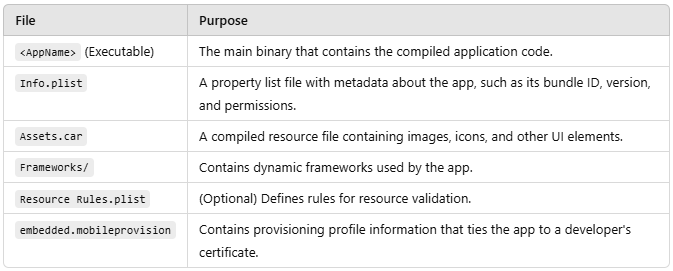
How Are IPA Files Distributed?
App Store:
Most IPAs are downloaded and installed directly from the Apple App Store. (PRODUCTION)
TestFlight:
You can upload your IPA to TestFlight for beta testing. (DEV OR PREPRODUCTION)
This allows users to install the app via an invitation link.
Firebase App Distribution
Firebase App Distribution is a service provided by Google to streamline the process of distributing pre-release versions of mobile applications to testers. It supports both Android and iOS platforms, offering developers a simple way to manage beta testing and collect feedback. (DEV OR PREPRODUCTION)
Visual Studio App Center
Developed by Microsoft, is an all-in-one tool for managing mobile application development, testing, and distribution. It supports iOS, Android, and even React Native or Xamarin apps. (DEV OR PREPRODUCTION)
Sideloading:
Developers and testers can sideload unsigned IPAs onto devices using tools like Sideloadly, AltStore, 3uTools or trollstore. (DEV, PREPRODUCTION or PRODUCTION)
Extracting and Decrypting iOS Apps
Extracting and decrypting iOS applications is a key step in penetration testing, allowing testers to analyze the app's contents and identify potential vulnerabilities. iOS apps downloaded from the App Store are encrypted and cannot be directly analyzed or reverse-engineered without first being decrypted.
Encryption: iOS apps distributed via the App Store, TestFlight are encrypted with Apple's FairPlay DRM to prevent unauthorized access or tampering.
Decryption: Requires access to a jailbroken device where the app can be loaded into memory, as decryption happens dynamically during execution.
Extracted IPA: Once decrypted, the app can be repackaged as an IPA file for analysis.
Extract IPA in Linux/Mac
Frida-ios-dump: Automates the process of dumping decrypted app binaries.
For this, it is necessary to have Frida installed on the mobile device and Frida-tools on our computer.
Installation and Use
git clone https://github.com/AloneMonkey/frida-ios-dump.git
cd frida-ios-dump
pip install -r requirements.txt
Run usbmuxd/iproxy SSH forwarding over USB (Default 2222 -> 22). e.g. iproxy 2222 22
Open the application to extract and list with frida-ps: frida-ps -Ua
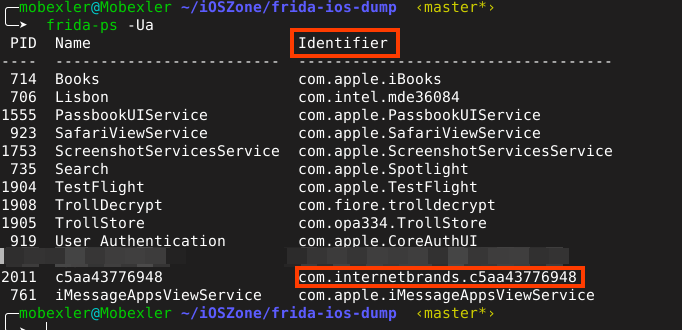
In my case, I extract the IPA of the identifier. com.internetbrands.c5aa43776948
python3 dum.py com.internetbrands.c5aa43776948 -u mobile -P passwordconfiguredinthejailbreakprocess


Once the process is complete, we have our decrypted IPA ready for manual or automated static analysis.
Extract IPA in Windows
To perform this process from Windows, I recommend using the TrollDecrypt tweak for TrollStore, which should already be configured and installed on our device.
Install:
Open TrollStore, select the option to install an application from a URL, then add the final version URL of the app you want to install and proceed with the installation. v1.1
Open the TrollDecrypt app from your device.
Select the IPA application you want to decrypt.

Now extract the IPA generated by TrollDecrypt using SCP
scp mobile@<IPofdevice>:/path/to/decrypted.ipa /path/to/save/on/your/computer
If the generated file contains spaces, I recommend renaming the file.

Once the process is complete, we have our decrypted IPA ready for manual or automated static analysis.
Cross-Platform Languages/Frameworks
Cross-platform development allows developers to write a single codebase that can run on both iOS and Android. Popular cross-platform frameworks include Flutter, React Native, Xamarin and Ionic/Cordova.
The choice between native and cross-platform development depends on the specific requirements of the project. Native development is best suited for apps requiring high performance and full use of platform-specific features, while cross-platform frameworks excel when reducing time and cost is a priority without sacrificing too much in terms of functionality.
When auditing mobile applications developed with cross-platform languages, the testing methodology may differ from that applied to native applications. Each of these languages and frameworks has unique characteristics that can influence the security testing approach. Below, we will provide a brief overview of each of the main cross-platform languages used in mobile app development. Throughout this series of posts, we will delve deeper into how to conduct specific audits for each of them.
Popular cross-platform languages include:
Cordova
It is a mobile application development framework used to create hybrid applications using standard web technologies such as HTML, CSS, and JavaScript. It enables cross-platform development, eliminating the need to develop native applications for each mobile platform and operating system. Applications developed with Apache Cordova use containers to execute the native functions of the target platform.
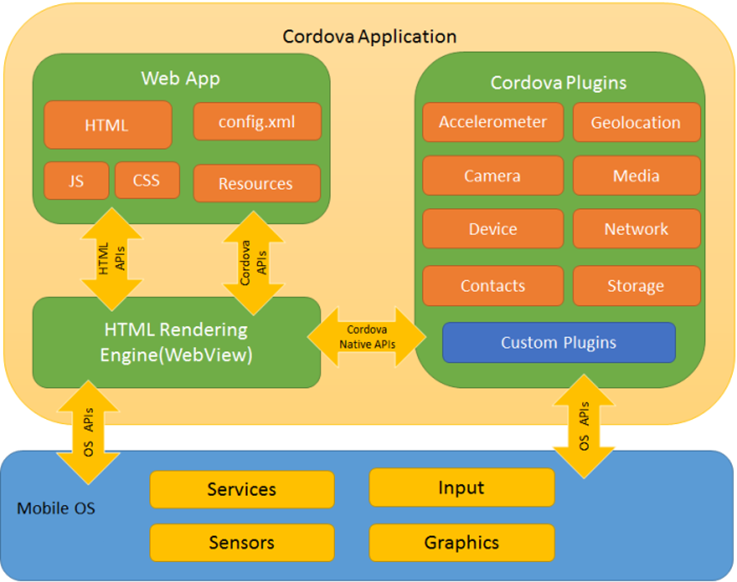
It uses the operating system's native WebView to render user interfaces and provides a set of plugins that allow access to the device's native functions, such as contacts, camera, GPS, Face ID, among others. This simplifies the development of hybrid applications by reusing web code across multiple platforms.
React Native
It uses JavaScript, which is by far the most dynamic, popular, and high-performance language. React Native combines the benefits of JavaScript and React.js and is also backed by Facebook.
The best part of working with React Native is that, among the three frameworks, it allows developers to write pieces of code in Swift, Obj-C, or Java when needed. If you want to handle heavy operations in your application, you gain access to native modules and libraries in React Native-based apps.

The React Native compiler converts JSX elements into native interface elements for both Android and iOS. This allows the developed applications to have a look and feel similar to native apps, running on the JavaScript virtual machine of each operating system.
Flutter
Flutter is a cross-platform application development framework created by Google that allows developers to create applications for iOS, Android, Web, and more using a single codebase written in the Dart language.
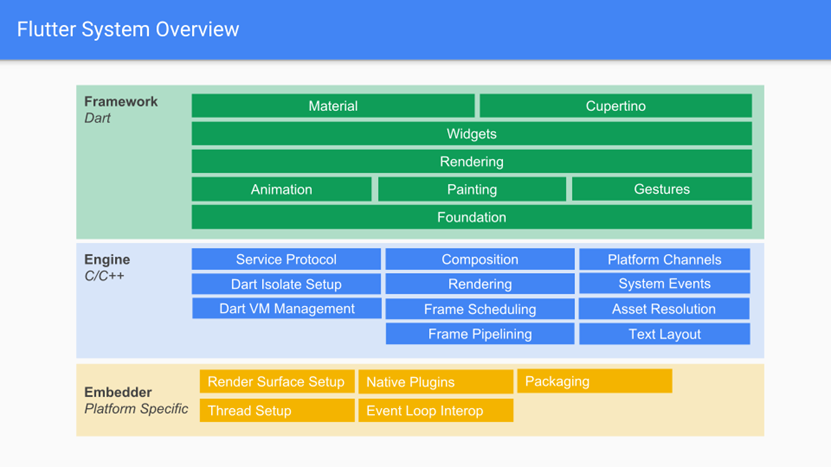
Flutter is composed of three main layers:
Framework:
This layer contains tools and libraries that developers use directly to build applications.
It includes prebuilt widgets for creating user interfaces, such as Material Design for Android and Cupertino for iOS.
Written in Dart, it is fully customizable, allowing the creation of highly tailored interfaces.
Engine:
The core of Flutter, written in C++.
Handles critical tasks such as rendering, animations, graphics (via Skia), and access to platform-specific APIs.
It interprets and executes Dart code, translating it into instructions that the platform's hardware can understand.
Embedder:
The layer responsible for the integration between Flutter and specific platforms (iOS, Android, Web).
Configures the application window, manages user input, and communicates platform-specific requests to the engine.
Provides the necessary bridge to access native APIs.
Flutter uses its own certificate store to manage secure connections through the HTTPS protocol. This is because Flutter does not rely directly on the native components of iOS or Android to handle network communication. Instead, it uses its own libraries and APIs for most operations, including managing SSL/TLS certificates.
Xamarin
Xamarin is a mobile application development platform that allows developers to create apps for iOS and Android using C# and .NET. On iOS, Xamarin provides an abstraction layer over the native iOS APIs, allowing access to platform-specific features without the need to write code in Objective-C or Swift.
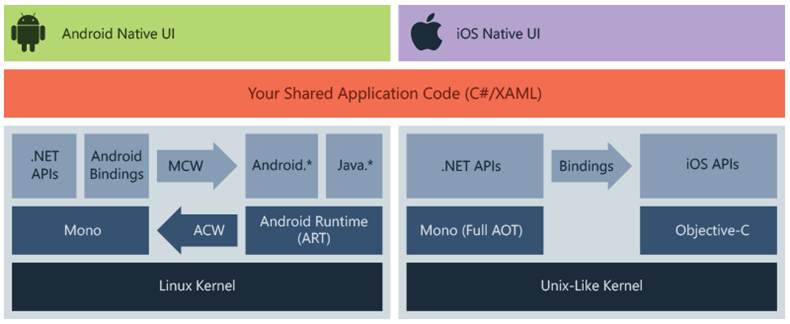
On iOS, Xamarin always uses AOT. Apple does not allow JIT compilation in iOS applications due to security restrictions, so Xamarin compiles all the application code into native code using AOT before the application is executed.
The application code, written in C#, is converted into native iOS (ARM) code during the compilation process.
This process occurs at compile time and generates native code that is included in the application package, allowing the application to run directly on the iOS device.
As can be seen, cross-platform applications use different approaches and technologies to provide a consistent experience across multiple devices and operating systems.
Vulnerable iOS Apps
When practicing penetration testing and security research on iOS applications, it is important to target apps that have known vulnerabilities or have been intentionally designed to be insecure for educational purposes. Below is a list of some vulnerable iOS apps that can be used for practice, particularly in controlled environments like Capture The Flag (CTF) challenges, bug bounty programs, or learning platforms.
DVIA-v2
Damn Vulnerable iOS App (DVIA) is an iOS application that is damn vulnerable.
v1: https://github.com/prateek147/DVIA
v2: https://github.com/prateek147/DVIA-v2
iGoat (Swift)
A Damn Vulnerable Swift Application for iOS
https://github.com/OWASP/iGoat-Swift
Mobile Helper Framework
Mobile Helper Framework (mhf) is a tool that automates the process of identifying the framework/technology used to create a mobile application. Additionally, it assists in finding sensitive information or provides suggestions for working with the identified platform.
git clone https://github.com/stuxctf/mhfcd mhf
pip install -r requirements.txt
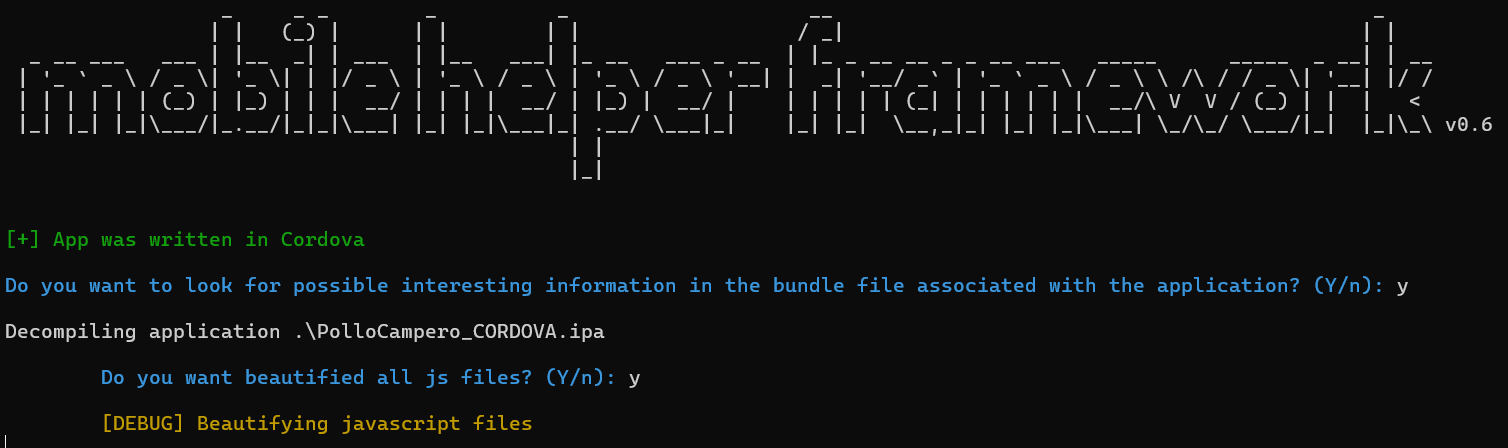
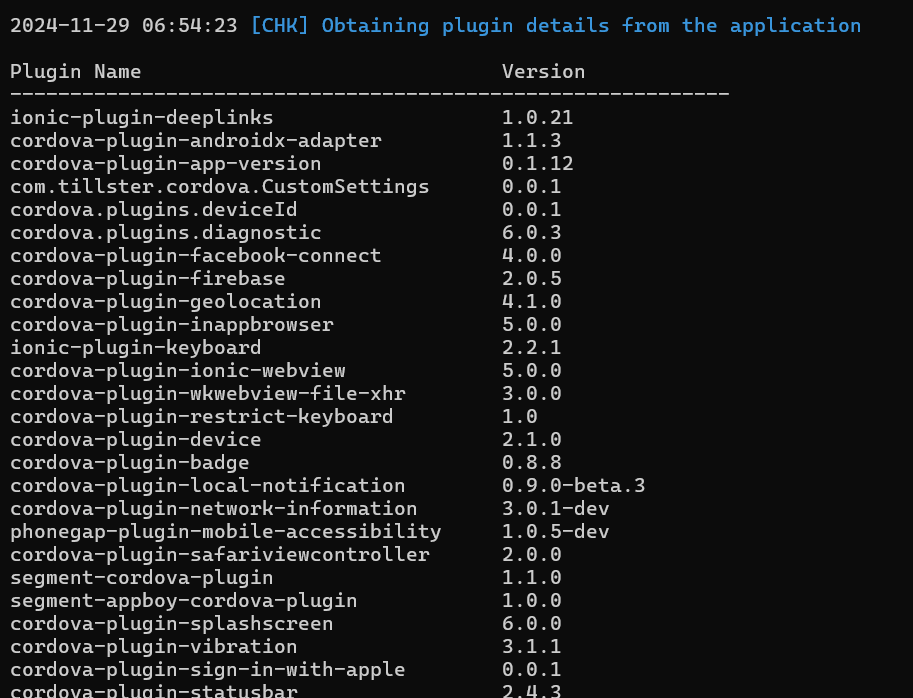
I have created this tool to detect which framework the application was built with in order to focus testing on the technology used. It still needs some improvements.
Note: On Mac, there is a bug with python-magic library, and a solution has not yet been worked on. Tested on Python 3.8.10