

Managing support tickets doesn’t have to mean paying for expensive software. You can build a fully functional ticketing system using nothing but Google Sheets and Google Apps Script — free, fast, and accessible from any device.
This setup is ideal for small teams, freelancers, or anyone who needs a quick way to log, track, and update tickets without leaving Google Workspace.
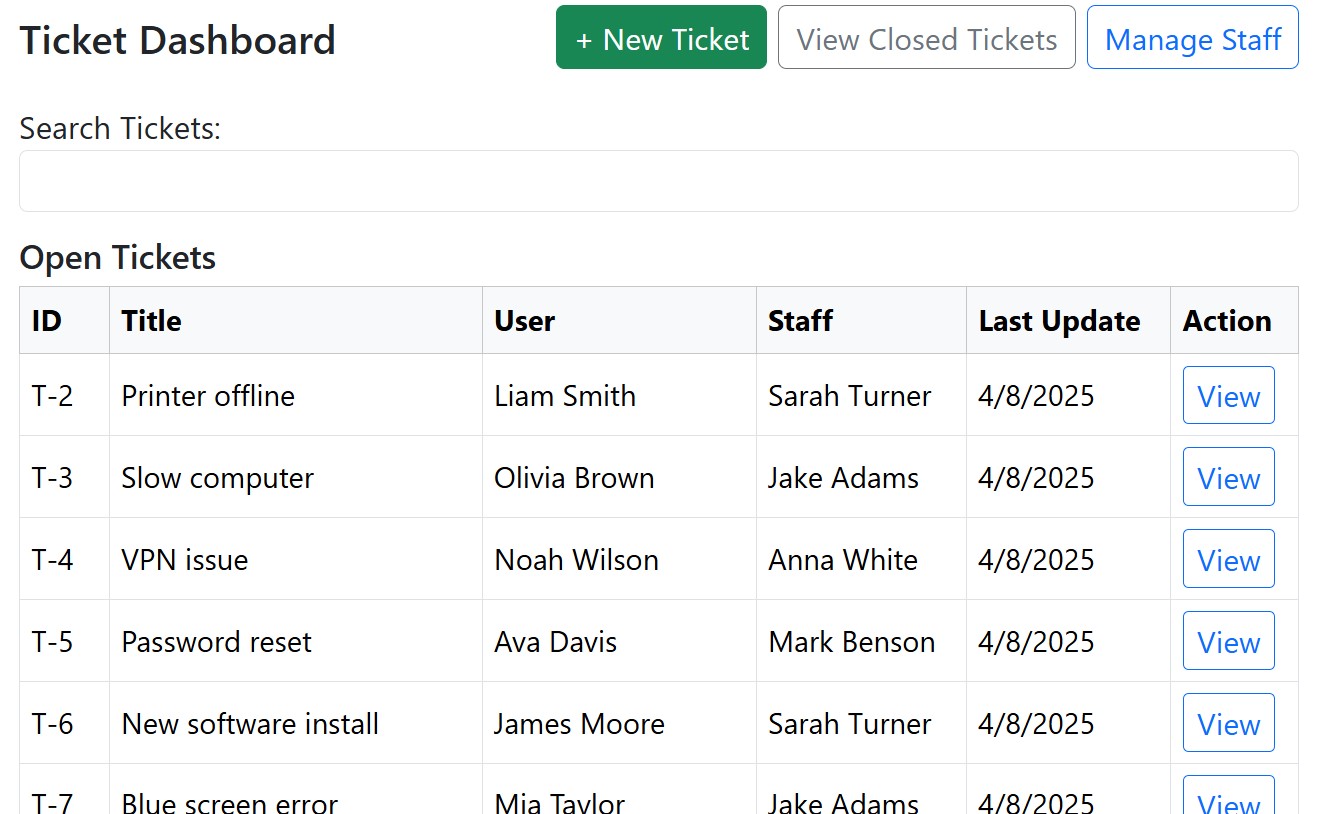
What You’ll Get
A dashboard showing open and closed tickets.
A simple web-based form to create, update or close tickets.
Add and delete staff members
Automatic ticket numbering and date stamps.
Send emails to user and staff on create, update or close tickets.
No extra hosting — it all runs inside your Google account.
How It Works
Google Sheets stores all tickets in a structured table.
Google Apps Script powers the logic and the web app interface.
A web app interface to do all the work
Why Use Google Sheets for Ticketing?
Free — no subscription costs.
Accessible — works on desktop, tablet, and mobile.
Customisable — you control the script, layout, and permissions.
Easy to share — give view or edit access to team members.
Step-by-Step Deployment
I’ve documented the full setup process, including:
Setting up the Google Sheet. Just make a copy of my Sheet
Publishing the web app
Testing and using the ticket system
You can follow the complete guide here: