
To help in monitoring the status of an upcoming release, we make use of our Release Manager Dashboard, which collects all the relevant release information in the same place:
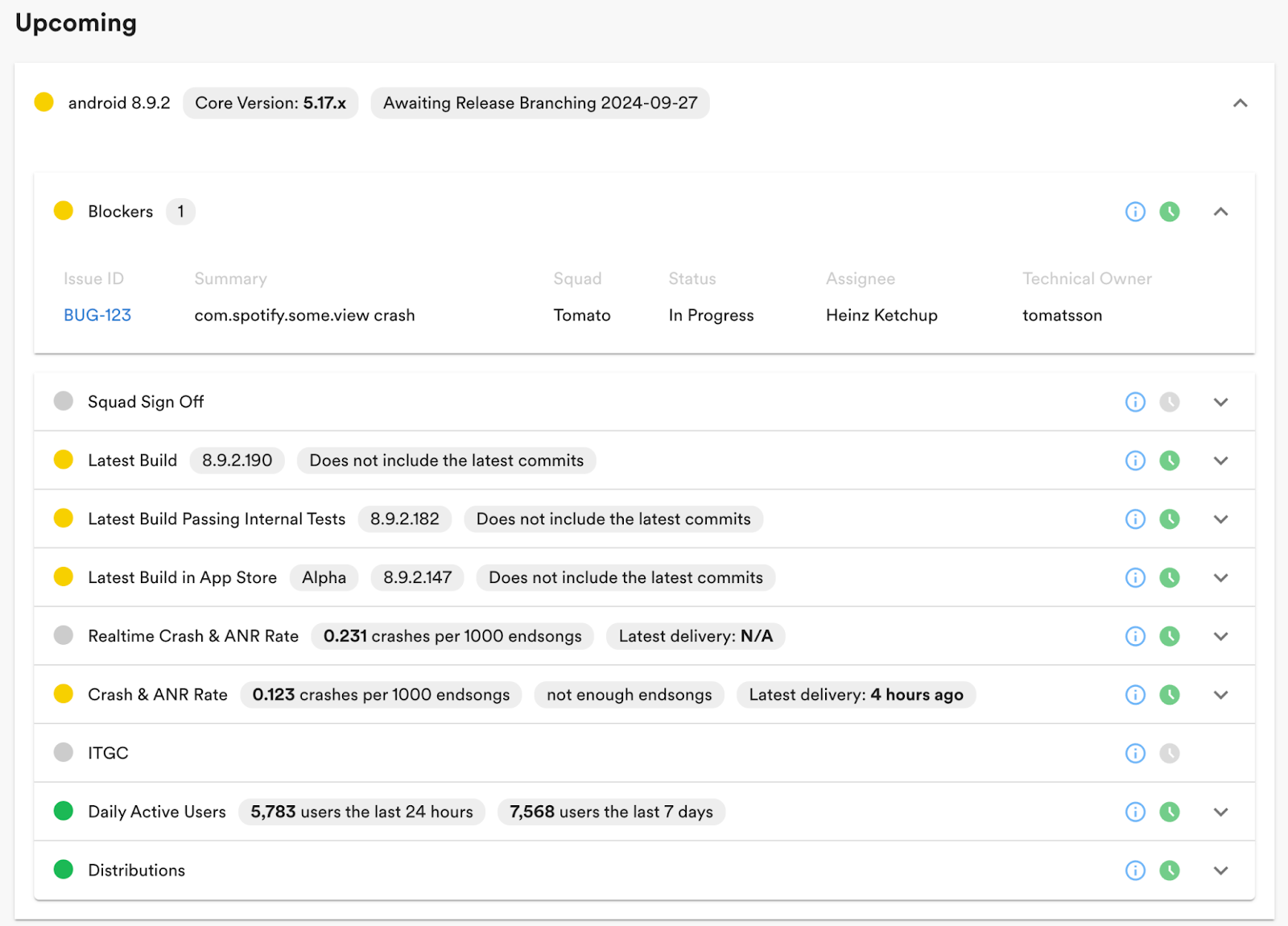
Some examples of the data found in the dashboard are as follows:
Blocking bugs
Latest build available, passing tests, and distributed through the alpha program in the app store
Crashes and ANRs (App Not Responding) per unit of consumption
Daily usage
Status of the distribution jobs that distribute the app internally and externally
By this time, the Audiobooks feature had been turned on for most employees. So in addition to the regular process for this particular release, both the Release Manager and the Audiobooks team looked through all the crashes happening in the client to see if anything might put the Audiobook rollout in jeopardy. Even a seemingly minor crash affecting a small number of employees could signify a potential issue impacting a large user base upon rollout. Therefore, it’s important to investigate and mitigate any issues as soon as possible.
Friday, September 27: Fri-yay is branch day!
Once a week passed, it was time for the 8.9.2 version to be branched off for releasing, initiating the most intensive part of the release process. Once a release has been branched off, it is regarded as the current release and only critical bug fixes are permitted. Our weekly release cadence allows less critical bugs and new features to be addressed in subsequent releases, and teams generally avoid last-minute changes to minimize risk.
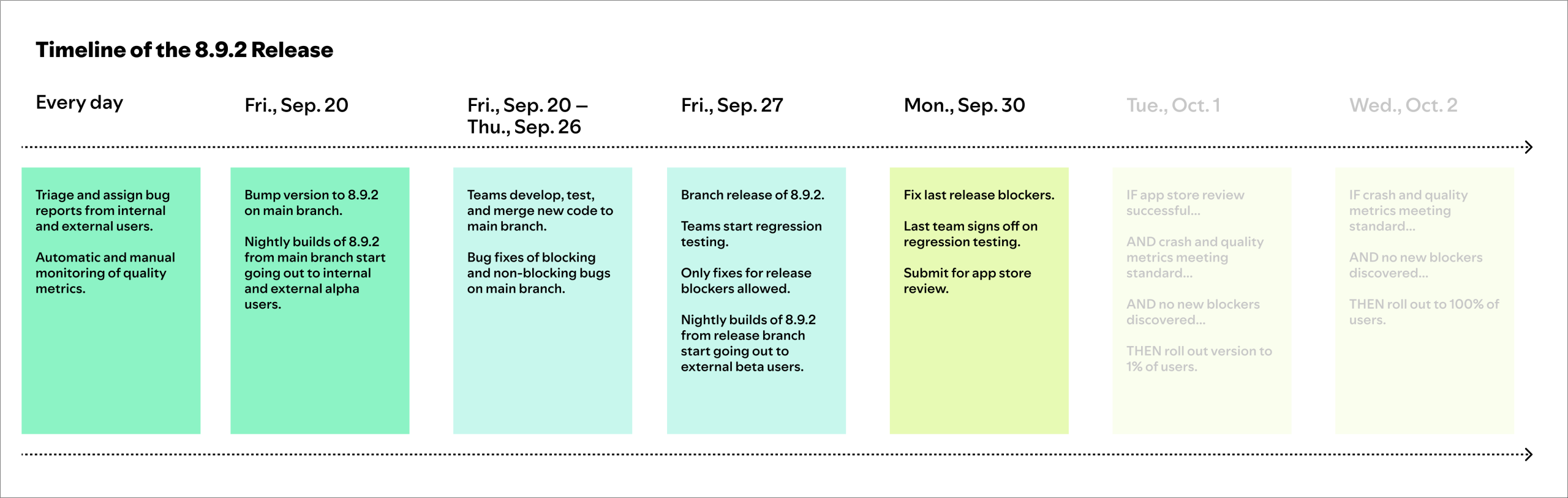
Once branching is done, the Release Manager coordinates the work of releasing the version as soon as possible with all stakeholders.
To help us gather additional data on the quality of the release branch, we have a public beta program that is taken from the release branch — these builds are expected to be more stable than our alpha builds.
On Fridays during Week 2, teams perform manual regression testing on their owned features and report their results. Teams with high confidence in their automated tests and pre-merge routines can opt out of manual testing.
Throughout the testing process, teams may uncover bugs in their own or in other teams’ features and will file tickets for these. Additionally, crash reports and bug reports from internal and external users also trigger the creation of new bug tickets.
For 8.9.2, the Audiobooks team was particularly vigilant during this phase, meticulously searching for any potential issues. At this point, it’s not uncommon to discuss bugs and decide if they warrant a release blocker. Good release management means objectively looking at risk, potential impact, and workarounds.
Friday, September 27 – Monday, September 30: Getting it ready for submission
During the weekend after branching, our beta users provide additional runtime of the app, which either increases our confidence in releasing it or helps us to find issues that had not been found earlier, by the time we get back to work on Monday.
Ideally, we aim to submit the app to the app stores on Monday. However, complex bugs or unforeseen issues can extend this process by a few days. To streamline communication and coordination for each release, the Release Manager, feature teams, and other stakeholders share updates, ask questions, and flag potential concerns on a dedicated Slack channel.
The Release Manager ensures bugs are assigned to the correct team and prioritized appropriately, manual testing is executed and reported, and any release-blocking bugs (there tend to be perhaps three to five such bugs per release) are fixed on the release branch.
Before we submit a build to the app stores, we want to make sure the following criteria are met:
All commits on the release branch are included in the latest build and have passed automated tests.
No blocking bug tickets remain open.
All teams have signed off and approved.
Crash rates and other key metrics are below our defined thresholds.
The app version to be released has been used to play a sufficient amount of content.
The Release Manager Dashboard provides a clear overview of these criteria, using color-coding (red/yellow/green) for quick assessment.
For the 8.9.2 release, we provided additional test accounts with the Audiobooks functionality enabled, as well as detailed testing instructions to the various app stores to ensure they were aware of the new features and wouldn’t be caught off guard when we started to roll out the functionality.
Tuesday, October 1 – Wednesday, October 2: Rollout
Once the app is approved for a platform, we roll it out in two phases: first, to a small percentage of users and, then, the following day, to 100% of users.
When a release has been rolled out to 1%, we expect the dashboard to look like this:
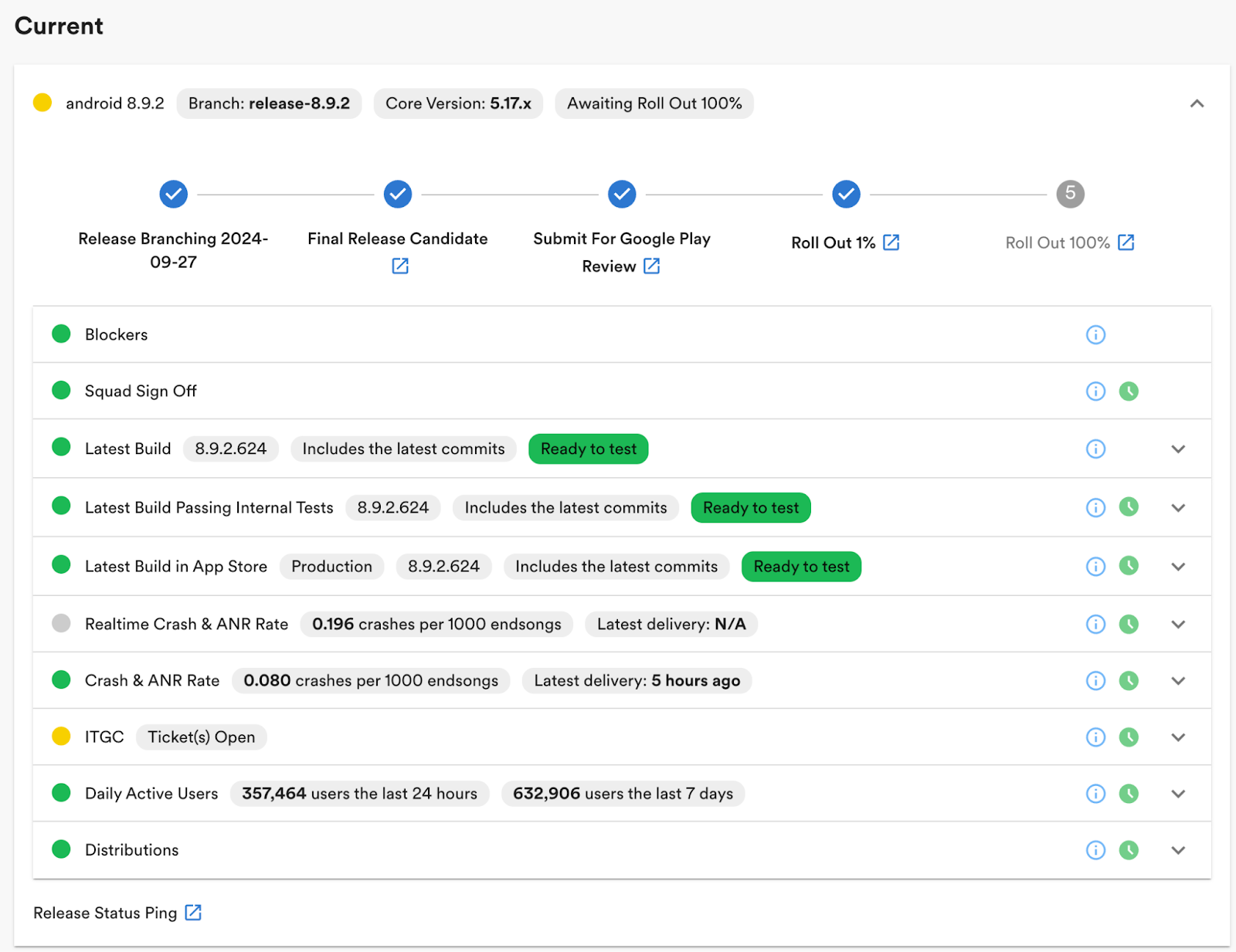
The only remaining items, indicated in yellow, needed before full rollout are the ITGC tickets, where we check to see that reporting from the client to the backend is working as necessary. It’s not unusual to uncover minor bugs that, while acceptable in the current version, would be considered blockers for future releases. In severe cases, we might temporarily halt the feature rollout and resume with the next release.
Thanks to our large user base, even a small initial rollout percentage allows us to quickly identify critical issues that may have slipped through the cracks during the internal and public alpha and beta testing.
If we find a severe issue during the first rollout phase, we immediately pause the rollout and the team responsible starts to create a fix. Ideally, the fix is ready before the next version branches, allowing us to submit an updated build. However, if the fix isn’t timely, we may face the difficult decision of canceling either the current or the upcoming release to prevent the complexity of managing two active release branches simultaneously. Once we have reached 100%, we continue monitoring the state of the release over the next week.
For version 8.9.2, once a sufficient user base was using the new version, the Audiobooks team initiated their phased rollout. This involved gradually enabling the Audiobooks feature for a small percentage of users in specific markets using a backend feature flag.
Fortunately, for version 8.9.2, the Audiobooks feature met our quality standards, and the rollout successfully ramped up to 100% over the following days.
Using the release procedure described above, we are able to roll out more than 95% of releases to all our users. The weekly cadence also means that a canceled release is not the end of the world for the feature teams, since a new release will go out the following week. In the same way, users will be able to get a new version of the app every week as long as it meets our quality standards.
Summary
Spotify’s weekly mobile app release process tries to strike a balance between speed and quality. The person at the helm of the process is the Release Manager, who handles communication and coordination with feature teams and other stakeholders throughout the release cycle with the help of the Release Squad. Tools like the Release Manager Dashboard play an important role in enabling the Release Manager to make fast and accurate decisions.
Detailed documentation of the tools and processes helps guide all the teams involved.
This robust system allows Spotify to consistently update its app, quickly address issues, and introduce new features like Audiobooks, all while minimizing disruptions to the user experience.
Stay tuned for part 2, where we’ll look under the hood to see how the systems (and robots!) that power the Release Manager Dashboard work.