


In this article, I will teach you how to Add an FAQ schema to your Blogger website and improve your chances to land the featured snippet on Google.
FAQ schema helps search engines better understand the topic and identify that it is a question and answer section within the blog post.
What is FAQ schema?
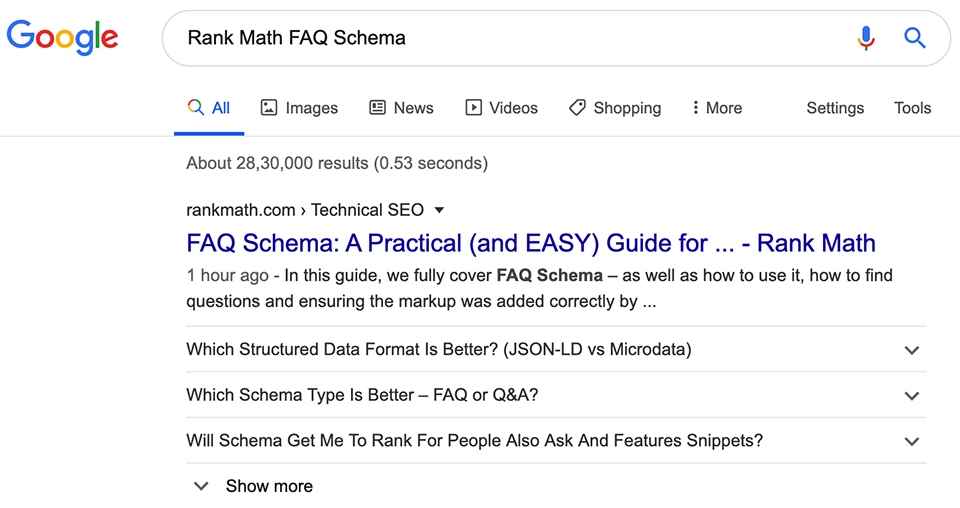
FAQ schema is a structured code that tells the search engines that the page contains a frequently asked question and answer and which can be used to display a rich snippet in search results.
Although it is not always displayed for all search results, it is definitely helpful for Search engines bots to better understand the content and rank well in SERPs (Search Engine Result Pages).
You can use the rich result testing tool of Google to check the preview of the rich results, how they will appear on the search page if eligible.
Benefits of FAQ schema
There are a lot of benefits of using FAQ schema in a website as it gives you an opportunity to occupy more space in search results as a rich snippet and may result in an increase in Click-through Rate (CTR).
It also helps your website be eligible for Voice search as Google assistant can easily pick up the questions and answers from your website.
FAQ schema is super helpful if your website is ranking on the first page but not on the first three results.
Another thing to note is that Schema is not a ranking factor but it can help you rank higher as the Google Algorithm will understand the content better.
How Do I Add FAQ Schema in Blogger?
When it come to Blogger as a blogging platform there is no plugin support available, that’s why we need to use a third-party tools to generate the schema. This means, the schema that we put out we will generate it manually.
So, for this I recommend you to use this schema markup generator.
Once you've opened the page, you have to select the FAQ page option in the schema markup dropdown and you will see the option to add questions and answers.
Now, you will manually type out the questions and answers and it will automatically generate the FAQ schema for you. It's that simple!
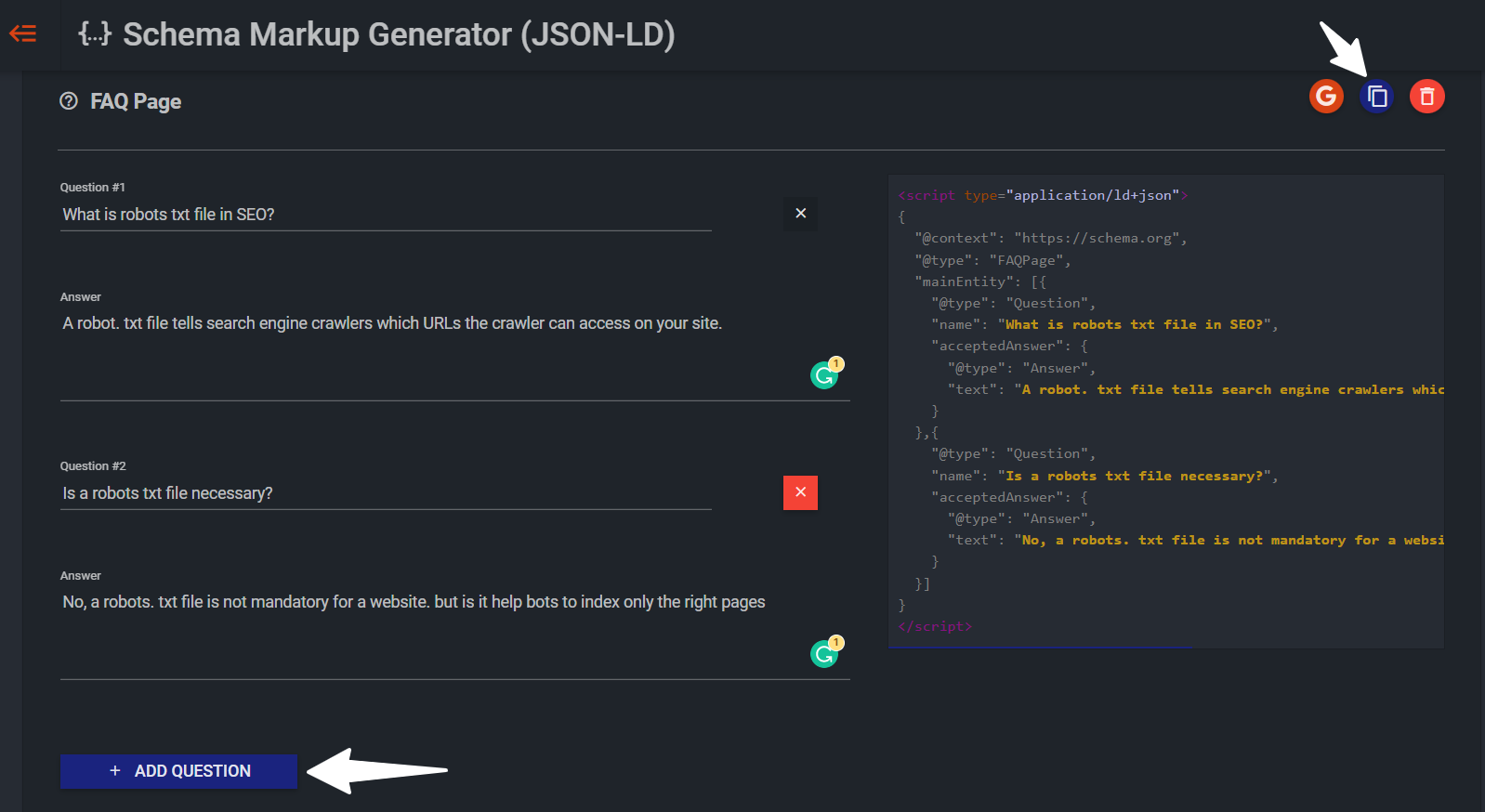
You can use the Add question button to add more questions.
Then, you will use the copy button (two vertical rectangles) on the top-right to copy the FAQ schema and use it in the Blogger website.
Now use the FAQ schema you just copied in Blogger by opening the Blog post in “HTML view”.
Add the copied code anywhere in the blog page in HTML view. And
Now you can type the question and answer in Compose view to display the FAQ section to the readers. And you're done.
INFO: FAQ schema is only visible to search engine bots and the normal user can’t see this code. That’s why you have to add questions and answers in plain text as you normally would.
Validating FAQ Schema
Schema is a Piece of Formatted code that should be used correctly. If you delete even a single letter and/or sign from the code accidentally, it will not work.
That’s why you can use the Google Rich Result Testing Tool to verify if the schema is implemented properly or not.
You will get two options on the page, one is tested via URL and another one is by code.
If your blogpost is published already, you can paste the blog post URL or use paste code directly in this tool if you are still writing your blog post.
After that select the suitable Google bot and start the test. So, it will check the URL/code and show you the result like this as shown in the below image.
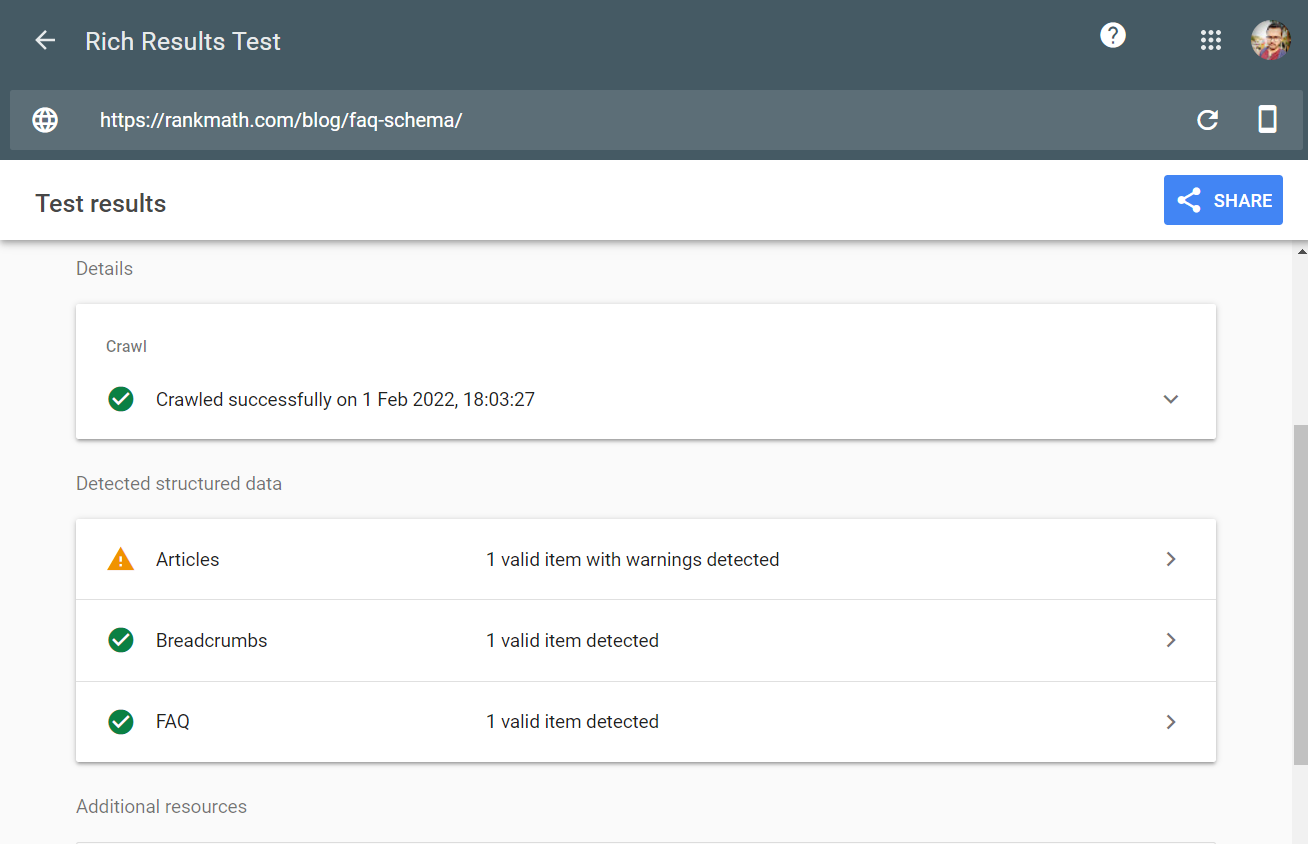
Here, check if there is a green tick or yellow warning in the FAQ section.
If it is showing green tick then the FAQ schema is properly implemented on your website.
If it is showing a warning, then there will be mistakes in the coding. In that case, I recommend you generate the Schema code again and paste it in HTML section of your blogger website.
Now, you can select the preview result option to check how the FAQ schema will look on Google’s search result page. You can also use the search console URL inspection tool to check if the page has a FAQ schema or not.
Notify Google about the FAQ Schema
I hope you have successfully added a FAQ schema in your blogger website. It’s time to notify Google about the Schema using the Google search console.
To do this, just submit your blog post page URL in the URL inspection tool and submit the page for indexing again in your search console.
Finding Questions for FAQ Schema
You can use various free and paid tools to gather frequently asked questions for your blog. The easiest way is to search the term in Google and find relevant questions from the “people also ask” section.
You can also use the Google auto complete features, related searches feature to generate more ideas.
Some other tools to to know what questions people may be asking in your own topic:
Quora (Free)
Ubbersugest (Free and Paid) also a tool I use personally and recommend.
Guidelines for FAQ schema
Here are some official Guidelines regarding FAQ schema that you should follow.
The FAQ section should be written by site and there will be no user input on it.
The FAQ section should not be used in forum websites where users can post alternative answers to the questions.
You can’t use FAQ Page for advertising purposes.
All FAQ content must be visible to the user on the webpage.
You should not use the same FAQ questions and answers in multiple pages.
Question and answer will not display as rich result it violates the guidelines.
Drafted by: Abhishek from The Balkeni Team.
Co-authored, edited, proofread and maintained henceforth by Zera.
☞ Join my blogging memberships to go from $0 a month to $100/month for just $2/month.
☞ Join my blogging memberships to go from $100 a month to $500/month for just $15/month.
Feel free to ask questions and engage the comments section.
INFO: However, please do not attach your blog links in the comment, If I'll need a link to your blog I'll reply with further instructions to get in touch with me. Comments with links will not be published and will end up in the spam. You can use any social platform to log-in and leave a comment.
If you've enjoyed this post, please support our work by donating using the support button below. Writing blog post takes a lot of time and effort as many of you may already know, and we want to be able to keep the blog alive and free for the majority all of you.
We also don't use ads from Google or other ad companies so we rely on community support to cover the costs of blogging. A small donation really helps me and the team stay motivated and be compensated for the time, energy and effort we put into our work. As always, thank you so much for your support!
Alternatively, you can even help us spread the word by sharing this blog post with your followers if you think they will enjoy reading this, or a friend who will benefit from this.