

Annotations without altering the layout
Reliquary will be the "everything" variant of Delving Deeper V5: all four books, illustrated, and annotated--tracing the details back to their sources. Book I alone has over a thousand notes. This post explains some of the layout challenges, and a couple of options.
Same page numbers
As I posted previously, V5 aims to maintain consistent page numbers across variants. Page 47 of the free PDF has the same content as page 47 of the illustrated Compendium. Ideally, that would hold true across Reliquary too, but the challenge is that the annotation text is considerably larger than the game text itself. So how will it all fit?
A couple of layout options are explained below:
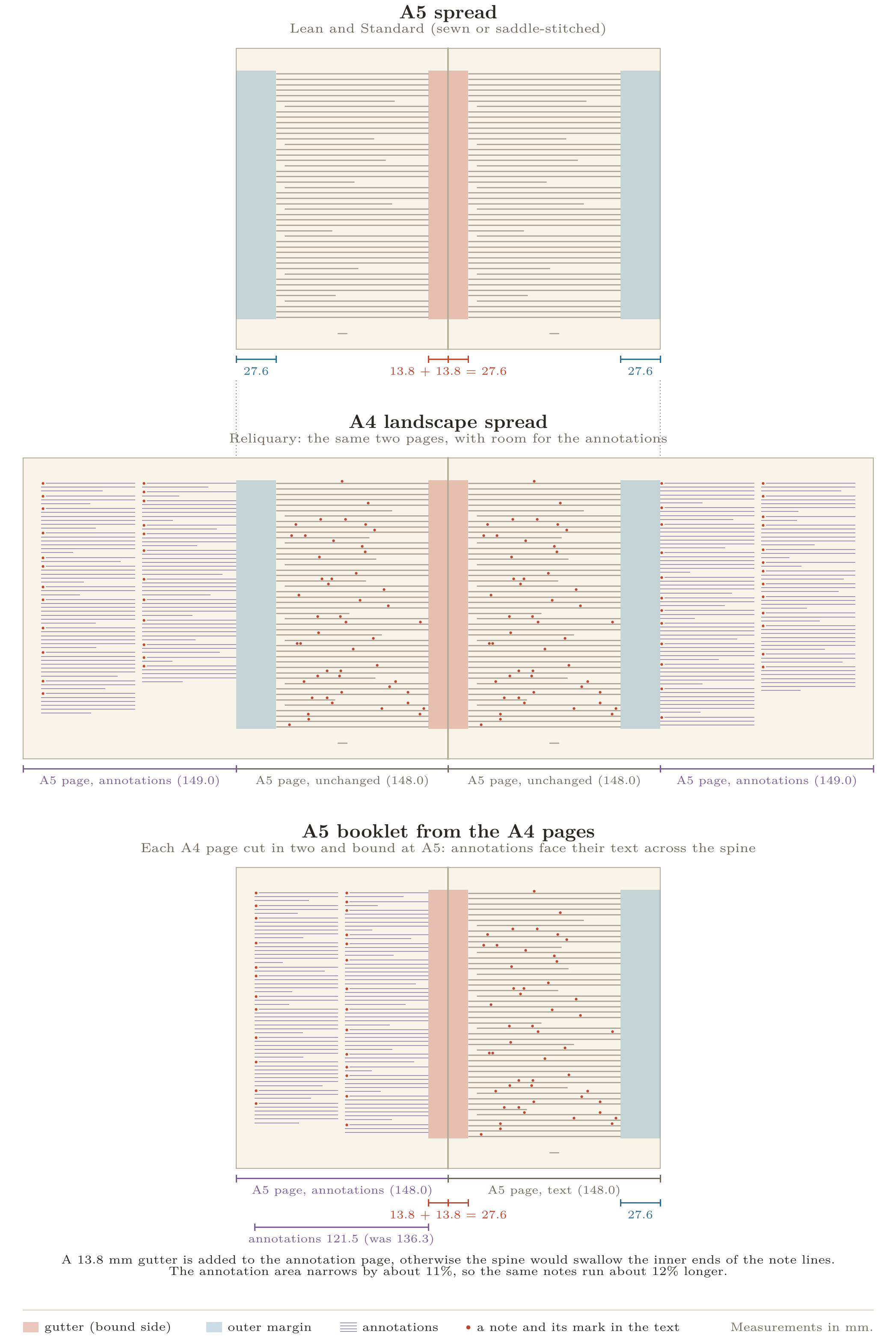
Top (A5 spread) shows the existing (Lean and Illustrated) Compendium layout. Two facing A5 pages of main text per spread.
Center (A4 landscape spread) This option is to print Reliquary on larger (A4) sized paper, with each sheet having the main text in an A5-sized area adjacent to the spine (exactly per the above A5 spread), while the additional, outer, A5-sized area carries the annotations.
Bottom (A5 booklet) This option binds each A4 landscape page (shown in center, above) as an A5 page, with a gutter between the main text and the annotations. We would get one main text page number per spread, with the main text and annotations alternating between the left and right hand side as you turn each page. Note, there is a little less width available for annotations with the layout due to the additional gutter.
In both the center and bottom options, the annotations themselves sit in two columns beside the text they belong to, never entering the main type block. So the notes themselves don't affect the layout of the main text. Of course, there's always a catch... the note anchors are in the main text.
The note anchors
While the annotations are outside the main text, the note anchors that point to them are not. Every annotation has a superscript anchor in the main text, and that anchor needs some space. Out of the box, this extra space reflows the layout, blowing it up like this: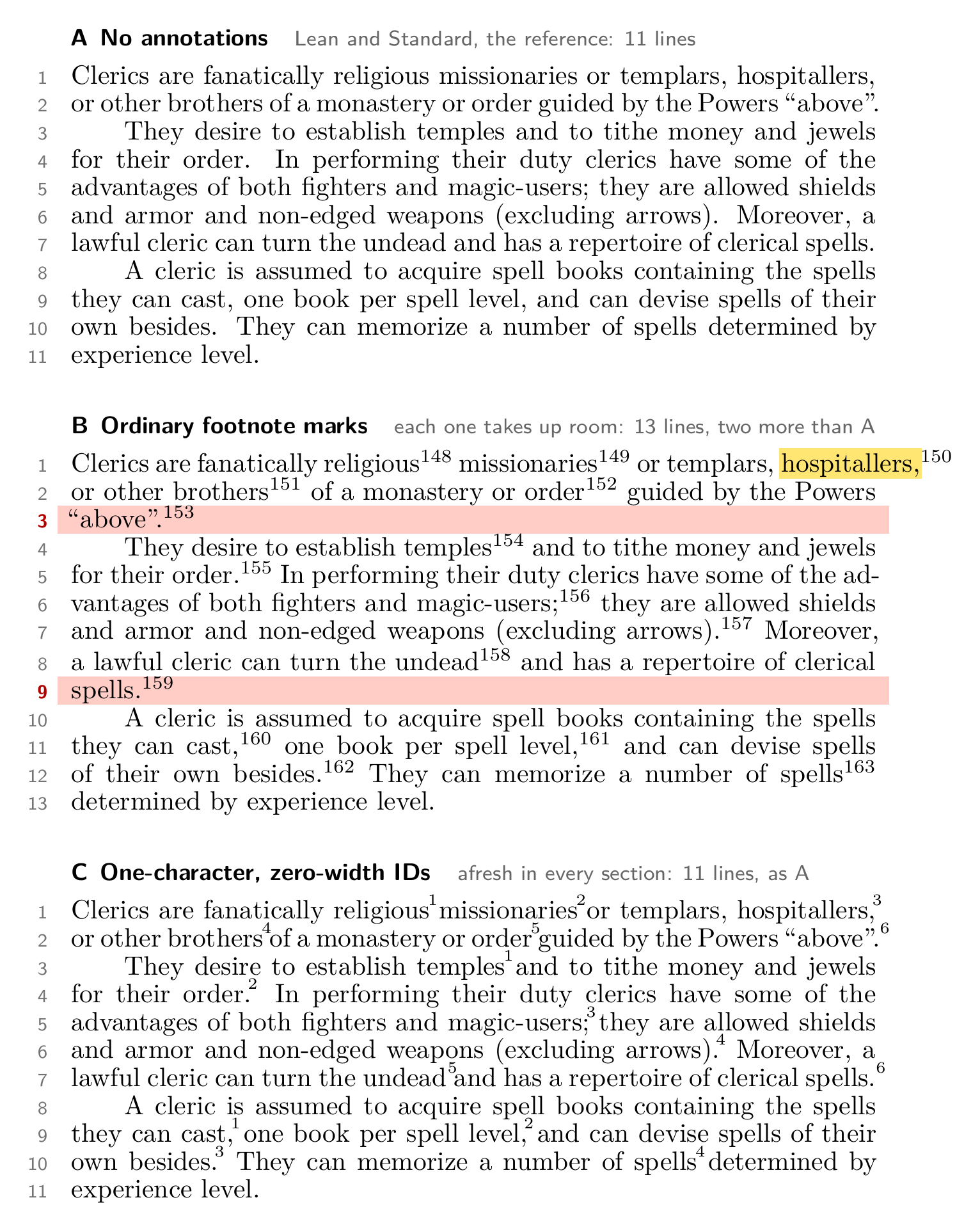 - A shows three paragraphs with no annotations, running to 11 lines.
- B is the same text with regular (out of the box) footnote marks, using realistic note ID numbers. The sixteen note anchors in this paragraph push the layout to 13 lines. Lines 3 and 9 (highlighted) are new: each has a word or two pushed over from the preceding lines. It gets worse as the note IDs get into four digits. Line 1 shows another issue, where "hospitallers" cannot be broken neatly over lines, so it hangs out over the margin. Fixing this manually would also contribute to the reflow.
- C shows the Reliquary solution. Anchor IDs are limited to single characters printed at zero width, so the lines of text they decorate are set exactly as they were without anchors. We have 11 lines again, breaking at the same words as in sample A.
Sections: working with one character note anchors
A zero-width note anchor still has to be printed somewhere, and the only clear space is the gap between words. That space is about 3.3 points wide, which is room for one superscript character. We can imagine note IDs 0-9 and maybe a-z. That gives us 36 note IDs to work with, but V5 has thousands of notes. Something has to give.
Clearly, note anchors cannot simply increment serially through the entire book. Instead, Reliquary will give every paragraph a section ID, counting up through the book: §1, §2, and so on. The section number will sit quietly in the margin beside its paragraph, allowing anchor IDs to start over from 1 within each para. Most paragraphs have fewer than ten notes, so almost every note anchor will be a single digit. Where there are occasionally more than 9 notes in a para, they will be marked a, b, c, etc. Each annotation will then be keyed by its unique section ID and anchor ID. E.g., the seventh note in paragraph §105 will be note number 105.7.
Here's what it could look like (a page of 3rd-level magic-user spells):
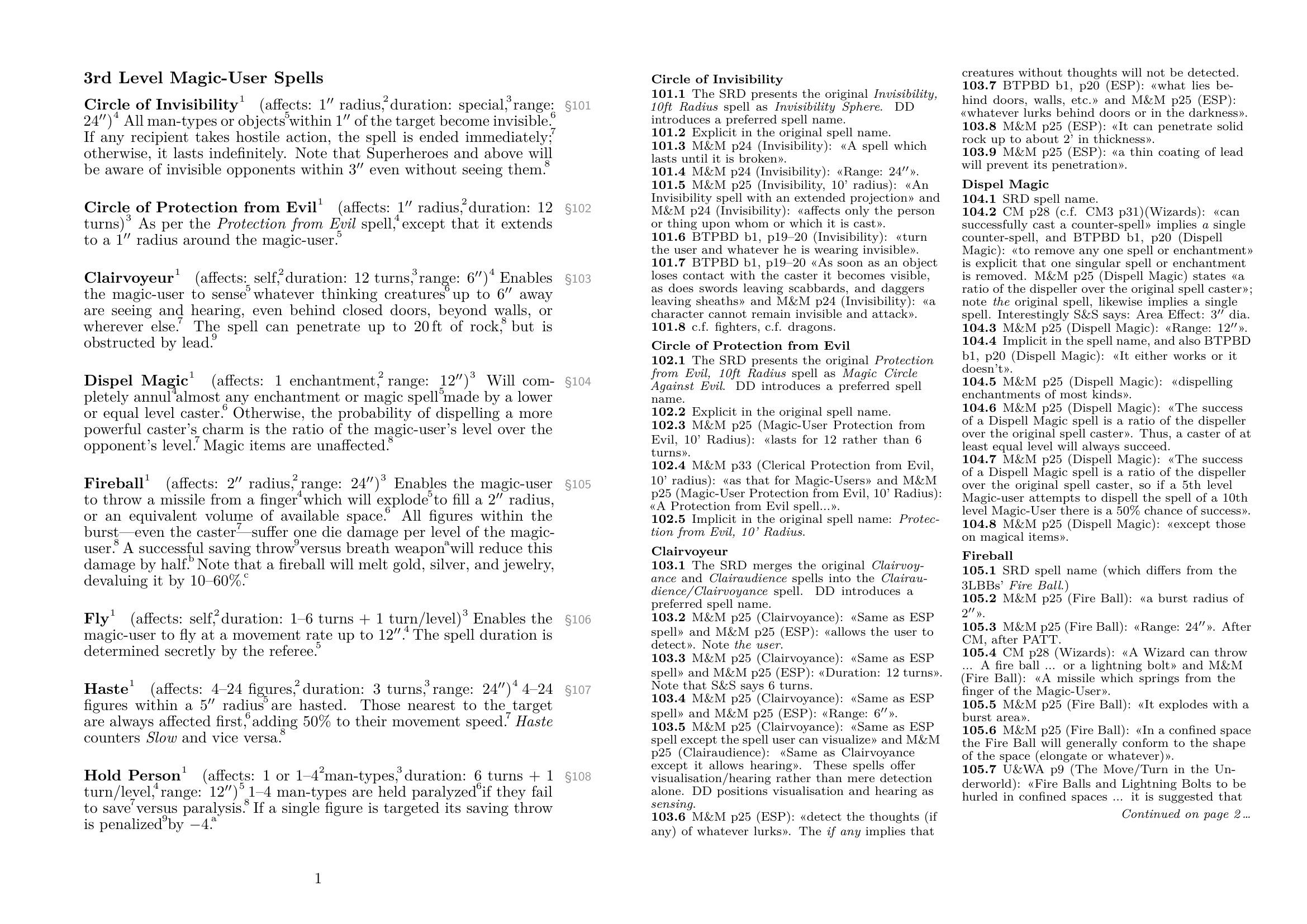
There are a few edge cases that need attention to keep the anchors clear of the main text (e.g., for run-in titles, parenthesis, and note anchors between two tall characters), but it seems to mostly work.
Still to solve
The remaining problem is that many pages have more annotation text than will fit in the A5-sized margin page. There are three main ways to close that gap, and I expect to use all of them:
- Illustrations. A picture in the main text means less text, and so fewer notes, on that page.
- Continuation on a later page. If the notes overflow, the margin can say Continued on page X… (as shown above), where the remainder picks up on a page that has room to spare. Probably should be used sparingly, but this method could also fill otherwise unused space.
- Trim the notes. It may be the case that I've gone overboard with the notes (!!), and that some could be shortened and/or merged to make the layout work. We'll see.