

https://github.com/wikilift/CANgaroo
CANgaroo
An open source can bus analyzer with support for transmit/receive of standard and FD frames and DBC decoding of incoming frames
Supported interfaces:
CANable SLCAN interfaces on Windows and Linux
CANable 2 SLCAN interfaces on Windows and Linux with FD support
Candlelight interfaces on Windows
Socketcan interfaces on Linux
CANblaster socketCAN over UDP server with auto-discovery
GrIP Driver
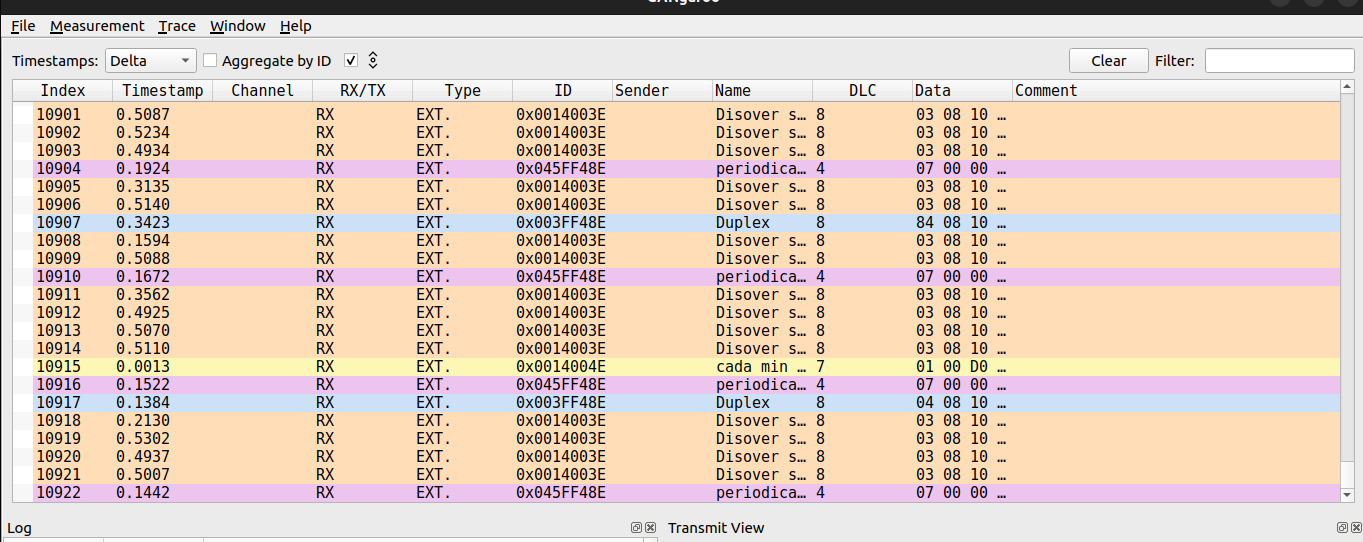
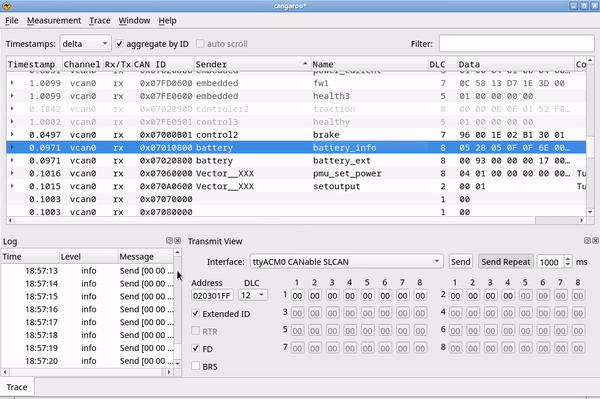
Written by Hubert Denkmair [email protected]
Further development by:
Ethan Zonca [email protected]
WeAct Studio
Schildkroet (https://github.com/Schildkroet/CANgaroo)
Wikilift (https://github.com/wikilift/CANgaroo)
Building on Linux
to install all required packages in a vanilla ubuntu 24.04:
sudo apt-get install build-essential git qt5-qmake qtbase5-dev libnl-3-dev libnl-route-3-dev cmake qt5-default libqt5serialport5 libqt5serialport5-dev libqt5charts5 libqt5charts5-dev
sudo apt install build-essential git qt6-base-dev libnl-3-dev libnl-route-3-dev cmake libgl1-mesa-dev
build with:
qmake6
make
make install
For Debian/Ubuntu users, can go to Releases and download .deb*
Building on Windows
Qt Creator (Community Version is okay) brings everything you need
except for the PCAN libraries.
Get them from http://www.peak-system.com/fileadmin/media/files/pcan-basic.zip
Extract to .zip to src/driver/PeakCanDriver/pcan-basic-api
Make sure PCANBasic.dll (the one from pcan-basic-api/Win32 on a "normal" 32bit Windows build) is found when running cangaroo, e.g. by putting it in the same folder as the .exe file.
if you don't want Peak support, you can just disable the driver: remove the line "win32:include($$PWD/driver/PeakCanDriver/PeakCanDriver.pri)" from src/src.pro
if you want to deploy the cangaroo app, make sure to also include the needed Qt Libraries. for a normal release build, these are: Qt5Core.dll Qt5Gui.dll Qt5Widgets.dll Qt5Xml.dll
Changelog
v0.3.1 (2025-02)
This release introduces major improvements to the trace window, user interface, and import/export capabilities.
New: Full trace import/export (.ctrace)
Added new JSON-based file format
.ctrace.Export now includes:
timestamps
raw ID, ID string, DLC and payload
RX/TX direction
per-message comments
per-ID colors
per-ID aliases
Import fully reconstructs the trace model, restoring all colors, aliases and comments.
New: Per-message comments
Added editable comments in Linear Trace View (separate for each message).
Comments are persisted in
.ctrace.
New: ID aliases
Aliases may now be assigned to CAN IDs.
Quoted in the UI and exported/imported in
.ctrace.
New: ID color assignment
Color assignation per ID.
Custom color override via color picker.
Colors persisted in
.ctrace.
New: Add language options menú and Spanish translate
Added
i18n_es_ESFull UI retranslation on
LanguageChange.Menu entry for language selection.
v0.3.0
Migrate to Qt6
Added GrIP driver
v0.2.4.1
General bugfixes
Add WeAct Studio Support
Initial Translation support
v0.2.4
Add initial support for CANFD
Add support for SLCAN interfaces on Windows and Linux (CANable, CANable 2.0) including FD support
Add support for CANblaster socketCAN over UDP server with auto-discovery
Add live filtering of CAN messages in trace view
v0.2.1
make logging easier
refactorings
scroll trace view per pixel, not per item (always show last message when autoscroll is on)
v0.2.0 released 2016-01-24
docking windows system instead of MDI interface
windows build
windows PCAN-basic driver
handle muxed signals in backend and trace window
do not try to extract signals from messages when DLC too short
can status window
bugfixes in setup dialog
show timestamps, log level etc. in log window
v0.1.3 released 2016-01-16
new can interface configuration GUI (missing a suid binary to actually set the config)
use libnl-route-3 for socketcan device config read
query socketcan interfaces for supported config options
new logging subsystem, do not use QDebug any more
some performance improvements when receiving lots of messages
bugfix with time-delta view: timestamps not shown when no previous message avail
v0.1.2 released 2016-01-12
fix device re-scan ("could not bind" console message)
fix some dbc parsing issues (signed signals, ...)
implement big endian signals
v0.1.1 released 2016-01-11
change source structure to better fit debian packaging
add debian packaging info
v0.1 released 2016-01-10
initial release \o/
TODO
backend
support non-message frames in traces (e.g. markers)
implement plugin API
embed python for scripting
can drivers
allow socketcan interface config through suid binary
socketcan: use hardware timestamps (SIOCSHWTSTAMP) if possible
cannelloni support
windows vector driver
import / export
export to other file formats (e.g. Vector ASC, BLF, MDF) (no changes)
import CAN-Traces ✔ done in v0.3.1: full .ctrace import/export with colors, comments and aliases
general ui
give some style to dock windows
load/save docks from/to config
✔ done in v0.3.1: runtime language switching (new menu, .qm loader)
log window
filter log messages by level
can status window
display #warnings, #passive, #busoff, #restarts of socketcan devices
trace window
assign colors to can interfaces / messages ✔ done in v0.3.1: posible asignation colors by id
limit displayed number of messages
show error frames and other non-message frames
sort signals by startbit, name or position in candb
✔ done in v0.3.1: per-message comments + persistence
✔ done in v0.3.1: per-ID aliases + persistence
CanDB based generator
generate can messages from candbs
set signals according to value tables etc.
provide generator functions for signal values
allow scripting of signal values
replay window
replay can traces
map interfaces in traces to available networks
graph window
test QCustomPlot
allow for graphing of interface stats, message stats and signals
packaging / deployment
provide clean debian package ✔ done in v0.3.1: go to releases
Flatpak
provide static linked binary
add windows installer