

Over the years, macOS systematically lost some really useful features like seeing live item counts on the Trash icon or keeping a dedicated, movable trash bin right on your desktop instead of exiling it in a tiny corner of the Dock where it's hard to drop files into it.
Bringing back these features were some of the biggest reasons I originally created Trash Buddy Plus in the first place. With the v1.20 release, Trash Buddy Plus now solves some of its biggest functional gaps: maintaining synchronization with macOS's filesystem while keeping the overall application relatively snappy.
Here's a closer look at what makes this release a major update and how these under-the-hood improvements can elevate your daily workflow.
Real-Time File Synchronization
Previous versions of Trash Buddy Plus relied on the clever use of periodic polling timers or manual keyboard triggers to see if new files had been placed into your Mac's trash. If you deleted a file using the Dock or a Finder context menu, Trash Buddy Plus wouldn't immediately know about it, causing the desktop icon state to lag behind, which created a less-than-ideal user experience.
Trash Buddy Plus 1.20 solves this by implementing a file system observer using Apple’s low-level FSEvents framework (the same API that Watchtower uses), unlocking two important capabilities:
Bidirectional Trash Sync: The app now monitors your Mac's local trash, iCloud trash, and trash folders on mounted external drives, so it can quickly respond to changes in them.
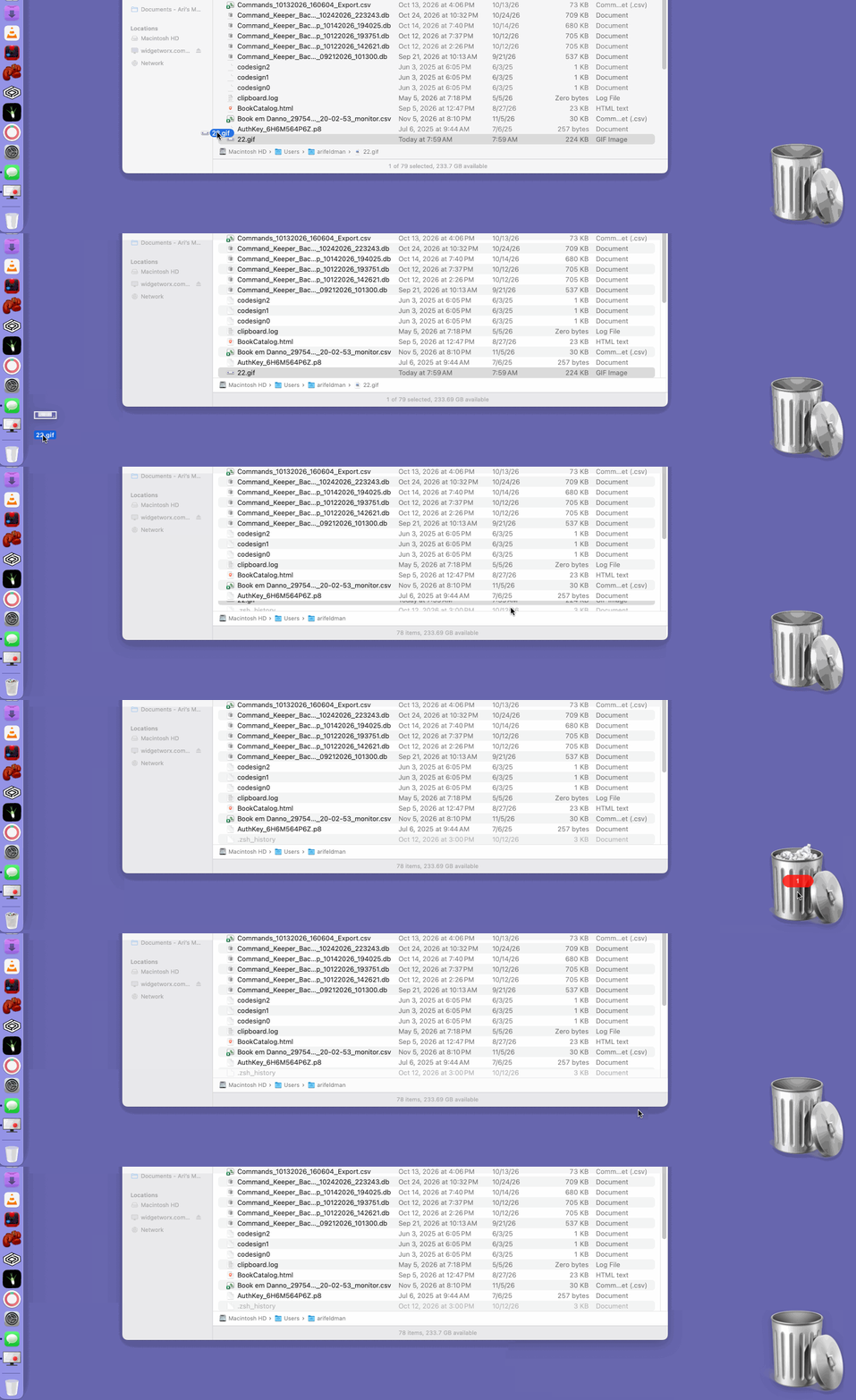
Immediate State Reflection: Whenever a file is added to or removed from your Mac's trash, the change is detected instantly. If you drop a file into the macOS Dock Trash, Trash Buddy Plus immediately updates its full/empty visual state and item count badge (and vice versa).
The following animation illustrates this in action:
Multithreaded Operations
The 1.20 release now offloads certain resource-heavy operations to dedicated background threads:
Background Item Counting: When the trash contents change, calculating the total number of items is now delegated to a background worker thread for faster updates.
Non-Blocking Trash Emptying: Initiating an empty trash command now spawns a background thread to execute the file purging process. Trash Buddy Plus' desktop trash icon now remains responsive while macOS handles the file deletion in the background.
A Better Trash Enhancer
By pairing low-level system observation with multithreaded execution, Trash Buddy Plus 1.20 now operates in lockstep with macOS without impacting system performance.
NOTE: For those of you who previously purchased Trash Buddy Plus, the 1.20 release is completely free. Just download the latest version (it has a 9 November 2026 date) to take advantage of these new capabilities.
Of course, I'll continue to fix bugs and release periodic improvements. Until next time...