

🛠️ FC 27 MODS – COMMON ISSUES & FIXES
Hello and welcome to the FC 27 modding world! 👋
Before using any mods, make sure you follow these basic steps to avoid common issues.
⚙️ BASIC REQUIREMENTS
1. FIFA Mod Manager
Always use the latest version of FIFA Mod Manager.
🔗 https://fifaeditortool.com/download
2. FC Live Editor
You must use FC Live Editor v27.1.9
🔗 https://www.patreon.com/cw/xAranaktu
3. Update Your Game
Make sure your game is updated to the latest version.
4. Launching the Game
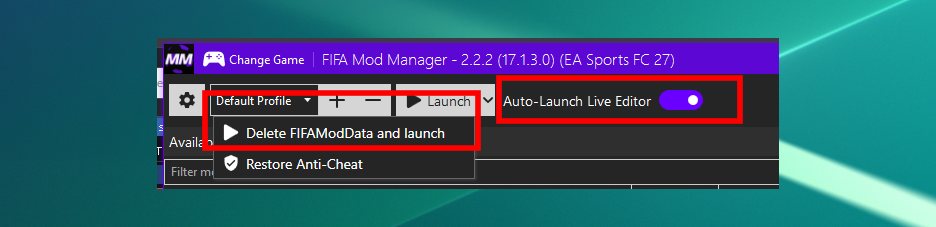
Whenever you launch the game through FIFA Mod Manager:
Check the Auto Launch Live Editor option.
Click Delete FIFAModData.
Click Launch.
⚠️ Important: I don't provide support for cracked or pirated versions of the game.
❓ COMMON ISSUES & FIXES
1. My Game Is Still Crashing
If you’re still experiencing game crashes, try the following steps:
✅ Fix:
Close the game.
Go to:
%LocalAppData%\EA SPORTS FC 27Back up your Career Mode saves and any other files you want to keep.
Delete everything inside that folder.
Launch the game again.
⚠️ Important: Make sure your backup is saved somewhere outside this folder before deleting its contents.
2. I Can't See My Squad File on the Load Squads Screen
This is a simple issue and can be fixed easily.
✅ Fix:
Go to Manager Career Mode.
Select any manager.
Go back to the Load Squads screen.
Your squad file should now appear.
3. How Can I Use the Teamkits & Competitionkits Files?
These files contain extra kit information, including collars, font colors, and additional kits.
I provide these files so you can add my extra kit features to your own custom squad file.
✅ How to use them:
Open RDBM 27.
Import the
teamkitsandcompetitionkitsfiles into your custom squad file.Save your squad file.
⚠️ Important: You need to start a new Career Mode save to see the changes.
More issues and fixes will be added whenever needed.
If you're facing any problems with my mods, please check this guide first!