

Question:Explain the difference between findAny and findFirst, and when would you prefer one over the other?
findFirst returns the first element of the stream, respecting the encounter order if one exists.
findAny can return any element from the stream, and it's more performance-friendly in parallel streams because it doesn't enforce processing order.
Question: When would you use Parallel Streams and why?
We would use Parallel stream if
We have a lot of data to process in the same (or a very similar) way.
Ordering doesn’t matter.
Items are independent of each other.
if particular processing step is the bottleneck.
Let's find the Sum of large list of integers.
Lets find the Sum of large list of integers.
package collectors;

import java.util.ArrayList;
import java.util.List;
import java.util.Random;

public class ParallelStreamsDemo {

        public static void main(String[] args) {
            // Create a large list of random integers
            List<Integer> numbers = new ArrayList<>();
            Random random = new Random();
            for (int i = 0; i < 1_000_000; i++) {
                numbers.add(random.nextInt(100));
            }

            // Calculate the sum using parallel stream
            long startTime = System.currentTimeMillis();
            int sum = numbers.parallelStream().reduce(0, Integer::sum);
            long endTime = System.currentTimeMillis();

            System.out.println("Sum: " + sum);
            System.out.println("Time taken with parallel stream: " + (endTime - startTime) + " ms");
        }
}
Question: What if you have a list of Orders and each Ordercontains Edibles Fruits with quantities and prices. You want to find the total amount spent on each Fruit across all orders.
This requires some skills of grouping and summarizing.
Orders Model
package collectors.model;

import java.util.List;

class Orders {
    List<Item> items;

}
Item Model
package collectors.model;

public class Item {
    String name;
    double price;
    int quantity;
}Results:Below is the total price for each Fruit for all the orders.
package collectors;
import collectors.model.Item;import collectors.model.Orders;
import java.util.Arrays;import java.util.List;import java.util.Map;import java.util.stream.Collectors;
public class ItemPriceAggregator {

    public static void main(String[] args) {

        List<Orders> orders = Arrays.asList(new Orders(Arrays.asList(new Item("Pears",200.45, 22),new Item("Mangoes",120.45, 45),new Item("Oranges",145.67, 22),new Item("Mandarins",207.45, 89))),
                new Orders(Arrays.asList(new Item("Pears",200.45, 21),new Item("Mangoes",120.45, 459),new Item("Oranges",345.67, 22),new Item("Mandarins",207.45, 89))));

        Map<String, Double> totalAmountPerItem = orders.stream()
                .flatMap(order -> order.items.stream())
                .collect(Collectors.groupingBy(Item::getName,
                        Collectors.summingDouble(item -> item.price * item.quantity)));
        totalAmountPerItem.entrySet().stream()
                .forEach(entry -> System.out.println(entry.getKey() + " = " + entry.getValue()));

    }
How do you Stream from a File?
Stream<String> lines = Files.lines(Paths.get("file.txt"));What is the purpose of the peek method in a Stream?
peek is an intermediate operation used mainly for debugging purposes, as it allows you to perform an operation on each element of the stream as it's consumed.
peek is used to
→Observing Elements: is often used to observe the elements of the stream at a certain point in the pipeline.
This is particularly useful for debugging complex stream operations to understand how elements are transformed as they pass through various stages of the stream.
>Logging: peek can be used to log information about the elements for debugging purposes without altering the stream's processing.
Let’s say we have a list of integers, and we want to filter out numbers less than 10, map them to their squares, and then collect them into a list.
While we are doing this we want to see the element after filtering and also after mapping. Lets look at the below example.
import java.util.Arrays;
import java.util.List;
import java.util.stream.Collectors;

public class PeekExample {
    public static void main(String[] args) {
        List<Integer> numbers = Arrays.asList(1, 5, 10, 15, 20);

        List<Integer> squaredNumbers = numbers.stream()
            .filter(n -> n >= 10)
            .peek(n -> System.out.println("After filter: " + n))
            .map(n -> n * n)
            .peek(n -> System.out.println("After map: " + n))
            .collect(Collectors.toList());
    }
}
How do you convert a Stream to an array?
String[] array = stream.toArray(String[]::new);How can you find the average salary for all the employees who have salary greater than 50000 in each department.
Employee Model.
package collectors.model;

import lombok.AllArgsConstructor;
import lombok.Getter;
import lombok.NoArgsConstructor;
import lombok.Setter;

import java.math.BigDecimal;
@Getter
@Setter
@AllArgsConstructor
@NoArgsConstructor
public class Employee {
    private String name;
    private Department department;
    private BigDecimal salary;

}
Department Model
import lombok.AllArgsConstructor;
import lombok.Getter;
import lombok.NoArgsConstructor;
import lombok.Setter;

@Getter
@Setter
@AllArgsConstructor
@NoArgsConstructor
public class Department {
    private String name;

}
Finding average salary in each department greater than 50000.
package collectors.model;

import java.math.BigDecimal;
import java.util.Arrays;
import java.util.List;
import java.util.Map;
import java.util.stream.Collectors;
public class AverageSalaryByDept {
    public static void main(String[] args) {
        List<Employee> employees = Arrays.asList(new Employee("Vikas",new Department("IT"),new BigDecimal(212345.67)),
                new Employee("Ravi",new Department("Commercial"),new BigDecimal(12345.67)),
                new Employee("Rajni",new Department("Procurment"),new BigDecimal(322345.67)),
                new Employee("Sinha",new Department("Commercial"),new BigDecimal(42345.67)));

        Map<Department, Double> averageSalaryByDepartment = employees.stream()
                .filter(e -> e.getSalary().compareTo(new BigDecimal("50000")) > 0)
                .collect(Collectors.groupingBy(Employee::getDepartment,
                        Collectors.mapping(Employee::getSalary,
                                Collectors.averagingDouble(BigDecimal::doubleValue))));

        averageSalaryByDepartment.entrySet().stream()
                .forEach(entry -> System.out.println(entry.getKey().getName() + " = " + entry.getValue()));
    }
}
How do you manage checked exceptions in Stream Pipeline.
Answer:Java streams don’t handle checked exceptions gracefully with lambda expressions , One approach could be is to wrap the code that throws a checked exception in a separate method and handle the exception there, either by converting it to an unchecked exception or by implementing a custom functional interface that can throw checked exceptions. You Need to follow below steps:
Define a Functional Interface.
Create a wrapper method that converts the checked exception in to unchecked and throws that.
Use that Wrapper method in your implementation.
Let’s Look at the code.
Step1:Define a Functional Interface.
package exceptionhandling;

import java.util.function.Function;

@FunctionalInterface
public interface ExceptionInterface<T, R, E extends Exception> {
    R apply(T t) throws E;

    public static <T, R, E extends Exception> Function<T, R> unchecked(ExceptionInterface<T, R, E> function) {
        return t -> {
            try {
                return function.apply(t);
            } catch (Exception e) {
                // Wrap and rethrow the checked exception as an unchecked one
                throw new RuntimeException(e);
            }
        };
    }

}
Step2:Create a wrapper method.
public static <T, R, E extends Exception> Function<T, R> unchecked(ExceptionInterface<T, R, E> function) {
        return t -> {
            try {
                return function.apply(t);
            } catch (Exception e) {
                // Wrap and rethrow the checked exception as an unchecked one
                throw new RuntimeException(e);
            }
        };
Step3:Use this in the code to throw unchecked exception.
package exceptionhandling;

import java.io.IOException;
import java.util.Arrays;
import java.util.List;
import java.util.stream.Collectors;

import static exceptionhandling.ExceptionInterface.unchecked;

public class ExceptionWrapperTest {
    public static void main(String[] args) {
        List<String> strings = Arrays.asList("a", "b", "c");
        List<String> uppercasedStrings = strings.stream()
                .map(unchecked(s -> exceptionThrowingMethod(s))) // Use the wrapper method
                .collect(Collectors.toList());
    }
    public static String exceptionThrowingMethod(String s) throws IOException {
        // Imagine this method could throw an IOException
        return s.toUpperCase();
    }

}
Describe the difference between map, flatMap and reduce in Stream.
Map function take an input as an array and transform that an return the array of same length. Map creates a new version of transformed data and does not modify the original data. The below map function takes an argument as a Lambda expression to modify the data which is in this case to return the length of each word in the ArrayList.
List<String> words = Arrays.asList("Modern", "Java", "In", "Action");
List<Integer> wordLengths = words.stream()
                                 .map(String::length)
                                 .collect(toList());
For example, given the list of words [“Hello,” “World”] you’d like to return the list [“H,” “e,” “l,” “o,” “W,” “r,” “d”]. That means you need to find the unique characters in the given list of of words.
//The above example creates a stream of words.
List<String> words = Arrays.asList("Modern", "Java", "In", "Action");
words.stream()
     .map(word -> word.split(""))
     .map(Arrays::stream)
     .distinct()
     .collect(toList());
The problem with this approach is that the lambda passed to the map method returns a String[] (an array of String) for each word. The stream returned by the map method is of type Stream. What we want is Stream to represent a stream of characters
Now here is the introduction of flatMap which is used to flatten a stream
Fixing the problem with the flatMap, flatMap will provide you the Stream not the Stream as a result and then you can run distinct on that character array which is flattened using all the words in the List.
List<String> uniqueCharacters =
  words.stream()
       .map(word -> word.split(""))
       .flatMap(Arrays::stream)
       .distinct()
       .collect(toList());
Another Example is that if Employee class has an email field and you want to find all the emails associated with each employee you would do something like this.
public class Employee
  {
  private String empId;
  private List<String> emails;
  }
emplist.stream().flatMap(x-> x.getEmails()).collect(toList);The above code will return you the flattened list of all the emails instead of returning the email arrays for each employee.
Describe the use of Optional in Java?
Optional has been introduced in Java in order to model the absence of a value. We all know the notorious “NullPointerException” in java and various ways to write the code to avoid that, Optional models the NullPointerExecption and establishes a design pattern around that.
Problems with Nulls
NullPointerException is the most conspicuous error in java.
The code with defensive null checks looks cumbersome.
Its just an overhead and does not relate to business logic.
It creates a hole in the type system. null carries no type or other information, so it can be assigned to any reference type. This situation is a problem because when null is propagated to another part of the system, you have no idea what that null was initially supposed to be.
I would like to share some of the interview questions that I have been asked in last couple of months while I was interviewed for Java Lead position.
For Example.
public class Person {
    private Car car;
    public Car getCar() { return car; }
}
public class Car {
    private Insurance insurance;
    public Insurance getInsurance() { return insurance; }
}
public class Insurance {
    private String name;
    public String getName() { return name; }
}
Consider below piece of code , this code may throw NullPointerExecption as various places and you may have to do a defensive checking of the Nulls.
public String getCarInsuranceName(Person person) {
    return person.getCar().getInsurance().getName();
}
What if you could write the code this way
public class Person {
    private Optional<Car> car;
    public Optional<Car> getCar() { return car; }
}
public class Car {
    private Optional<Insurance> insurance;
    public Optional<Insurance> getInsurance() { return insurance; }
}
public class Insurance {
    private String name;
    public String getName() { return name; }
}
You can create optional in 3 ways.
Empty Optional.
Optional<Car> optCar = Optional.empty();Optional from a Non Null value.
Optional<Car> optCar = Optional.of(car);Optional from Null.
Optional<Car> optCar = Optional.ofNullable(car);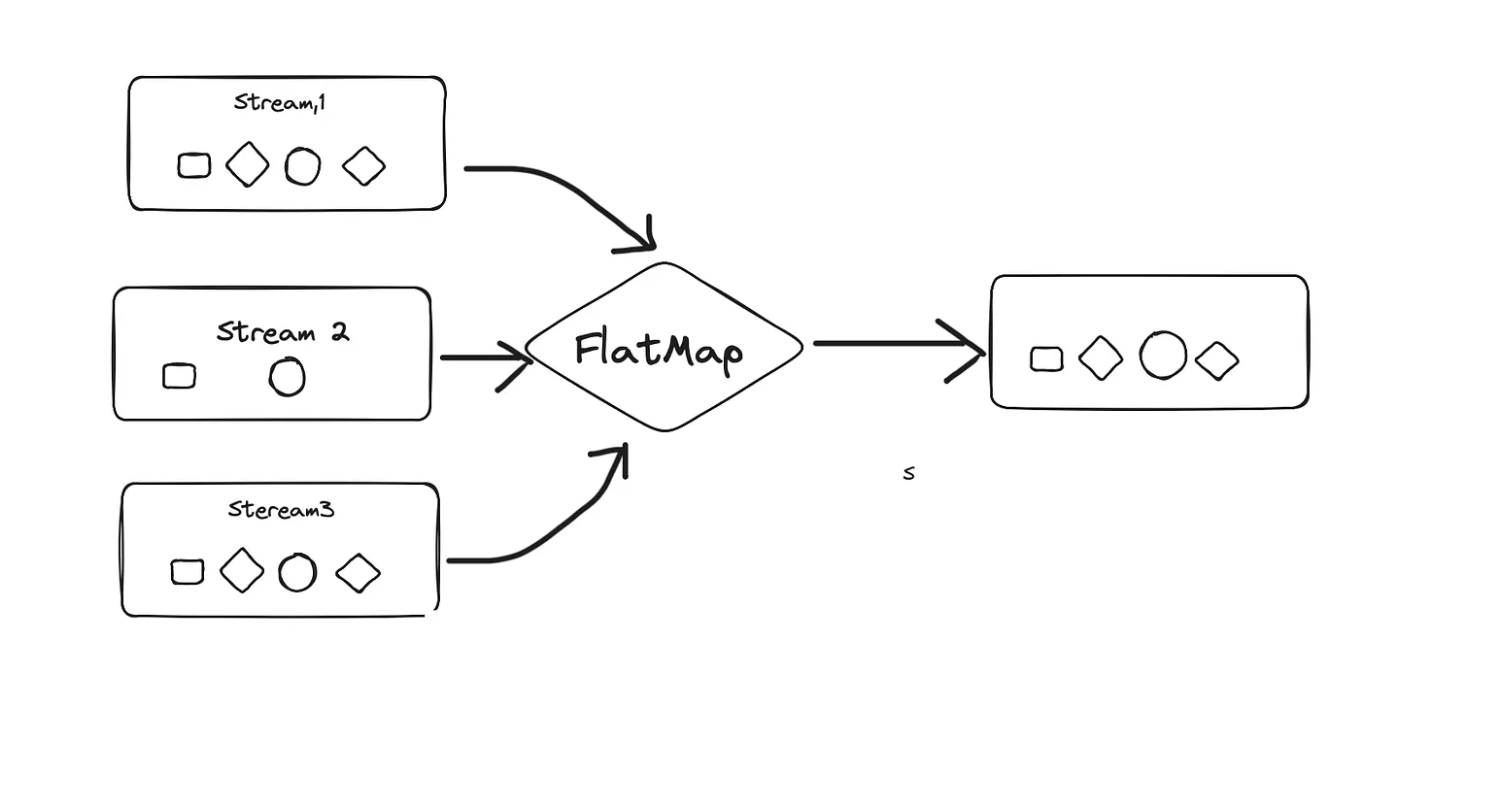
Merge and Sort two arrays in Java using Stream
int[] arr1 = new int[]{3, 5, 1, 9, 6};
        int[] arr2 = new int[]{4, 6, 2, 1, 2};
int[] mergedArray = concat(Arrays.stream(arr1),Arrays.stream(arr2))
.sorted()
.toArray();Compute Standard Deviation of a given numbers
Solution:Using Library:
var statistics = numbers.stream().collect(Collectors.summarizingDouble(s -> s));Output:
Statistics{count=7, sum=28.000000, min=1.000000, average=4.000000, max=7.000000}Solution :Using Reduce
List<Double> numbers = Arrays.asList(1.0, 2.0, 3.0, 4.0, 5.0,6.0,7.0);
        double mean = numbers.stream().reduce(0.0, Double::sum) / numbers.size();
        double variance = numbers.stream()
                .reduce(0.0,
                        (acc, num) -> acc + Math.pow(num - mean, 2),
                        Double::sum) / numbers.size();
        double standardDeviation = Math.sqrt(variance)
Create Histogram for given numbers (Value to Frequency Map)
Solution 1: Using Reduce :
List<Integer> histoGramNumbers = Arrays.asList(1, 2, 1, 3, 3, 3, 4,8,9,45,67,2);
        Map<Integer, Integer> histogramExample = histoGramNumbers.stream()
                .reduce(new HashMap<Integer, Integer>(),
                        (map, val) -> { map.merge(val, 1, Integer::sum); return map; },
                        (map1, map2) -> { map1.putAll(map2); return map1; });
Solution 2: using Stream API.
List<Integer> histoGramNumbers = Arrays.asList(1, 2, 1, 3, 3, 3, 4,8,9,45,67,2);
        var result = histoGramNumbers.stream()
                .collect(Collectors.groupingBy(k -> k, Collectors.counting()));
How do you calculate the Sum of the number which are given as a List of Lists. For example.
List<List<Integers>> nestedList=Arrays.asList(Arrays.asList(1,2,3,6,7),
Arrays.asList(8,5,6));Solution: Using Reduce:
List<List<Integer>> nestedList=Arrays.asList(Arrays.asList(1,2,3,6,7),
                Arrays.asList(8,5,6));
        int sumOfElemetnsInNestedLists = nestedList.stream()
                .reduce(Collections.emptyList(),   //Edge Case for reduce Method
                        (partialResult, item) -> {
                            List<Integer> newList = new ArrayList<>(partialResult);//Creating a new list with the nested lists
                            newList.addAll(item); // Adding all items of the nested lists in to the big list
                            return newList; //returning the resultant flattened list.
                        })
                .stream()
.reduce(0, Integer::sum);// Summing the elements of Flattened list.Solution: Using Flat Map
int totalSum = nestedList.stream().flatMap(Collection::stream).mapToInt(s -> s).sum();Please share or clap if you liked my content.
Take a look at the below story to understand Reduce and Collection Operations in Java Streams API.
Reduce and collects are Both terminal operations in Java.
Let’s First Understand the Reduce
Reduce method is used to combine a stream in to single result. Its more of an aggregation for example finding minimum and maximum of a stream or finding sum, average, median and other operations on data.
Reduce method is used to perform a reduction on the given stream using an associative accumulation function which returns an optional value.
Associative :Don’t get baffled by associative here as an associative property of a data means that the result of the functional does not depend on the grouping of the data elements.
For the given values a, b and c the function is associative if
(a⊕b)⊕c=a⊕(b⊕c)Which means that you can perform the operation on a and b first and then c or you could perform operation on b and c first and then a.
The grouping of the elements don’t change the result of the function.
Examples of Associative Functions:
Addition and Multiplication:
(a+b)+c=a+(b+c)and(a×b)×c=a×(b×c)String Concatenation.
(A+B)+C=A+(B+C)Logical AND/OR:
(X∧Y)∧Z=X∧(Y∧Z)and(X∨Y)∨Z=X∨(Y∨Z)What is non Associative:
Subtraction is non associative.
(a−b)−c !=a−(b−c)Well this concept is useful to understand Reduce operation so I took some time in order to make you understand that.
Reduce Operation is useful when you want to combine the elements of a Java stream in to a single summarized value.
Adding the Elements of a List.
List<Integer> numbers = Arrays.asList(1, 2, 3, 4, 5);
int sum = numbers.stream()
                 .reduce(0, (a, b) -> a + b);
System.out.println("Sum: " + sum); // Output: Sum: 15
Multiply Elements in a List.
List<Integer> numbers = Arrays.asList(1, 2, 3, 4, 5);
int product = numbers.stream()
                     .reduce(1, (a, b) -> a * b);
System.out.println("Product: " + product); // Output: Product: 120
Finding the Maximum Value
List<Integer> numbers = Arrays.asList(1, 2, 3, 4, 5);
Optional<Integer> max = numbers.stream()
                               .reduce(Integer::max);
max.ifPresent(value -> System.out.println("Max: " + value)); // Output: Max: 5
For example there is an Employee Class:
public class Employee {
    private String department;
    private double salary;
    private boolean isFullTime;
// Constructor, getters, and setters
    public Employee(String department, double salary, boolean isFullTime) {
        this.department = department;
        this.salary = salary;
        this.isFullTime = isFullTime;
    }
    // Other methods...
}
Now we need to find out overall salary expenditure:
Employee e1=new Employee("IT", 10000, false);
        Employee e2=new Employee("Commerce", 2000, true);
        Employee e3=new Employee("Infra", 30000, true);
        Employee e4=new Employee("Business", 40000, true);
List<Employee> employees=new LinkedList<Employee>();
        employees.add(e1);
        employees.add(e2);
        employees.add(e3);
        employees.add(e4);
        final double SALARY_THRESHOLD = 100000.0;
        final double DISCOUNT_FACTOR = 0.9; // 10% discount
        double totalSalary = employees.stream()
                // Step 1: Filter to include only full-time employees
                .filter(Employee::isFullTime)
                // Step 2 & 3: Group by department and sum the salaries
                .collect(Collectors.groupingBy(Employee::getDepartment,
                        Collectors.summingDouble(Employee::getSalary)))
                .entrySet().stream()
                // Step 4: Apply discount if salary exceeds threshold
                .map(entry -> entry.getValue() > SALARY_THRESHOLD ?
                        entry.getValue() * DISCOUNT_FACTOR : entry.getValue())
                // Step 5: Sum the totals
                .reduce(0.0, Double::sum);
Collect Terminal Operation
Collect is used to transform the elements of the stream in to a different form , like a collection , List, set or Map.
Collect method is stateful unlike the Reduce method which is stateless. Collect maintains a mutable container for operation.
Collect is is more suitable for parallel processing as it uses mutable containers that can be modified concurrently in different parts of the stream.
Lets take an example of Employee Class
@Getter
    @Setter
    @AllArgsConstructor
     class Employee {
        private String name;
        private String department;
        private double salary;
    }
Collect all employees into a list
List<Employee> employees = // ... initialize employee listList<Employee> employeeList = employees.stream()
.collect(Collectors.toList());Group employees by their department:
Map<String, List<Employee>> employeesByDepartment = employees.stream()
    .collect(Collectors.groupingBy(Employee::getDepartment));
Calculate the average salary for each department:
Map<String, Double> averageSalaryByDepartment = employees.stream()
    .collect(Collectors.groupingBy(Employee::getDepartment,
            Collectors.averagingDouble(Employee::getSalary)));
Count the number of employees in each department:
Map<String, Long> countByDepartment = employees.stream()
    .collect(Collectors.groupingBy(Employee::getDepartment, Collectors.counting()));
Sum the salaries of all employees in each department:
Map<String, Double> totalSalaryByDepartment = employees.stream()
    .collect(Collectors.groupingBy(Employee::getDepartment,
            Collectors.summingDouble(Employee::getSalary)));
Find the highest paid employee in each department:
Map<String, Optional<Employee>> highestPaidByDepartment = employees.stream()
    .collect(Collectors.groupingBy(Employee::getDepartment,
            Collectors.maxBy(Comparator.comparingDouble(Employee::getSalary))));