

The UniFi US-8 I had installed at my sister's place finally gave up after serving us for around 8 years. That's a pretty respectable run for a network switch, so I can't complain too much. I checked its power supply, opened the unit, and looked for obvious faults, but nothing pointed to an easy fix. Sometimes, hardware simply reaches the end of its life.
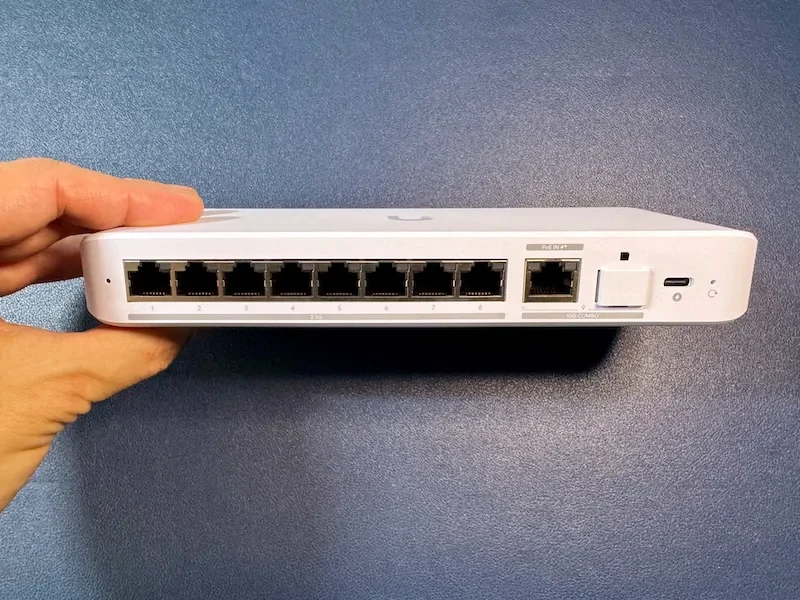
I temporarily replaced it with a non-UniFi switch to get the network back up and running. However, I wanted to return to the UniFi ecosystem while taking the opportunity to upgrade to faster networking. That's how I ended up buying the UniFi Flex 2.5G. It has 8 2.5GbE ports, a 10GbE uplink, and a fanless design. I've now installed it and integrated it into my UniFi network, and there are a few things worth knowing before you buy one for your home lab or office.
The UniFi Flex 2.5G gives you 8 multi-gigabit ports
The UniFi Flex 2.5G is an 8-port managed Ethernet switch with 8 2.5GbE RJ45 ports and 2 alternative 10GbE uplink interfaces: 1 RJ45 port and 1 SFP+ port. You can use either uplink, but not both simultaneously.
That port arrangement is one of my favorite things about this switch. The 10GbE uplink connects it to the rest of the network without sacrificing one of the 8 ports intended for local devices. In the current setup, I connected it directly to the UCG-Fiber.
If you're upgrading from a gigabit switch, the move to 2.5GbE can make a noticeable difference when transferring large files between compatible devices. A NAS with 2.5GbE networking, for example, can offer substantially more bandwidth than a conventional gigabit connection. The 10GbE uplink also gives traffic moving between the switch and the rest of the network more room to breathe.
Of course, the ports alone won't make everything faster. Your NAS, workstation, cabling, and network configuration must support the speeds you're trying to achieve. Connecting a gigabit-only device to a 2.5GbE switch won't magically give it a faster network interface.
The physical design is equally straightforward. The switch weighs around 395g and uses a hard-plastic enclosure. There's no display and no fan, which keeps the design simple and makes it completely silent. During my use, it stayed relatively cool, without any noticeable heat problems.
Setting up the Flex 2.5G was straightforward
One reason I went for another UniFi switch was the existing network infrastructure. She was already using the Cloud Gateway Fiber, so adopting the Flex 2.5G was much easier than introducing a different management platform.
I connected the switch, adopted it through UniFi, and integrated it into the network. The initial process was straightforward, although the network itself had a small hiccup.
Several devices lost internet access after I added the switch. I restarted the UniFi devices through the mobile app, which resolved the issue. I haven't experienced any further problems with VLANs, multicast, or the other network functions I've used since then.
I wouldn't interpret that initial issue as evidence of a general problem with the Flex 2.5G. It happened in my particular setup, and restarting the devices fixed it. Still, it's worth mentioning because replacing network hardware can occasionally involve a little more troubleshooting than simply plugging everything in and walking away.
Once everything was working, the switch did what I wanted it to do. I had UniFi management back, more bandwidth available to compatible devices, and enough ports without having to rethink the entire network layout.
What you should know before buying the UniFi Flex 2.5G
The Flex 2.5G isn't designed to be the cheapest way to connect 8 devices to a network. It's a managed switch aimed at people who want multi-gigabit networking and integration with the UniFi ecosystem. That focus comes with a few limitations.
The 10GbE RJ45 and SFP+ interfaces are alternatives, not 2 independent uplinks you can use simultaneously. If your setup requires both interfaces to be active, you'll need a different switch.
The bigger consideration is the price because it is a substantial amount for a switch intended for home use. If you just need to connect a few computers and don't care about centralized management, a cheaper 2.5GbE switch could be a better purchase.
However, if you're already invested in UniFi, the Flex 2.5G is easier to justify. It combines faster Ethernet ports, a 10GbE uplink, and familiar management in a compact, silent device.
You can check the for current specifications, availability, and compare prices on Amazon. After 8 years, I can't be too upset about retiring the US-8. Here's hoping the new switch gives us just as many years of trouble-free networking.