

I have always found it a little annoying when a motherboard has plenty of PCIe slots but barely enough M.2 slots for the storage I want to install. Over the years, I have tested quite a few different NVMe adapters, from expensive OEM cards to cheap AliExpress specials, refurbished hardware, and some outright knockoffs. Some turned out to be surprisingly good, while others weren't worth the money I spent on them. I have also managed to lose track of quite a few along the way, which is probably a good excuse to stop buying more hardware than I can keep track of.
The three cards I'm looking at here are the ones that have stayed in my rotation, or at least earned a place on my current shortlist. The ASUS Hyper M.2 x16, ASRock Hyper Quad, and Sabrent EC-SC4B all let you add multiple NVMe SSDs through a single PCIe slot, but they approach cooling, power, and physical design differently. If you are building a NAS, expanding a Proxmox server, or trying to squeeze more storage into an existing workstation, here's what I would consider before spending money on one of them.
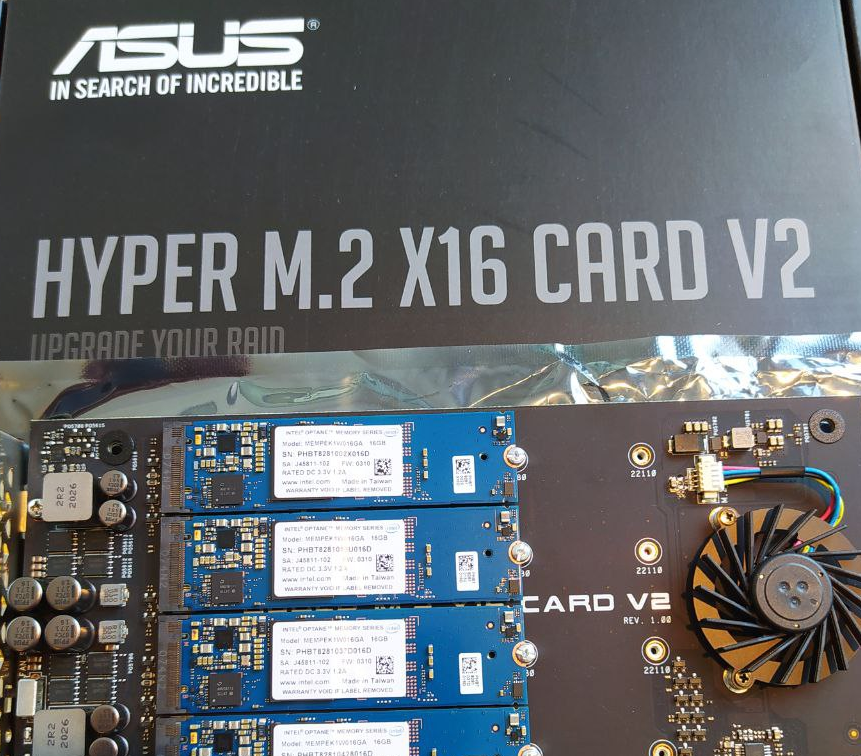
The ASUS Hyper M.2 x16 is my all-around workstation choice
The ASUS Hyper M.2 x16 is the kind of expansion card I reach for when I want to add several NVMe drives without turning the motherboard into a storage-only platform. Four M.2 slots on a single PCIe card give you plenty of room to expand, whether you are working with fast scratch storage, virtual machine disks, large datasets, or a collection of SSDs for a workstation.
What I particularly like about this design is that ASUS hasn't treated the cooling system as an afterthought. It pairs a full-cover aluminum shroud with an active blower fan, and the shroud provides a substantial surface for dissipating heat from the installed drives. Thermal pads help transfer heat from the SSDs to the cooler, while the fan provides additional airflow when passive cooling isn't enough.
That arrangement is particularly useful in a workstation where I want fast local storage but don't have a motherboard with four spare M.2 connectors. It also gives me more options when repurposing an older system instead of replacing the motherboard simply to gain additional storage slots.
The card uses a PCIe x16 interface and supports four x4 NVMe connections through x4/x4/x4/x4 bifurcation. That means the motherboard must split the available lanes into four separate groups. An x16-length slot alone isn't enough, and this is one of those hardware details that can turn an otherwise straightforward upgrade into a frustrating afternoon if the platform doesn't support the required configuration.
The auxiliary 6-pin PCIe power connector is also of real value. Four fast SSDs drawing power at the same time can place a greater demand on the card than a lightly used single-drive adapter. Auxiliary power gives the card an additional power source rather than relying entirely on the motherboard slot.
For a workstation with several fast drives, this is the card I would put at the top of my list.
 You can get it here: https://link.amazon/B0eOT5abR
The ASRock Hyper Quad is the one I would consider for a server chassis
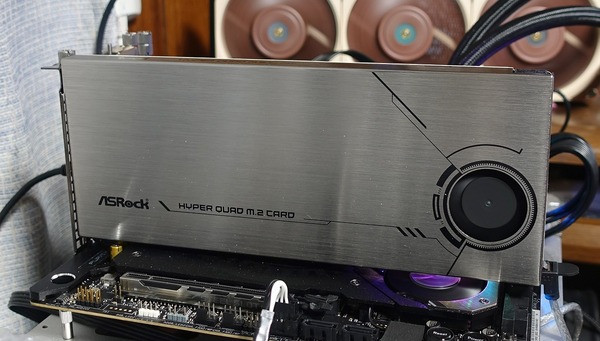
The ASRock Hyper Quad takes a different approach to fitting four M.2 drives onto a single expansion card. Its angled drive layout is the feature that stands out in the specifications you have supplied, particularly if you are building around a server chassis where space, drive placement, and cooling all influence the final configuration.
I like the idea of a card designed around the physical realities of a dense storage build. A four-drive adapter isn't particularly useful if the installed SSDs interfere with one another, the card blocks neighboring components, or the cooling arrangement struggles to move air through the assembly.
The angled layout and support for longer enterprise M.2 drives
Hyper Quad's 45-degree angled PCB layout is particularly relevant if you are using longer enterprise SSDs. The card is supports M.2 2242, 2260, 2280, and 22110 drives, giving you more flexibility than an adapter that only accommodates the most common 2280 format.
That matters when reusing refurbished enterprise storage. An M.2 22110 drive is 110 mm long, compared with 80 mm for a 2280 SSD. Longer drives can be useful in certain enterprise storage configurations, and I wouldn't want to rule them out simply because an expansion card was designed around shorter consumer SSDs.
Like ASUS Hyper M2, Hyper Quad also has an active blower fan and uses a uses a 6-pin PCIe power connection.
 You can get it here: https://link.amazon/B07nXapIF
The Sabrent EC-SC4B is the passive option I would consider for a quiet homelab
If you are putting together a homelab that runs around the clock, I can understand why you won't like adding unnecessary noise and another moving part. That's where the Sabrent EC-SC4B enters the picture.
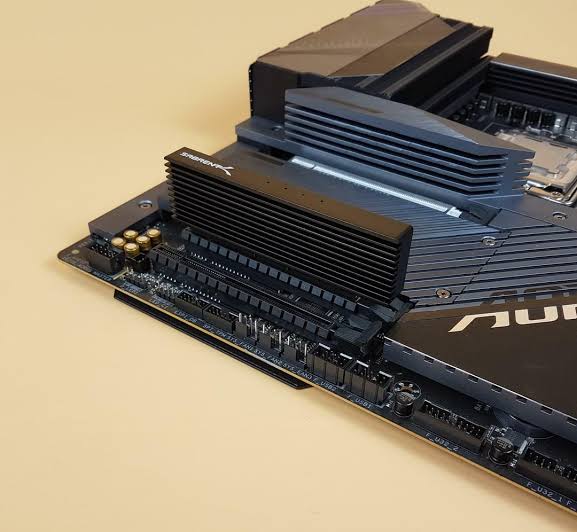
It is a four-drive NVMe expansion card with a heavy extruded aluminum heatsink and no onboard fan. Instead of relying on active cooling, the design uses the heatsink's surface area and thermal mass to carry heat away from the SSDs.
Why you may consider a large passive heatsink
The biggest attraction is simplicity as tere's no small fan on the expansion card to produce additional noise, and I don't have to worry about an onboard fan eventually becoming noisy or failing.
Couple of years ago I used it with my TrueNAS setup (my memory is a bit hazy). A machine might spend most of its time serving files, hosting virtual machines, or running containers, and a passive expansion card can fit naturally into a system designed for quiet operation. As for power, Sabrent uses a total of 75W PCIe slot power which removes the need for a separate 6-pin PCIe power cable, which makes installation less cumbersome.
One thing all three cards have in common is their four-drive layout, but the motherboard has to provide the right PCIe connections for that layout to work. With a passive adapter, PCIe bifurcation allows the motherboard to divide a PCIe x16 connection into four x4 links, one for each SSD.
A motherboard can have a physical x16 slot without supporting x4/x4/x4/x4 bifurcation, and the available configurations can depend on the CPU and the specific slot.
Some multi-drive adapters use a PCIe switch instead. These cards manage the downstream connections to the SSDs through the switch, so they don't necessarily require the motherboard to expose four separate x4 links.