

I recently got my hands on the TerraMaster F4-425 Pro. I am not going to use it as my personal NAS, though. I configure NAS systems for specific use cases and then sell them once they are ready for their intended purpose. This F4-425 Pro was already configured for its use case, so before shipping it out, I decided to spend some time testing it.
But if you are considering buying the F4-425 Pro, this review covers the areas that matter most before spending your money, including 5GbE transfer speeds, NVMe RAID performance, TOS 7, Docker, Jellyfin, virtualization, power consumption, and OpenClaw AI.
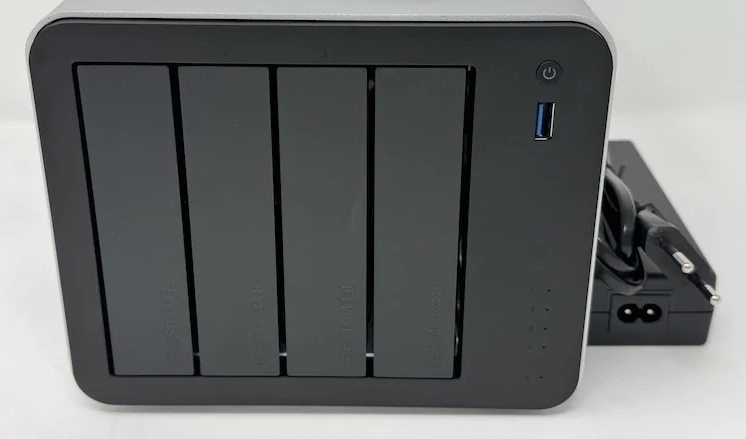
The Hardware
The F4-425 Pro is a 4 bay NAS with support for both 2.5-inch and 3.5-inch drives. It also includes 3 M.2 2280 NVMe slots using PCIe 3.0 x1. That's really solid!
The NAS uses a light-gray metal chassis with black plastic sections on the front and rear. It measures 186 × 277 × 277 mm and weighs 2.1 kg. Cooling is handled by a 120 mm rear fan which is quite normal.
Each NVMe slot provides a theoretical maximum throughput of around 985 MB/s. That is sufficient for caching or an NVMe storage volume, although the 5 Gb/s network connection becomes the limiting factor when transferring data over the network.
Connectivity
The F4-425 Pro includes:
2 5 Gb/s RJ45 ports
3 USB 3.2 Gen 2 ports, including one on the front
1 USB 3.2 Gen 2 Type-C port
1 HDMI output
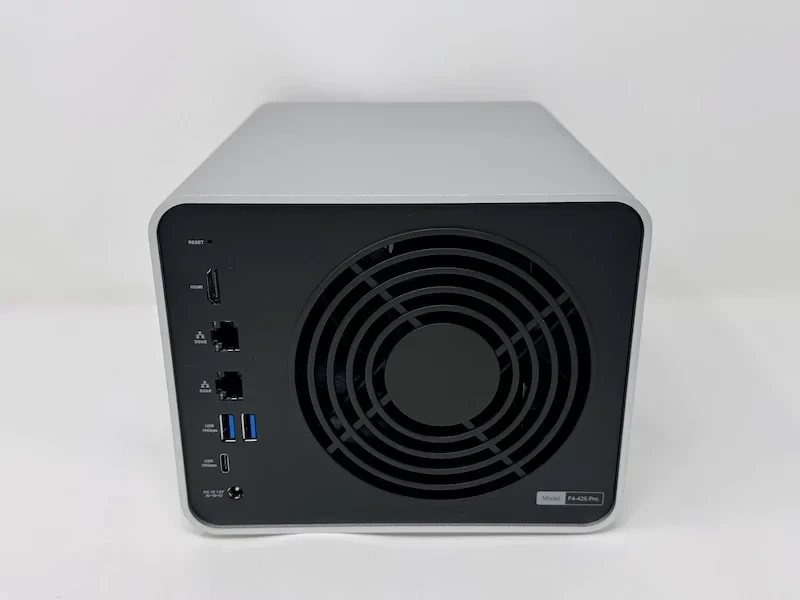
The dual 5 Gb/s networking is one of the more interesting hardware features. There is no 10 Gb/s port, which would have made more sense if you wanted to extract the maximum performance from the NVMe storage, but 5 Gb/s is still a significant improvement over the 1 Gb/s and 2.5 Gb/s interfaces commonly found on lower-end NAS systems.
Inside the F4-425 Pro
TerraMaster offers the F4-425 Pro in two configurations. One comes with an Intel N350 and 16 GB of DDR5 RAM, while the other uses an Intel N305 with 8 GB of DDR5 RAM.
The model I tested uses the N350. It is an 8 core processor capable of reaching 3.9 GHz with a 7 W TDP. The system comes with 16 GB of DDR5 memory and supports an upgrade to 32 GB, although there is only one memory slot. According to PassMark, it scores 7,372 points, above the current NAS average of around 5,500 points.
The two configurations are aimed at different priorities. The N350 version provides more memory and focuses on power efficiency, while the N305 offers higher raw CPU performance with less memory.
For a NAS that is expected to run containers, media services, and lightweight virtual machines, the additional memory in the N350 configuration is useful.
TOS 7
The F4-425 Pro runs TOS 7.0, TerraMaster's latest NAS operating system.
The initial setup is straightforward. You can access the setup assistant through http://tnas.local/, which walks you through the initial configuration. Once setup is complete, TOS 7 launches its Security Advisor, which checks the system for potential configuration and security problems.
The operating system also includes an application center with 62 applications at the time of testing. These include TerraMaster's own backup, photo management, and surveillance applications, along with Docker, Portainer, Jellyfin, Plex, WordPress, VirtualBox, and Transmission.
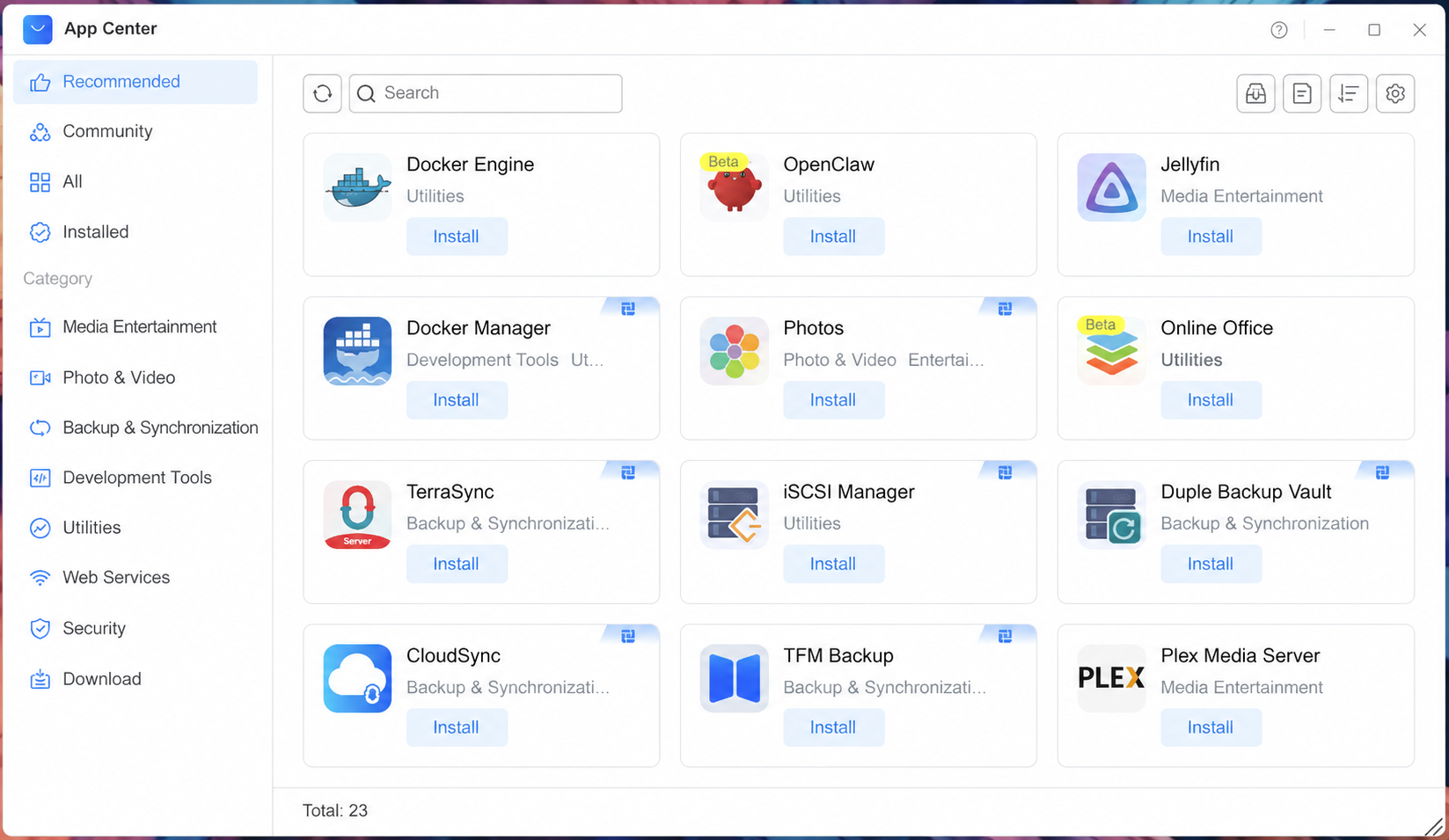
The application selection makes the F4-425 Pro more useful than a NAS that is limited to file storage. The hardware is capable of running additional services directly on the system, and that is where the platform starts to make sense as a small home server.
OpenClaw and the AI Claims
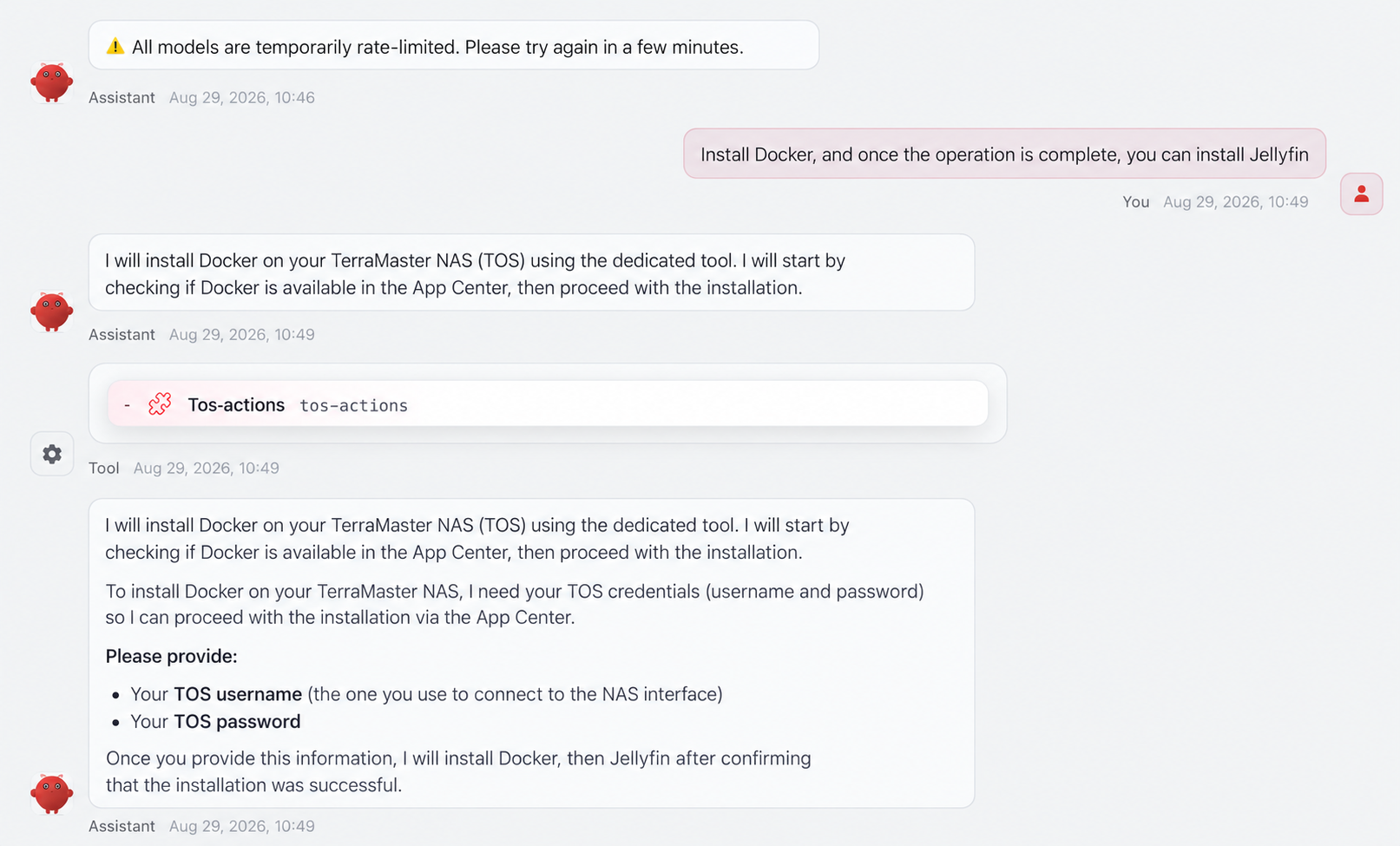
OpenClaw is one of the biggest selling points of TOS 7, at least according to TerraMaster. The company presents it as an AI agent that can manage the NAS, configure Docker containers, organize photos, create backup strategies, and handle other administrative tasks through natural-language instructions.
After testing it, I think the AI claim is considerably stronger than the actual product.
OpenClaw is still in beta, and it shows. The integration with TOS 7 is not mature enough to make this something I would trust with important NAS administration. Some of the things I tried did not work as expected, and the experience was inconsistent enough that I would not consider OpenClaw a practical reason to buy this NAS today.
There is also an important technical limitation. OpenClaw is not an LLM running locally on the F4-425 Pro. The NAS still needs access to an external model such as Claude, ChatGPT, or Mistral to interpret the instructions. I used Mistral through its API during my testing.

The underlying concept is interesting, but the current implementation needs a lot more work. Right now, OpenClaw feels more like a beta demonstration of what TerraMaster wants its AI-assisted NAS experience to become than a feature that is ready for serious use.

Testing the Storage Performance
Since the NAS was already configured and ready to ship, I wanted to get some real performance numbers before handing it over.
The first tests focused on file transfers over a 5 Gb/s network connection. Rather than relying on a single sequential benchmark, I used different file sizes and workloads to get a better idea of how the NAS behaves during actual transfers.
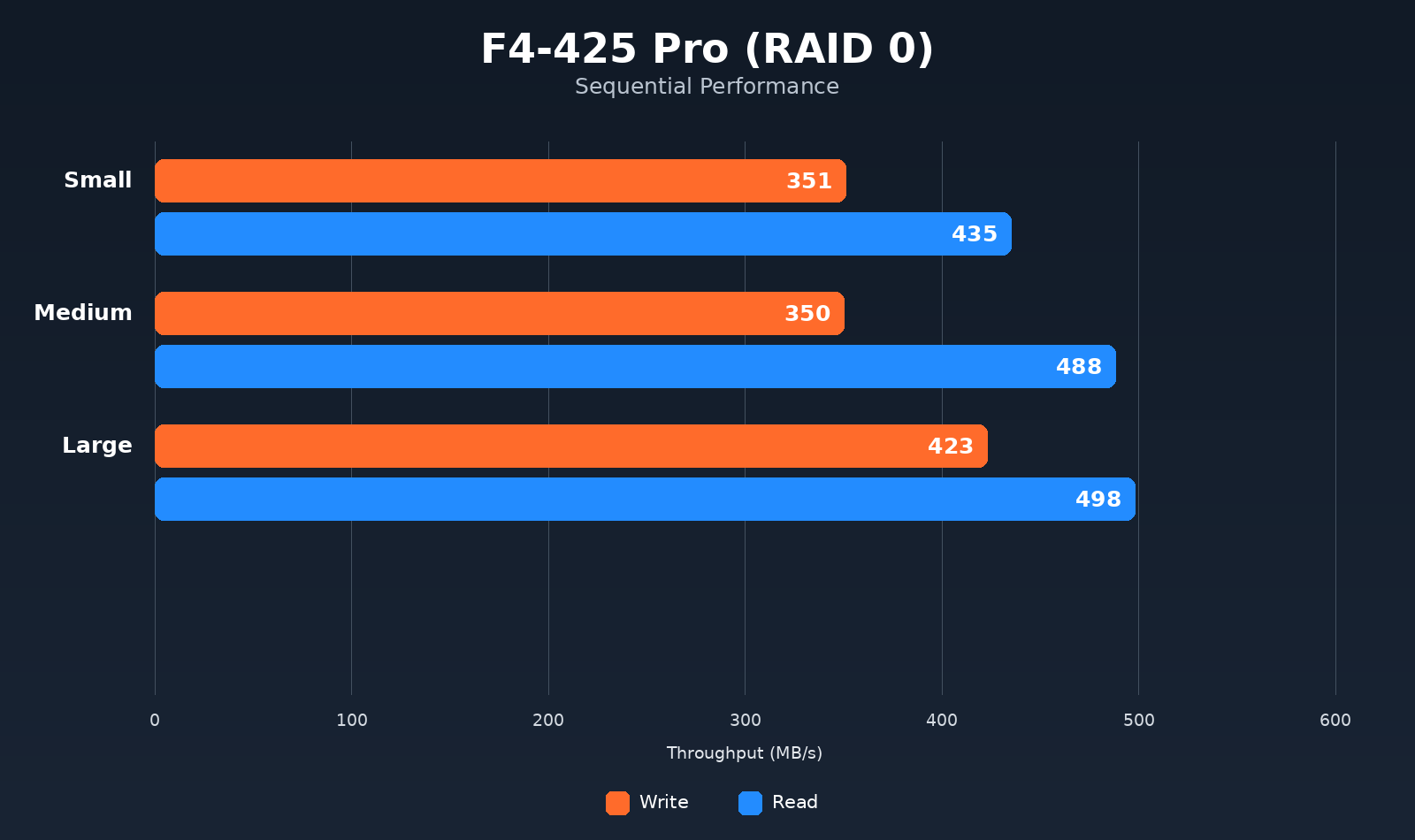
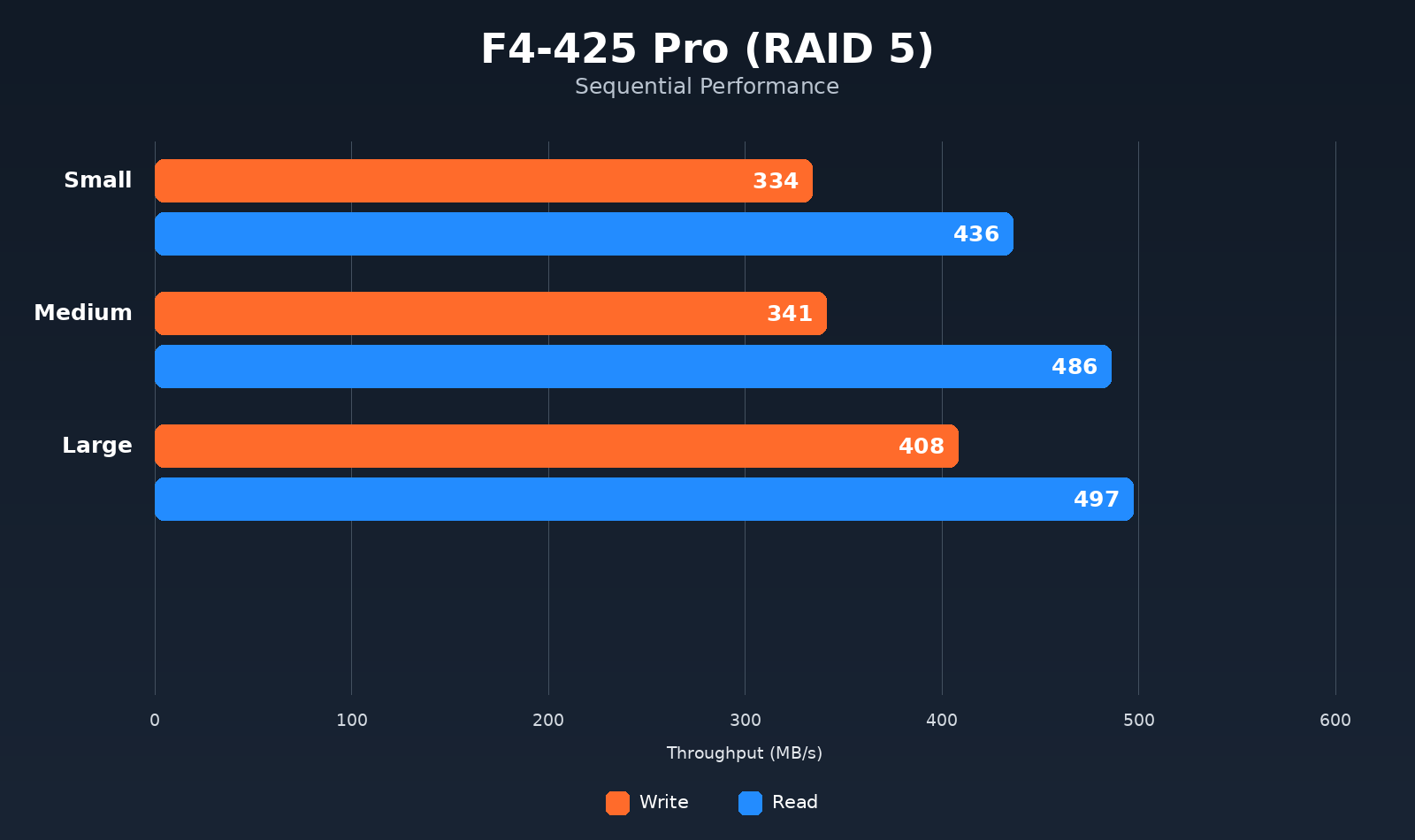
The test set included 100 small files ranging from 500 KB to 12 MB, 30 medium-sized files ranging from 12 MB to 350 MB, and 10 large files between 4 GB and 10 GB.
Transfers were tested in both directions, from the NAS to the computer and from the computer to the NAS.
For the storage configuration, I first used two NVMe SSDs in RAID 0 and then three NVMe SSDs in RAID 5.
RAID 0
With two NVMe SSDs in RAID 0, the F4-425 Pro was able to make good use of the 5 Gb/s network connection.
Transfer speeds occasionally reached and exceeded 500 MB/s. I could not reach the roughly 600 MB/s theoretical limit of a 5 Gb/s connection, but the performance was still substantially higher than what you would get from a 1 Gb/s or 2.5 Gb/s NAS.
The NVMe storage was not an obvious bottleneck during these tests. The network connection was much closer to becoming the limiting factor.
RAID 5
The RAID 5 results were surprisingly close to RAID 0.
With three NVMe SSDs configured in RAID 5, the F4-425 Pro again reached around 500 MB/s during transfers. It still did not reach the theoretical 600 MB/s network ceiling, but the performance remained close to what we saw with RAID 0.
That is useful if you want redundancy without giving up most of the performance provided by the NVMe storage.
Overall Performance
The F4-425 Pro is capable of more than file storage. I installed Jellyfin manually and tested video transcoding, including multiple streams. The N350 handled the workload without significant problems.
Docker was also straightforward. Multiple containers could run simultaneously without the system showing obvious signs of being overwhelmed.
I also tested lightweight virtualization by running Fedora and Rocky Linux. The system completed those workloads without major issues.
The combination of 8 CPU cores and 16 GB of RAM gives the F4-425 Pro enough headroom for these workloads. It is still a low-power NAS processor, so I would not treat it like a dedicated virtualization server, but it can handle moderate container and virtualization workloads alongside normal NAS duties.
Power Consumption and Noise
With three NVMe SSDs installed, the F4-425 Pro consumed around 15 to 16 W during normal use. Under heavier workloads, consumption increased to approximately 39 W.
The 120 mm rear fan is audible if you are standing close to the NAS, but it is not particularly intrusive during normal operation.
For a system capable of running NVMe storage, containers, media services, and lightweight virtual machines, the power consumption is reasonable.
If you decide to buy the F4-425 Pro, check Amazon before ordering directly from TerraMaster. As of writing, Amazon is currently offering the F4-425 Pro at a lower price than TerraMaster's own store. Check the current Amazon price!
The F4-425 Pro was already configured for its intended use case when I started testing it. Since I was going to ship it anyway, I wanted to find out what the hardware could actually do before it left my hands.
The hardware is the strongest part of the package. The Intel N350, 16 GB of DDR5 RAM, 3 NVMe slots, and dual 5 Gb/s networking give the F4-425 Pro enough capability to handle much more than basic file storage. The NVMe tests reached around 500 MB/s over the network in both RAID 0 and RAID 5, while Docker, Jellyfin, and lightweight virtualization workloads ran without major problems.
TOS 7 is more interesting than a simple interface update, and its application catalog gives the NAS plenty of room for additional workloads. OpenClaw, however, is not a reason I would recommend buying the system.
If you are interested in the F4-425 Pro because you want a capable 4 bay NAS with NVMe storage, fast networking, and enough hardware to run additional services, there is plenty to like here. For me, the testing is now done. The NAS is configured, the workloads have been tested, and it is ready to be shipped to its actual owner.