

Minisforum is not an unknown name in the mini PC market. The company has built a strong reputation with systems such as the MS-01.
I have now been using the Minisforum MS-A2 for more than a month, which has given me a much better idea of how this machine behaves outside of an initial hands-on test. On paper, its specifications are impressive: an AMD Ryzen 9 9955HX processor, support for up to 96 GB of DDR5 memory, multiple NVMe drives, dual 10GbE SFP+ ports, dual 2.5GbE ports, and a PCIe expansion slot.
After more than a month of daily use, most of that specification translates into genuine practical value but it is not perfect...
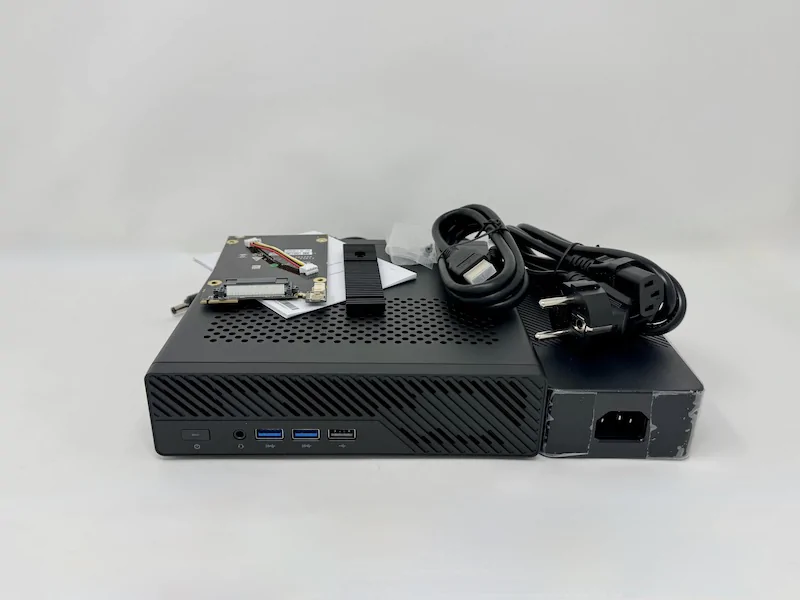
What's in the Box
A barebone system with room for customization
The MS-A2 is available as a barebone mini PC, meaning RAM, SSD storage, and an operating system are not included. This is useful if you already have components available or want to choose your own memory and storage configuration.
The package includes the MS-A2 itself, an external power supply, a U.2 NVMe/M.2 22110 adapter, SSD mounting screws, an HDMI cable, and documentation.
A network cable would have been a useful addition, particularly given how heavily Minisforum markets the MS-A2 around its networking capabilities but corporates ....
The power supply is also worth clarifying. Minisforum specifies a 19 V, 12.63 A adapter for the current MS-A2 configuration, which works out to roughly 240 W. That is considerably more substantial than the power supplies found with ordinary low-power mini PCs and makes sense given the power requirements of the Ryzen 9 9955HX. Check the latest price and configurations!
Design and Build Quality
A compact aluminum workstation
 You can buy it here https://amzn.to/4qnBRnV
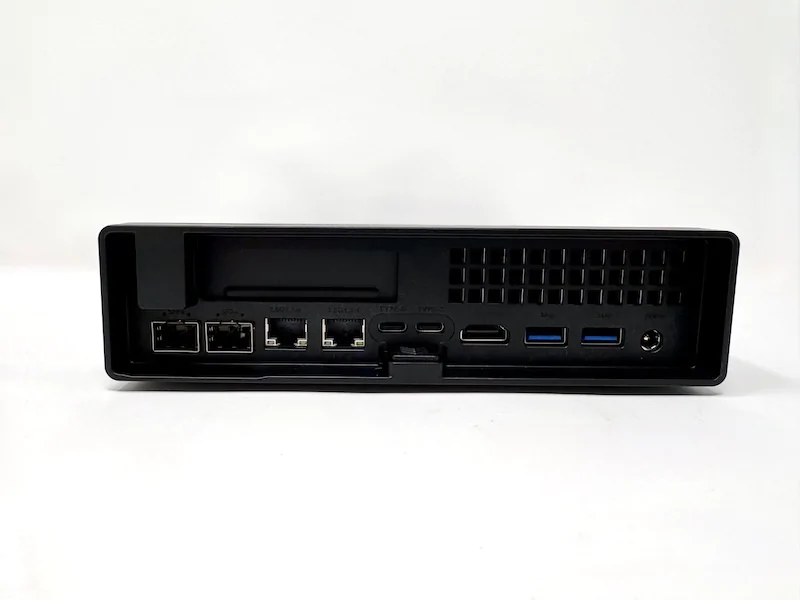
The MS-A2 measures approximately 196 × 189 × 48 mm and weighs around 1.4 kg. It is larger and heavier than many conventional mini PCs, but that is understandable considering the hardware packed inside.
The anthracite-gray aluminum chassis has a professional appearance and feels substantially more robust than the inexpensive plastic enclosures found on many budget mini PCs.
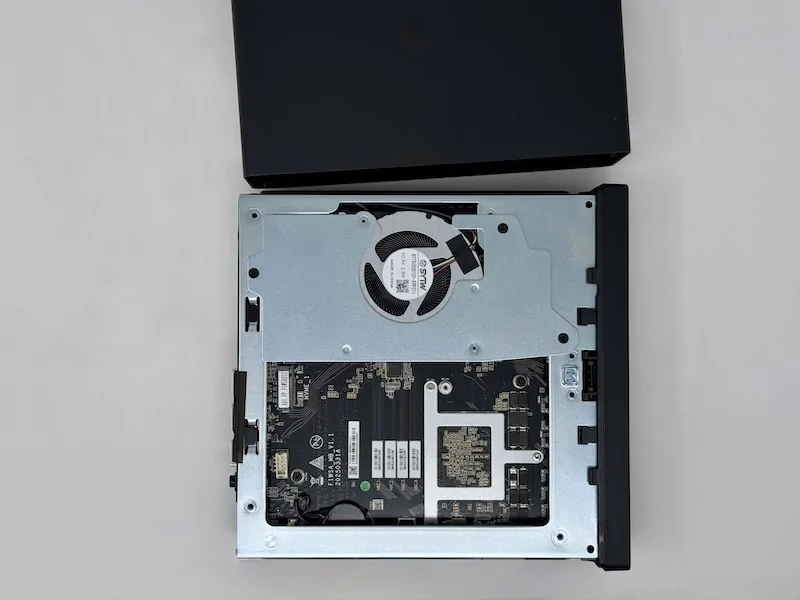
After a month of use, the physical design has held up well. The chassis does not feel fragile, and access to the internals is relatively straightforward. A release mechanism on the rear allows the top cover to slide off, providing access to the upgradeable components.
The compact design does come with a compromise. It's not very coolboi!.The MS-A2 has to dissipate considerably more heat than a typical office mini PC, particularly when the Ryzen 9 processor is allowed to operate at higher power levels. The cooling system therefore becomes audible during sustained workloads.
Connectivity
Four Ethernet ports and dual 10GbE
Networking is one of the strongest reasons to consider the MS-A2. The front provides two USB 3.0 ports, one USB 2.0 port, a 3.5 mm audio jack, and the power button.
The rear provides HDMI 2.1, two USB-C ports with display support, additional USB-A connectivity, two 2.5GbE RJ45 ports, and two 10GbE SFP+ ports.
That gives the MS-A2 an unusually comprehensive networking configuration for a mini PC:
Two 2.5GbE RJ45 ports
Two 10GbE SFP+ ports
HDMI 2.1
Two USB-C ports
Multiple USB-A ports
3.5 mm audio
The two 10GbE SFP+ ports are particularly useful in a homelab. They can be used for high speed NAS access, virtualization traffic, storage networks, server-to-server transfers, or dedicated network segments. This is still one of my favorite aspects of the MS-A2. A conventional mini PC with one 2.5GbE port simply cannot offer the same networking flexibility without additional adapters.
Internal Expansion
Multiple NVMe drives and a PCIe expansion slot
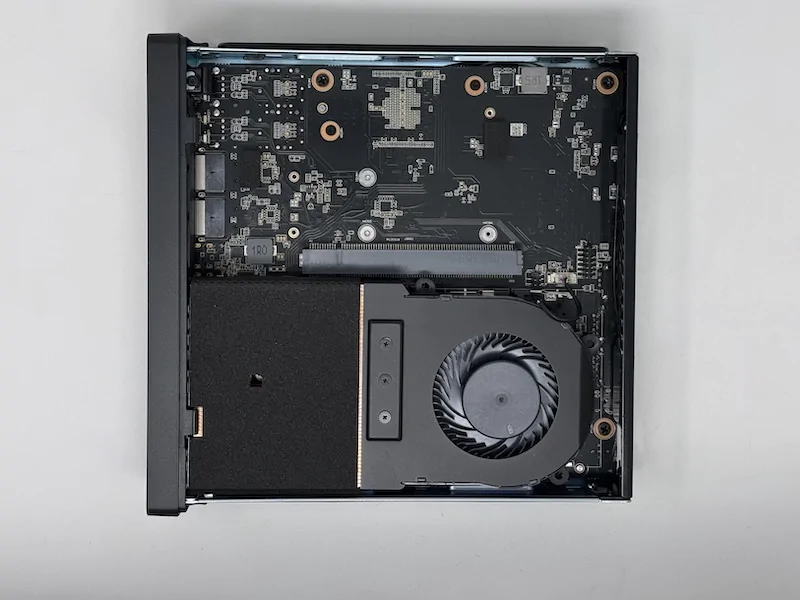
The internal expansion options are where the MS-A2 separates itself from ordinary mini PCs. There are two DDR5 SO-DIMM slots supporting up to 96 GB of memory. Storage consists of multiple NVMe positions, including two M.2 2280/22110 slots and a U.2 NVMe configuration using the supplied adapter. Minisforum also advertises support for RAID 0 and RAID 1 configurations.
There is an important detail for anyone buying the MS-A2 specifically for high-speed storage.
The two M.2 2280/22110 positions are configured for PCIe 3.0 x4 by default and can be switched to PCIe 4.0 x4 through the BIOS. Buyers installing PCIe 4.0 SSDs should therefore check the firmware configuration instead of assuming that every M.2 position will operate at Gen 4 immediately.
Then there is the PCIe slot... The system has a physical PCIe 4.0 x16 slot operating at x8 bandwidth. It also supports PCIe bifurcation, allowing the available lanes to be divided into two x4 connections. This is an exceptional feature for a mini PC.
However, if you are serious about buying it you should pay close attention to the physical dimensions and power requirements of any expansion card. This is still a compact 48 mm chassis, not a conventional desktop tower unless you plan to take it out and shift it.
AMD Ryzen 9 9955HX Performance
The Ryzen 9 9955HX is the centerpiece of the MS-A2. It uses AMD's Zen 5 architecture and provides 16 cores, 32 threads, a maximum boost clock of 5.4 GHz, and 64 MB of L3 cache. Minisforum specifies power levels reaching up to 100 W for the processor configuration used in the MS-A2.
This is substantially more CPU horsepower than you normally expect from a compact mini PC. During everyday use, the MS-A2 feels extremely responsive. Browsing, office applications, software development, document editing, virtual meetings, and general multitasking are effortless.
The real advantage appears with heavier workloads. Compilation, compression, virtualization, media processing, containers, and other multi-threaded workloads can make effective use of the 16 cores and 32 threads.
However, in my experience, the integrated Radeon 610M GPU is considerably less impressive.
It is perfectly adequate for desktop acceleration, video playback, and multiple displays, but it is not intended for modern demanding games (people usually don't on minipc anyway) or serious GPU computing (that's is worth considering).
This is probably the largest performance limitation of the otherwise impressive hardware configuration. Fortunately, the PCIe expansion slot gives the MS-A2 a potential path to a more capable GPU or accelerator.
RAM and SSD Installation
One of the advantages of purchasing the MS-A2 barebone is the ability to configure the system yourself.
For this review, I installed 24 GB of DDR5 memory using an 8 GB + 16 GB (I'm short on another 16 GB stick) configuration and a 1 TB Samsung 990 Pro NVMe SSD.
Installation is relatively straightforward and took less than ten minutes. Accessing the memory requires removing the screws securing the fan assembly, so RAM installation is slightly more involved than on some conventional mini PCs. Once the cooling assembly is moved out of the way, however, the process is simple.
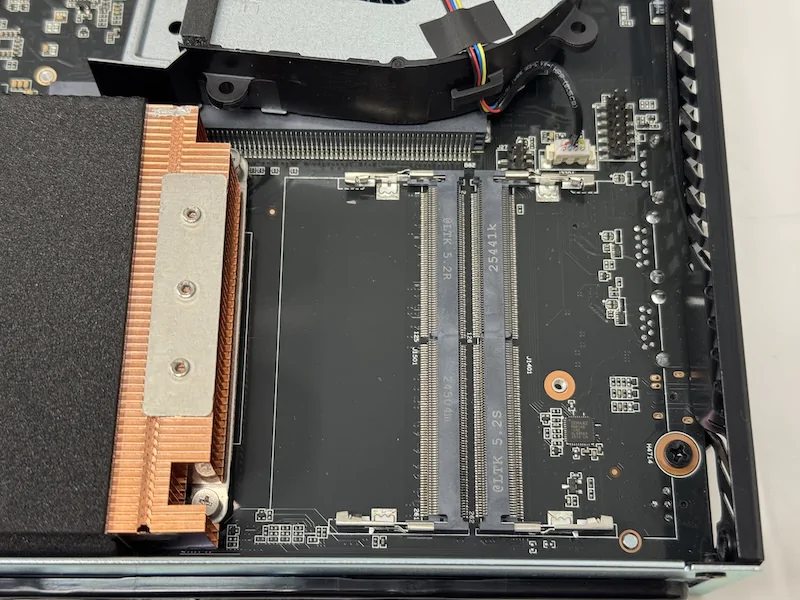
For a new build, I would recommend using a matched memory kit where possible. A 2 × 16 GB configuration is a better starting point than mixing an 8 GB and 16 GB module. If you intend to use the MS-A2 for homelab or local AI workloads, 64 GB is a much more sensible target.
Fast PCIe 4.0 SSD performance
The Samsung 990 Pro is an excellent match for the MS-A2. Its rated sequential performance approaches 7,400 MB/s for reads and 7,000 MB/s for writes when operating under suitable PCIe 4.0 conditions.
In practical desktop use, this means extremely fast application launches, short boot times, and excellent large-file transfer performance.
Virtualization and Homelab Performance
The MS-A2's strongest use case
After more than a month of use, this is where I think the MS-A2 makes the most sense. The combination of 16 CPU cores, 32 threads, up to 96 GB of RAM, multiple NVMe drives, four Ethernet ports, 10GbE connectivity, and PCIe expansion makes it an unusually capable homelab platform.
Proxmox installs without any major problems, and the CPU provides enough resources for multiple virtual machines and containers. The exact number of VMs you can run depends heavily on their workload and memory requirements, so I would not recommend judging the system by an arbitrary VM count (I tried 18 and they worked well). Lightweight Linux servers, network appliances, development environments, and containers can coexist comfortably, while demanding database or application workloads will naturally consume considerably more resources.
For anyone looking for a Proxmox mini PC, 10GbE homelab server, or compact virtualization host, the MS-A2 is significantly more interesting than most consumer mini PCs.
BIOS and UEFI
The MS-A2's UEFI provides more configuration options than many inexpensive mini PCs. You can configure boot behavior, fan settings, automatic startup after power loss, and other system options.
Automatic power recovery is particularly useful when running the system as a server. If the machine loses power while you are away, it can be configured to start again when power is restored.
The BIOS also contains important storage settings, including the ability to change the PCIe generation of the relevant M.2 slots.
For a homelab deployment, these configuration options make the MS-A2 more practical than a basic consumer mini PC.
Power Consumption and Fan Noise
After using the MS-A2 for more than a month, the cooling system is the aspect I would pay the most attention to before buying.
This is a powerful 16-core processor operating inside a compact chassis. There is no way to get workstation-class CPU performance without generating considerable heat.
In my testing I have measured approximately 41.5 dBA at idle and 48.4 dBA under maximum load. If I was to really dumb in down, in practical terms, the MS-A2 is audible.
For ordinary desktop work, the fan noise is manageable. Under sustained CPU-heavy workloads, however, the fans become much more noticeable. This is particularly important if the computer will sit directly beside your monitor in a quiet room.
Power consumption is similarly higher than what you would expect from an inexpensive office mini PC. The system is designed around substantially more powerful hardware, and its larger external power supply reflects that.
Is the Minisforum MS-A2 Worth Buying?
A specialized mini workstation with serious homelab potential
After more than a month of use, I would not recommend the MS-A2 simply to someone looking for a small everyday desktop. It is toooooooo specialized for that and an overkill!
The MS-A2 makes the most sense when you actually need the features that make it different from conventional mini PCs. If you need a high-performance mini PC with 10GbE, several NVMe drives, substantial RAM capacity, PCIe expansion, and a powerful multi-core processor, the MS-A2 is an excellent fit.
It is particularly compelling as a Proxmox server, homelab workstation or a development machine. The integrated GPU and fan noise prevent it from being a perfect all-rounder, but neither issue undermines the machine's primary purpose.
The MS-A2 is expensive actually quite expensive compared with ordinary mini PCs, but it is also doing something very different. It packs workstation class CPU performance and server-oriented connectivity into a remarkably compact chassis. For the right buyer, that combination makes the Minisforum MS-A2 one of the most compelling high-performance mini PCs in its class. Ready to buy the Minisforum MS-A2? Check the current price, available configurations, and promotions before ordering.