

British people talk about the weather - a lot. It is an easy starter for small talk and this month we have been able to talk at length about how hot it has been. Not as hot as it has been for our neighbours on continental Europe, but far too hot for day-to-day life in the UK. Temperatures soared into the high thirties Celsius (around 100°F). Given that air conditioning is a rarity outside of business premises, the recent heatwave took a toll on the population with many people experiencing sleepless nights, schools closing, and transport being overly hot to use. I’ve muddled through, but we are definitely now considering at least a small portable air conditioning unit so we can cool a bedroom or two down for better sleep when the next heat wave inevitably surfaces.
But, while working conditions were less than ideal, I did manage to push forward on a few fronts.
 ThoughtAsylum
This month I was able to put together a couple of blog posts. The first of these combined two of my favourite Mac apps, Drafts, and Keyboard Maestro. In the post I describe how I came up with a solution for logging Safari pages in Drafts. Normally I do this while writing and pull the page details into Drafts. I’ve also been known to use the share sheet extension from Drafts. But on occasion I’m in more of a research mode and need to capture quickly to a single draft. With a bit of help from Keyboard Maestro I can now keep a running list of web pages against whatever draft I want, without constantly swapping to Drafts or choosing which draft to share it to each time.
You can read how I did this in the Capturing Links to Drafts blog post.
 My second post is the first in what I am hoping will become an interesting series of posts. I have been looking at options to use local AI on my relatively modest home setup of my Mac Studio (M4 64GB), which is also my primary machine. I am happy using cloud hosted models, but the idea of having something where I am not sharing my data, and not incurring additional cost, where I can have the AI do things for me when given a task to complete. That was an appealing prospect.
In this post I talk a bit about my initial foray. The challenges, and the resulting path taken. It really is just the tip of the iceberg. As I write this, it is still very early days and still an experiment, but I have been learning a lot and in line with my usual approach to things, it seems only right to share what my experiences have been.
 If this sounds interesting, you can now join me In Search of a Private Digital Assistant.
Forums
This month I have to admit I did not publish anything noteworthy on the Drafts or Automators podcast forums. There simply hasn’t been anything where I could help any more than others had already contributed. Again, I find myself wondering if I should post more proactively with non-questions, rather than just biding my time for a question I can add to.
Other
This past month I have been busy on quite a few things.
New Role
The first notable thing this month has to be my new job. After a long time at risk of redundancy in a role where I was carrying out technical work in an HR team, I have been recruited into an IT team to do technical work on HR systems. I am still covering mostly the same systems as before, but now with a different lens and different responsibilities. In effect I am much more accountable, but at the same time I have more influence on the direction and the how.
The unfortunate truth however is that many colleagues have all moved on, a cohort that I would have continued working with has just departed, and there are still more to go. While intellectually I understand it is the natural flow, and the it is simply business. I know we have had a lot of great people leave. I know they will survive and thrive, but I am still left with that pang of survivors guilt and the trepidation about what is to come in a new role that I know will be bombarded with big changes to deal with, and I know that this may only be a reprieve as the organisation HQ will relocate to Canada when the next merger completes - at which point we are definitely on for a significant system merger journey (in parallel with some divestments too).
Never a dull moment I guess.
Marked 3 vs Marked 2
I recently switched from Marked 2 to Marked 3 for my Markdown viewing needs and it is nice. However, one of the things I use it for is to preview Drafts content. I do this at conferences and when writing posts like this monthly round-up. It gives me a strong visual reference when writing these posts (as I also use CSS for the website), and allows me to immediately see and reference content in photographs I add into the drafts.
Unfortunately, that is also where I am bumping into an issue. After an image is included and I modify the text, the entire page flashes as it reloads in Marked 3 when using the clipboard-based streaming preview. This is particularly distracting if using a dark CSS theme. In Marked 2, this behaviour simply didn’t occur.
I need to sit down and do some analysis to verify exactly under what conditions this does, and does not, happen and validate it against Marked 2. Does the image size matter? Does the applied style matter? Does it matter if an image set to be hidden? Is it only when stream from Drafts? There are many experiments I would like to try in order to narrow down the definition and circumstances.
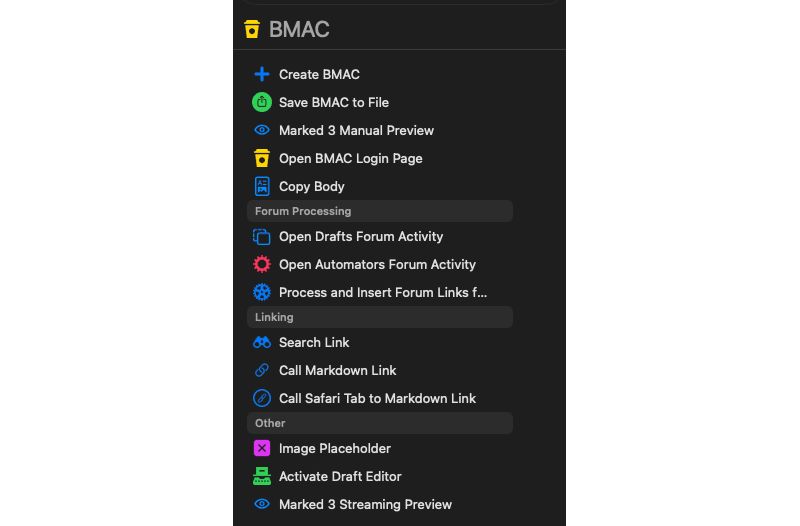
Until then, I have added some new actions to my action group. “Save BMAC to File”, and “Marked 3 Manual Preview”. These let me deal with the updates like I would for non-streamed content. A single occasional flash is much easier to accommodate than something flashing persistently in my near-peripheral vision as I type.
 Home Audio Feed
A simple quality of life tweak I did this past month was with my home audio feed. For those with excellent memories, who have been reading along for a while now, you may recall that I host a service called Audiobookshelf on my Synology NAS. I recently began re-listening to the Lovecraft Investigations podcast, but I have everything set up so that I can link back to the service over Tailscale. As a result, sometimes I was opening my Audiobookshelf app, Plappa, only to realise I’d disconnected at some point from Tailscale. The solution was simple. I replaced the home page icon for the app with a home page Apple Shortcuts shortcut. The shortcut has an “if” to check if I am connected to Tailscale (because Tailscale has Shortcuts support 🎉), and if not, connect me. After that, it opens Plappa as normal.
However, because this check is something I might want to do for other shortcuts, I actually pulled this logic out as a separate shortcut. Now I can just call a pre-built bit of logic and should I ever need to change it, I can modify it in just the one place.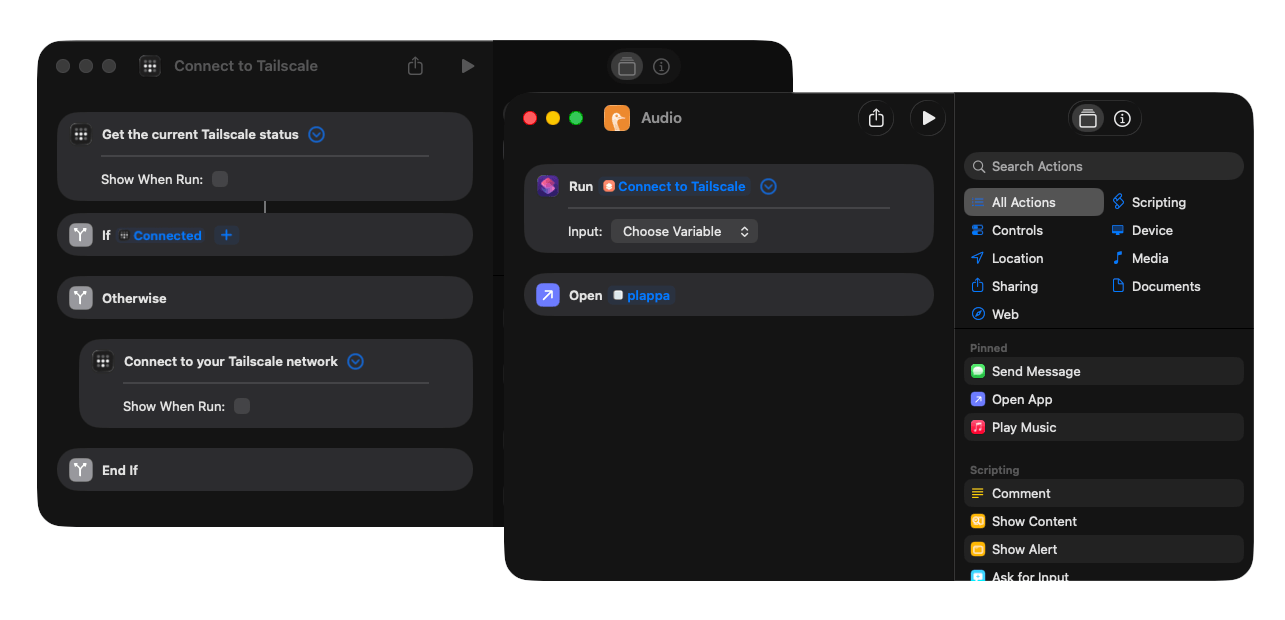 For me, the removal of minor friction with a little Shortcuts automation is always rather delightful.
A New Project
After dabbling in Swift scripting a few times in the past, I am now experimenting with Swift in Xcode. I ran into something the other day where I was frustrated I didn’t have a good solution. It is one I’ve bumped into before, and one I have tried a few third party solutions for in the past. Now I have decided to roll up my sleeves and tackle it myself.
I have a core app that works, but I am working on building some additional functionality around it to make it automation friendly and in ways that mesh with its own purpose, extensible. I have a way to go, and while it isn’t going to be groundbreaking in any way, I know it meets my own needs.
Once version one is complete and I have some documentation and a website to support it I will be putting it out there for all. The only thing I do not know yet is how long it will take me. Realistically, probably not all that long, but it is a case of slotting it in around everything else, and keeping all my plates spinning.
 Alfred Workflows
I’ve also been working on a few Alfred workflows this past month.
One of these is called Mercury, and is helping me with my digital assistant. That might well make a public appearance at some point, but it is still growing and it will need a lot of remedial work to change it from my personal setup to something more customisable.
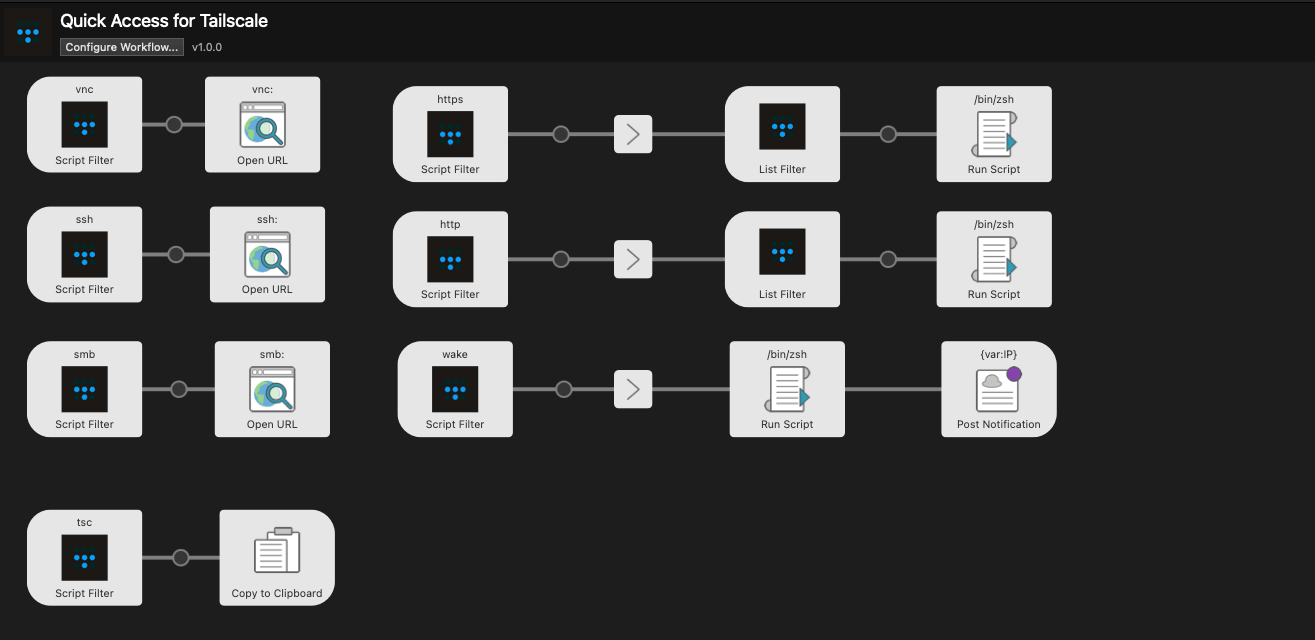
I’ve also got a Tailscale helper workflow that I’ve been slowly expanding. It is very much just a launcher for various services I’m accessing via Tailscale, but I also just added something to let me grab Tailscale names rather than IP addresses, which is quite useful, and really something I was surprised the Tailscale app was not better at.
 Lastly, I’ve been starting to get an Alfred workflow set up for working with the new application I mentioned above. This is probably the way I will mostly interact with the app, so it is definitely in my own best interests to ensure this one works seamlessly.
Links
This month’s links have another audio recommendation and a multi-platform service, and an iOS app for anyone travelling in the UK.
Intentional AI Podcast
The first link this month is for the Intentional AI Podcast hosted by David Sparks, and Chris Bailey. Full disclosure in that I am fortunate to know David through appearing on some of his podcasts, sessions, and courses, but regardless, I would still be recommending this for a listen.
 The podcast is not focussed on the latest AI features and industry news, but rather is a series looking at AI in a positive view. It looks at the ways AI can help you cut through the time-sapping, mind numbing work. It is about exploring how you can hand off tasks which an AI is more skilled at, without giving up the oversight and insight that humans bring into the loop.
This intentional use of AI is something that resonates with me and it is a breath of fresh air compared to all the other AI-related content I have waded through this year.
That being said, it is still early days and there is a good chunk of foundation laying at the moment. If you are already familiar with the AI space, then you might want to skip through some of the foundational parts to the example discussions. But, if this is all relatively new to you, then I think it is a good jumping off point for your journey into the intentional use of AI.
What the Font
Every now and then, particularly at work, I will come across something where I need to reproduce it as closely as possible, and it will be some sort of image with some text on it with a font that most definitely is not Arial or Times New Roman. Enter What the Font (also available on mobile).
What the Font allows you to capture and select text from an image and then the myfonts.com catalogue is matched against to identify the font. It does not always give a 100% guaranteed match, but the matches are often close enough that I can find a font to use for my recreation.
 Once again, this past month it let me match something in a small image that I could then reproduce at a reasonable size on a presentation slide. I make great efforts and take great pride in producing quality presentations, and What the Font is a great utility for the tool belt to ensure everything looks truly good.
Railboard
Finally, to an app I use at least once a month. I used to travel more by train in my pre-Covid days as a consultant, but nowadays, my train travel is limited to a visit to my London office once or twice a month, and the occasional recreational journey.
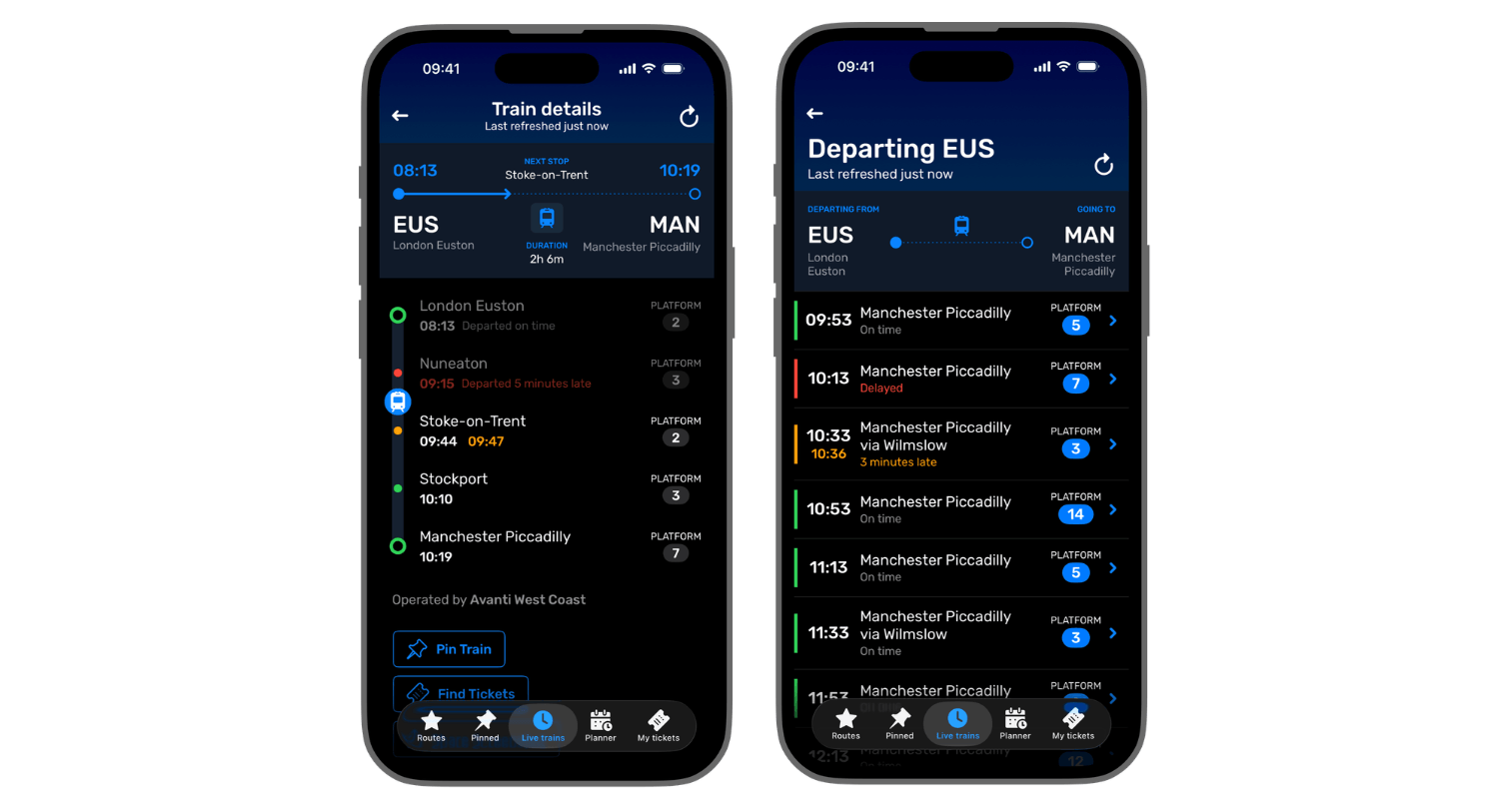 The Railboard application is one I use not for purchasing tickets (though it may be good for that), but one that I use for checking the departure and arrival boards for stations. This is particularly useful when checking for next services and platforms. I will note that the late platform announcement at London Kings Cross does not get any easier with this, but that is not the app’s issue, that is just how that station functions.
Even querying the Darwin API didn’t get my answers any sooner where it comes to Kings Cross.
Upcoming
This July, as well as settling into my new role, I am hoping to keep things relatively simple. I want to publish more posts about my personal digital assistant journey, and to work on the new application. Anything beyond that will be a bonus, or a distraction, but progress is progress.
Thank you once again to everyone who has bought me a coffee. I really appreciate it, and it continues to power my development and writing sessions.