

As we roll into September 2026, it is time for me to take a look back at my August. It has certainly been a busy month, both in and outside of work, but I finally managed to get some annual leave and had a week away from work, which was a welcome break. The return to the day job was particularly painful, with two migraines arriving at the end of my first two days back. Added to this, we are starting to get the children ready for their return to school, so everything is all go in the Millard household.
However, having managed to get some time off, and with fewer school-related jobs on my list, I have actually managed to make good progress on quite a few of my personal projects.
 ThoughtAsylum
This past month I spent some time dealing with a number of challenges relating to managing some local website builds and LLM hosting. It frustrated me enough that I ended up developing a couple of different utilities to help me.
The first of these was the subject of my first post this month. My Mac was getting cluttered with apps and windows, as well as background tmux sessions for different long-running processes. I wanted to bring them all together somewhere out of the way, where I could check in on them and manage them. The result was Sentinel, a free Mac menu bar utility that allows you to consolidate and run your processes while keeping them easily at hand.
The Monitoring non-interactive Terminal sessions with Sentinel post goes into more detail about why I created it and some of its features. I will note that I have tried to make it as automatable as possible to slot into your own workflows. It includes command line, AppleScript, Shortcuts, and URL scheme support, and has a dedicated website providing guides and feature overviews. The post also includes an Alfred workflow to let you interact with Sentinel if you want to control it directly from the launcher, which I find very useful.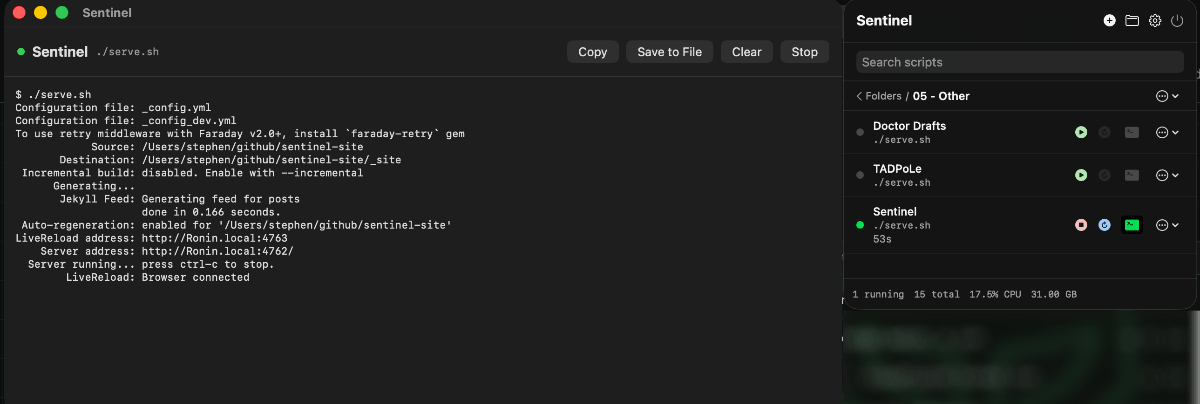 The second blog post this past month, Build vs Buttle with your AI, was about my view of using AI to build things rather than to do every little thing for you. This is based on a number of premises, including things like cost and repeatability. If it is possible to build around an algorithm that produces the same results every time, I find that for most of my scenarios that approach will satisfy them entirely. There are some instances where some variation and flexible analysis is required, and that is where an AI in the process can excel and go far beyond what would otherwise be possible. In the post, I go into more detail and explain why I think it is generally better to have an AI help you build a process rather than simply throwing everything at AI.
 The final blog post for August was about using Keyboard Maestro macros to create file and folder tree reports from within Finder. The post walks through the use of a command line utility to create plain-text visualisations representing a file and folder structure. It shows how a core subroutine macro was developed that handles different types of selections within Finder, and how it is then called by separate macros that determine the options for what specific type of output is produced.
 Podcasts
I was proud once again to get a few mentions on Mac Power Users episode 862. There were mentions of some of my Alfred workflows, as well as my Elgato Stream Deck plugin, Mac Automation. It now has over 5.5K users and is available on the Elgato Marketplace for free.
Other
I have been busying myself with a lot of things this month. Truth be told, I think it has been too many things. But at the same time, I have had a lot of fun with some new things and a lot of pleasure in finally finishing off a couple of things that have been nagging at me for too long. First up are a couple of projects where a bit of LLM use helped me resolve some things I was struggling to nail down.
Also, if you are wondering what happened to my regular forums section this month, I simply did not have any noteworthy posts. Hopefully I will make some in September.
MPU Obsidian Vault
I have been a fan of the Mac Power Users podcast for a very long time, and it was actually a big tick on my bucket list to be invited on to the show, and a double-tick to be invited back. As a long-running podcast, it has a lot of content. Some of it is dated, and some of it is evergreen. If you know where to look and listen, it is a vault of fantastic knowledge, and in fact, that is exactly what I have done with it.
I had a rough-and-ready transcription pipeline set up on my Mac so I could pull in the latest episode and transcribe it. With a bit of help from an LLM, I managed to streamline the process so that it automatically creates Markdown files containing the episode information, transcription, and show notes, which are then added to an Obsidian vault.
Now, for some of you this might sound eerily familiar to what I did for another Relay podcast and The Automators Obsidian Vault. It is fairly similar, but much more lightweight. With the Automators vault, I was checking through and updating transcriptions by hand and writing lots of extra pages of supplementary content. It was building out in a much more wiki-like manner, and at some point I will add some more content — perhaps with a bit more AI assistance. The MPU vault, on the other hand, is not getting that level of attention. I simply cannot afford to sink the same effort into it. With all the episodes, I expect I would have to quit my day job to even stand a remote chance of doing it.
The MPU vault content is generated through an automated pipeline and, other than a quick sense check at the end by me, there is little human involvement. But as a result, it is easy for me to make it available in a similar way via a GitHub repo — sylumer/mpu_vault.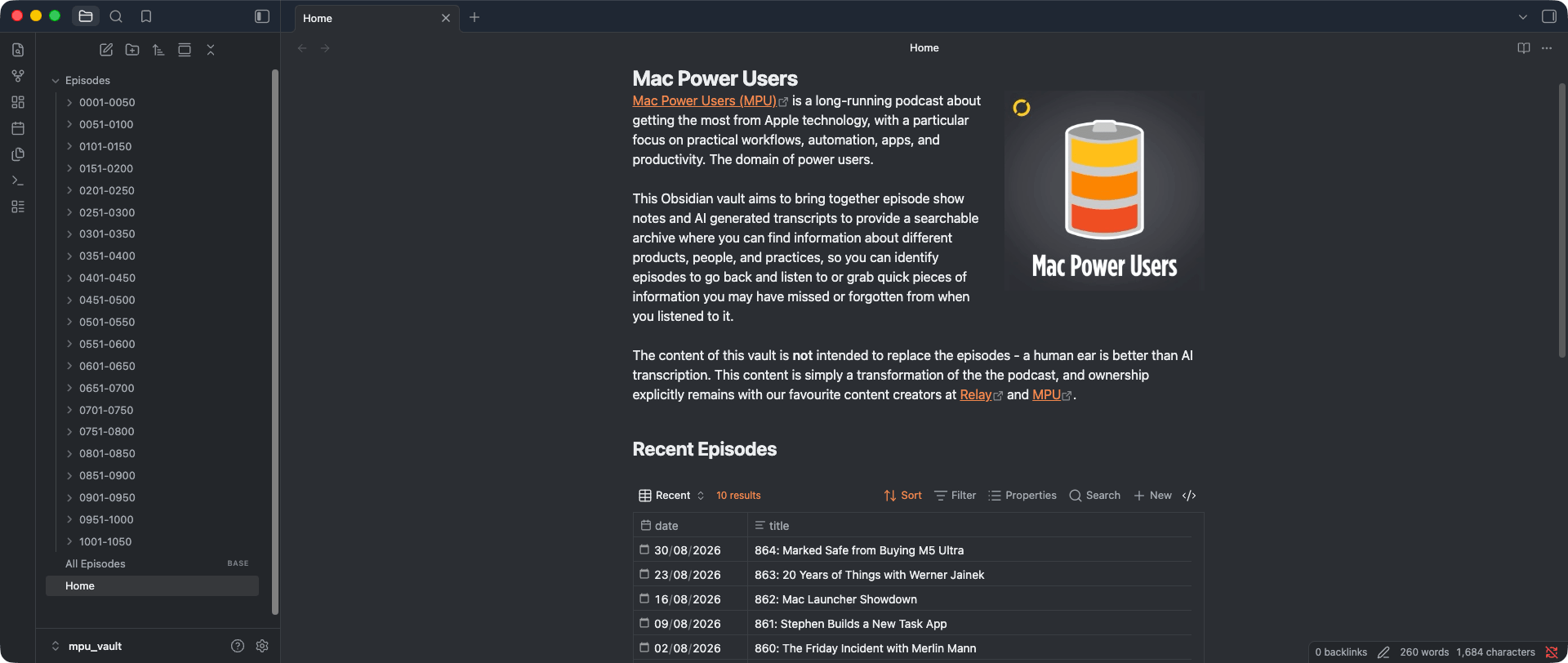 I heard, after putting the vault repo live, in episode 864 that MPU Plus subscribers also now get access to a transcript. So, if you find them to be of higher quality, maybe you can build out your own vault with those and, if necessary, grab any early content not covered from this vault.
A little challenge for anyone downloading the vault is to figure out what episode I first had a mention on. It is probably a lot earlier than you might think….
LTeX Server Extension for Nova
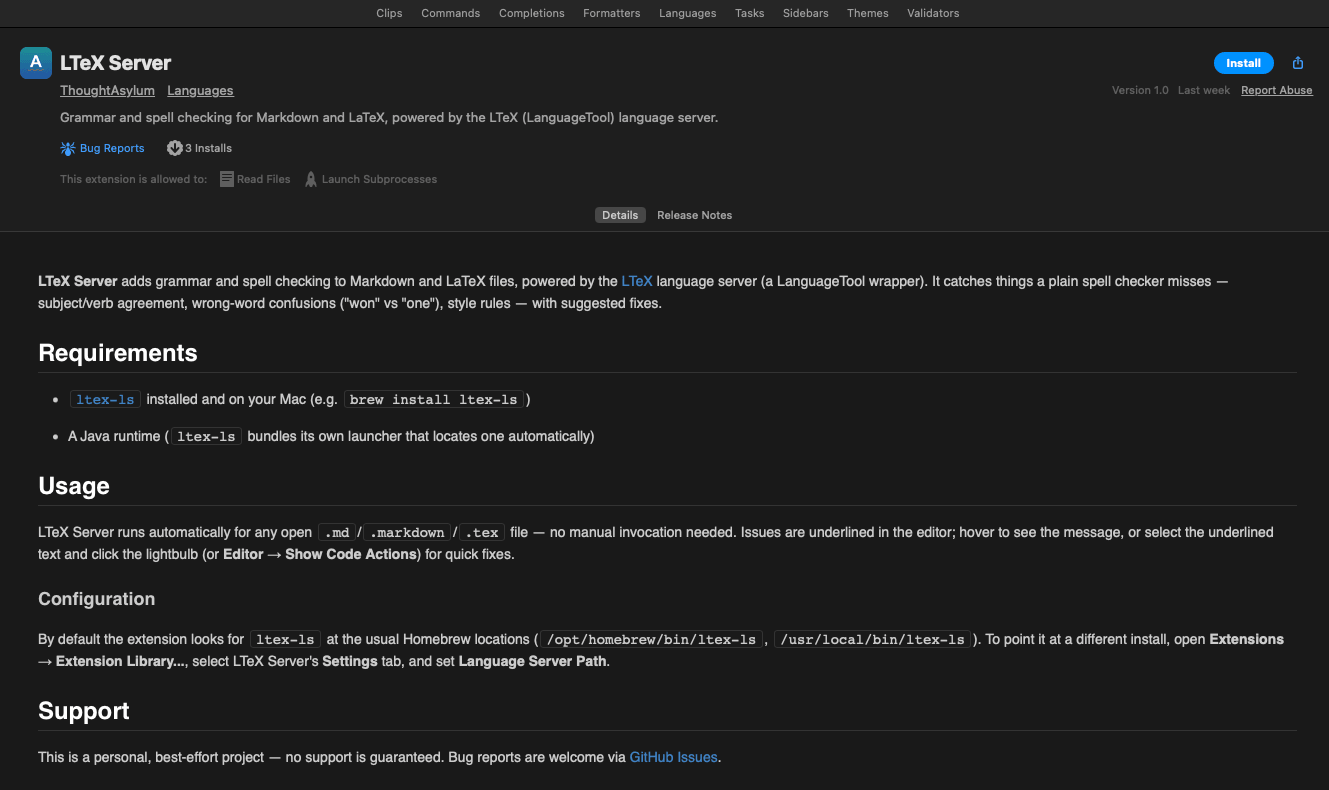
The second area where I got some deeper-dive assistance was with a language server extension I had tried to build for my daily-driver text editor. It utilises LTeX server to provide spelling and grammar checking in Nova, the text editor by Panic. I had spent several days tinkering on and off with this in the first half of 2026, but I never quite managed to get it working. I had never worked with Language Servers before, or Nova, and the details of whatever was going on were getting harder and harder for me to debug. At the time, it simply got to the point where I had to resort to pasting into Visual Studio Code, where I had the language extension running, thanks to someone else’s efforts, and then back to Nova.
Cut to August, and a bit of time directing an LLM at the problem, and very quickly, it was working.
I have since come across a bug that I have resolved and need to get an update uploaded for, but the extension is available in the Nova Extension Library.
 E-Ink and a Surprise Router
Not So Paperless
For the past few months at work, I have found myself scratching down notes and actions during meetings on pieces of paper. I have been paperless in my work for almost two decades at this point, and so I found it strange that I was using notes on pieces of paper rather than actually capturing notes into Obsidian, which was my usual course of action.
While I have had dalliances with Rocketbook notebooks to supplement my note taking, I often neglected to clean text from the books for months at a time and would end up with lingering marks on some of the pages, which I found a little irksome. Overall, they were very good, but they did have a slippery plastic feel when writing, which was not ideal for such a tactile activity.
As the scraps of paper stacked up and moved around on my desk, and as I began reusing the same piece of paper to track actions from multiple meetings and multiple sets of notes on both sides in different orientations, I realised I was making things harder for myself.
To try and get some semblance of order back, I started looking at different stationery, looking for some sort of notebook that I could keep in the small space on my desk, reorder when needed, and that would lie flat and be easily replaced once I needed a new one. All those sorts of things that you might consider when you want to invest in something that is going to be by your side every day. I saw lots of cool things, but nothing that really ticked all the boxes.
e-ink
It was then I remembered that my wife had a reMarkable tablet, an e-ink tablet designed for writing. I had used it briefly before when she first got it, and it had seemed fine at the time. But I thought perhaps it was time to give that another look, as that would be an excellent solution for my desk. It would allow me to easily transfer notes to an electronic store. I spent 15 or 20 minutes trying it out and, while it is one of the original versions, it worked well and I decided it might just fit my needs. I do have a few other paper notebooks dotted around for specific uses, and maybe an e-ink tablet could take over from them too.
Before acquiring a reMarkable tablet, I decided to have a look around at what was available and what other brands were out there and how they compared. I was delighted to find lots of discussions, both high-level and in-depth, online, about different features and attributes, and how these align to different use cases and so different users. It was fascinating.
Manta
After a few weeks of research I eventually decided to order a Supernote Manta. This is a tablet from a company called Ratta, and unfortunately they do not have anywhere in the UK that you can buy them, and even in Europe they do not ship to the UK, so I had to order it from the main website and have it sent from Japan according to the UPS order tracking I got.
It arrived after about a week and I received my Supernote Manta pack including the tablet, the standard pen, and a half-folio cover. I also added a separate Amazon order for a cheap, ‘not quite felt’ case slip case to put the tablet in, for a bit of extra protection when taking it out and about. I only had it for the last week of August, so it is still new to me and I am still bedding it in, but so far my desk is tidier, my notes more organised, and my stress levels have dropped significantly as things get back in order. I am still using Obsidian to capture my notes as much as I can, but there just seems to be something of late in the way meetings have been running and my need to do screen shares that means having this separate capture option is helping. All I need to make sure of is that this does not simply become a separate silo.
An additional point I want to talk about is that rather than using the Supernote sync platform, I am actually using the private cloud sync integration instead. I am hosting the server on my Synology NAS in my home office and syncing to that automatically via my home Wi-Fi. And once I got it up and running, it has worked fantastically.
The reason I have opted for the private cloud option is because I am taking work notes on it. I will first affirm that my work notes are not going to contain anything “tasty” — passwords and API keys are in my password manager, and I do not write down commercially sensitive stuff outside of my work laptop. But I do note decisions, key points, deadlines, etc. and as such I treat them with what I hope is a professional duty of care. I certainly would feel very uncomfortable putting them on an unencrypted cloud service. There are options to sync with big providers (Microsoft, Google, Dropbox), but self-hosting gives me a level of isolation and control I feel more comfortable with. Those other services are of course professionals at protecting data, but private cloud sync is what I have opted for, for now.
Given I have some encryption on my NAS, that does beg the question about what encryption is available on the Supernote Manta. Unfortunately the answer is none. That is probably the respect in which it is most like a physical, paper notebook. All of my security precautions will therefore follow a similar physical approach — though I have been told my handwriting sometimes looks like I have encrypted the words.
UTR
I need to be on my home Wi-Fi to use the sync (no Tailscale for the Supernote OS yet — though I have not looked at side-loading yet…), so when I am away I will generally not be syncing until I return, or I will be protecting and linking back to my home network using another acquisition — a Unifi Travel Router (UTR).
This past month I actually had my first week off this year. It started with the worst journey I have had to London (over twelve and a half hours door-to-door rather than the usual three to four, thanks to a rail network in chaos that day), followed by taking in a few shows in the West End and some pottering around the city, and then a few days back north at my in-laws. I had set my children up with my travel router to use at their grandparents' house to extend the Wi-Fi to a back room where they like to hang out. For my trip to London I found myself without a travel router, and I knew my wife and I would need one to keep our devices protected and online as we travel with more than a few connected devices each, and hotels do tend to limit your access. Given the number of rave reviews and the ridiculously compact form factor, I grabbed a UTR a few days before the trip. I have to say that throughout the trip it performed admirably and was indeed exactly what we needed. I have configured the option to “teleport” back to my home (also Unifi) network, so that will happen to be ideal for if I am travelling and want to be able to sync/backup my notes back to my NAS — the alternative being taking manual copies off the Supernote Manta over a local USB connection and some MTP software (for my Mac).
Alfred Workflows
As well as the Alfred workflow I created for the Sentinel app, I also released a couple of other new Alfred workflows this past month. One of these was an expanded version of something I had been using for a little while to help me manage errant web services. The other was created to relieve a frustration that I had had but never really crystallised: opening and abandoning far too many throwaway terminal sessions from Alfred.
PortChecker
The Port Checker workflow began as a convenient way for me to kill ports left open by web server processes that I had lost track of in some terminal or even tmux session somewhere. This past month I expanded it to enable a few other useful port investigation actions. It was then just a case of adding some of the usual polish features that I try to add to the Alfred workflows I release, and I made it available to download via my website.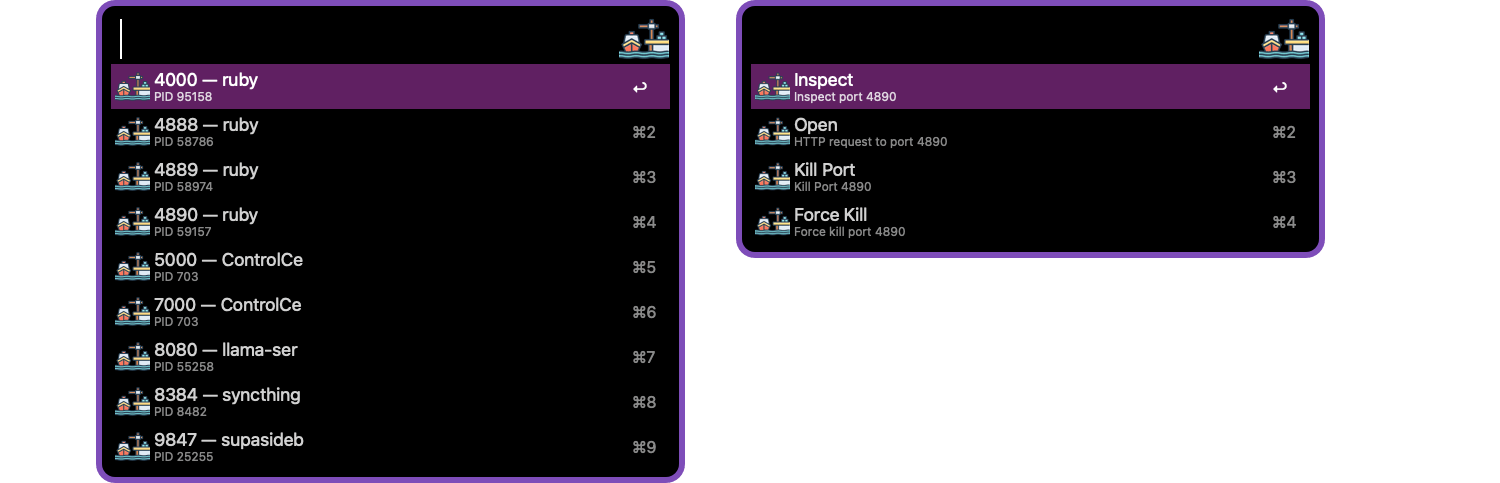 It is quite niche, and certainly nothing fancy, but I figured it might be useful to a handful of people out there.
Splash Terminal
The third Alfred workflow I released this month was Splash Terminal. This is an Alfred utility that allows you to enter details of a terminal command and execute it. Unlike the built-in Terminal functionality or even the Factor workflow that I created for use with the Warp terminal, Splash Terminal executes one and only one command and then disappears just like a splash screen.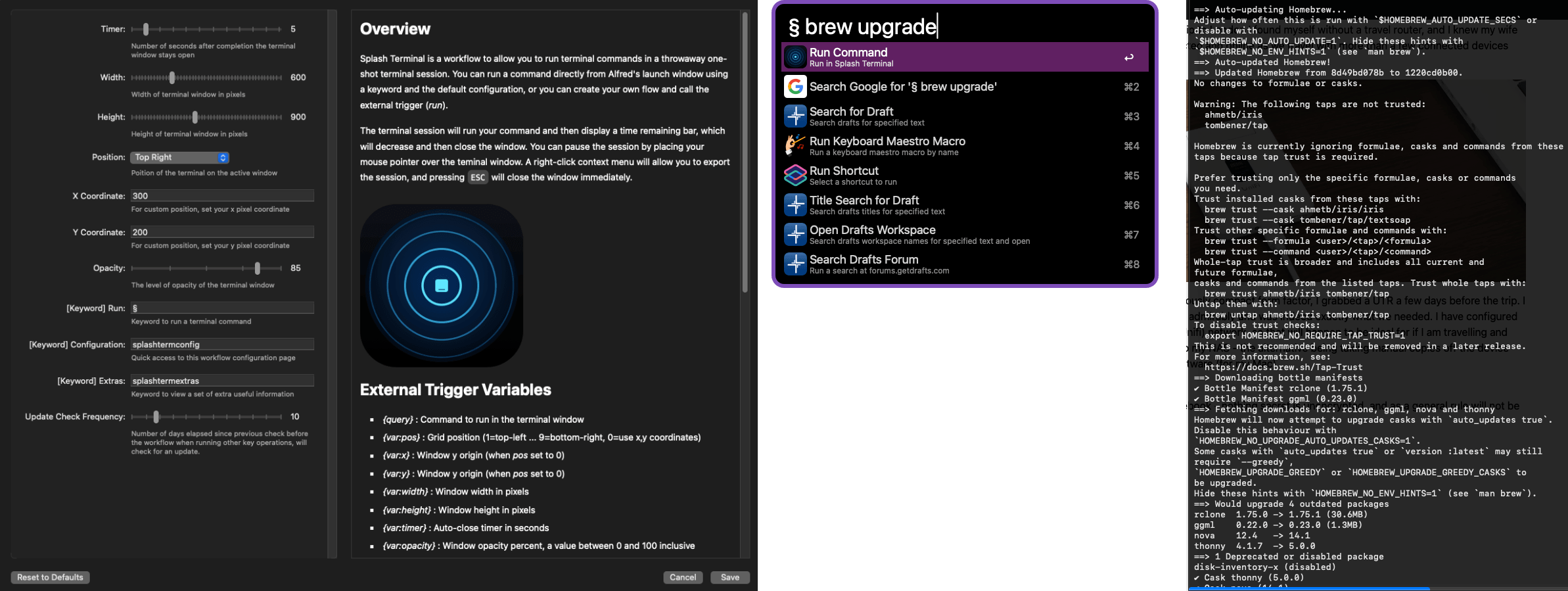 It includes several configuration options, such as setting the amount of time the window will stay open after the command has completed, and setting the transparency of the window and where the window will appear. You can pause the countdown to disappearance by simply placing your mouse pointer over the Splash Terminal window. If you right-click on the window, you can also save the output to a file, to the clipboard, or to a screenshot.
As I mentioned above, I found myself opening lots of terminal sessions to run quick one-off commands from Alfred, leaving them to complete and then rarely going back to the terminal session to close them out. Later I would discover I had more than a handful of abandoned Terminal windows hidden behind other windows. My solution was Splash Terminal, as it effectively tidies up after me.
Mystery Application
For anyone who is a regular reader, you might recall that I have been working on an application. That application is not actually Sentinel. “There is another” application in the works that requires a lot more effort to prepare for release. Once again, I am scratching my own itch with this one, and I think its appeal may be a little broader than for Sentinel, but time will tell.
The application itself is actually probably 95% complete at this point. But there is definitely more to do outside the coding, as well as a final feature and some polish to apply to the app, and I have been continuing to work on some of these this past month.
I have built the framework of the website locally for the app, but it requires a lot more work to fully populate the content. There are many pages, but not all of them are complete. I want to ensure there is documentation for every feature, and enough documentation for each different type of user who might find it useful, from the most casual user who just dips in through to the power users who might want to go deep and tap into more of the functionality it can offer.
In addition, while I am very much hoping it will allow people to bring their own resources to use with it, I also want to make sure that someone installing it for the first time has plenty of things available to get them started. That means making sure there are plenty of resources available and that the website and application make it easy to find them. I have been hard at work on those resources and have some plans around how people will discover them, but I need to run a whole proof of concept on that first, which I suspect will be an entire weekend’s effort.
Basically, there is still a good deal of groundwork to lay before I will be happy to release it into the wild, and I am still trying to decide if it is worth a beta test. A lot of people are releasing apps these days and there is definite fatigue on that front, so I will probably revisit that once it is close to ready for someone other than me to try it out. While I am hopefully not going to let slip what it is quite yet, I will say it is a Mac-only app, and you will not need to dip into your purse or wallet to get it. It will be free to use. No pay to download. No trial period. No pay to unlock any features. No bring-your-own-AI API key. No pay to access the resources — or at least the ones I will be making available will be free. I am just hoping that it will be an app that people other than just me find useful, given the effort I have put into it over the last few months, and that will make the effort worthwhile.
Links
Bloom
Finding a truly great file manager for the Mac is one of my quests in life. I used a combination of Forklift and Path Finder for many years, and while I still use Path Finder, I have not updated in a little while because the feature set has not warranted it. But as a result, on macOS Tahoe, I have occasionally returned to my Mac and found that Path Finder has incurred a massive, multi-dozen-gigabyte memory leak that has basically incapacitated my Mac. So this month, for a change, I thought I would give one of the newer file management apps that has had a lot of positive reviews a try. That app is Bloom.
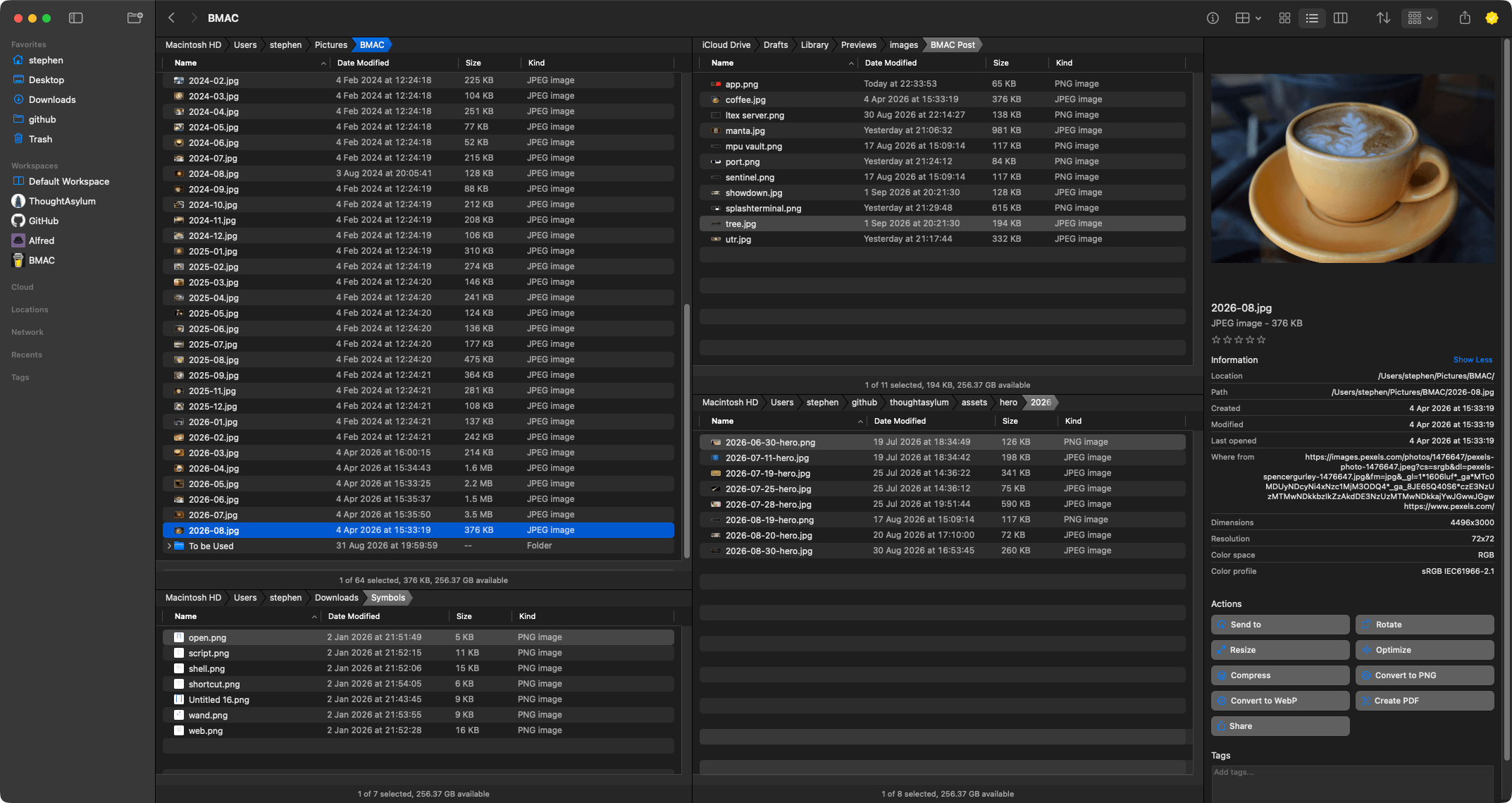 It is an actively developed application and is incorporating functionality around automation, which is great to see, and I am still experimenting with some of that. The look and feel is generally clean and very customisable, which I really appreciate. The only thing that is causing me some consternation is the tab and window approach. I am used to having a file manager window with multiple tabs in it that I can quickly switch between within each pane of the layout within the window. Bloom takes a different approach. Each tab has its own layout within a window. So that is flipping the display approach on its head from what I am used to, and honestly that is proving quite painful for me given the way I currently work. The multi-pane layout is great, but I do find it limiting for workspaces I have where I actually want to have quick access to more than four panes. In applications like Path Finder and Forklift, I would have a pane and be able to switch between five or six tabs. So this is still something I am getting used to, and we will have to see how that works out for me, but honestly, that is the only personal point of friction that I have with this application. It is definitely worth checking out, given its low price point brings exceptional value to the table.
Microsoft Power Toys
A perennial favourite of mine is Microsoft Power Toys. After using them in the 1990s, they have been a key part of my PC setup whenever possible, providing a variety of useful tools for Windows power users. There are many tools in the suite, but there are a few to call out.
I recently used PowerRename to do some complex file renaming using regular expressions for some testing.
The Command Palette is a poor Alfred substitute, but much better than Windows Search alone.
Awake is the equivalent of tools like Amphetamine or Caffeinate.
Text Extractor is so useful when trying to grab text off someone’s screen share or from an unselectable table on web pages.
TMOG
Still in beta, and created by the original developer of Windows Task Manager, TMOG (Task Manager ‘Original Gangster’) is a cross-platform evolution of that application, but one with native development branches for each.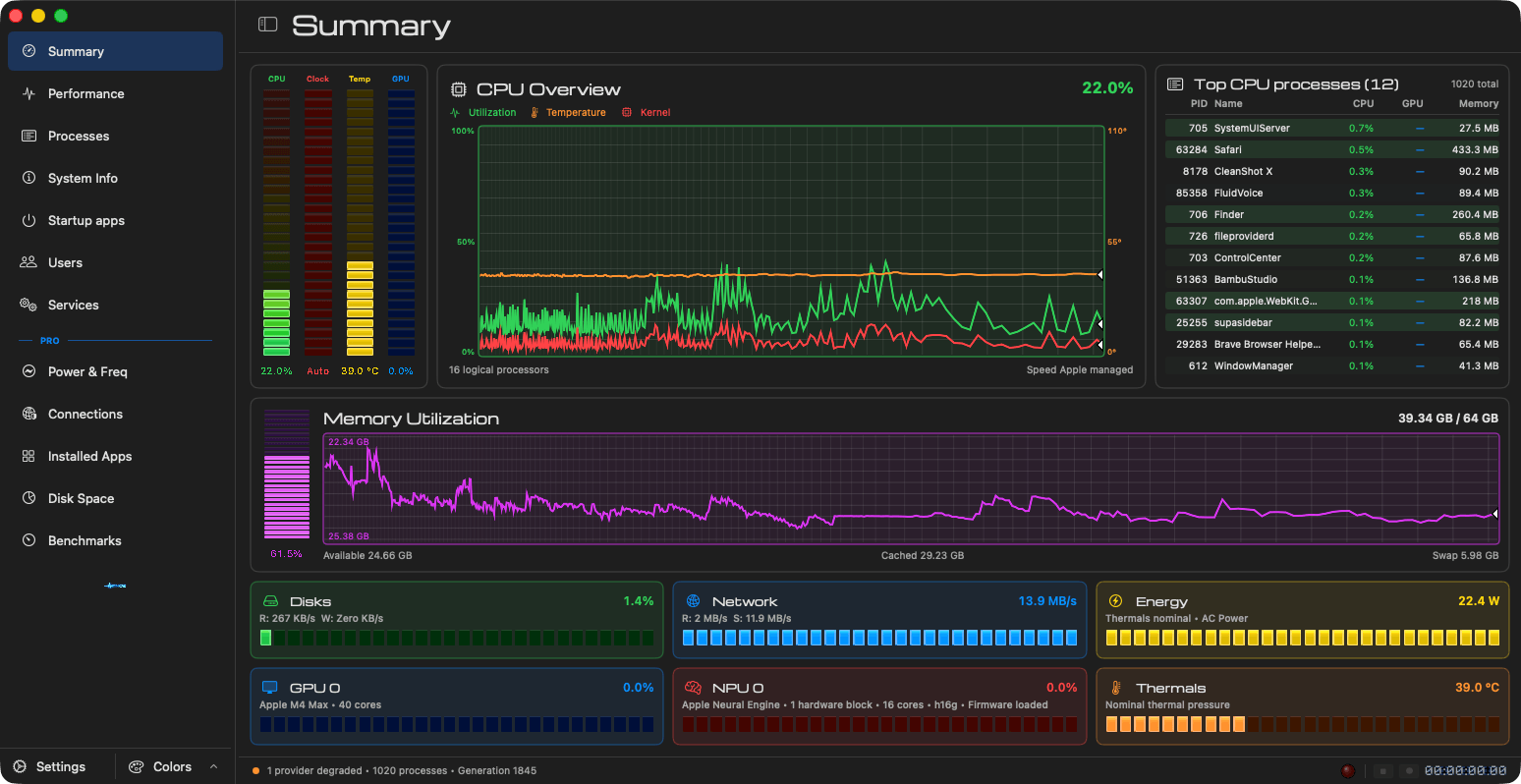 I currently have it on my Mac Studio and, as it is in beta, I am very much just kicking the tyres on it. But I must confess, I have always preferred the detail and drill-downs supported on the Microsoft Task Manager side versus the Mac’s Activity Monitor. Maybe that is down to me having more hands-on experience in a few jobs, but certainly TMOG is quite intuitive for me. I think it is certainly worth a look no matter what OS you are driving.
Upcoming
September is here. Schools in the UK are starting back for a new academic year, work is ramping up quickly on four demerger/merger projects, and so my time to work on things is expected to take a big hit for the rest of 2026 compared to these last few months.
I have several blog post ideas lined up that I just need to find time to turn from outlines into final versions, as well as several little projects I am finishing off and have put together in the last few days. There is also the mystery app, for which I will still be building resources and website content. One thing is for sure: I have plenty to keep me busy as autumn begins to cool off the summer heat.
As always, thank you to everyone who has bought me a coffee recently or in the past. It is really appreciated, and I was in fact sat in a village cafe this morning, with my Supernote Manta and a cappuccino, jotting down ideas for more content, resources, and projects to work on.
Have a great September, and I will be back in October with my monthly round-up.