

Solan - 1.0
I'm really proud to announce Solan 1.0, the biggest update since the first release.
What's Solan?
Solan is a multi-system command-line software, written in Python, used to share files from a local computer.
When a directory is shared with Solan, every browser (or similar) can be used to navigate files and download them. And with the -r option, Ngrok creates a link that works from anywhere, not only from your local network.
What's New?
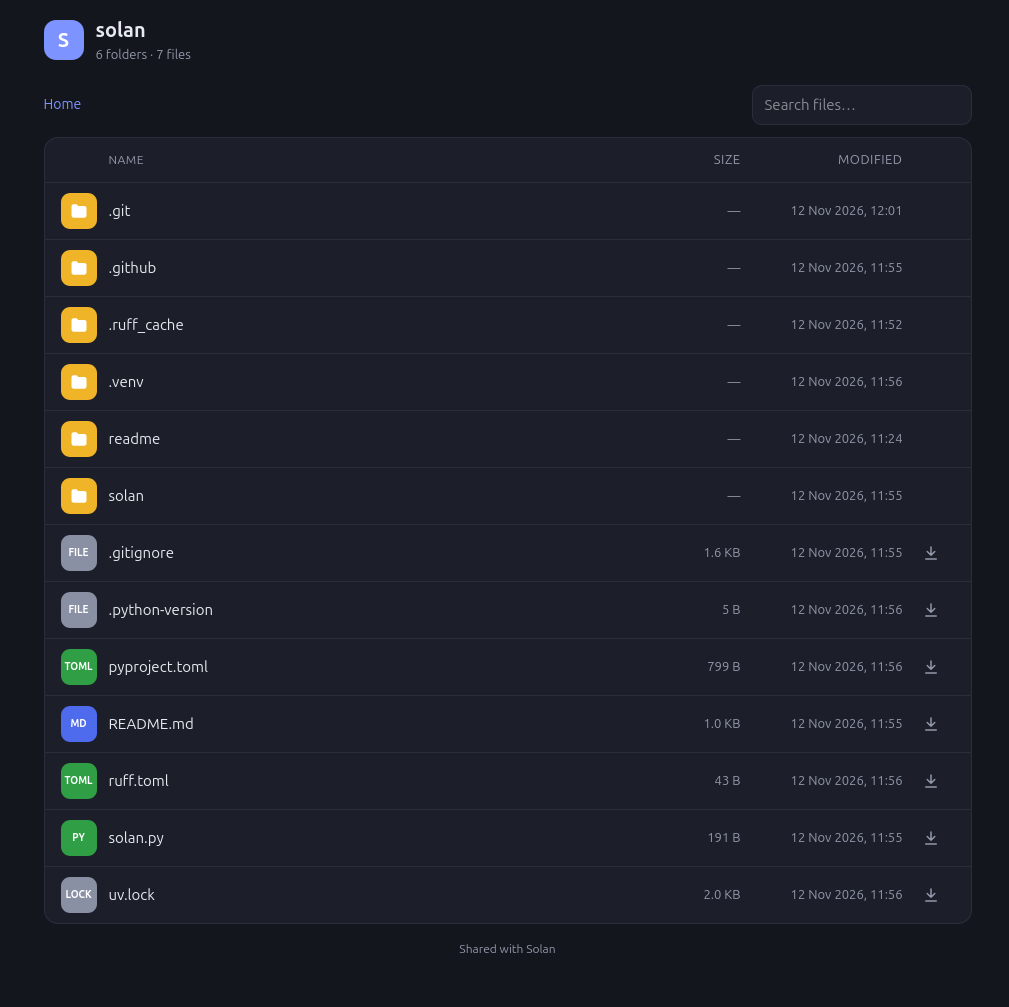
A brand new interface. Opening the shared link no longer shows a bare list of files. Now you get a clean, modern page:
- breadcrumbs to always know where you are
- colored icons for each file type (photos, videos, music, documents, archives…)
- readable sizes and modification dates
- a download button next to every file
- instant search to find a file while you type
- dark/light mode and a layout designed for phones
The right address, right away. The terminal now shows your computer's real address on the local network, as a ready-to-open link, like http://192.168.1.55:8000. Just send it to whoever is on the same Wi-Fi.
Easier to install. Solan now uses uv, so a single command is enough:
uv tool install solan
Or try it without installing anything:
uvx solan ~/Pictures
Under the hood. Solan now requires Python 3.15, and every new version is published automatically to GitHub and PyPI.
Try Solan now: [GitHub](https://github.com/OpenCode/solan) · [PyPI](https://pypi.org/project/solan/)