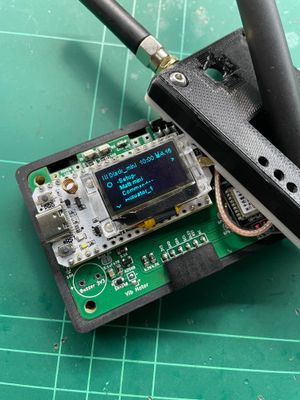

The v7.0 firmware for the T-Deck is now downloadable here.
Quick summary of new/changed stuff:
Saved paths! You can now save discovered paths and give them a name, eg. "Home to Croydon", and can now manually set the path to a contact, like in the MeshCore mobile app.
Room and Repeater UI redesigned.
Trackball press now selects, and long-press turns screen off.
MeshCore library bug fixes
New customisable sound for existing vs new adverts
Saved preferences (sound, gps permission, etc)
Some maximums now increased (eg. max Discover list size now 140)
Named Paths
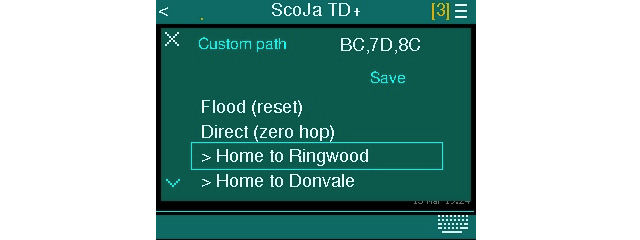
In the various conversation screens, and repeater or room server UI, the "Reset Path' menu is gone, replaced with "Path...", which pops up the dialog above. The current path is shown as comma-separated hashes. You can edit this if you know the hashes of the repeaters you want to use, then press ENTER to apply that path to this contact.
Also, you can scroll down to the 'Save' button and press ENTER, which will prompt you to enter a name for this path. These are stored on your device, so you can re-use them at any time, for any contact/repeater/room. (NOTE: the Save button is a paid feature, and is included with the standard unlock code)
if you scroll further down, and select "Flood (reset)" then press ENTER, this will reset the path. The next one "Direct (zero hop)" will set the path to be direct, and zero hop.
The items underneath (starting with '>') are your Named Paths, and selecting these will manually set the path for this contact to the saved path. You can keep scrolling down and contents scroll to accommodate.
Trackball Presses
A number of people have expressed frustration that pressing the trackball does not select, so I have changed the behaviour to that, and turning the screen off is now a long press. (2 sec) NOTE: some actions still require pressing ENTER key, like when finishing text entry or sending a message, etc.
Room and Repeater UI
Both the rooms and repeater have a logged in/connected state, which is shown in home screen with the green dots: (previously only Rooms had a 'connected' state)
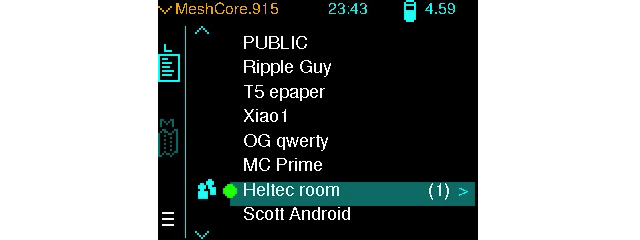
And, now you independently set the path to the Room or Repeater with the new 'Path..." menu.
Also, the Room UI now only shows the Posts, and if you are the admin, there is a separate "Command Line" menu for going into the CLI.
The Room connections now do not use the keep-alive interval (suggested by login response from server). This never really worked that well, and causes a fair bit of traffic. So now, the green connected indicator stays until you explicitly select the "Disconnect" menu (or "Logout" for Repeater). When you nav into the Room it nows sends a nudge to the Room server to send unsynced posts to you.
One downside of this is that if the server has kicked you out (because it's getting crowded), you won't know (ie. green dot still there). In this case, you'll need to do the old Disconnect/re-Connect.
New Customisable Sound
When an advert is received, it now plays either 'new-advert.mp3' or 'existing-advert.mp3', depending on whether the advert is from a new node or one already in your contacts. Like the other sounds, you can just place the correctly-named .mp3 file onto the SD card to customise.
TIP: place a zero-length .mp3 file to suppress that sound!
Saved Preferences
Some more of your preferences are now saved, so when you reboot or power off/on, they're back to where you left them. These are now: Sound, Conversation Timestamps, GPS Location permission.
Future Stuff...
Soon I hope to add more nice-to-haves, like:
A 'Saved Paths' screen, for managing your named/saved paths, and a nicer path builder UI instead of just editing the comma-separated hashes.
A popup asking if you want a received contact path overwritten or not, ie. when the remote node sends a 'suggested path' back to you. Currently, this just overwrites the path for that contact, but if you have set the path manually, you might want that to persist (so, you'd just select 'Ignore').
Ability to customise the network profile Bandwidth and Coding Rate settings. (currently fixed at 250 and 5).