

First, I want to send a Big Thank You goes out to Tag for being such an awesome Supporter this month! It's always motivating when people share my posts (helping me move up in search rankings) and/or show support. :)
THIS POST'S PRIVACY EXAMPLE TOPIC/TUTORIAL:
In this post we go over a common security/surveillance setup found in the wild. Phones/devices come across this fairly often (when WiFi is on).
[example setup similar to features found in certain big box department stores (and other locations]
We go over an example setup: using a single board computer to host a camera using Motioneye for recording motion detection videos. Attached to this SBC is our microcontroller (ESP32) via USB, acting as a dedicated WiFi sniffer: logging all mac addresses of devices in the vicinity detected during each motion detection video recording trigger.
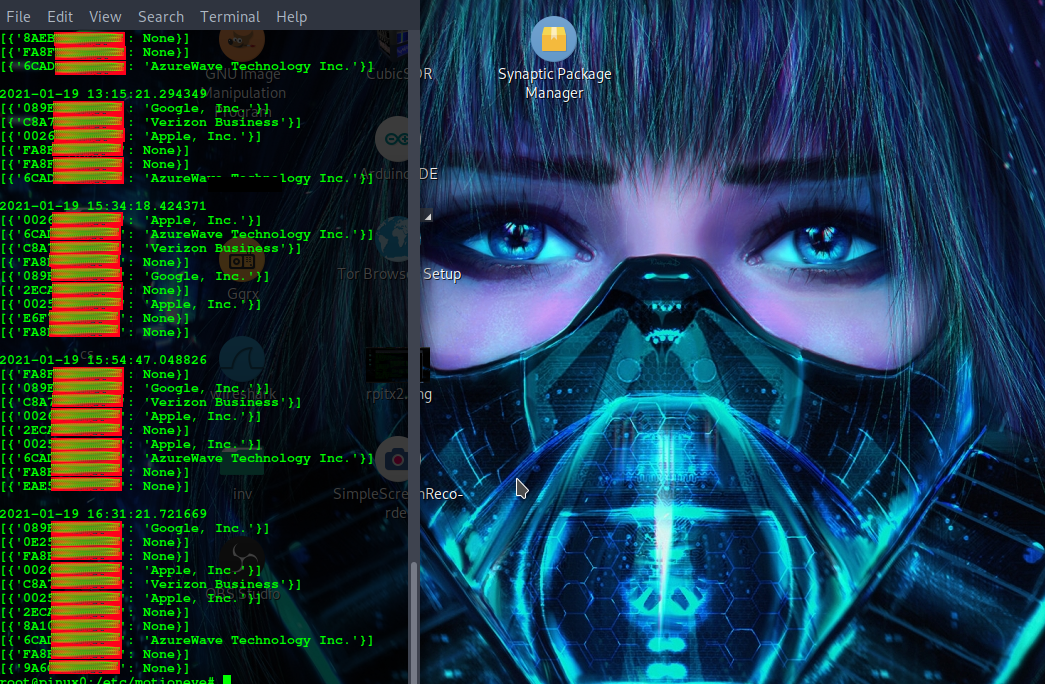
Each motion detection triggered list of mac addresses is time stamped to coordinate device imprints with our Motioneye saved video clips.
Devices listed in the log are those detected during each motion detection event. Each logging is time stamped to cross reference with our motion detection video recording clips.
Devices in our mac address/device log are organized/listed in order of greatest signal strength. This helps estimate distance from the camera. The stronger the signal, the closer a device (generally: trilateration using multiple mcu's would be more accurate).
EXAMPLE MOTION DETECTION LOG SCREENSHOT:
HARDWARE/SOFTWARE:
ESP32 + USB for serial data
Single Board Computer
Camera
Motioneye (Dietpi - see video below)
Arduino
Sniffer code for ESP32
SETUP:
1.) Setup your Camera + Motioneye (general direction mentioned in video below for Dietpi- exact setup will depend on unique camera/sbc/motioneye specifications)
2.) Setup ESP32 WiFi listening code:
- Connect usb between PC and ESP32
- Compile sketch in Arduino after selecting ESP32 port
- Upload to ESP32. Your WiFi Listener/sniffer is now ready!
3.) Add the python script I wrote to your SBC and make executable
4.) Use the motion detection notification -> run command (on) to select location of the mactroll executable; Your line may look similar to:
killall -9 mactroll; /usr/bin/mactroll
The above uses killall -9 mactroll preceding the mactroll command is to end any previously triggered mactroll processes that may be running in conflict (in case a new motion detection happens)
The mactroll python script takes advantage of the motion notification setting inside Motioneye.
NEW:
SOPINE/A64-LTS/PINEDIO DIETPI IMAGE AVAILABLE:
Relating to Motioneye, I created a (first that I can find) Dietpi image for SOPINE/A64-LTS/Pinedio Gateways, converted over from an Armbian base to offer users another lightweight option with some great features.
Dietpi brings a large amount of configuration tools and software installation options. In this post we are going to go over a security/surveillance example for detecting/logging device mac addresses detected during each motion detection recording (for our camera setup). I previously shared this with supporters.
VIDEO:
I was away for a bit (out of town on vacation) but back now to work on more original content. Share this post/video to help me move up in search rankings and if you want to show support it's easy to grab coffee (CASHAPP: $HumanRightsTech ). Thank you! :)