

EDIT: Please see updated post HERE for more information and the correct code/download/instructions! This posting here was a preview (look ahead) for Supporters. Thank you!
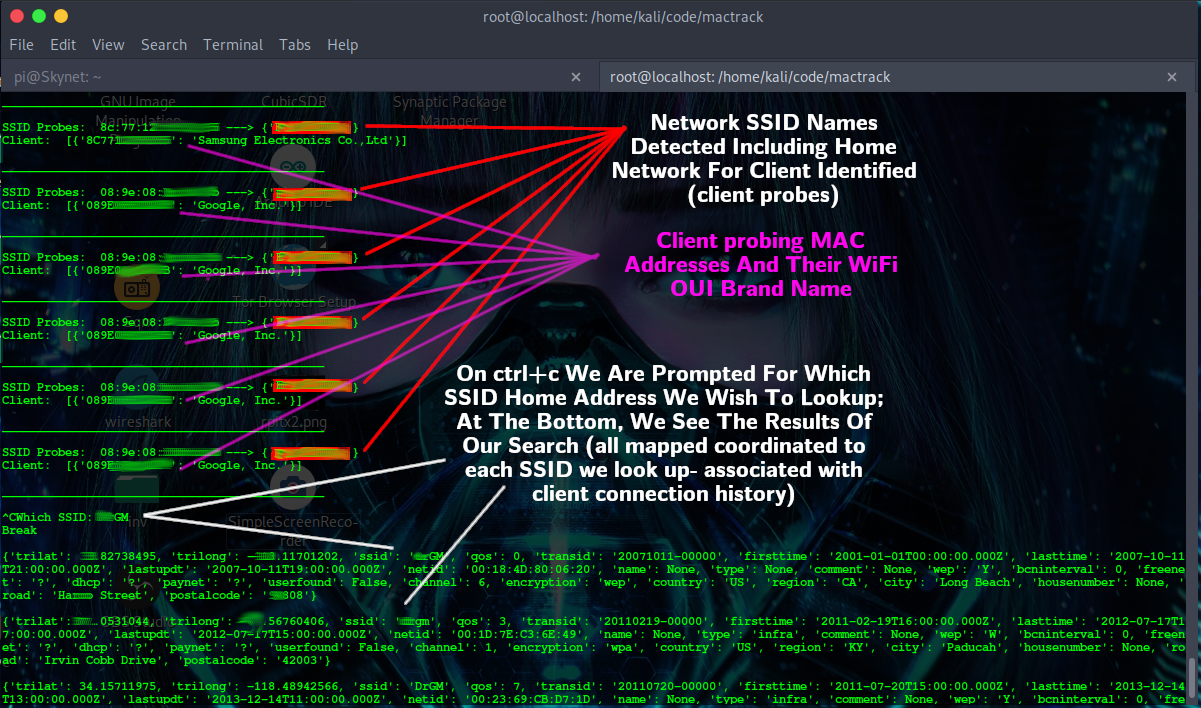
My previous post showed screenshots of the mactrack.py script turning your wifi device into a "local visitor" information gathering tool.
When first run, it starts catching all WiFi client-> SSID probes from any WiFi devices in the victinity (phones, computers). It then then when you press ctrl+c, it drops you to an SSID lookup prompt allowing you to enter SSID's of interest. Once you type in the SSID you want to look up, press enter. mactrack.py will return a list of various addresses/gps coordinates for those SSID's, giving you a heads up on who is in the area.
After the SSID information is printed out, mactrack leaves that information up on the screen for you to look at. When ready to return to probe watching, press enter.
This process repeats as long as you like it to (for continuous monitoring/looking up, if you like).
I also added code to return the wifi device brand name on each probe (using their mac address- another reason to use wipri). This can help you better identify who has what device in the area. More on that later.
All probes captured are devices NOT connected to wifi. This is directly related to the WiFi Probes to home address video, and is the script I mentioned making to demo it.
The entire process is silent. Passive. Meaning there are no connections from your machine.. Your machine just becomes a 'listener' for SIGINT (signals intelligence).
I plan to incorporate more into this later (like logging but it's superbowl day and I'm short on time!), but at this time this is only place it has been posted.
Here is the screenshot from before, and below that, the current source code (works now but want to add loggin feature for saving interesting SSID locations/information).
I wanted to give supporters first access as I really appreciate you guys!
The code (will be updated w/logging, but fully functional):
#!/usr/bin/env python3
#
# Odysee (My Videos/File Sharing)- https://odysee.com/$/invite/@RTP:9
# https://politictech.wordpress.com - RTP Linux/Privacy Blog
#
# You may need to use pip3 to install the following dependencies:
# scapy, yawigle, OuiLookup
#
from scapy.all import *
from yawigle import client
from OuiLookup import OuiLookup
import sys
import time
# Sniffing the client for ssid
logfile = "ssid.log" # Logfile name for SSID locations
def ssidprobes(pkt) :
if pkt.haslayer(Dot11) :
if pkt.type == 0 and pkt.subtype == 4 :
client = str(pkt.addr2)
ssid = ({pkt.info.decode('UTF-8')})
print("SSID Probes: ", client, '--->', ssid)
print("Client: ", OuiLookup().query(client))
print("\n______________________________________________\n")
# Listen to probes
while True:
sniff(iface="wlan0mon", prn = ssidprobes)
# Below we search wiggle for ssid location
c = client('AIDyourIDgoesHERE', 'EnterCodeHere') # add acct for wiggle here
netname = input("Which SSID: ")
nets = c.network.search(ssid=netname)
print("\n")
for i in nets:
print(i, str("\n"))
input("Press Enter To Return To Probe Watching:")
You need to edit the c = line to add in your own personal API code from wiggle.net. I can't give out my own personal account information, but you can easily sign up for a free account giving mactrack script full access to all databases. Once you have the account you can enter that information into the python code c = line.
If you need help leave a reply and I will help you get it running (requires wifi card that supports monitor mode).
Once you have fixed the c = variable to match your account on wiggle, start your wifi card in monitor mode. Example command to do this:
sudo airmon-ng check kill && airmon-ng start wlan0
When ready to run, copy/paste the source code into a file and call it 'mactrack.'
Then make it executable:
chmod +x mactrack
Once executable, make it a command if you like by moving it to /usr/bin/mactrack
Then you can call on it like any other Linux command when you need it.
I just wanted to share this with known Supporters first as I really appreciate you guys!
There will be more updates and I will package it more neatly with README file.
Thanks so much and let me know if you have any issues.
Regards,
-RTP
Like content/videos like this? Share it with friends/family who care about Privacy.
Support options found at the bottom of this page
(offering early access to some content):
😀 Thank you for Sharing this (Telegram/Social media + everywhere).
----------------------------------------------------------------------
🧅🔐 ANONYMOUS GITEA (.onion): Books, Code/Scripts, Wiki, more (make a repository)
🧅🔐 PASTEBIN (.onion): options- password protect, zk-256bit, "Burn After Reading" + more
----------------------------------------------------------------------
🤗 SUPPORT OPTIONS
(If you like)
🎁 EXTRAS: Unique extra Services (get something back for your support)
💲CASHAPP: $HumanRightsTech
✍🗒🎞 Politictech (monthly coffee option)
💳 Politictech Main Page: (info + current Crypto addr)
✍🗒 Politictech Blog: (Search Posts, read by category)
----------------------------------------------------------------------
FOLLOW:
✍🗒MASTODON
🐦 TWITTER
🎞 PEERTUBE
🎞 BITCHUTE
🎞 ODYSEE
---------------------------------------------------------------------
✉ CONTACT
-------------------------------------------------------------------------
!SHARE THIS ON SOCIAL MEDIA!
-------------------------------------------------------------------------
If you aren't registered for Odysee I'd love to see you over there.
Use my invite link: https://odysee.com/$invite/@RTP
--------------------------------------------------------------------------