
Before the age of five, I was gifted my first computer ever. Since that date, my passion of the computers started, and it became a part of my life. And to make my life easier and not wasting my time on that machine, I carefully choose my pieces of software. In this article, I will share some of the utilities I use daily for my personal or business uses.
Hardware
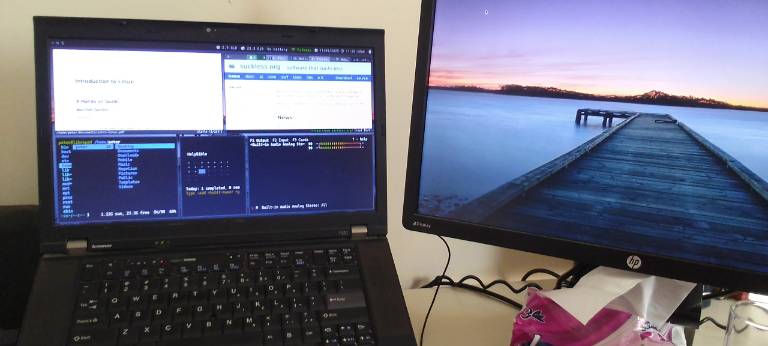
I use ThinkPad T520 as my main machine for over a year ago. I extended it with an external monitor. This setup is highly productive 👍.
Before this machine, I was using Dell's OptiPlex 7010. The machine was really awesome, but I was forced to sell it due to the electricity outage, so I could not work on it.
I always use and recommend using old computers. Please read Luke Smith's Only Use Old Computers article to know more.
Software
Most of the software I use are terminal-based. TUI (textual user interface) software are resources-friendly, and more efficient. I prefer more the software that uses Vim-key binds, for it keeps my hands on the home-row, with no need to switch between the keyboard and mouse.
Operating System
I'm using Void Linux operating system. Void is an independent, rolling-release, lightweight GNU/Linux distribution. It's considered as advanced system because its packages doesn't include config files. Also, it's Systemd-free.
Before Void, I used Arch Linux, but I left it due to its instability and the lack of packages. Yes! Arch Linux depend more on AUR (Arch User Repositories) than the official repositories, which supposed not to be the default case. In addition, it seems like Arch Linux doesn't check the AUR packages, so it may contain malware.
Regarding forks: I know there is a Systemd-free fork of Arch Linux called Artix, but I don't recommend using forks, because your system will be affected in case the mother distro made any critical changes or even was discontinued.
Window Manager
i3WM: It's a hackable manual tiling window manager, written in C and configured in Bash. TWM are the best choice when you desire to customise your system to just fit your use.
Terminal
URxvt: Highly configurable and customisable terminal emulator. It's also the best when it comes to rendering UTF-8 characters and images preview in terminal.
Application Launcher
Rofi: Lightweight, highly customisable app launcher. I also use its based-packages:
rofimoji: Emoji picker; and
rofi-calc: Live calculator.
Productivity
File Manager
Ranger: Vim-like full-featured terminal file manager, written in Python. It does literally everything. For Python haters, there is a clone of it written in Go called
lf.SpaceFM: It's a secondary file manager, in case there is someone unfamiliar with terminal uses my computer.
Text Editor
I mainly use vim. It's more a lifestyle than just an editor. I know vim looks scary at the beginning, but once you start using it and get your fingers dirty, you will realise how efficient this piece of software is.
Word Processor
LaTeX: It's really helpful for editing heavy content, such as academic papers, books, scientific presentations, etc. I prefer using
xelatexfor multilingual documents, since it fully support UTF-8 characters.Obsidian: One of the couple of close-source software on my machine. Besides
latex, I use it for writing simple and quick texts, such as this article.obsidianis an offline text editor, with a huge library of plug-ins.obsidianlately added more database features to help users manager their projects using it like onnotionorcoda. The offline nature ofobsidianmakes no fear of collecting data or feeding AI with my projects.LibreOffice: I use it rarely those days, just in case I need an office suite, or to edit files created using office suites (like M$ Office or Google Doc).
Regarding ROFF: I find roff (or any of its distributions like groff) a minimal, yet efficient word processor, it's even better than latex from some aspects. But the lack of RTL languages support limits my use.
Presentation
I mainly use beamer, the latex class that let you create professional presentations with the same latex code. It supports everything you may need for making presentations, even if playing videos or making interactive presentations.
Spreadsheets
SC-IM: It's a Vim-based spreadsheet editor (based on
sc), that runs via terminal.For advanced databases, I may use
coda, the best alternative tonotion.
Document Viewer
Zathura: A minimal PDF viewer that has all the features you may need. It also supports viewing other formats such as djvu and ps. The only drawback in zathura is it does not allow text highlighting. I mostly don't need to do this, so it's not a problem for me.
The Web
Internet became a disgusting place, where people dispose their garbage on, and big e-corps are competing to collect your data. So, I use tools to let me use the internet the way it was made to be used.
Web Browser
LibreWolf: A fork of Mozilla Firefox, but with removing all the unnecessary features in it, and disabling telemetry. I recommend using it with the following add-ons:
Email Client
NeoMutt: A TUI, vim-based email client. It's minimal, yet powerful client what will let you manage all your emails and mail accounts, even the Gmail's and Outlook's. It's recommended using it with
isyncto enable navigating and reading mail offline. Also withabookas address book for managing contacts.Aerc: I used it previously. It's the same as
neomutt, but it comes with pre-configurations.
RSS Reader
NewsBoat: I mostly do not subscribe to newsletters, podcasts, or YouTube channels or these things. I add the RSS/Feed URLs to newsboat and starting following it without sacrificing my data or let algorithms recognise my preferences.
Multimedia
Image Viewer:
SXIV: Simple X Image Viewer. And yes, it uses vim-key binds 😁.
Media Player
MPV: Minimal, highly customisable, powerful media player. A player that can do anything. It uses Vim concepts, but not the key binds.
I tried to use
mpdfor audio playing, but it does not work for me. So, I gave up 😥.
Image Editing
GIMP: I usually don't edit images, but when I need, GIMP is really helpful. It's even the best alternative to Adobe Photoshop.
Lunacy: The second close-source software on my machine. I mainly use it for UX design works, but it's also used for simple image edits. I will write about it soon.
Miscellaneous
btop: System resources monitor.
CalCurse: Powerful, vim-like, terminal-based calendar.
Dijo: TUI, vim-like habit tracker (maybe will write about it soon).
Conclusion
As you see, I depend mostly on TUI software, with priority for the ones that use Vim key binds. As the aphorism says, 'ignorance is the parent of fear,' you may not try to use a new tool for it looks hard. But believe me, once you start using it, you will find how it's easy and efficient, and how productive you became.