

Hey everyone, Ben here. It’s been a while! Over 18 months to be more specific, but who’s counting 😅
Before I get into my ramble, I have to start with a sincere and massive thank you to everyone reading this. All the support this project has received - whether it be people giving feedback, reporting bugs, sharing kind words, or buying us a coffee - truly means the world. Most of the blog posts here were written before Grundo’s Cafe even existed - back when this project was just a sandbox site where you could pick a display name, play Jelly Blobs of Doom, and follow a high score table. How much has happened since then boggles my mind. Countless features, amazing art, and the development of a wonderful community. If the version of me back then could see Grundo’s Cafe in its mid-2024 glory…
He would have spent more brain cells on schema design!!! Or hopefully he’d at least buy a copy of Databases for Dummies. Ideally with the intent of avoiding the headache that a single decision has caused both me and (most likely) you.
Okay, rewind. What am I talking about? A few definitions to start with:
Database: A structured way to store data. Typically made up of many tables, each with many rows and columns.
Schema: Like the blueprint of a building. The schema dictates what the database looks like.
As immersive as a site like Neopets can be, under the hood it’s all just playing around in a database. Earn an avatar? That’s adding a row to the games_useravatar table. Create a guild? That’s adding a row to the guilds_guild table. Attach a Petpet to your pet? That’s… you guessed it! Adding a row to the pets_petpet table.
In all fairness, adding rows is only a quarter of the equation. Software developers like to talk about crud. Well, CRUD. Create, Read, Update, and Delete - the four basic & essential actions of any kind of persistent storage. The row creations I describe above are the C of CRUD: create. Reading is when we list out what exists at the moment in the database. Updating is when we take an existing record and change the value. Deletion is getting rid of an existing record.
Every single page load we do on Grundo’s Cafe does some combination of creating, reading, updating, and deleting various rows in the tables of the database. Typically a page load will involve dozens of these actions, but sometimes hundreds! And when it comes to the total time spent processing a request to GC’s web server, that comes out to roughly 40-50% of each request being spent on database actions (labeled below as SQL: Structured Query Language, a fancy term for talking in a language that databases understand).
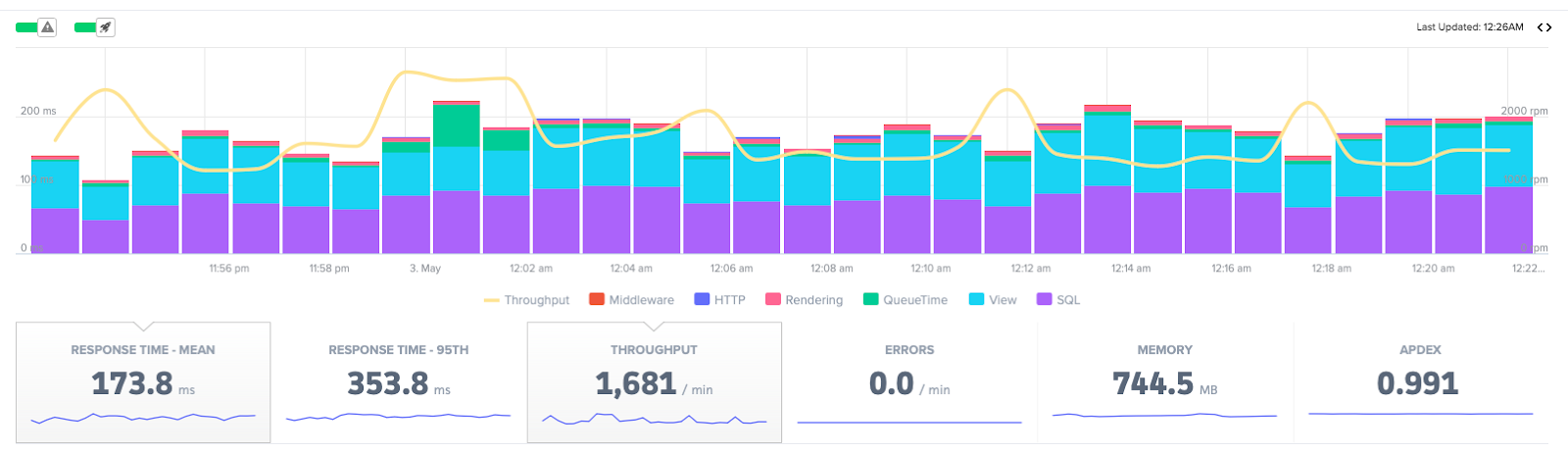
This screenshot was taken from a monitoring tool we use to evaluate site activity and lag. Notably at midnight NST on a weekday, when lag tends to be much better. Note the y-axis on the left - the average time per request is measured on the scale of milliseconds.

And this screenshot, shown above, was taken from a development server that I run locally. Here I show off a neat debug toolbar that displays how many database actions (otherwise known as queries) are occurring on that page load. 50 database queries to load a particular page is pretty par for the course.
Imagine that - 50 queries in 173.51 ms. A little more than 3 ms per query. Granted, my laptop isn’t as beefy as the servers which run Grundo’s Cafe so surely that inventory page load would fare a bit better on the actual site. But it gives a good intuition for the numbers we should expect to see. I’ve heard some general wisdom that if your individual queries are taking any more than 10 ms, something is going wrong.
Enter, my nemesis: the Safety Deposit Box.
Postgres (the database technology that we use for Grundo’s Cafe) offers a brilliant tool called pg_stat_statements. We can use it to query queries! In other words, we can see data on how long certain queries are taking. This shines a light on where we can make performance improvements. Behold, the top ten queries sorted in descending order by mean execution time (ms):

I truncate the query column because the queries tend to be wordy and difficult to understand. But more importantly, what trend do we see? A whopping 7/10 queries here belong to the items_sdbitem table. With the worst of them taking 1.6 seconds to execute. And this is just since the last time the server has been restarted (at the time of taking the screenshot). In other words, that’s not even the worst of it.

Here is a detailed breakdown of one of the worst performing queries we see on a regular basis - select all items from a very large SDB that are within a certain rarity. Over 6.5 seconds! Imagine the web server chewing on a single request for 6.5 seconds, and the hundreds of requests that pile up behind it. Imagine that happening at restock time. It’s the lag-pocalypse!
So there’s evidently a problem here, but why? In this example, it is wildly inefficient index scanning. But more generally, it is where my biggest regret comes into play. Behold, the items_sdbitem schema:
SDBItem:
id: UUID
item_id: fkey
owner_id: fkey
date_obtained: datetime
Git blame says that I coded this in June 2022. As far as I can remember, my reasoning was to keep it simple / stupid. One SDB item? One row! Deposit a SDB item? Create a row! Withdraw a SDB item? Delete a row! Atomicity, easy as pie, no need to worry about sometimes updating & sometimes deleting depending on quantity. I think I was also worried about somehow ending up with negative quantity and the wonkiness (and potential dupe bugs) that could result.
What I wish I had done is the following:
SDBItem:
id: UUID
item_id: fkey
owner_id: fkey
date_obtained: datetime
quantity: integer
This would have made the rate of growth for the database’s largest table so much smaller and more manageable. Eventually we’d still have to reckon with a mammoth table as user counts grow and grow. But the query optimizations would be much less urgent, and the lag would be much less brutal.
So how do we fix it? The answer is: with great care. This is the second half of my regret. It turns out that schema design decisions can be incredibly hard to undo.
Our first thought was simple - just run a script to condense the rows. The trouble here is that we’d have to take the site offline while we migrate the data. For a table of over 30 million rows, and with a conservative estimate of 5 milliseconds per row… I don’t think anyone wants 36+ hours of no Grundo’s Cafe. And that’s assuming that everything goes according to plan. If there’s a hiccup with the script? That could be your beloved Old Rotten Left Boot collection gone in a snap 😭

Then we thought - what if we distribute the migration slowly over time? Say a user deposits an Old Rotten Left Boot into their SDB that already contains 418 Old Rotten Left Boots. Instead of adding a 419th row, the server deletes all existing rows and adds a new row with quantity 419. We’d anticipate some slowness at first - but over time, SDB queries would become much less problematic. We can even tune the rate at which these micro-migrations happen with some AB testing-style rate of dial-up.
The problem with this approach is that it requires a risky refactoring of all site features which involve creating, reading, updating, and deleting on the SDBItem table. A refactoring which needs to be watertight against dupe / disappearing item bugs. The only thing worse than lag to me is the thought of a rollback or deluge of tickets…
So that’s our pickle. The prognosis is that things will only get worse if we do nothing. And the longer we wait, the harder the eventual refactor will be. Thankfully I now have three months of summer break before school resumes in the fall - and I plan on seizing the moment to get this refactor in motion. Thereby clearing my plate (and my conscience) to work on more fun things. GC’s first plot?! HATPC?! Both are still incredibly high on my list of priorities.
If you’ve made it this far, additional thanks for reading my 1 AM screed. If you have any thoughts, opinions, or suggestions (especially to the DBAs out there - I would love your input) - feel free to reach out. Until next time! Hopefully sooner than 18 months from now…