
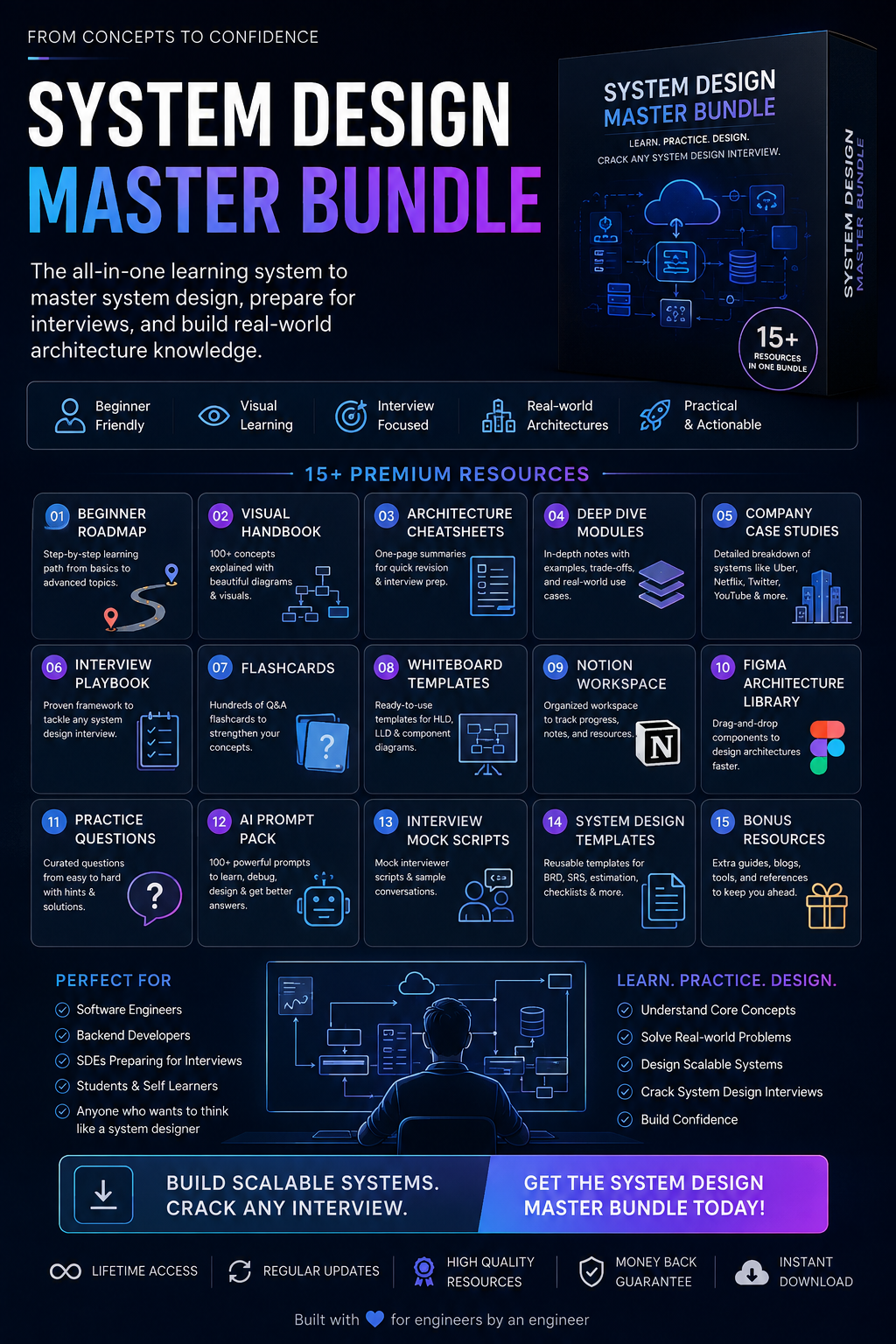
System Design Master Bundle: The Complete Guide to Learning System Design (Without Getting Overwhelmed)
Stop watching random YouTube videos. Stop jumping between blog posts. Learn system design with a structured roadmap used by real software engineers.
Your pack
Introduction
If you've ever searched "How do I learn System Design?", you've probably seen hundreds of resources:
YouTube playlists
GitHub repositories
Blogs
Interview experiences
Books
Courses
The problem isn't the lack of resources.
The problem is information overload.
Most engineers start with excitement, read about Redis one day, Kafka the next, then CAP theorem, Kubernetes, and finally quit because nothing connects together.
This bundle was created to solve exactly that problem.
Instead of collecting more resources, it organizes everything into a structured learning journey—from absolute beginner to interview-ready engineer.
Whether you're preparing for your first backend role, an SDE interview, or simply want to understand how modern applications scale, this guide will help you study smarter.
Who Is This Bundle For?
This bundle is designed for:
Software Engineers
Learn how large-scale applications are designed in production.
Backend Developers
Understand databases, caching, queues, scalability, distributed systems, and architecture.
Frontend Developers
Understand what happens after your API request leaves the browser.
Full Stack Developers
Connect frontend knowledge with backend architecture.
Computer Science Students
Build practical knowledge that universities often don't teach in depth.
Job Seekers
Prepare for system design interviews at startups and large technology companies.
Self Learners
Follow a roadmap instead of jumping randomly between articles.
What You'll Learn
By completing this bundle, you'll understand:
Client-server architecture
HTTP & HTTPS
DNS resolution
CDNs
Load balancing
Reverse proxies
API gateways
Caching
SQL databases
NoSQL databases
Replication
Database sharding
Consistency models
CAP theorem
Message queues
Event-driven architecture
Object storage
Search systems
Monitoring
Rate limiting
Authentication
Authorization
Microservices
Distributed systems
Cloud architecture
Scalability principles
Real-world architecture
…and much more.
What's Included
1. Beginner Roadmap
Don't know where to start?
This roadmap removes all the guesswork.
Instead of randomly reading system design topics, you'll follow a carefully ordered learning path.
Example:
Week 1
Internet Basics
HTTP
HTTPS
DNS
Browser Request Flow
Week 2
Servers
Reverse Proxy
Load Balancers
CDN
Week 3
SQL
Indexing
Replication
Sharding
Week 4
Redis
Cache Patterns
Consistency
CAP Theorem
Each week builds on previous concepts.
2. Visual Handbook
Some people learn faster through diagrams.
Instead of reading 10 pages of text, you'll understand concepts through architecture illustrations.
Every topic contains:
visual architecture
request flow
component explanation
common interview questions
Examples:
How Redis works
How Kafka works
DNS lookup
CDN request flow
Load balancing
Replication
Sharding
Consistent hashing
3. Architecture Cheat Sheets
Need quick revision before an interview?
Each cheat sheet contains:
Definition
Problem
Solution
Advantages
Disadvantages
Common Interview Questions
Real-world Usage
One page.
Easy to revise.
4. Deep Dive Modules
Once you understand the basics, you'll study every topic in detail.
Each chapter follows the same structure:
What is it?
Why was it created?
How does it work?
Architecture
Advantages
Disadvantages
Trade-offs
When to use
When NOT to use
Interview questions
Real production examples
5. Company Case Studies
Learning concepts is useful.
Seeing how companies use them is even better.
This bundle contains architecture walkthroughs for systems inspired by companies like:
Netflix
YouTube
Twitter/X
Instagram
WhatsApp
Discord
Uber
Airbnb
Dropbox
Google Drive
Amazon
Each case study walks through:
Requirements
Scale estimation
Database choice
Caching strategy
Storage
API design
Scalability
Bottlenecks
Trade-offs
Final architecture
6. Interview Playbook
One of the biggest mistakes candidates make is immediately drawing boxes.
Real interviews don't work that way.
This playbook teaches a repeatable framework:
Clarify requirements
Estimate traffic
Define APIs
Design database
Add caching
Scale services
Handle failures
Discuss trade-offs
Monitoring
Future improvements
This structure can be reused in almost every interview.
7. Flashcards
Active recall is one of the fastest ways to retain technical concepts.
Example:
Front
"What is eventual consistency?"
Back
"A consistency model where updates propagate over time instead of immediately."
Hundreds of cards make revision much faster.
8. Whiteboard Templates
Instead of drawing architectures from scratch every time, use reusable templates.
Examples include:
API Gateway
Load Balancer
Cache
Database
Queue
Worker
Search Engine
Storage
Monitoring
Simply drag, connect, and explain.
Perfect for interviews.
9. Notion Workspace
Track your progress.
Organize notes.
Save interview questions.
Bookmark useful resources.
Review completed topics.
Everything stays in one place.
10. AI Prompt Pack
Use modern AI tools as your personal mentor.
Examples:
Explain Redis like I'm 15.
Quiz me on Kafka.
Review my architecture.
Ask me Amazon system design questions.
Simplify CAP theorem.
Generate Mermaid diagrams.
Find bottlenecks in this design.
Hundreds of curated prompts save hours of prompt engineering.
11. Practice Questions
Knowledge without practice isn't enough.
This section contains challenges categorized by difficulty.
Beginner
Design URL Shortener
Design Pastebin
Design Logger
Intermediate
Instagram Feed
TinyURL
Google Docs
Chat System
Advanced
Netflix
Uber
YouTube
WhatsApp
Twitter
Discord
Each challenge includes hints, expected trade-offs, and discussion points.
Recommended Learning Schedule
One mistake many learners make is trying to finish everything in a weekend.
Don't.
Treat this as a long-term skill.
Month 1
Focus only on fundamentals.
Topics:
Networking
HTTP
HTTPS
DNS
Load Balancer
CDN
Browser Flow
Goal:
Understand how requests travel across the internet.
Month 2
Learn storage.
Topics:
SQL
NoSQL
Indexes
Replication
Sharding
Transactions
Goal:
Know where data lives.
Month 3
Learn scalability.
Topics:
Redis
Cache
Kafka
RabbitMQ
Queues
Event-driven systems
Goal:
Understand performance.
Month 4
Distributed systems.
Topics:
CAP
Consistency
Availability
Distributed locks
Consensus
Goal:
Understand trade-offs.
Month 5
Cloud architecture.
Topics:
Kubernetes
Docker
Object Storage
CDN
Monitoring
Goal:
Build production-ready systems.
Month 6
Practice.
Design one system every week.
Examples:
Spotify
Netflix
Uber
Slack
Google Drive
Discord
Repeat.
Improve.
How to Study Effectively
Don't just read.
Use the following method.
Step 1
Read the topic once.
Don't worry about memorizing.
Focus on understanding.
Step 2
Look at diagrams.
Visualize request flow.
Imagine packets moving through servers.
Step 3
Explain it yourself.
If you cannot explain Redis in simple words, you don't understand Redis.
Teaching yourself is one of the best learning techniques.
Step 4
Use the flashcards.
Review old concepts every day.
Five minutes is enough.
Step 5
Solve practice questions.
Theory without application won't prepare you for interviews.
Step 6
Use AI prompts.
Ask AI to challenge your understanding.
Request alternative architectures.
Discuss trade-offs.
Think critically instead of memorizing answers.
Step 7
Repeat.
System design is a skill built through repetition.
The more architectures you design, the more patterns you'll recognize.
Common Mistakes to Avoid
❌ Memorizing diagrams without understanding why components exist.
❌ Learning Kubernetes before understanding HTTP.
❌ Ignoring databases.
❌ Jumping directly into microservices.
❌ Watching endless videos without designing anything yourself.
❌ Copying interview solutions without discussing trade-offs.
Suggested Daily Routine (60–90 Minutes)
15 Minutes: Review flashcards and yesterday's concepts.
25 Minutes: Read one new topic and study its diagrams.
15 Minutes: Summarize the concept in your own words or notes.
20–35 Minutes: Solve one design exercise or discuss trade-offs using the AI prompts.
Consistency matters more than marathon study sessions.
Frequently Asked Questions
Do I need backend experience?
No. Basic programming knowledge is enough. The roadmap starts from networking fundamentals and gradually builds toward distributed systems.
How long will it take to complete?
Most learners can complete the structured roadmap in 4–6 months with consistent study, though you'll continue improving through practice afterward.
Is this only for interview preparation?
No. While interview preparation is a major focus, the concepts are equally valuable for building scalable production systems.
Should I memorize architectures?
No. Learn the reasoning behind each decision. Good system design is about understanding trade-offs, not reproducing diagrams from memory.
Can I use AI while studying?
Absolutely. The included AI Prompt Pack is designed to accelerate learning by helping you explore alternative solutions, receive feedback, and test your understanding.
Final Thoughts
System design isn't about remembering hundreds of technologies.
It's about understanding patterns.
Every large-scale application—from Netflix and Spotify to WhatsApp and Uber—solves similar problems:
How do we store data?
How do we serve millions of users?
How do we reduce latency?
How do we handle failures?
How do we scale without downtime?
Once you recognize these patterns, you'll stop seeing system design as a collection of disconnected technologies and start seeing it as a set of reusable engineering principles.
Use this bundle as your long-term companion. Follow the roadmap, study consistently, draw architectures often, question every design decision, and practice explaining your reasoning.
That's how strong system designers are built.