

How do you all handle syncing in Obsidian?
Some people use GitHub for free to do it, while others pay for Obsidian Sync to use it. I've tried both, but I didn't need multi-device syncing enough to pay for Obsidian Sync every month, and GitHub integration felt like a hassle when conflicts occurred.
So, wanting to unify my environment with Cloudflare, I created a small plugin that syncs an Obsidian Vault with a storage destination called Cloudflare Artifacts and published it as an Obsidian community plugin. It's free, and the source code is also public.
In this article, I will summarize everything from "What is Cloudflare Artifacts?" to "Why I made it" and "What I learned from making it."
First, what is Cloudflare Artifacts?
In a nutshell, it is a file storage destination with version control that can be read and written to like Git. Cloudflare released it as an open beta in October 2026. *I had been requesting it for a long time but it wasn't approved, so I'm happy it's finally out...
Git is a mechanism that keeps a record of all file change history. It keeps track of "when, who, and where" changes were made, and allows you to revert to older versions. It's that thing programmers use to manage code. The most famous place to store that history is GitHub.
Think of Artifacts as having only the "storage destination" part of GitHub prepared within Cloudflare. There are no features for editing files in a browser or discussing things via Issues or Pull Requests. All you have is the ability to create Namespaces and repositories (storage destinations), view files, and issue keys (tokens). In exchange, you can have a storage destination with history using only a Cloudflare account, without needing to create a GitHub account.
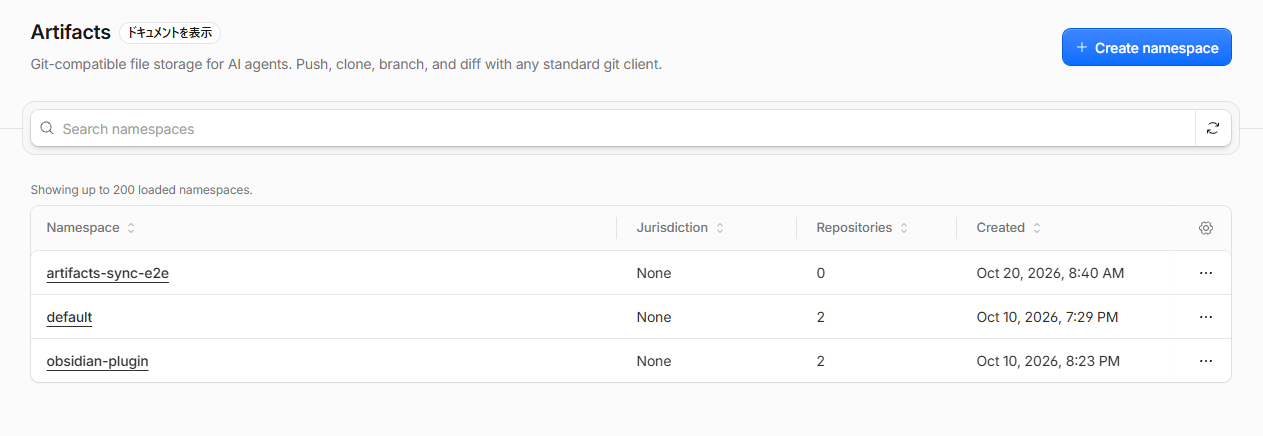 Namespaces in Cloudflare Artifacts
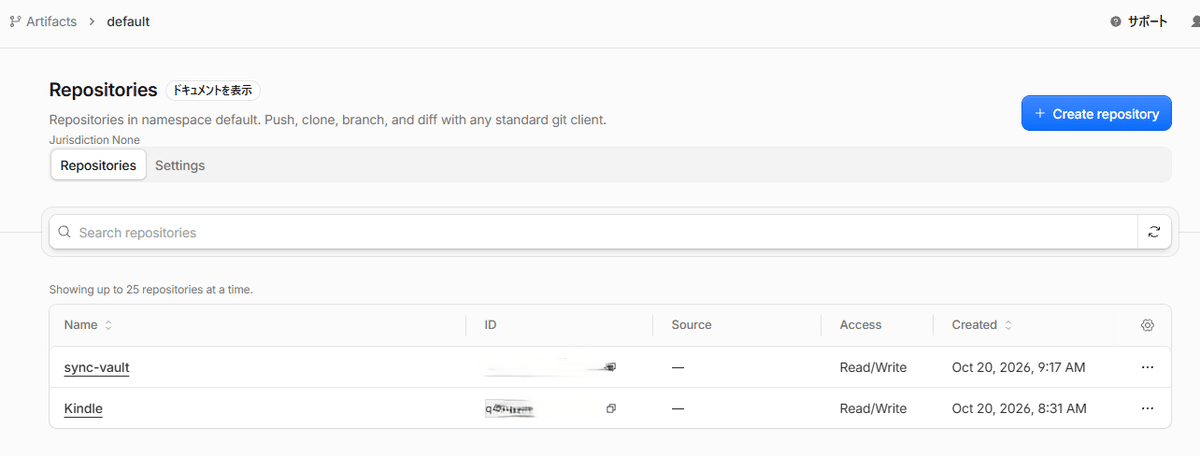 Repositories in a Cloudflare Artifacts Namespace
I'll also write down the numbers. One repository is up to 1GB, and one file is up to 32MB. The Workers Paid ($5/month) plan is a prerequisite, and there is no additional charge for up to 1GB of storage and 10,000 operations per month (as of October 2026, according to official documentation. Please check the Cloudflare pricing page for the latest information).
What did I want to solve?
The trigger was an in-house AI for a client.
We ended up accumulating know-how in Obsidian as a way to build a harness for the in-house AI. We wanted the in-house AI to read that know-how as "knowledge." Up to this point, it's a normal story.
The problem was the manual work required for every update. Every time notes increased, we had to have the files sent to us, format them, and re-upload them from the management screen. The company president had never used GitHub, so we couldn't just say "please push with Git."
We had no choice but to act as intermediaries, and the updating of knowledge was tied to "when we had free time."
Since we were also utilizing Cloudflare for the foundation of that in-house AI, I came up with a mechanism to read the Artifacts repository directly as knowledge.
In other words, "if you can push directly from Obsidian, all the manual work in between disappears". No GitHub required, everything stays within Cloudflare. This was the initial motivation.
What I made
Cloudflare Artifacts Sync is the plugin.
Once you enter the settings, all you have to do is press "Sync now." It records the changed notes, fetches what other devices have sent, and sends your changes. It does these three things at once.
No Git knowledge is required. Once you create and paste one Cloudflare "API token," the plugin creates a repository, issues a key that expires in 30 days, and automatically updates it before it expires.
It works on both PC and smartphones (iOS / Android). On mobile, I built it to achieve the same thing using only Obsidian's native file and communication functions.
On a second device, you just select the repository created by the first device from the list. If there are notes with the same name but different content, it doesn't delete them; it keeps them alongside with the name '.local-timestamp'.
The publication page is here. You can also find it by searching for "Cloudflare Artifacts Sync" in Obsidian's "Community Plugins -> Browse". https://community.obsidian.md/plugins/cloudflare-artifacts-sync
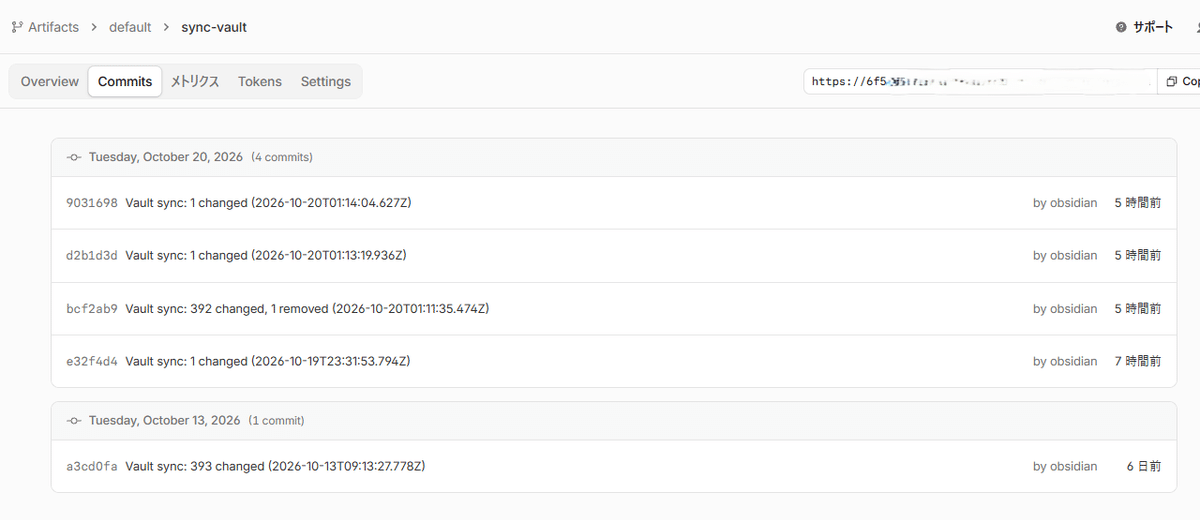 Commit log during synchronization
What I learned from building this
1. Syncing with smartphones was difficult
It worked on PC from the start, but syncing with smartphones was a bit of a struggle.
The error message "Multiple errors occurred. Please check errors," which provided no details, was also a factor that made debugging difficult.
I learned about the wireless debugging feature for connecting a smartphone to the same WiFi, and I used that to fix it.
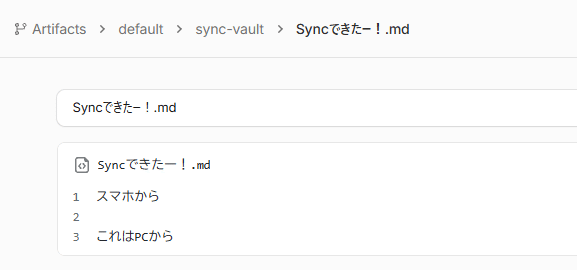 The joy of successful synchronization between PC and smartphone
2. "Overwrite sync" and "don't delete" can coexist
A common situation on a second device is: "The same note is already on the smartphone, but the content is slightly different."
I decided to make it: "Treat the repository side as the source of truth. However, keep the local version that was different alongside it." Since nothing is deleted, you can overwrite with peace of mind.
I also set it to manual sync only by default, as there were conflicts caused by automatic syncing when using Obsidian's GitHub integration.
3. I couldn't publish it under my company account
I wanted to publish it as an organization when applying for the Obsidian community plugin, but it didn't work out, so I ended up applying with my personal account.
I was surprised that the review process was faster than I had researched, finishing in just a few hours.
For those who want to try it out
Create an API token in your Cloudflare account with "Account / Artifacts / Edit" permissions.
Install the plugin in Obsidian and paste your Account ID and the token.
"Set up" -> "Sync now"
The Japanese installation guide (including how to install on mobile, setting up a second device, and troubleshooting) is summarized here. https://github.com/alancodvo/obsidian-artifacts-sync/blob/main/README.ja.md
Regarding my initial motivation of wanting to turn notes into AI knowledge, I am currently putting it into actual operation by combining it with a setup that allows the in-house AI on Cloudflare to read the Artifacts directly. If it runs smoothly, I will write about that too.
Related KOIYAL articles
What is Cloudflare's new CLI 'cf'? What changes from wrangler: https://koiyal.com/blog/cloudflare-cf-cli-vs-wrangler?utm_source=note&utm_medium=referral&utm_campaign=cloudflare-artifacts-sync
About KOIYAL
KOIYAL is a company from Niigata that creates 'in-house management for the AI era.' We build systems to have AI read internal knowledge and conduct training so that employees can use AI themselves. Click here for consultations.
https://koiyal.com?utm_source=note&utm_medium=referral&utm_campaign=cloudflare-artifacts-sync