


Advances in artificial intelligence (AI) are reshaping many fields, and healthcare equipment is no exception. When machines interface with clinicians and patients, the user interface (UI) becomes a critical point of interaction.
AI‑enhanced interfaces are changing how equipment is used, how decisions are made, and how patients and providers engage with technology. This article explores how AI is transforming healthcare equipment user interfaces, what design challenges emerge, and what engineers and product designers should keep in mind.
1. What AI Brings to Healthcare Interfaces
AI applied in healthcare equipment UI does more than add automation. It enables intelligent interaction, adapts to context, and supports better decision‑making. Here are some key contributions:
Adaptive interaction: Equipment can change how it presents information based on user role, clinical setting, or patient condition. For example, an interface might simplify options for a patient, while showing full detail for a clinician.
Predictive guidance: AI algorithms embedded in equipment can anticipate next steps, highlight anomalies, or suggest alerts based on sensor input and historical data. This makes the interface more proactive.
Natural language and voice control: Incorporating machine‑learning and natural language capabilities into UI allows users to interact via voice commands or receive spoken feedback from equipment. These features make interfaces more accessible.
Personalised user experience: AI monitors user behaviour, workflow patterns and preferences, enabling UI customisation that improves efficiency and reduces cognitive load.
2. How UI Design Must Adapt for AI in Healthcare Equipment
Designing user interfaces for AI‑enabled healthcare equipment demands special attention. The stakes are high because the interface supports clinical decisions, patient safety, and operational workflows.
1. User roles and context sensitivity
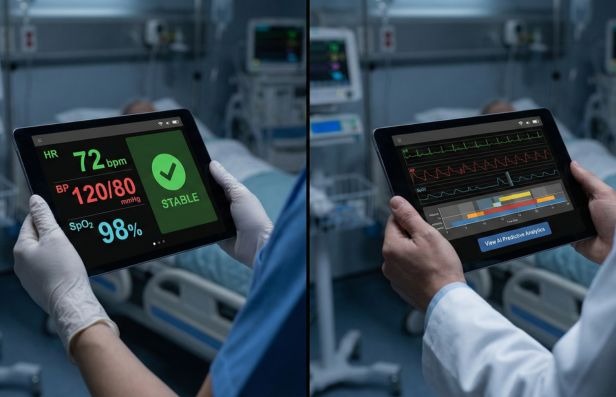
Healthcare interfaces must recognise that users include patients, nurses, physicians and technicians. AI can help tailor the interface depending on the user role. For instance, a nurse may need rapid vital‑sign trends, while a physician might require deeper analytics. The UI must adapt accordingly, not overwhelm.
2. Transparency and trust
When an AI system suggests a diagnostic or control action, the interface must communicate why it is making that suggestion. Without transparency, users may distrust the system or ignore important alerts. UI design must present AI outputs clearly and enable users to understand and verify them.
3. Managing alert fatigue and information overload
Healthcare environments generate large amounts of data. AI can filter and prioritise, but UI design must ensure alerts are meaningful and actionable. Poor design may lead to ignored warnings or alarm fatigue. Designers must work with AI outputs to present only relevant information at the right time.
4. Accessibility and usability
AI‑infused equipment must still be usable by all users, regardless of their technical comfort or physical ability. Interfaces must support clear visual design, intuitive flow, and accommodate different levels of user expertise. Especially when AI adjusts UI dynamically, the baseline must remain highly usable.

Key Areas of Transformation in Healthcare Equipment UIs
AI is already impacting several classes of healthcare equipment user interfaces. Below are three major areas of transformation:
1. Diagnostic imaging and interpretation
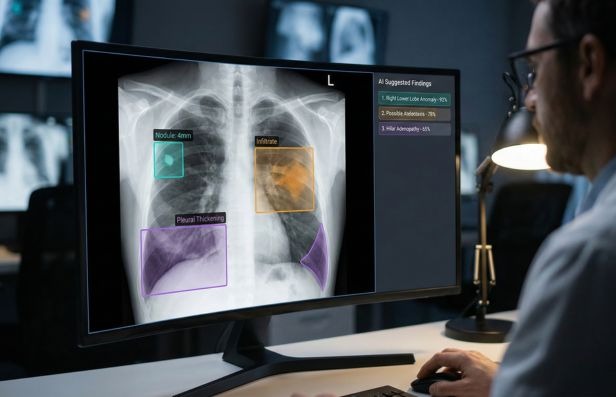
AI algorithms analysing scans (MRI, CT, ultrasound) change the UI by overlaying real‑time annotations, alerts, or suggestions. The interface shifts from passive display to interactive guidance. This transformation helps clinicians make faster and more accurate decisions.
2. Patient monitoring and remote equipment
Wearables, bedside monitors and remote devices use AI to interpret continuous sensor data. The UI presents trend forecasts, risk scores or early warning signals rather than raw numbers. This leads to a more proactive user interface that supports intervention before critical events.
3. Workflow automation and documentation
AI‑driven interfaces assist clinicians by automating tasks like note‑taking, data capture, and routine control actions. For example, devices can summarise a session, populate records or propose next steps. The user interface thus becomes a partner in the workflow rather than simply a display panel.
Challenges and Design Considerations
Despite the potential, integrating AI into healthcare equipment UIs involves challenges that designers must proactively address:
Data privacy and security: AI uses large datasets and may personalise interfaces. UI design must clearly reflect privacy controls and data‑usage transparency.
Algorithmic bias and fairness: If the AI reflects biased data, the UI must provide mechanisms for correction, explanation and override by human users.
Regulation and validation: Healthcare devices must meet regulatory standards. The UI must support traceability, documentation and safe use of AI features.
User training and acceptance: A new AI‑enabled interface may have different user expectations. Training, onboarding, and user education become part of the design system.
Maintaining human‑centric design: AI should not remove human context. UI must preserve the clinician‑patient relationship, supporting empathy and human judgment.
Practical Design Guide for Engineers
Here are actionable steps engineers and designers should follow when developing AI‑enhanced user interfaces for healthcare equipment:
Define user personas and tasks: Identify who will use the interface, their roles, and which decision points the AI will support.
Map data flows and user journeys: Understand how sensor or algorithm output flows through the UI, and how users interact with it.
Design for transparency: Ensure users can see why AI made a given suggestion, override it, and review relevant data.
Prototype and test with real users: Designers must test the UI under real conditions (clinics, bedside, home care) to capture workflow, interruptions and stress conditions.
Iterate with feedback loops: Collect user feedback, monitor misuses or confusion, and refine UI behaviour and layout accordingly.
Ensure compliance and safety features: Include audit trails, fail‑safe UI states, and controls for AI‑driven suggestions.
What to Remember
AI is transforming user interfaces in healthcare equipment by shifting the focus from static displays to interactive, adaptive, and intelligent experiences. Well‑designed UIs can help clinicians work faster, patients feel more engaged, and workflows become more efficient. At the same time, design teams must stay mindful of trust, usability, transparency and human factors.
Final Reflection
Designing user interfaces for AI‑enabled healthcare equipment is a unique intersection of technology, clinical care and human interaction. By integrating AI thoughtfully, designers can create interfaces that feel natural to users, enhance insight without extra burden and uphold high standards of safety and usability.
If you are designing or upgrading healthcare equipment with AI features, I can assist you with mapping user interactions, defining transparency layers, or building prototypes that reflect real workflows. Just let me know your use case, and we can proceed together.