

Introduction
Attackers who gain access to a Linux system often use commands such as sudo, su, nmap, nc, curl, wget, python, and perl.
I built this project to detect selected command executions on Linux using Auditd and Wazuh SIEM.
GitHub:
https://github.com/jaseervk/Malicious-Command-Execution-Detection-Linux
How It Works
The detection flow is simple:
Linux Command
     ↓
   Auditd
     ↓
Audit Log
     ↓
Wazuh Agent
     ↓
Wazuh Manager
     ↓
Security Alert
Auditd records the command execution.
Wazuh Agent sends the Auditd logs to the Wazuh Manager.
Wazuh Manager uses custom rules to detect specific activity and generate alerts.
Tools Used
Ubuntu/Debian Linux
Auditd
Wazuh Agent
Wazuh Manager
MITRE ATT&CK
1. Install Auditd
Install Auditd on the Linux machine:
apt install -y auditdStart it:
systemctl enable auditd
systemctl start auditd
Check the status:
auditctl -s2. Add Auditd Rules
Create the rules file:
nano /etc/audit/rules.d/privilege-escalation.rulesAdd:
-a always,exit -F path=/usr/bin/nc -F perm=x -k netcat_exec
-a always,exit -F path=/usr/bin/nmap -F perm=x -k recon_exec
-a always,exit -F path=/usr/bin/curl -F perm=x -k data_exfil
-a always,exit -F path=/usr/bin/wget -F perm=x -k data_exfil
-a always,exit -F path=/usr/bin/python -F perm=x -k script_exec
-a always,exit -F path=/usr/bin/perl -F perm=x -k script_exec

-a always,exit -F path=/usr/bin/sudo -F perm=x -k sudo_exec
-a always,exit -F path=/bin/su -F perm=x -k su_exec
-a always,exit -F path=/bin/bash -F euid=0 -F perm=x -k root_shell
-a always,exit -F path=/bin/sh -F euid=0 -F perm=x -k root_shell
-a always,exit -F path=/usr/bin/pkexec -F perm=x -k pkexec_exec
Reload the rules:
augenrules --load
systemctl restart auditd
Check them:
auditctl -lThese rules monitor the execution of selected commands.
For example:
nc      → netcat_exec
nmap    → recon_exec
curl    → data_exfil
wget    → data_exfil
python  → script_exec
perl    → script_exec
su      → su_exec
bash    → root_shell
3. Send Auditd Logs to Wazuh
Edit the Wazuh Agent configuration:
nano /var/ossec/etc/ossec.confAdd:
<localfile>
  <log_format>audit</log_format>
  <location>/var/log/audit/audit.log</location>
</localfile>
Restart the agent:
systemctl restart wazuh-agentNow the Wazuh Agent will read the Auditd log and send the events to the Wazuh Manager.
4. Create Wazuh Detection Rules
On the Wazuh Manager:
nano /var/ossec/etc/rules/local_rules.xmlAdd:
<group name="malicious_commands">
<rule id="100200" level="13">
    <if_sid>80700</if_sid>
    <field name="audit.key">netcat_exec</field>
    <description>Netcat execution detected</description>
    <mitre>T1046</mitre>
  </rule>
  <rule id="100201" level="12">
    <if_sid>80700</if_sid>
    <field name="audit.key">data_exfil</field>
    <description>Potential data exfiltration command executed</description>
    <mitre>T1041</mitre>
  </rule>
  <rule id="100202" level="12">
    <if_sid>80700</if_sid>
    <field name="audit.key">script_exec</field>
    <description>Scripting language execution detected</description>
    <mitre>T1059</mitre>
  </rule>
</group>
<group name="privilege_escalation">
  <rule id="100101" level="14">
    <if_sid>80700</if_sid>
    <field name="audit.key">su_exec</field>
    <description>su command executed – root shell attempt</description>
    <mitre>T1548</mitre>
  </rule>
</group>
Restart the manager:
systemctl restart wazuh-manager5. Test the Detection
Now run commands on your Linux test machine.
For example:
nmap 127.0.0.1curl https://example.comsudo idYou can also check Auditd directly:
ausearch -k recon_execor:
ausearch -k data_exfilWazuh should process these events and generate alerts when the configured rules matchUse this caption:
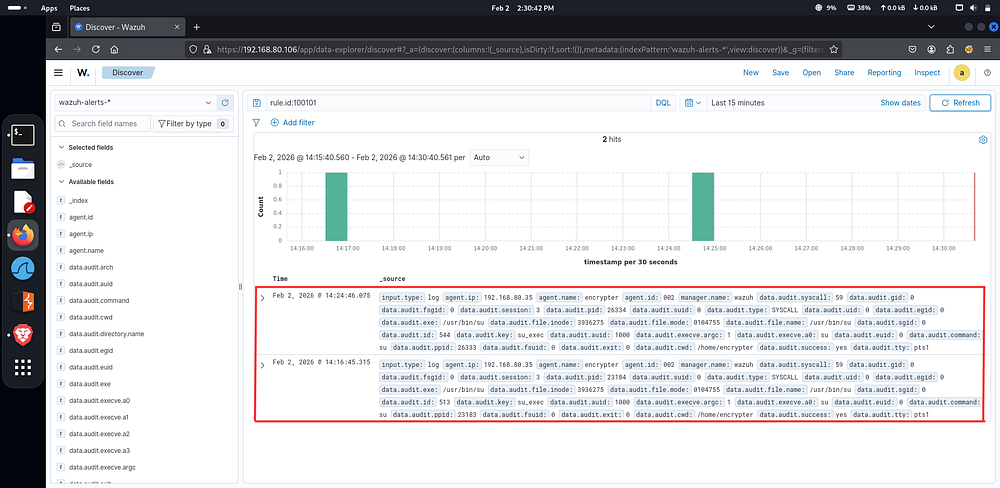
Wazuh alert generated from Linux command execution detected by Auditd
What I Learned
This project helped me understand how Linux command execution can be monitored using Auditd and converted into useful SIEM alerts with Wazuh.
The main idea is:
Auditd = Collect events
Wazuh Agent = Send events
Wazuh Manager = Detect activity
This can be expanded later by monitoring command arguments, users, parent processes, network connections, and other suspicious behavior.
Conclusion
Detecting malicious activity does not always require a complicated system.
With Auditd + Wazuh, we can create a simple Linux monitoring pipeline that detects selected command executions and generates security alerts.
This project is a small example of how endpoint logs can be turned into practical SOC detections.
GitHub
https://github.com/jaseervk/Malicious-Command-Execution-Detection-Linux
Other Digital presences:
GitHub: github.com/jaseervk
Portfolio: www.jaseervk.com
Blog: blog.jaseervk.com
LinkedIn: linkedin.com/in/jaseer-vk-
Medium: https://medium.com/@jaseervk321
#Cybersecurity #Linux #Wazuh #Auditd #SIEM #SOC #DetectionEngineering