

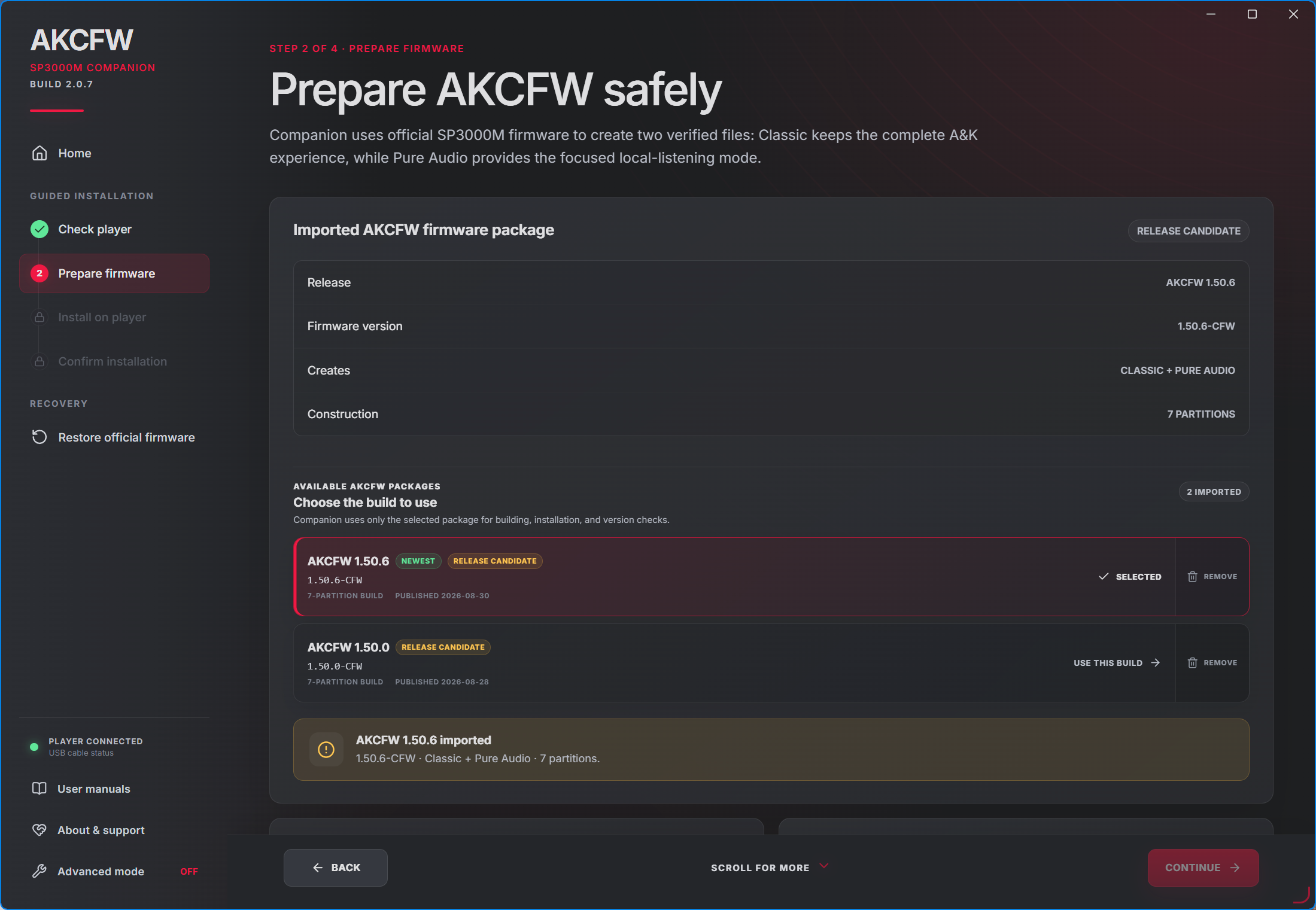
Starting with AKCFW Companion 2.0.7, you can keep and manage multiple AKCFW releases in one place. This makes it easy to try a newer Engineering or Release Candidate build—or return to an older release if the new one is not right for you.
Companion 2.0.7 and AKCFW 1.50.6 are launching today as Release Candidates for the Insider group.
What’s new in AKCFW Companion 2.0.7?
Companion can now store multiple imported AKCFW firmware packages. The newest release and its immediate predecessor remain readily available, while additional versions are organized under a collapsible “Previous releases” section.
You can:
Choose which imported AKCFW release to build and install.
Move forward to a newer firmware release.
Return directly to an older AKCFW release without restoring official firmware first.
Remove individual imported firmware packages you no longer need.
Keep already-created Classic and Pure Audio installation files even after removing their source package.
Staying on the newest release remains recommended. If you deliberately select an older build, Companion clearly identifies the installed and selected versions, explains the implications, and asks for your explicit consent before proceeding. A rollback reinstalls both Classic and Pure Audio so the two sides remain a matching pair.
The installation interface has also been refined. Back and Continue now remain in a dedicated footer while the rest of the page scrolls normally. When more content is available below the visible area, an animated “Scroll for more” indicator makes that clear.
Companion 2.0.7 also includes the latest revised AKCFW User Guide, with improved installation and first-library setup guidance.
What’s new in AKCFW 1.50.6?
Compared with AKCFW 1.50.0, version 1.50.6 focuses on music-library reliability, navigation improvements, Notification Panel polish, and general stability.
Decades sorting
The Decades screen now offers Ascending and Descending sorting.
Ascending retains the familiar order:
1960 → 1970 → 1980 → … → 2020
Descending starts with the newest decade and works backward.
Your selection is remembered after restarting and is shared between Classic and Pure Audio.
Improved music-library handling
AKMusic can now recognize completed library-generation updates without unnecessarily requesting a complete library rebuild.
AKMusic startup and direct-boot behavior have also been improved, alongside additional media-scanning and library-reliability corrections.
Updated Notification Panel defaults
DSP and 180° Flip are now included in the default Notification Panel layout:
DSP appears in the top row.
180° Flip appears in the bottom row.
This arrangement is restored when using the Notification Panel’s Reset control and after a factory data reset.
The DSP and 180° Flip icons have also been corrected when placed outside the active two-row layout. Their blue coloring, lighter outline, and overall presentation now match the established AK File Drop styling.
Restored system logging
Reliable Android system logging has been restored, giving me much better diagnostic visibility for future testing and troubleshooting.
Logging uses Android’s normal bounded, memory-based buffers. It does not continuously write large logs to storage and is not expected to prevent normal deep sleep.
Additional reliability improvements
AKCFW 1.50.6 also includes:
Improved recognition of updated AKCFW components on the first boot after installation.
Improved AKMusic startup reliability.
Additional boot, playback, media-scanning, and general stability fixes.
Matching Classic and Pure Audio builds, verified as a complete seven-partition pair.
Before installing
For the cleanest first-library setup, remove the microSD card before installing AKCFW or performing a factory reset.
After installation:
Start both Classic and Pure Audio at least once.
Connect to Wi-Fi and allow the clock to synchronize.
Confirm that both sides show the correct time.
Insert the microSD card and allow music discovery to begin.
Time Synchronizing both environments before the first library scan helps prevent avoidable rescans caused by large clock corrections.
As always, these Release Candidates are intended for Insider testing before wider public promotion. Feedback on installation, playback, library behavior, and switching between Classic and Pure Audio is greatly appreciated.
Visit Head-Fi's forum thread if you have any questions or would like to request participation:
https://www.head-fi.org/threads/akcfw-astell-kern-custom-firmware-development-releases-discussion.981152/
Visit ASR's forum thread if you have any questions or would like to request participation:
https://www.audiosciencereview.com/forum/index.php?threads/akcfw-astell-kern-custom-firmware-development-releases-discussion.73066/
Download Companion & CFW below:
https://adam-nas-01.synology.me/sharing/vyvfUhS3u
APK changelog:
1.50.6 AKMusic
1.50.6 AKSettings
1.49.4 SystemUI
0.16.0 AutoEQ
0.1.0 DSP
1.50.6 Media Provider
0.17.0 Extras
Released firmware will always remain free. Your support helps me continue improving AKCFW and, over time, explore support for additional players such as the SP4000, SP4000T, and other models.
If you enjoy AKCFW and would like to support its continued development, Support AKCFW ❤️
-Adam