

Using the simple display provided in the previous post, we make a voltage meter (voltmeter) by adding 2 resistors. It comes in handy when making your own power supplies. Since the Arduino Uno contains 6 analog-to-digital converter inputs, we could have up to 6 inputs. I'll only show one now, but it only takes a small modification to use the others.
I have to point out that this is suitable for measuring DC voltage. Not good for measuring AC current. Measuring limit mainly depends on resistance R1, you have to calculate it yourself. With the current R1=100K, R2=10K divider, you can safely measure up to a maximum of 50V.
It is forbidden to plug into the mains socket , that is alternating current and 230-240V are life-threatening .
Circuit:
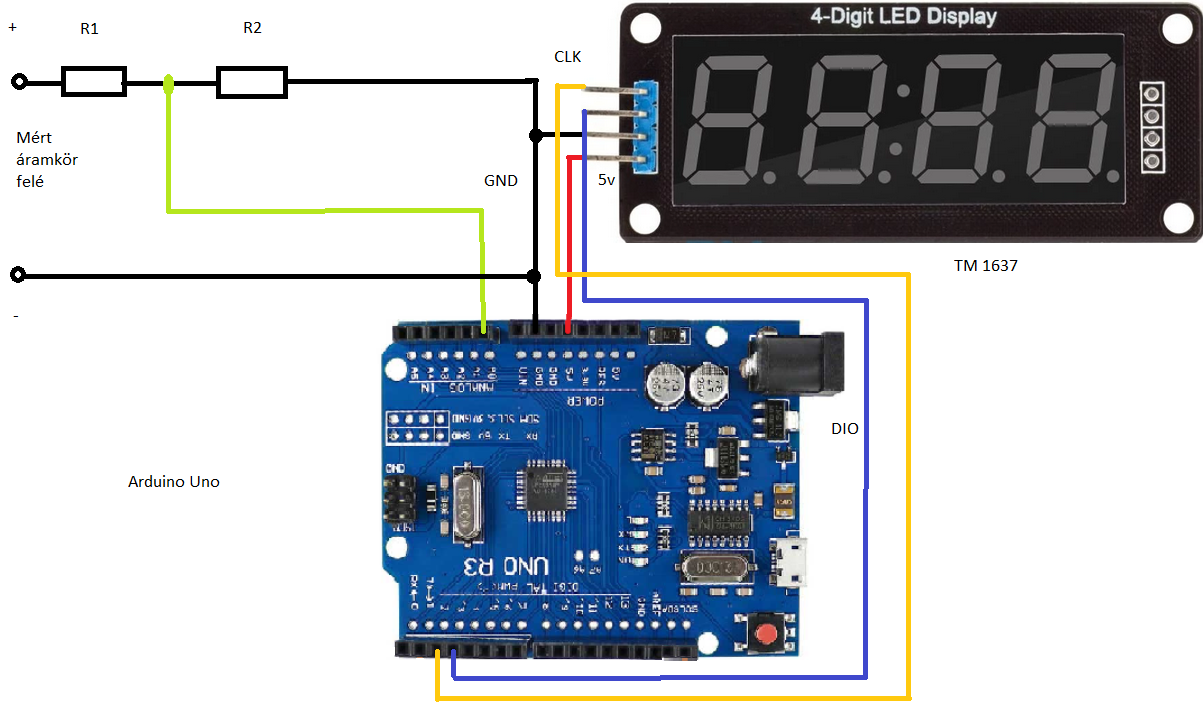
To calculate resistors R1 and R2, we use the formula of the unloaded voltage divider. To make an accurate measuring instrument, measure the value of resistances, do not calculate with the values marked on them.
Uki = 5V – our reference voltage, which is the same as the supply voltage of the microcontroller, since we use an internal reference.
Ube = maximum voltage to be measured
R2 = 10Kohm
R1 = can be calculated using the formula below

Script:
#include <TM1637Display.h>

const int CLK = 2; //Display CLK pin
const int DIO = 3; //Display DIO pin
TM1637Display display(CLK, DIO); //Initialize display.

int be = A0; //0 analog input
int dc = 0;
float voltbex;
float voltki = 0.00;
float voltbe = 0.00;
float R1 = 97500.0; //  R1 resistor value in ohms
float R2 = 9700.0; // R2 resistor value in ohms
void setup() {
  // put your setup code here, to run once
Serial.begin(9600);
pinMode(be, INPUT);
display.setBrightness(0x0a); //display brightness set max
}

void loop() {
  // put your main code here, to run repeatedly:
  for(int m=0;m<=40;m++){        //40 measurements
 dc = analogRead(be); //ad converter reading
    voltki = (dc * 5.0) / 1024.0; // 5.0 reference voltage
    voltbe = voltki / (R2/(R1+R2)); //calculating

    voltbex=voltbex+voltbe;
    delay(5);
  }
  voltbex=voltbex/40;// average
Serial.println(voltbex);//measured voltage print to serial
    voltbex = voltbex * 100;//round
    display.showNumberDecEx(voltbex, 0b01000000, false, 4, 0);  //write on display
    voltbex=0;


    delay(200);
}
To achieve high accuracy, more sampling and accurate measurement of the resistance R1, R2 are required. Here I focused on how. Happy measuring everyone! Below is a video with the circuit in action.


