

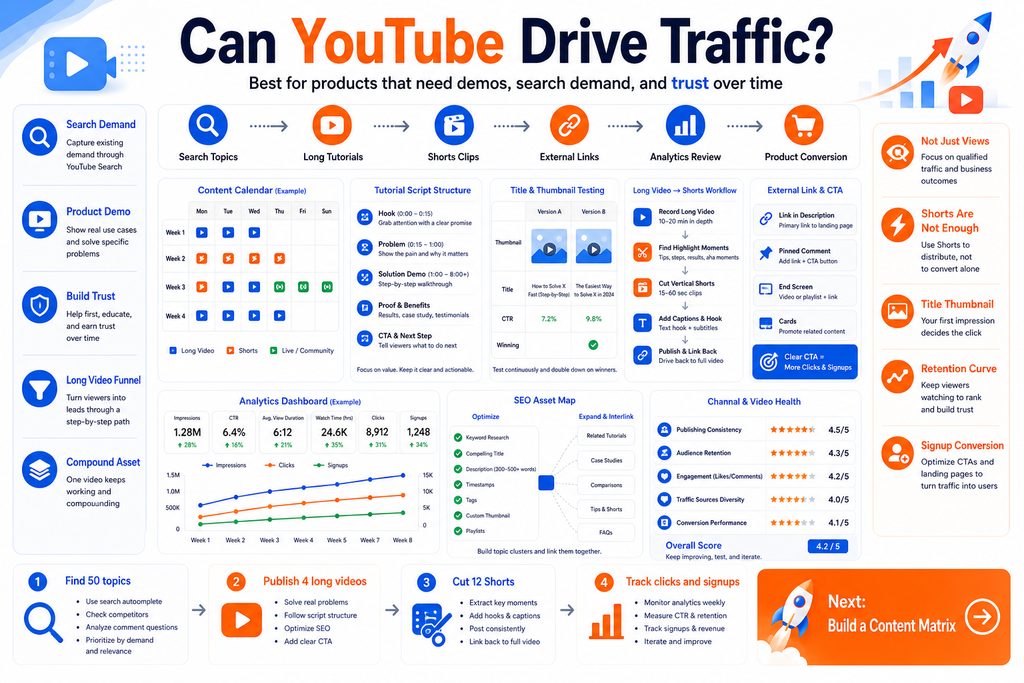
Yes, YouTube can drive traffic.
But it is not an instant traffic button.
For indie founders, YouTube works more like a long-term compounding channel. You explain problems, demonstrate the product, build trust, and then convert through search, recommendations, subscribers, external links, and repeat viewing.
It is not best for “post today, explode tomorrow.”
It is best for:
Problems people search for over time
Products that need demonstration
Use cases that require trust before conversion
Tutorials, cases, reviews, comparisons, and postmortems
This article references official YouTube materials:
Define “Traffic” First
Many founders only look at views.
But views are not the final metric.
For a product, traffic has five layers:
Impressions: how many people see the thumbnail
Viewing: how many click and keep watching
Trust: how many believe you know the problem
Clicks: how many visit the website or next step
Conversion: how many sign up, try, book, or pay
If a video gets 100,000 views but no clicks or signups, it is content noise.
If a video gets 2,000 views but brings 100 qualified visits and 20 signups, it is effective traffic.
So the question is not, “Does YouTube have traffic?”
The better questions are:
Is my product easier to understand with video?
Will target users search this problem on YouTube?
Is there a clear next step after watching?
Can I create 20-50 related videos over time?
Which Products Fit YouTube?
YouTube works better when the product:
Needs demonstration
Needs teaching
Has a visible before-and-after
Has users searching tutorials
Requires trust before purchase
Can support reviews, cases, and breakdowns
Can be discovered for months or years
Good examples:
AI tools
Design tools
Developer tools
Productivity tools
Analytics tools
Marketing tools
Video editing tools
Cross-border ecommerce tools
Language learning tools
Weaker examples:
Hidden enterprise back-office workflows
Low-visual infrastructure APIs
Highly customized consulting services
Problems users do not search publicly
Products that require heavy sales explanation
They are not impossible.
YouTube just may not be the first channel.
Three Video Types Work Best
Early on, do not start with broad entertainment or pure opinions.
Prioritize three formats.
First: search-driven tutorials.
How to create a landing page with AI
How to write a cold email sequence
How to fix low email deliverability
How to compare two SaaS tools
These videos have clear intent, long shelf life, and strong demand.
Second: product scenario demos.
I used this tool to generate an English landing page in 10 minutes
From blank Notion page to project management system
Using AI to turn 30 customer feedback notes into feature priorities
These videos help users see how the product solves a problem.
Third: postmortems and comparisons.
I tested five AI resume tools
We changed onboarding and here is what happened to signup conversion
Real numbers after launching on Product Hunt
These videos build trust.
Do Not Only Make Shorts
Shorts can create reach, but they are not always good for direct conversion.
YouTube’s official link sharing guidance says URLs in Shorts comments and Shorts descriptions are non-clickable to reduce spam and scams.
If your goal is website clicks, trials, or signups, long-form videos usually carry conversion better.
A stronger mix:
Long-form videos explain and convert
Shorts create discovery and clips
Community posts remind and interact
Livestreams build deeper trust
For example, create one 12-minute tutorial and cut it into three to five Shorts.
Shorts bring viewers back to the channel and long video. The long video sends them to the product.
Give Value Before Product
The common product-video mistake is starting with yourself.
Users do not care who you are first. They care whether their problem can be solved.
A better structure:
First 15 seconds: state the problem and outcome
Part 1: explain why the problem happens
Part 2: give a step-by-step framework
Part 3: show how the tool accelerates the process
Part 4: show before-and-after results
Ending: give a natural next step
Avoid:
Hello everyone, welcome to my channel. Today I will introduce our new product...Better:
If your English landing page sounds machine-translated, it is usually because of these three issues.
Today I will rewrite a real example into something closer to a global SaaS page.
Start with the problem, then introduce the product.
Titles and Thumbnails Decide the First Step
YouTube Analytics includes impressions and click-through rate.
YouTube defines impressions click-through rate as how often viewers watched a video after seeing the thumbnail.
So optimize:
Does the title feel relevant to the target user?
Does the thumbnail make the result or contrast immediately clear?
Weak:
My Product Demo
New AI Tool Launch
Update 2.0 Walkthrough
Better:
I rewrote a weak SaaS landing page in 12 minutes
5 cold email mistakes that kill reply rates
How I analyze 100 competitor reviews with AI
The title is not just a description.
It tells the target user, “This is about your problem.”
External Links Should Be Compliant and Natural
YouTube’s external links policy says links must not direct users to content that violates Community Guidelines.
YouTube’s link sharing guidance also explains that only certain link locations are clickable.
For founders:
Put the main product link in the channel profile
Use long-form descriptions for related resources and product pages
Use pinned comments for the most relevant next step
Mention the next step verbally without exaggeration
Do not use misleading promises to force clicks
Do not stuff unrelated links into the description
Use Shorts to point toward related long-form videos
The best link is not “click here to buy.”
It is:
Download the template from the video
See the full case study
Try the tool I just demonstrated
Get the checklist
Book a diagnosis
The link should extend the video’s value.
A 30-Day YouTube Test
Do not commit to a year immediately.
Run a 30-day test:
Days 1-3: collect 50 search-driven topics
Days 4-7: choose 10 titles and thumbnail concepts
Days 8-21: publish 4 long-form videos, each solving one clear problem
Days 22-25: cut long videos into 8-12 Shorts
Days 26-28: optimize descriptions, pinned comments, landing page, and CTA
Days 29-30: review impressions, CTR, watch time, clicks, and signups
The test is not about going viral.
It is about learning:
Do users search for this?
Do titles and thumbnails work?
Does the content hold attention?
Does the video lead to clicks?
Do clicks convert?
Can you produce consistently?
If you cannot create 10 clear topics, YouTube may not fit your current stage.
What to Review
In YouTube Studio, do not only look at views.
Track:
Impressions: how often thumbnails are shown
CTR: how often viewers click after seeing the thumbnail
Average view duration: how long viewers watch
Audience retention: where viewers leave or rewatch
Traffic sources: search, suggested, external, or channel pages
Description link clicks: links in descriptions and pinned comments
Signup conversion: signups and activation after clicks
Returning viewers: whether people come back
YouTube’s engagement analytics explain that audience retention helps you understand which parts hold attention and which parts lose viewers.
For product acquisition, connect YouTube data with product analytics.
Otherwise you know content performance but not business impact.
YouTube and SEO
YouTube videos can become SEO assets.
A strong video can:
Be discovered through YouTube search
Appear in Google search results
Be embedded in your article pages
Increase page engagement
Become FAQ and tutorial material
Be cut into social clips
Become sales demo material
So do not treat a video as a one-time asset.
Every video should have supporting assets:
Blog post
Template download
Case study page
Product page
Email content
Social clips
One video can support many channels.
When You Should Not Do YouTube
You may want to wait if:
Product positioning is unclear
You do not know the user yet
There is no core workflow to demonstrate
You cannot publish consistently
The team will not show face, record screens, or speak
Shorter-path channels have not been tested
YouTube is not cheap.
Scripts, recording, editing, thumbnails, publishing, and review all take time.
If you have not understood the user and problem, interviews, SEO, Reddit, or cold email may be faster.
Summary
YouTube can drive traffic, but it is a long-term compounding channel
It fits products that need demos, teaching, trust, and search
Prioritize tutorials, scenario demos, postmortems, and comparisons
Shorts create reach; long videos explain and convert
Titles and thumbnails drive clicks; retention drives future discovery
External links should be compliant and naturally extend the video value
Review impressions, CTR, watch time, retention, clicks, and signups
Next, we will cover how to get your first 100 users.