

Hello again, fantastic community builders! We've journeyed together through the intricate steps of crafting an engaging, monetizable Discord café, and we're now at the grand finale! Your amazing support has driven this guide series, and if you've found these posts useful and wish to further support this endeavor, the 'Support' button is eagerly awaiting your click. Now, let's embark on Step 10 and wrap up this remarkable journey!
This final step is about adding the finishing touch to our café - the logo! Just like a café has a distinctive sign, your server needs a unique logo that embodies your community's spirit. Ready to crown our café with its visual identifier? Let's get to it!
First, journey into the 'Server Settings', the control room of our café. Spot the 'Upload Image' tab next to the server name? That's where we're going to add our logo. Clicking on it will open your file explorer window. This is akin to opening your design portfolio, ready to choose the perfect logo for our café.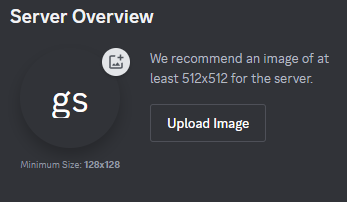
Select the logo image you've envisioned for your server, akin to choosing the most appealing sign for our café. Crop it to your desired size and click 'Apply'. It's like ensuring the sign fits perfectly over our café's entrance.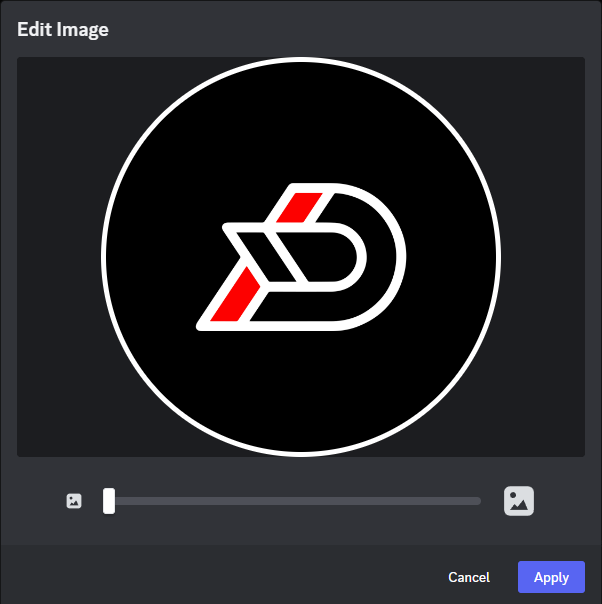
Once satisfied with your logo, click the 'Save Changes' button. With that, our café now has a stunning, distinctive sign that welcomes all community members!
And there we have it, folks - Step 10 completed! Your server, your café, now has a unique visual identity that will attract many virtual passers-by. But remember, your café can always expand! Repeat Steps 4, 5, and 6 to add more areas to your café, akin to adding more tables, private rooms, or even an outdoor terrace to your physical café.
The picture below illustrates how your server might look once it's fully furnished. Envision it as a bustling, vibrant café, teeming with engaging conversation and shared interests.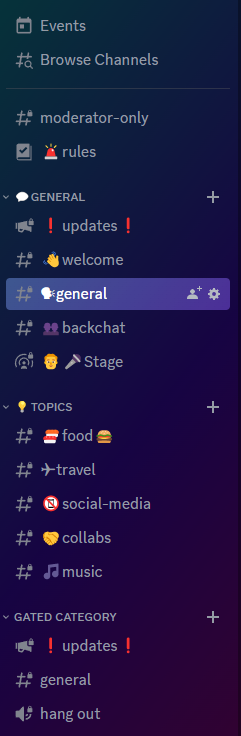
I sincerely hope this guide has been a helpful companion as you've ventured through the process of building a Discord server ready for a thriving community. The steps and tips provided should empower you to create a successful, engaging space that caters perfectly to your community's needs.
Remember, this is more than just a digital platform; it's a place where people will come together, form connections, share laughter, and even a few tears. It's a café in the truest sense, a community hub where every member feels at home.
I wish you all the best as you continue to expand and fine-tune your server, your café. Remember to have fun, engage with your community, and most importantly, enjoy the rewarding experience of creating a space where people feel welcomed and heard.
If you've found these guides informative and valuable, consider buying me a coffee. Your support makes it possible for guides like these to be created and shared. Until our paths cross again in the digital world, happy community building, and may your Discord café thrive!