

A teacher is away today, and the printed timetable is now wrong. In FET Viewer, you record the change one time. Everyone who opens the timetable for that date sees the change in place. Nobody needs to check a separate notice.
A cover teacher: the lesson runs at the same time, but another teacher takes it.
A room change: the same lesson, with the same teacher, moves to a different room.
A cancellation: the lesson does not happen on that date.
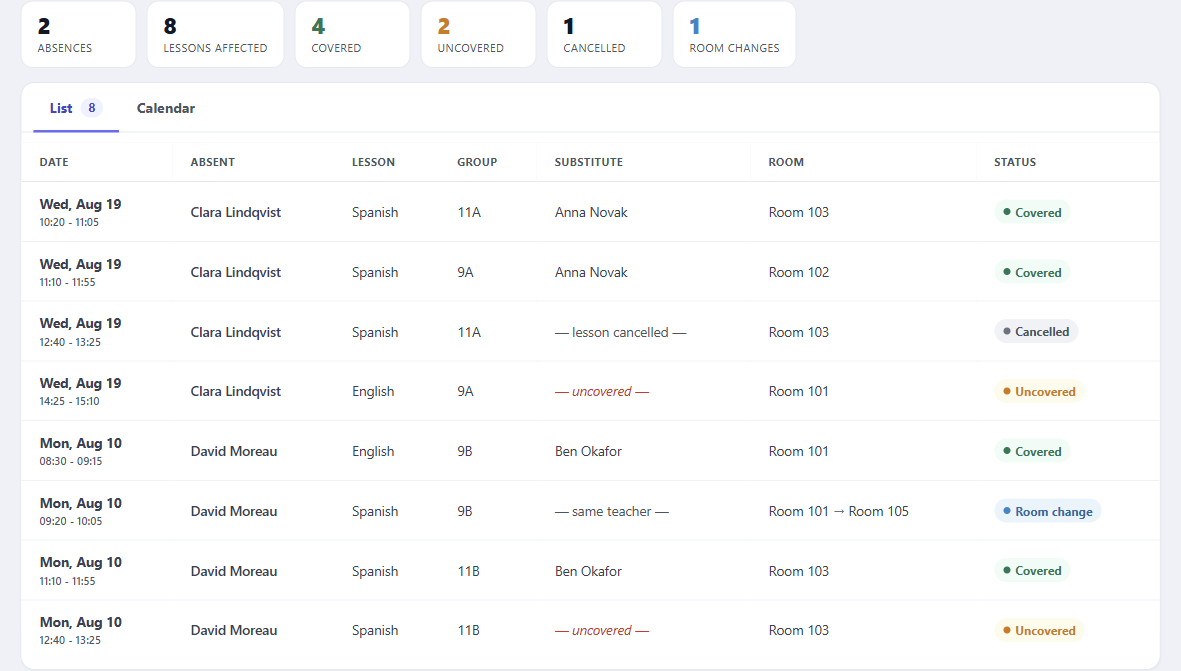
The substitutions list: covered, uncovered and cancelled lessons, and one room change.
Each substitution belongs to one real date, not to the weekly pattern. A change on one Tuesday does not touch any other Tuesday. The substitutions board for a date shows who is away, which lessons this affects, and who takes each one. If no teacher covers a lesson yet, the board shows the lesson as uncovered. So a lesson without cover never looks finished.
After you save a substitution, it shows everywhere that date is on screen. This includes the Substitutions panel, the dated print layouts and the shared links. A covered lesson keeps its original text with a line through it, so you can see what changed. The replacement shows next to it. A cancelled lesson is also dimmed, so you can tell it from a covered lesson across a corridor.
A link for only some teachers or student groups hides the lessons outside its scope. This includes the covered lessons. A substitution does not make the scope of a link wider.
The full guide shows how a covered lesson looks on screen and on paper.