

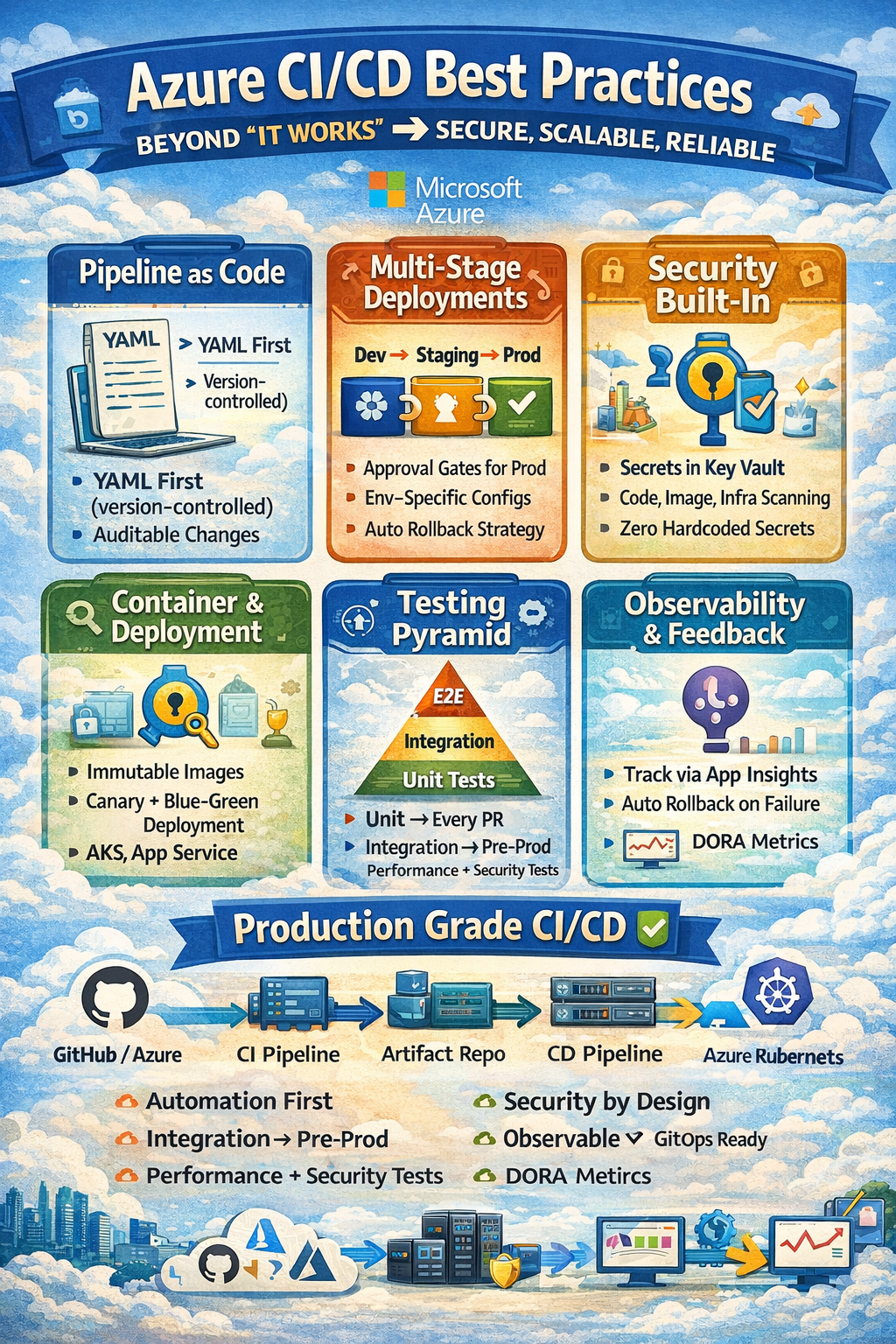
SECTION 1 — AZURE CI/CD ECOSYSTEM OVERVIEW
AZURE DEVOPS SERVICES — FULL PLATFORM:
  Azure Repos          → Git repositories (source code)
  Azure Pipelines      → CI/CD automation (build + deploy)
  Azure Boards         → Work items, sprints, Kanban
  Azure Artifacts      → Package management (NuGet, npm, Maven, PyPI)
  Azure Test Plans     → Manual + automated testing

AZURE PIPELINES — TWO SYNTAX OPTIONS:
  Classic (GUI-based):   point-and-click pipeline editor
                         Not recommended for new projects
                         No version control of pipeline definition

  YAML-based (modern):   pipeline defined as code (azure-pipelines.yml)
                         Stored in Git repo alongside application code
                         Version controlled, reviewable, repeatable
                         RECOMMENDED — use this always

GITHUB ACTIONS INTEGRATION:
  GitHub Actions:        Microsoft-owned (GitHub acquired 2018)
  Triggers:              push, pull_request, schedule, workflow_dispatch
  Runners:               GitHub-hosted OR self-hosted (Azure VMs)
  Azure Integration:     Deploy to Azure directly from GitHub Actions
  When to use:
    Code in GitHub + Deploy to Azure → GitHub Actions
    Code in Azure Repos + Deploy to Azure → Azure Pipelines
    Both work — choose based on where code lives

KEY AZURE DEPLOYMENT TARGETS:
  Azure App Service         → Web apps, APIs (PaaS)
  Azure Kubernetes Service  → Containerized workloads
  Azure Container Apps      → Serverless containers
  Azure Functions           → Serverless functions
  Azure VM / VMSS           → Infrastructure-level
  Azure Static Web Apps     → Frontend static sites
  Azure API Management      → API gateway deployments

PIPELINE TERMINOLOGY:
  Pipeline:    complete CI/CD workflow definition
  Stage:       logical group of jobs (Build, Test, Deploy-Dev, Deploy-Prod)
  Job:         unit of work running on an agent
  Step:        individual task within a job
  Task:        pre-built action (AzureCLI, Docker, Kubernetes, etc.)
  Agent:       machine that runs pipeline jobs
  Artifact:    output of build stage (passed to deploy stage)
  Variable:    parameterized value (connection strings, versions)
  Secret:      encrypted variable (passwords, API keys, connection strings)
  Environment: logical deployment target with approval gates
  Service Connection: authenticated connection to Azure subscription
SECTION 2 — AZURE PIPELINE YAML STRUCTURE
# azure-pipelines.yml — MASTER TEMPLATE (production grade)

# TRIGGER: when does pipeline run?
trigger:
  branches:
    include:
      - main           # production deployments
      - develop        # dev deployments
      - release/*      # release branch deployments
    exclude:
      - feature/*      # feature branches: PR pipeline only
  paths:
    include:
      - src/**         # only trigger if src changed
      - azure-pipelines.yml  # or pipeline itself changed
    exclude:
      - docs/**        # docs changes never trigger pipeline
      - '**/*.md'      # markdown changes ignored

# PR TRIGGER: runs on every pull request
pr:
  branches:
    include:
      - main
      - develop
  paths:
    include:
      - src/**

# SCHEDULE: nightly builds for regression testing
schedules:
  - cron: "0 1 * * *"      # 1am UTC every day
    displayName: Nightly Regression Build
    branches:
      include:
        - main
    always: true            # run even if no code changes

# AGENT POOL
pool:
  vmImage: 'ubuntu-latest'  # Microsoft-hosted Ubuntu agent
  # OR: use self-hosted agent pool:
  # name: 'MyAgentPool'
  # demands:
  #   - java
  #   - maven

# PIPELINE-WIDE VARIABLES
variables:
  - group: 'production-variable-group'   # Azure DevOps variable group
  - name: buildConfiguration
    value: 'Release'
  - name: dockerRegistryServiceConnection
    value: 'acr-service-connection'
  - name: imageRepository
    value: 'order-service'
  - name: containerRegistry
    value: 'mycompany.azurecr.io'
  - name: dockerfilePath
    value: '$(Build.SourcesDirectory)/Dockerfile'
  - name: tag
    value: '$(Build.BuildId)'

# STAGES: logical grouping of jobs
stages:

# ─── STAGE 1: BUILD + TEST ──────────────────────────────────────────
- stage: Build
  displayName: 'Build and Test'
  jobs:
  - job: Build
    displayName: 'Build Application'
    steps:

    - task: UseDotNet@2
      displayName: 'Install .NET SDK'
      inputs:
        packageType: 'sdk'
        version: '8.x'

    - task: DotNetCoreCLI@2
      displayName: 'Restore NuGet packages'
      inputs:
        command: 'restore'
        projects: '**/*.csproj'
        feedsToUse: 'select'
        vstsFeed: 'my-artifact-feed'

    - task: DotNetCoreCLI@2
      displayName: 'Build solution'
      inputs:
        command: 'build'
        projects: '**/*.csproj'
        arguments: '--configuration $(buildConfiguration) --no-restore'

    - task: DotNetCoreCLI@2
      displayName: 'Run unit tests'
      inputs:
        command: 'test'
        projects: '**/*Tests.csproj'
        arguments: >
          --configuration $(buildConfiguration)
          --no-build
          --collect "Code coverage"
          --logger trx
          --results-directory $(Agent.TempDirectory)

    - task: PublishTestResults@2
      displayName: 'Publish test results'
      condition: succeededOrFailed()
      inputs:
        testResultsFormat: 'VSTest'
        testResultsFiles: '**/*.trx'
        searchFolder: '$(Agent.TempDirectory)'

    - task: PublishCodeCoverageResults@1
      displayName: 'Publish code coverage'
      inputs:
        codeCoverageTool: 'Cobertura'
        summaryFileLocation: '$(Agent.TempDirectory)/**/coverage.cobertura.xml'

    - task: Docker@2
      displayName: 'Build Docker image'
      inputs:
        command: 'build'
        repository: '$(imageRepository)'
        dockerfile: '$(dockerfilePath)'
        containerRegistry: '$(dockerRegistryServiceConnection)'
        tags: |
          $(tag)
          latest
        arguments: '--build-arg BUILD_VERSION=$(Build.BuildId)'

    - task: Docker@2
      displayName: 'Push Docker image to ACR'
      condition: and(succeeded(), ne(variables['Build.Reason'], 'PullRequest'))
      inputs:
        command: 'push'
        repository: '$(imageRepository)'
        containerRegistry: '$(dockerRegistryServiceConnection)'
        tags: |
          $(tag)
          latest

    - task: PublishPipelineArtifact@1
      displayName: 'Publish build artifacts'
      inputs:
        targetPath: '$(Build.ArtifactStagingDirectory)'
        artifact: 'drop'
        publishLocation: 'pipeline'

# ─── STAGE 2: SECURITY SCAN ─────────────────────────────────────────
- stage: SecurityScan
  displayName: 'Security & Quality Scan'
  dependsOn: Build
  condition: succeeded()
  jobs:
  - job: SAST
    displayName: 'Static Analysis'
    steps:
    - task: SonarQubePrepare@5
      inputs:
        SonarQube: 'sonarqube-connection'
        scannerMode: 'MSBuild'
        projectKey: 'order-service'
        projectName: 'Order Service'
        extraProperties: |
          sonar.exclusions=**/obj/**,**/*.dll
          sonar.coverage.exclusions=**Tests*/**

    - task: SonarQubeAnalyze@5
    - task: SonarQubePublish@5
      inputs:
        pollingTimeoutSec: '300'

    - task: WhiteSource@21
      displayName: 'Dependency vulnerability scan'
      inputs:
        cwd: '$(System.DefaultWorkingDirectory)'

    - task: CredScan@3
      displayName: 'Credential scanner (detect secrets in code)'

# ─── STAGE 3: DEPLOY TO DEV ─────────────────────────────────────────
- stage: DeployDev
  displayName: 'Deploy to Development'
  dependsOn: SecurityScan
  condition: |
    and(
      succeeded(),
      ne(variables['Build.Reason'], 'PullRequest'),
      eq(variables['Build.SourceBranch'], 'refs/heads/develop')
    )
  variables:
    - group: 'dev-variable-group'
  jobs:
  - deployment: DeployDev
    displayName: 'Deploy to Dev AKS'
    environment: 'development'     # Azure DevOps Environment (no approval gate)
    strategy:
      runOnce:
        deploy:
          steps:
          - task: KubernetesManifest@0
            displayName: 'Deploy to AKS Dev'
            inputs:
              action: 'deploy'
              kubernetesServiceConnection: 'aks-dev-service-connection'
              namespace: 'order-service-dev'
              manifests: |
                $(Pipeline.Workspace)/drop/k8s/deployment.yml
                $(Pipeline.Workspace)/drop/k8s/service.yml
              containers: '$(containerRegistry)/$(imageRepository):$(tag)'

# ─── STAGE 4: DEPLOY TO STAGING ─────────────────────────────────────
- stage: DeployStaging
  displayName: 'Deploy to Staging'
  dependsOn: DeployDev
  condition: and(succeeded(), eq(variables['Build.SourceBranch'], 'refs/heads/main'))
  variables:
    - group: 'staging-variable-group'
  jobs:
  - deployment: DeployStaging
    displayName: 'Deploy to Staging AKS'
    environment: 'staging'        # has approval gate configured
    strategy:
      runOnce:
        deploy:
          steps:
          - template: templates/deploy-aks.yml
            parameters:
              serviceConnection: 'aks-staging-service-connection'
              namespace: 'order-service-staging'
              tag: '$(tag)'

# ─── STAGE 5: INTEGRATION TESTS ─────────────────────────────────────
- stage: IntegrationTests
  displayName: 'Integration Tests on Staging'
  dependsOn: DeployStaging
  jobs:
  - job: RunIntegrationTests
    steps:
    - task: DotNetCoreCLI@2
      inputs:
        command: 'test'
        projects: '**/*IntegrationTests.csproj'
        arguments: '--configuration Release --logger trx'

# ─── STAGE 6: DEPLOY TO PRODUCTION ──────────────────────────────────
- stage: DeployProduction
  displayName: 'Deploy to Production'
  dependsOn: IntegrationTests
  condition: and(succeeded(), eq(variables['Build.SourceBranch'], 'refs/heads/main'))
  variables:
    - group: 'production-variable-group'
  jobs:
  - deployment: DeployProduction
    displayName: 'Deploy to Production AKS'
    environment: 'production'     # REQUIRES MANUAL APPROVAL
    strategy:
      canary:                     # CANARY DEPLOYMENT
        increments: [10, 50, 100]
        preDeploy:
          steps:
          - script: echo "Pre-deploy checks: verify staging green"
        deploy:
          steps:
          - template: templates/deploy-aks.yml
            parameters:
              serviceConnection: 'aks-prod-service-connection'
              namespace: 'order-service'
              tag: '$(tag)'
        postRouteTraffic:
          steps:
          - script: echo "Run smoke tests against production"
        on:
          failure:
            steps:
            - script: echo "Rollback initiated"
          success:
            steps:
            - script: echo "Deployment successful"
SECTION 3 — BRANCHING STRATEGY BEST PRACTICES
RECOMMENDED: GITFLOW FOR ENTERPRISE / TRUNK-BASED FOR STARTUPS

GITFLOW BRANCHING MODEL:
  main (master):
    Always production-ready
    Protected: no direct push allowed
    Merges only via PR from release/* or hotfix/*
    Every merge = version tag (v1.2.3)
    Pipeline: full CI + deploy to production

  develop:
    Integration branch (latest features)
    Protected: no direct push
    Pipeline: CI + deploy to development environment

  feature/*:
    feature/JIRA-123-add-payment-method
    feature/JIRA-456-ims-registration-fix
    Created from: develop
    Merged back to: develop via PR
    Pipeline: CI only (unit tests, build, security scan)
    Naming: feature/[ticket-id]-[short-description]

  release/*:
    release/v1.2.0
    Created from: develop when ready for release
    Only bug fixes allowed (no new features)
    Merged to: main + back to develop
    Pipeline: full CI + deploy to staging

  hotfix/*:
    hotfix/critical-payment-bug
    Created from: main (fix production bug)
    Merged to: main + develop
    Pipeline: CI + deploy to staging + production (with approval)

TRUNK-BASED DEVELOPMENT (for fast-moving teams):
  One main branch: main / trunk
  Feature branches: short-lived (< 1 day ideally, max 2 days)
  Feature flags: hide incomplete features (not branch-based)

  Benefits:
    No merge conflicts (always integrating)
    Faster delivery (no long-lived branches)
    CI always runs on main
  Use: Netflix, Google, Facebook engineering culture

BRANCH PROTECTION RULES (Azure Repos):
  Setting → Repositories → Policies → Branch Policies

  For main branch:
    ✅ Require minimum 2 reviewers
    ✅ Reset reviewer votes on new pushes (re-approve if code changes)
    ✅ Require linked work items (traceability)
    ✅ Build validation: azure-pipelines.yml must pass
    ✅ Check for comment resolution (all PR comments resolved)
    ✅ Limit merge types: Squash only (clean history)
    ✅ Automatically include code owners as reviewers

  For develop branch:
    ✅ Require minimum 1 reviewer
    ✅ Build validation must pass
    ✅ No force push allowed

COMMIT MESSAGE STANDARDS (Conventional Commits):
  Format: <type>(<scope>): <description>

  Types:
    feat:     new feature
    fix:      bug fix
    docs:     documentation
    style:    formatting (no logic change)
    refactor: code restructuring
    test:     adding/fixing tests
    chore:    build, dependency updates
    perf:     performance improvement
    ci:       CI/CD changes

  Examples:
    feat(payment): add UPI payment gateway integration
    fix(rtp): resolve packet loss during high jitter scenarios
    feat(ims): implement IMS registration retry with AKAv1-MD5
    fix(sip): correct Via header in REGISTER response
    ci(pipeline): add SonarQube security scan stage
    perf(media): optimize SRTP decryption using AES-NI

  Why this matters:
    Automated changelogs (semantic-release tool)
    Automated version bumping (patch/minor/major)
    Clear history — why was this changed?
SECTION 4 — ENVIRONMENTS AND APPROVALS
AZURE DEVOPS ENVIRONMENTS (best practice):

  Create environments in Azure DevOps:
  Project Settings → Pipelines → Environments → New Environment

  ENVIRONMENT SETUP:

  development:
    Approvals: None (auto-deploy on merge to develop)
    Checks: Pipeline must succeed
    Target: AKS dev cluster
    Retention: 7 days

  staging:
    Approvals: 1 approver required (tech lead)
    Checks:
      Pipeline must succeed
      SonarQube quality gate passed
      No critical security vulnerabilities
    Target: AKS staging cluster
    Retention: 30 days

  production:
    Approvals: 2 approvers required
                (tech lead + product owner)
    Approval timeout: 24 hours
    Checks:
      Integration tests passed on staging
      Performance tests passed (no regression)
      Change management ticket created (ServiceNow)
      Business hours only (Mon-Fri 9am-3pm)
    Target: AKS production cluster
    Branch restriction: main branch only
    Retention: permanent

ENVIRONMENT CHECKS CONFIGURATION:

  Business hours check (prevent 3am deployments):
  Type: Business Hours
  Days: Monday, Tuesday, Wednesday, Thursday, Friday
  Start: 09:00
  End:   15:00
  Timezone: Asia/Kolkata (IST)

  ServiceNow change ticket check:
  Type: Invoke REST API
  URL: https://yourcompany.service-now.com/api/check_change
  Method: POST
  Headers: Authorization: Bearer $(serviceNowToken)
  Body: {"change_id": "$(changeId)", "status": "approved"}

  Required template check:
  Type: Required Template
  Definition: approved-production-pipeline-template
  (prevents running non-standard pipelines in production)

APPROVAL NOTIFICATIONS:
  When pipeline waits for approval:
  → Approver gets email notification
  → Teams message (via MS Teams integration)
  → Mobile push notification (Azure DevOps app)

  Approval link direct to pipeline run
  Approver can: Approve / Reject / Defer with comment

DEPLOYMENT GATES (automated checks before deploy):
  # In azure-pipelines.yml
  - stage: DeployProduction
    jobs:
    - deployment: Deploy
      environment: production
      # Gate: check monitoring BEFORE deploying
      # If staging MOS score < 4.0 → block production deploy
      # Configured in Environment → Approvals and Checks
      # Type: Azure Monitor Alert
      # Alert rule: staging-health-check
      # If alert firing → deployment blocked
SECTION 5 — SECRETS AND VARIABLE MANAGEMENT
NEVER HARDCODE SECRETS IN PIPELINES OR CODE.
THIS IS THE #1 AZURE DEVOPS SECURITY MISTAKE.

AZURE DEVOPS SECRET MANAGEMENT HIERARCHY:

Level 1: Pipeline Variables (basic, avoid for secrets)
  Define in YAML:
    variables:
      MY_VAR: "some-value"       # visible in logs (not secret)
      MY_SECRET:                  # DON'T do this for secrets
        value: "password123"
        isSecret: true            # hides in logs but visible in YAML

  Define in UI:
    Edit Pipeline → Variables → New Variable
    ✅ Keep this value secret (encrypts at rest)
    Accessible as: $(MY_SECRET)
    Problem: no audit trail, not in code review

Level 2: Variable Groups (recommended for team-shared)
  Library → Variable Groups → New Variable Group

  Variable Group: "production-secrets"
    DB_CONNECTION_STRING: Server=prod-sql...  [secret]
    API_KEY_PAYMENT: sk_prod_xxxx             [secret]
    REDIS_PASSWORD: complexpassword123        [secret]

  Link to pipeline:
  variables:
    - group: 'production-secrets'
    - group: 'production-config'

  Access: $(DB_CONNECTION_STRING) in pipeline steps

  Benefits:
    One place for all secrets (update once, affects all pipelines)
    Access control (who can see/edit this group)
    Audit trail of changes

Level 3: Azure Key Vault Integration (BEST PRACTICE)
  Create Key Vault:
    az keyvault create \
      --name mycompany-prod-kv \
      --resource-group monitoring-rg \
      --location eastus \
      --enable-soft-delete true \
      --retention-days 90

  Store secrets in Key Vault:
    az keyvault secret set \
      --vault-name mycompany-prod-kv \
      --name "db-connection-string" \
      --value "Server=prod-sql;Database=orders;..."

    az keyvault secret set \
      --vault-name mycompany-prod-kv \
      --name "payment-api-key" \
      --value "sk_prod_xxxxxxxxxxxx"

  Link Key Vault to Variable Group in Azure DevOps:
    Library → Variable Groups → New Variable Group
    ✅ Link secrets from Azure Key Vault
    Select: mycompany-prod-kv
    Add secrets: db-connection-string, payment-api-key

  Pipeline accesses secrets:
  variables:
    - group: 'production-keyvault-group'

  steps:
  - script: |
      echo "Connecting to DB..."
      dotnet run --connection "$(db-connection-string)"
    env:
      DB_CONN: $(db-connection-string)  # inject as env var

  WHY KEY VAULT:
    Secrets stored OUTSIDE Azure DevOps
    Key Vault has HSM (hardware security module)
    Full audit log: who accessed which secret when
    Automatic rotation support
    Fine-grained RBAC (who can get/set/delete)
    Secret versioning

VARIABLE SCOPING (best practice):

  Global variables (apply to all stages):
    variables:
      imageRepository: 'order-service'
      containerRegistry: 'mycompany.azurecr.io'

  Stage-level variables (override for specific stage):
    - stage: DeployProduction
      variables:
        - group: 'production-variable-group'
        - name: targetNamespace
          value: 'order-service-prod'

  Runtime variables (passed at pipeline trigger):
    parameters:
    - name: deployEnvironment
      displayName: 'Target Environment'
      type: string
      default: 'staging'
      values:
        - development
        - staging
        - production

    # Use: $(deployEnvironment) in pipeline steps

SECRETS ANTI-PATTERNS (NEVER DO THESE):
  ❌  echo "Password is: $(MY_SECRET)"          # prints to logs
  ❌  git commit -m "add connection string"     # in source code
  ❌  hardcode API key in azure-pipelines.yml   # visible in repo
  ❌  use same secret across all environments   # breach = all envs exposed
  ❌  never rotate secrets                      # rotation mandatory
  ❌  give pipeline service principal Owner role # over-privileged

SECRETS BEST PRACTICES:
  ✅  All secrets in Azure Key Vault
  ✅  Environment-specific Key Vaults (dev-kv, staging-kv, prod-kv)
  ✅  Rotate secrets every 90 days (automate via Key Vault policy)
  ✅  Pipeline service principal: least privilege
      (Contributor on specific resource group only)
  ✅  Audit Key Vault access logs monthly
  ✅  Never print secrets: use displaySecretMasking
  ✅  Use managed identity instead of service principals where possible
SECTION 6 — DOCKER AND CONTAINER BEST PRACTICES
DOCKERFILE BEST PRACTICES FOR CI/CD:

# ─── MULTI-STAGE DOCKERFILE (production standard) ─────────────────
# Stage 1: Build
FROM mcr.microsoft.com/dotnet/sdk:8.0 AS build
WORKDIR /src

# Copy project files first (layer caching optimization)
# If .csproj unchanged → restore layer cached → faster builds
COPY ["src/OrderService/OrderService.csproj", "src/OrderService/"]
COPY ["src/OrderService.Core/OrderService.Core.csproj", "src/OrderService.Core/"]
RUN dotnet restore "src/OrderService/OrderService.csproj"

# Copy remaining source
COPY . .
WORKDIR "/src/src/OrderService"

# Build
RUN dotnet build "OrderService.csproj" \
    -c Release \
    -o /app/build \
    --no-restore

# Stage 2: Publish
FROM build AS publish
RUN dotnet publish "OrderService.csproj" \
    -c Release \
    -o /app/publish \
    --no-restore \
    /p:UseAppHost=false

# Stage 3: Runtime (final image — smallest possible)
FROM mcr.microsoft.com/dotnet/aspnet:8.0 AS final
WORKDIR /app

# Security: run as non-root user
RUN addgroup --system appgroup && adduser --system appuser --ingroup appgroup
USER appuser

# Copy only published output (not build tools, source, SDK)
COPY --from=publish /app/publish .

# Health check endpoint
HEALTHCHECK --interval=30s --timeout=3s --start-period=5s --retries=3 \
    CMD curl -f http://localhost:8080/health || exit 1

EXPOSE 8080
ENTRYPOINT ["dotnet", "OrderService.dll"]

# WHY MULTI-STAGE:
# Final image: ~200MB (runtime only)
# vs single stage: ~800MB (includes SDK, build tools)
# Smaller image = faster pull = faster deployment = less attack surface

AZURE CONTAINER REGISTRY (ACR) BEST PRACTICES:

  Create ACR:
  az acr create \
    --name mycompanyregistry \
    --resource-group devops-rg \
    --sku Premium \        # Premium: geo-replication, content trust
    --admin-enabled false \  # never enable admin (use service principal)
    --location eastus

  ACR Security:
    az acr config content-trust update \
      --name mycompanyregistry \
      --status enabled      # Docker Content Trust (image signing)

  Image scanning (Microsoft Defender for Containers):
    az acr update \
      --name mycompanyregistry \
      --security-policy \
      quarantine enabled    # quarantine images with vulnerabilities

  Tag naming convention:
    $(containerRegistry)/$(imageRepository):$(Build.BuildId)
    mycompany.azurecr.io/order-service:1234      # immutable build ID
    mycompany.azurecr.io/order-service:latest    # always latest
    mycompany.azurecr.io/order-service:v1.2.3    # semantic version
    mycompany.azurecr.io/order-service:main-1234 # branch-buildid

  NEVER use :latest only in production:
    :latest changes → no auditability of what is deployed
    Always use immutable tags (Build.BuildId or git commit SHA)

CONTAINER IMAGE SCANNING IN PIPELINE:

  - task: AzureCLI@2
    displayName: 'Scan image for vulnerabilities'
    inputs:
      azureSubscription: 'azure-service-connection'
      scriptType: 'bash'
      scriptLocation: 'inlineScript'
      inlineScript: |
        # Run Trivy vulnerability scanner
        docker run --rm \
          -v /var/run/docker.sock:/var/run/docker.sock \
          aquasec/trivy:latest image \
          --exit-code 1 \
          --severity CRITICAL,HIGH \
          --no-progress \
          $(containerRegistry)/$(imageRepository):$(tag)

        if [ $? -ne 0 ]; then
          echo "##vso[task.logissue type=error]Critical vulnerabilities found"
          echo "##vso[task.complete result=Failed]"
          exit 1
        fi

HELM CHART CI/CD FOR AKS:

  # Helm chart structure:
  charts/
    order-service/
      Chart.yaml          # chart metadata
      values.yaml         # default values
      values-dev.yaml     # dev overrides
      values-staging.yaml # staging overrides
      values-prod.yaml    # prod overrides
      templates/
        deployment.yaml
        service.yaml
        ingress.yaml
        hpa.yaml          # HorizontalPodAutoscaler
        configmap.yaml

  # values.yaml:
  replicaCount: 3

  image:
    repository: mycompany.azurecr.io/order-service
    tag: "latest"         # overridden by pipeline
    pullPolicy: IfNotPresent

  resources:
    requests:
      cpu: "250m"
      memory: "256Mi"
    limits:
      cpu: "1000m"
      memory: "512Mi"

  autoscaling:
    enabled: true
    minReplicas: 3
    maxReplicas: 50
    targetCPUUtilizationPercentage: 60

  # Pipeline helm deploy step:
  - task: HelmDeploy@0
    displayName: 'Helm upgrade order-service'
    inputs:
      connectionType: 'Kubernetes Service Connection'
      kubernetesServiceConnection: 'aks-prod-connection'
      namespace: 'order-service'
      command: 'upgrade'
      chartType: 'FilePath'
      chartPath: '$(Pipeline.Workspace)/drop/charts/order-service'
      releaseName: 'order-service'
      valueFile: 'charts/order-service/values-prod.yaml'
      overrideValues: |
        image.tag=$(tag)
        replicaCount=5
      install: true          # install if not exists
      waitForExecution: true # wait for rollout to complete
      arguments: '--timeout 10m --atomic'
      # --atomic: rollback automatically if deployment fails
SECTION 7 — DEPLOYMENT STRATEGIES
STRATEGY 1: ROLLING DEPLOYMENT (default, safe)
───────────────────────────────────────────────
  What happens:
    Replace old pods with new pods gradually
    Kubernetes default behavior
    Zero downtime (if configured correctly)

  Kubernetes config:
  spec:
    strategy:
      type: RollingUpdate
      rollingUpdate:
        maxSurge: 1          # max extra pods during update
        maxUnavailable: 0    # zero pods down at any time
    replicas: 5

  With 5 replicas:
    Step 1: start 1 new pod (6 total, 5 old + 1 new)
    Step 2: new pod healthy → terminate 1 old pod (5 total)
    Step 3: repeat until all 5 are new version

  Use: standard deployments, stateless services
  Risk: if new version has bug → affects increasing % of traffic
  Rollback: kubectl rollout undo deployment/order-service

STRATEGY 2: BLUE-GREEN DEPLOYMENT (zero-risk)
──────────────────────────────────────────────
  What happens:
    Blue environment: current production (v1)
    Green environment: new version (v2) deployed alongside
    Traffic switch: Kubernetes service selector changed
    Blue stays running (instant rollback = switch selector back)

  Azure App Service Blue-Green (slots):
    Staging slot: deploy new version here
    Production slot: current live version
    Swap: swap staging → production (< 1 second)
    Rollback: swap back (< 1 second)

  Pipeline step:
  - task: AzureAppServiceManage@0
    displayName: 'Swap staging to production'
    inputs:
      azureSubscription: 'azure-service-connection'
      Action: 'Swap Slots'
      WebAppName: 'myapp-order-service'
      ResourceGroupName: 'production-rg'
      SourceSlot: 'staging'
      # Swaps staging → production

  AKS Blue-Green:
  # Blue deployment (current v1)
  apiVersion: apps/v1
  kind: Deployment
  metadata:
    name: order-service-blue
  spec:
    selector:
      matchLabels:
        app: order-service
        version: blue

  # Green deployment (new v2)
  apiVersion: apps/v1
  kind: Deployment
  metadata:
    name: order-service-green
  spec:
    selector:
      matchLabels:
        app: order-service
        version: green

  # Service: switch selector to switch traffic
  apiVersion: v1
  kind: Service
  metadata:
    name: order-service
  spec:
    selector:
      app: order-service
      version: green      # change: blue → green to switch traffic

  Pipeline blue-green switch:
  - script: |
      kubectl patch service order-service \
        -p '{"spec":{"selector":{"version":"green"}}}'

  Use: when zero rollback time is critical
  Cost: 2x infrastructure during deployment window

STRATEGY 3: CANARY DEPLOYMENT (progressive)
────────────────────────────────────────────
  What happens:
    10% of traffic → new version
    Monitor metrics for 10 minutes
    25% → new version (if metrics good)
    50% → new version (if metrics good)
    100% → new version (or rollback if bad)

  Azure Pipelines Canary (in YAML):
  strategy:
    canary:
      increments: [10, 25, 50, 100]
      preDeploy:
        steps:
        - script: echo "Verifying staging is healthy"
      deploy:
        steps:
        - task: KubernetesManifest@0
          inputs:
            action: 'deploy'
            manifests: $(manifests)
      postRouteTraffic:
        pool: server
        steps:
        - task: Delay@1
          inputs:
            delayForMinutes: '10'   # wait 10 min between increments
        - script: |
            # Check error rate via Prometheus/Application Insights
            ERROR_RATE=$(curl -s "$(prometheusUrl)/api/v1/query?\
              query=rate(http_requests_total{status=~'5..'}[5m])" \
              | jq '.data.result[0].value[1]')
            if (( $(echo "$ERROR_RATE > 0.01" | bc -l) )); then
              echo "Error rate too high: $ERROR_RATE"
              exit 1  # forces rollback
            fi
      on:
        failure:
          steps:
          - script: |
              kubectl rollout undo deployment/order-service
              echo "Rollback completed"
        success:
          steps:
          - script: echo "Canary successful"

  Istio-based Canary (service mesh):
  # VirtualService splits traffic
  apiVersion: networking.istio.io/v1alpha3
  kind: VirtualService
  metadata:
    name: order-service
  spec:
    http:
    - route:
      - destination:
          host: order-service-stable
          port:
            number: 80
        weight: 90      # 90% to stable
      - destination:
          host: order-service-canary
          port:
            number: 80
        weight: 10      # 10% to canary

  Use: high-traffic production services
       Where a bad deploy would be catastrophic
       Netflix, Amazon, Flipkart all use canary

STRATEGY 4: FEATURE FLAGS (deploy ≠ release)
─────────────────────────────────────────────
  What it means:
    Code deployed to production (always)
    Feature DISABLED by default
    Feature ENABLED for: 5% of users, internal team, specific region
    Toggle in real-time (no deployment needed)

  Azure App Configuration (feature flags):
    # Create feature flag
    az appconfig feature set \
      --name mycompany-appconfig \
      --feature "new-payment-ui" \
      --label production \
      --yes

    # Enable for 10% of users
    az appconfig feature filter add \
      --name mycompany-appconfig \
      --feature "new-payment-ui" \
      --filter-name Microsoft.Percentage \
      --filter-parameters Percentage=10

  Code reads flag:
    IFeatureManager featureManager; // injected
    if (await featureManager.IsEnabledAsync("new-payment-ui"))
    {
        return View("NewPaymentView");
    }
    return View("OldPaymentView");

  Use: separate deployment from release
       A/B testing
       Rollout to specific users/regions
       Instant kill switch (disable without rollback)
SECTION 8 — TESTING IN CI/CD PIPELINE
TESTING PYRAMID IN AZURE PIPELINES:

  ┌────────────────────────────────┐
  │          E2E Tests             │ Few, slow, expensive
  │      (Playwright/Selenium)     │ Run: on staging only
  ├────────────────────────────────┤
  │      Integration Tests         │ Medium count
  │  (API tests, DB integration)   │ Run: on dev + staging
  ├────────────────────────────────┤
  │         Unit Tests             │ Many, fast, cheap
  │   (business logic, functions)  │ Run: every commit (PR)
  └────────────────────────────────┘

  Cost: Unit < Integration < E2E
  Speed: Unit > Integration > E2E
  Run frequency: Unit (every PR) > Integration (every merge) > E2E (deploy)

UNIT TESTS — PIPELINE CONFIGURATION:

  - task: DotNetCoreCLI@2
    displayName: 'Unit tests with coverage'
    inputs:
      command: 'test'
      projects: '**/*UnitTests.csproj'
      arguments: |
        --configuration Release
        --no-build
        --collect:"XPlat Code Coverage"
        --results-directory $(Agent.TempDirectory)/unit
        -- DataCollectionRunSettings.DataCollectors.DataCollector.Configuration.Format=cobertura
      publishTestResults: true

  # Coverage gate: fail if < 80% coverage
  - task: BuildQualityChecks@8
    displayName: 'Check code coverage gate'
    inputs:
      checkCoverage: true
      coverageFailOption: 'fixed'
      coverageType: 'lines'
      coverageThreshold: '80'    # fail if < 80% line coverage

INTEGRATION TESTS:

  - job: IntegrationTests
    displayName: 'API Integration Tests'
    services:
      postgres:                  # spin up PostgreSQL container for tests
        image: postgres:15
        env:
          POSTGRES_PASSWORD: testpassword
          POSTGRES_DB: testdb
        ports:
          - 5432:5432
      redis:
        image: redis:7
        ports:
          - 6379:6379

    steps:
    - script: |
        # Wait for services to be ready
        until pg_isready -h localhost -p 5432; do
          echo "Waiting for PostgreSQL..."
          sleep 2
        done
        echo "PostgreSQL ready"
      displayName: 'Wait for services'

    - task: DotNetCoreCLI@2
      displayName: 'Run integration tests'
      inputs:
        command: 'test'
        projects: '**/*IntegrationTests.csproj'
        arguments: '--no-build -c Release'
      env:
        ConnectionStrings__Default: >
          Host=localhost;Port=5432;Database=testdb;Username=postgres;Password=testpassword
        Redis__ConnectionString: 'localhost:6379'

PERFORMANCE TESTS IN PIPELINE:

  - task: AzureCLI@2
    displayName: 'Load test with k6'
    inputs:
      azureSubscription: 'azure-service-connection'
      scriptType: 'bash'
      inlineScript: |
        # Run k6 load test
        docker run -i grafana/k6 run - < tests/load/smoke-test.js \
          --env BASE_URL=https://staging-api.company.com \
          --out json=/tmp/k6-results.json

        # Parse results: fail if p99 > 500ms or error rate > 1%
        P99=$(cat /tmp/k6-results.json | jq '.metrics.http_req_duration.values."p(99)"')
        ERRORS=$(cat /tmp/k6-results.json | jq '.metrics.http_req_failed.values.rate')

        if (( $(echo "$P99 > 500" | bc -l) )); then
          echo "##vso[task.logissue type=error]P99 latency $P99ms exceeds 500ms limit"
          exit 1
        fi

        if (( $(echo "$ERRORS > 0.01" | bc -l) )); then
          echo "##vso[task.logissue type=error]Error rate $ERRORS exceeds 1% limit"
          exit 1
        fi

SECURITY TESTING IN PIPELINE:

  - task: AzureCLI@2
    displayName: 'OWASP ZAP security scan'
    inputs:
      scriptType: 'bash'
      inlineScript: |
        # DAST scan against staging environment
        docker run -t owasp/zap2docker-stable zap-baseline.py \
          -t https://staging-api.company.com \
          -r zap-report.html \
          -x zap-report.xml \
          --autooff

        # Fail pipeline if high-severity findings
        HIGH_ALERTS=$(xmllint --xpath \
          "count(//alertitem[riskdesc='High'])" zap-report.xml)

        if [ "$HIGH_ALERTS" -gt "0" ]; then
          echo "##vso[task.logissue type=error]$HIGH_ALERTS high-risk vulnerabilities"
          exit 1
        fi

  - task: CredScan@3
    displayName: 'Credential scanner'
    # Scans all code for accidentally committed secrets
    # Connection strings, passwords, API keys, certificates

QUALITY GATES (block deployments if quality insufficient):

  SonarQube Quality Gate:
  - task: SonarQubePublish@5
    inputs:
      pollingTimeoutSec: '300'

  # Quality gate conditions (configured in SonarQube):
  # ✅ Code coverage: > 80%
  # ✅ Duplicated lines: < 5%
  # ✅ Maintainability rating: A
  # ✅ Reliability rating: A
  # ✅ Security rating: A
  # ✅ Technical debt: < 30 minutes
  # If ANY gate fails → pipeline fails → no deployment
SECTION 9 — INFRASTRUCTURE AS CODE IN CI/CD
BICEP / TERRAFORM IN AZURE PIPELINES:

BICEP PIPELINE (Azure-native IaC):

  # infrastructure/main.bicep
  @description('Environment name')
  param environmentName string

  @description('Azure region')
  param location string = resourceGroup().location

  resource appService 'Microsoft.Web/sites@2022-09-01' = {
    name: 'order-service-${environmentName}'
    location: location
    identity: {
      type: 'SystemAssigned'    # managed identity (no secrets needed)
    }
    properties: {
      serverFarmId: appServicePlan.id
      httpsOnly: true
      siteConfig: {
        alwaysOn: true
        http20Enabled: true
        minTlsVersion: '1.2'
        appSettings: [
          {
            name: 'APPLICATIONINSIGHTS_CONNECTION_STRING'
            value: appInsights.properties.ConnectionString
          }
        ]
      }
    }
  }

  # Pipeline: deploy infrastructure
  - stage: DeployInfrastructure
    displayName: 'Deploy Azure Infrastructure'
    jobs:
    - job: DeployBicep
      steps:
      - task: AzureCLI@2
        displayName: 'Validate Bicep template'
        inputs:
          azureSubscription: 'azure-service-connection'
          scriptType: 'bash'
          inlineScript: |
            az deployment group validate \
              --resource-group $(resourceGroup) \
              --template-file infrastructure/main.bicep \
              --parameters environmentName=$(environment)

      - task: AzureCLI@2
        displayName: 'Deploy infrastructure (what-if first)'
        inputs:
          azureSubscription: 'azure-service-connection'
          scriptType: 'bash'
          inlineScript: |
            # Show what would change (like Terraform plan)
            az deployment group what-if \
              --resource-group $(resourceGroup) \
              --template-file infrastructure/main.bicep \
              --parameters environmentName=$(environment)

      - task: AzureResourceManagerTemplateDeployment@3
        displayName: 'Deploy infrastructure'
        inputs:
          azureResourceManagerConnection: 'azure-service-connection'
          resourceGroupName: '$(resourceGroup)'
          location: 'East US'
          templateLocation: 'Linked artifact'
          csmFile: 'infrastructure/main.bicep'
          overrideParameters: '-environmentName $(environment)'
          deploymentMode: 'Incremental'

TERRAFORM PIPELINE:

  - stage: TerraformPlan
    displayName: 'Terraform Plan'
    jobs:
    - job: Plan
      steps:
      - task: TerraformInstaller@0
        inputs:
          terraformVersion: '1.6.0'

      - task: TerraformTaskV4@4
        displayName: 'Terraform Init'
        inputs:
          provider: 'azurerm'
          command: 'init'
          workingDirectory: 'infrastructure/terraform'
          backendServiceArm: 'azure-service-connection'
          backendAzureRmResourceGroupName: 'terraform-state-rg'
          backendAzureRmStorageAccountName: 'tfstatemycompany'
          backendAzureRmContainerName: 'tfstate'
          backendAzureRmKey: 'order-service.terraform.tfstate'

      - task: TerraformTaskV4@4
        displayName: 'Terraform Plan'
        inputs:
          provider: 'azurerm'
          command: 'plan'
          workingDirectory: 'infrastructure/terraform'
          environmentServiceNameAzureRM: 'azure-service-connection'
          commandOptions: '-out=tfplan -var="environment=$(environment)"'

      - task: PublishPipelineArtifact@1
        inputs:
          targetPath: 'infrastructure/terraform/tfplan'
          artifact: 'tfplan'

  - stage: TerraformApply
    dependsOn: TerraformPlan
    # Requires approval in production
    jobs:
    - deployment: Apply
      environment: 'production-infrastructure'
      strategy:
        runOnce:
          deploy:
            steps:
            - task: TerraformTaskV4@4
              displayName: 'Terraform Apply'
              inputs:
                provider: 'azurerm'
                command: 'apply'
                workingDirectory: 'infrastructure/terraform'
                environmentServiceNameAzureRM: 'azure-service-connection'
                commandOptions: '-auto-approve tfplan'

TERRAFORM STATE BEST PRACTICES:
  # Always use remote state (Azure Storage)
  terraform {
    backend "azurerm" {
      resource_group_name  = "terraform-state-rg"
      storage_account_name = "tfstatemycompany"
      container_name       = "tfstate"
      key                  = "order-service/production.tfstate"
    }
  }

  # Lock state during apply (prevent concurrent modifications)
  # Azure Storage: blob leasing provides automatic locking

  State file security:
    Storage account: private, no public access
    Encryption: Azure Storage Service Encryption (AES-256)
    Access: only pipeline service principal can access
    Versioning: enable blob versioning (recover from bad state)
    Soft delete: 90-day recovery window
SECTION 10 — MONITORING CI/CD PIPELINES
PIPELINE MONITORING WITH APPLICATION INSIGHTS:

  Track deployment events:
  - task: AzureCLI@2
    displayName: 'Track deployment in App Insights'
    inputs:
      azureSubscription: 'azure-service-connection'
      scriptType: 'bash'
      inlineScript: |
        # Send deployment annotation to App Insights
        az monitor app-insights component annotation create \
          --app order-service-appinsights \
          --resource-group production-rg \
          --annotation-name "Deployment $(Build.BuildId)" \
          --category "Deployment" \
          --custom-data "version=$(tag),triggeredBy=$(Build.RequestedFor)"

        # This creates a marker on all App Insights graphs
        # Engineers can see: "deployment happened here"
        # Correlate: did error rate increase after this deployment?

DEPLOYMENT TRACKING DASHBOARD (Grafana):

  Track pipeline metrics:
    Deployment frequency per service per week
    Lead time (commit → production, minutes)
    MTTR (mean time to recovery after failed deploy)
    Change failure rate (% of deploys that cause incident)

  These are DORA metrics:
    Deployment Frequency:  target > 1/day (elite)
    Lead Time:             target < 1 hour (elite)
    MTTR:                  target < 1 hour (elite)
    Change Failure Rate:   target < 5% (elite)

  Azure DevOps Analytics → DORA metrics report built-in
  (Project Settings → Analytics → DORA metrics)

PIPELINE ALERTS:

  Alert: pipeline failure rate > 20% (last 7 days):
    Pipeline → Edit → Notifications
    Condition: Pipeline run fails
    Notify: tech lead via email + Teams message

  Alert: deployment to production without passing tests:
    Azure Policy: require environment checks before production
    Cannot bypass: technical control (not just process)

  Alert: secret accessed outside business hours:
    Azure Key Vault → Diagnostic Settings → Log Analytics
    Alert rule: key vault operations at 3am → security team notification

POST-DEPLOYMENT VERIFICATION:

  - job: PostDeployVerification
    displayName: 'Post-deploy health check'
    dependsOn: DeployProduction
    steps:
    - script: |
        # Wait for pods to be ready
        kubectl rollout status deployment/order-service \
          --namespace order-service \
          --timeout=5m

        # Smoke test: basic API response
        HTTP_STATUS=$(curl -s -o /dev/null -w "%{http_code}" \
          https://api.company.com/health)

        if [ "$HTTP_STATUS" != "200" ]; then
          echo "##vso[task.logissue type=error]Health check failed: $HTTP_STATUS"

          # AUTO-ROLLBACK
          kubectl rollout undo deployment/order-service \
            --namespace order-service

          exit 1
        fi

        echo "Health check passed: $HTTP_STATUS"
      displayName: 'Health check + auto-rollback'

    - script: |
        # Check error rate via Prometheus API
        sleep 120  # Wait 2 minutes for traffic to establish

        ERROR_RATE=$(curl -s \
          "http://prometheus.monitoring:9090/api/v1/query?\
          query=rate(http_requests_total{status=~'5..',service='order-service'}[2m])\
          /rate(http_requests_total{service='order-service'}[2m])" \
          | jq -r '.data.result[0].value[1] // "0"')

        if (( $(echo "$ERROR_RATE > 0.02" | bc -l) )); then
          echo "Error rate ${ERROR_RATE} exceeds 2% threshold"
          kubectl rollout undo deployment/order-service -n order-service
          exit 1
        fi

        echo "Error rate ${ERROR_RATE} is acceptable"
      displayName: 'Error rate check + auto-rollback'
SECTION 11 — AZURE DEVOPS AGENT BEST PRACTICES
AGENT TYPES:

  Microsoft-Hosted Agents (default):
    ubuntu-latest:    Ubuntu 22.04 (most used)
    windows-latest:   Windows Server 2022
    macOS-latest:     macOS Ventura (for iOS/macOS apps)

    Pros:
      No maintenance (Microsoft manages)
      Fresh environment every job (clean)
      Free tier: 1,800 min/month (public projects)
                 1 parallel job free (private projects)

    Cons:
      Slower (shared infrastructure)
      No persistent cache between jobs
      Cannot access private VNet resources
      Limited to 6GB memory, 2 CPU
      Timeout: 60 min default (max 360 min)

  Self-Hosted Agents (recommended for production):
    Your own VMs / containers running Azure DevOps agent software

    Pros:
      Full control (specs, software, network)
      Access to private resources (Key Vault, ACR, AKS on private VNet)
      Persistent cache (Docker layer cache, npm cache, NuGet cache)
      Faster (dedicated hardware)
      No parallel job limits (pay for agent, not per job)

    Cons:
      You maintain it (patches, updates)
      Cost: VM + storage

    Setup self-hosted agent on Azure VM:
    # Download agent
    mkdir /opt/azure-agent && cd /opt/azure-agent
    wget https://vstsagentpackage.azureedge.net/agent/3.x/vsts-agent-linux-x64-3.x.tar.gz
    tar -xf vsts-agent-linux-x64-3.x.tar.gz

    # Configure
    ./config.sh \
      --url https://dev.azure.com/myorganization \
      --auth pat \
      --token $(PAT_TOKEN) \
      --pool MyAgentPool \
      --agent my-agent-01 \
      --acceptTeeEula

    # Install as systemd service
    sudo ./svc.sh install
    sudo ./svc.sh start

    # Agent runs as service, picks up jobs automatically

  VMSS-based Agent Pool (auto-scale agents):
    Azure VM Scale Set as agent pool
    Scale: 0 agents when idle → scale to 20 during build rush
    Cost: pay for VMs only when builds running

    Setup:
    Azure DevOps → Organization Settings → Agent Pools
    → New → Azure Virtual Machine Scale Set
    Select your VMSS → configure min/max agents

    Benefits:
      Scale-to-zero when no builds (cost = $0 at night)
      Scale-out during BBD-level code pushes
      Use spot VMs (VMSS with spot = 60-90% cost saving)

AGENT CACHING (critical for speed):

  # Cache NuGet packages between runs
  - task: Cache@2
    displayName: 'Cache NuGet packages'
    inputs:
      key: 'nuget | "$(Agent.OS)" | **/packages.lock.json,!**/bin/**'
      path: '$(NUGET_PACKAGES)'
      cacheHitVar: 'CACHE_RESTORED'

  # Cache npm packages
  - task: Cache@2
    displayName: 'Cache npm'
    inputs:
      key: 'npm | "$(Agent.OS)" | package-lock.json'
      path: '$(npm_config_cache)'
      cacheHitVar: 'NPM_CACHE_RESTORED'

  # Cache Docker layers (self-hosted agents only)
  # BuildKit + layer caching reduces image build from 5 min → 45 sec

  # Typical time savings from caching:
  # Without cache:  npm install = 3-5 minutes
  # With cache:     npm install = 10-30 seconds (cache hit)
  # NuGet restore:  2-3 min → 10-15 sec with cache
  # Docker build:   5-8 min → 45 sec with layer cache
  # TOTAL SAVINGS:  10-15 min per pipeline run

PARALLEL JOBS OPTIMIZATION:

  # Run tests in parallel (faster CI)
  - stage: Test
    jobs:
    - job: UnitTests
      displayName: 'Unit Tests'
      # Runs on agent 1
      steps:
      - script: dotnet test UnitTests.csproj

    - job: IntegrationTests
      displayName: 'Integration Tests'
      # Runs on agent 2 simultaneously
      steps:
      - script: dotnet test IntegrationTests.csproj

    - job: SecurityScan
      displayName: 'Security Scan'
      # Runs on agent 3 simultaneously
      steps:
      - script: run-sonar-scan.sh

    # All three run in PARALLEL → total time = max(3 jobs) not sum
    # Unit(2min) + Integration(5min) + Security(4min) = 11 min sequential
    # Parallel: max(2,5,4) = 5 min → 55% faster
SECTION 12 — REUSABLE TEMPLATES
TEMPLATE STRATEGY:
  Store reusable pipeline logic in templates
  Templates in: separate repository (recommended) or same repo

  Structure:
  pipeline-templates/              # separate Git repo
    templates/
      steps/
        build-dotnet.yml           # reusable build steps
        docker-build-push.yml      # reusable Docker steps
        deploy-aks.yml             # reusable AKS deploy
        run-tests.yml              # reusable test steps
      jobs/
        security-scan-job.yml      # reusable security job
        performance-test-job.yml   # reusable perf test
      stages/
        deploy-stage.yml           # reusable deploy stage

STEP TEMPLATE EXAMPLE:

  # templates/steps/deploy-aks.yml
  parameters:
    - name: serviceConnection
      type: string
    - name: namespace
      type: string
    - name: imageTag
      type: string
    - name: chartPath
      type: string
      default: 'charts/order-service'
    - name: valuesFile
      type: string
      default: 'values.yaml'

  steps:
  - task: AzureCLI@2
    displayName: 'Get AKS credentials'
    inputs:
      azureSubscription: '${{ parameters.serviceConnection }}'
      scriptType: 'bash'
      inlineScript: |
        az aks get-credentials \
          --resource-group $(aksResourceGroup) \
          --name $(aksClusterName) \
          --overwrite-existing

  - task: HelmDeploy@0
    displayName: 'Helm deploy to ${{ parameters.namespace }}'
    inputs:
      connectionType: 'Kubernetes Service Connection'
      kubernetesServiceConnection: '${{ parameters.serviceConnection }}'
      namespace: '${{ parameters.namespace }}'
      command: 'upgrade'
      chartType: 'FilePath'
      chartPath: '${{ parameters.chartPath }}'
      releaseName: 'order-service'
      valueFile: '${{ parameters.chartPath }}/${{ parameters.valuesFile }}'
      overrideValues: 'image.tag=${{ parameters.imageTag }}'
      install: true
      waitForExecution: true
      arguments: '--timeout 10m --atomic'

  - script: |
      kubectl rollout status deployment/order-service \
        --namespace ${{ parameters.namespace }} \
        --timeout=5m
    displayName: 'Verify rollout complete'

USING TEMPLATE IN MAIN PIPELINE:

  # azure-pipelines.yml (main pipeline)
  resources:
    repositories:
    - repository: templates
      type: git
      name: MyOrg/pipeline-templates
      ref: refs/heads/main

  stages:
  - stage: DeployDev
    jobs:
    - deployment: DeployDev
      environment: development
      strategy:
        runOnce:
          deploy:
            steps:
            - template: templates/steps/deploy-aks.yml@templates
              parameters:
                serviceConnection: 'aks-dev-connection'
                namespace: 'order-service-dev'
                imageTag: '$(Build.BuildId)'
                valuesFile: 'values-dev.yaml'

  - stage: DeployProd
    jobs:
    - deployment: DeployProd
      environment: production
      strategy:
        runOnce:
          deploy:
            steps:
            - template: templates/steps/deploy-aks.yml@templates
              parameters:
                serviceConnection: 'aks-prod-connection'
                namespace: 'order-service-prod'
                imageTag: '$(Build.BuildId)'
                valuesFile: 'values-prod.yaml'

BENEFITS OF TEMPLATES:
  DRY principle: deploy logic written once, used by 50 services
  Consistency: every service deploys the same way
  Updates: fix template once → all pipelines get fix
  Security: security scan steps cannot be removed (enforced by template)
  Compliance: required steps enforced centrally
SECTION 13 — QUICK REFERENCE CHEAT SHEET
Pipeline Status Conditions
# Common condition expressions:
condition: succeeded()                          # only if prev succeeded
condition: failed()                             # only if prev failed
condition: always()                             # always run (even on failure)
condition: succeededOrFailed()                  # run unless cancelled
condition: and(succeeded(), eq(variables['Build.SourceBranch'], 'refs/heads/main'))
condition: ne(variables['Build.Reason'], 'PullRequest')
condition: or(eq(variables['env'], 'prod'), eq(variables['env'], 'staging'))
Predefined Variables Reference
$(Build.BuildId)              unique build number (1234)
$(Build.BuildNumber)          pipeline run number
$(Build.SourceBranch)         refs/heads/main
$(Build.SourceBranchName)     main
$(Build.Repository.Name)      MyRepo
$(Build.SourcesDirectory)     /home/vsts/work/1/s
$(Build.ArtifactStagingDirectory) /home/vsts/work/1/a
$(Agent.TempDirectory)        /home/vsts/work/_temp
$(Pipeline.Workspace)         /home/vsts/work/1
$(Build.RequestedFor)         engineer name who triggered
$(Build.Reason)               Manual/PullRequest/Schedule/IndividualCI
$(System.DefaultWorkingDirectory) working dir of pipeline
$(System.TeamProject)         project name in Azure DevOps
DORA Metrics Targets
Metric                   Elite         High         Medium        Low
─────────────────────────────────────────────────────────────────────
Deployment Frequency     >1/day        1/week        1/month      1/6months
Lead Time for Changes    <1 hour       1 day         1 week       1 month
Time to Restore (MTTR)   <1 hour       <1 day        <1 week      >1 week
Change Failure Rate      <5%           <10%          <15%         >15%
Key Azure DevOps Services URLs
Organization:    https://dev.azure.com/{org}
Pipelines:       https://dev.azure.com/{org}/{project}/_build
Environments:    https://dev.azure.com/{org}/{project}/_environments
Artifact feeds:  https://dev.azure.com/{org}/{project}/_artifacts
Variable groups: https://dev.azure.com/{org}/{project}/_library
Agent pools:     https://dev.azure.com/{org}/_settings/agentpools
Service connections: {project} → Project Settings → Service connections
CI/CD Security Checklist
Secrets:
  ✅ All secrets in Azure Key Vault (not in YAML)
  ✅ No hardcoded credentials anywhere in codebase
  ✅ Credential scanner runs on every PR
  ✅ Secret rotation every 90 days

Permissions:
  ✅ Pipeline service principal: minimum required permissions
  ✅ Branch protection: no direct push to main/develop
  ✅ Approval required for production deployments
  ✅ Environment access: restricted to specific pipelines

Container:
  ✅ Trivy/Prisma scan every image before push
  ✅ Run as non-root user in container
  ✅ Multi-stage Dockerfile (minimal final image)
  ✅ No :latest tag in production (immutable tags only)
  ✅ ACR content trust enabled (image signing)

Infrastructure:
  ✅ Terraform/Bicep in version control
  ✅ terraform plan reviewed before apply
  ✅ Remote state in secured Azure Storage
  ✅ No Azure Owner role for pipelines (Contributor minimum)

Compliance:
  ✅ SonarQube quality gate (80% coverage, A rating)
  ✅ DAST scan on staging before production
  ✅ Dependency vulnerability scan (WhiteSource/Mend)
  ✅ Deployment audit log retained (App Insights annotations)
  ✅ Change management ticket required (ServiceNow)
#Azure #DevOps #CICD #CloudEngineering #Kubernetes #SRE
☕ If content like this helps you understand real production systems, your support allows me to keep creating deep, practical, no-fluff technical content on DigeratiDaily.
Thank you for supporting independent tech knowledge 🙏