

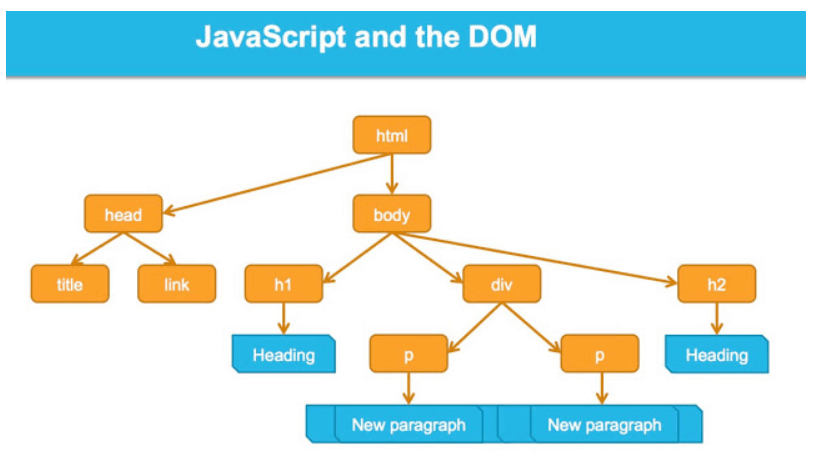
Understanding Nodes vs Elements
Every individual component in the DOM structure — whether it’s an HTML element, an attribute, or text content — is represented as a Node object. Here’s something important to understand: while every HTML element is a node, not every node is an element. For example, attributes and text content are also separate nodes in the DOM tree.
Essential Node Properties
The Node object gives us several useful properties to work with:
Child-related properties:
childNodes- returns all child nodes (including text and comments)children- returns only child elements (no text nodes)firstChild- gets the first child nodefirstElementChild- gets the first child elementlastChild- gets the last child nodelastElementChild- gets the last child element
Sibling properties:
previousSibling- returns the previous node at the same levelnextSibling- returns the next node at the same levelpreviousElementSibling- returns the previous element siblingnextElementSibling- returns the next element sibling
Parent and document properties:
parentNode- returns the parent nodeparentElement- returns the parent elementownerDocument- returns the root document node
Node information:
nodeName- returns the node's namenodeType- returns the node type as a numbernodeValue- returns text content for text nodes
Identifying Node Types
Let’s start with the basics — figuring out what type of node we’re dealing with:
const article = document.getElementById("article");
console.log(article.nodeName); // "DIV"
console.log(article.nodeType); // 1
Here are the most common node types:
1 — Element node
2 — Attribute node
3 — Text node
Working with Parent Elements
There are two ways to get a parent element:
const header = document.getElementById("header");
const parent = header.parentElement; // Preferred method
// const parent = header.parentNode; // Alternative
Pro tip: For the element, parentElement returns null, but parentNode Returns the document object. This is the only difference between these two properties.
Checking for Child Nodes
Use hasChildNodes() to see if an element contains any children:
const article = document.querySelector("div");
if (article.hasChildNodes()) {
    console.log("This element has children");
} else {
    console.log("No children found");
}
Iterating Through Child Elements
The children property gives you only the element nodes:
const article = document.getElementById("article");
for (const element of article.children) {
    console.log(element);
}
If you need all nodes (including text), use childNodes:
const article = document.getElementById("article");
for (const node of article.childNodes) {
    let nodeDescription = "";
    switch(node.nodeType) {
        case 1: nodeDescription = "element"; break;
        case 2: nodeDescription = "attribute"; break;
        case 3: nodeDescription = "text"; break;
    }
    console.log(`${node.nodeName}: ${nodeDescription}`);
}
Important note: Whitespace between HTML elements creates text nodes! If your HTML looks like this:
<div id="article">
    <h1>Title</h1>
    <p>Text</p>
</div>
You’ll get 5 nodes: text (whitespace), h1, text (whitespace), p, text (whitespace).
Getting First and Last Elements
const article = document.getElementById("article");
console.log("First element:", article.firstElementChild);
console.log("Last element:", article.lastElementChild);
Counting Child Elements
const article = document.getElementById("article");
console.log(article.childElementCount); // Number of child elements
console.log(article.children.length);   // Same result, different approach
Traversing Siblings
You can navigate through elements at the same level:
const article = document.getElementById("article");
let currentElement = article.firstElementChild;
while (currentElement !== null) {
console.log(currentElement);
currentElement = currentElement.nextElementSibling;
}To go backwards:
let currentElement = article.lastElementChild;
while (currentElement !== null) {
    console.log(currentElement);
    currentElement = currentElement.previousElementSibling;
}
Getting Text Content
The nodeValue property only works on text nodes, not elements:
const paragraph = document.getElementById("text");
console.log(paragraph.nodeValue); // null - this won't work!
// Instead, access the text node inside the element:
for (const textNode of paragraph.childNodes) {
if (textNode.nodeType === 3) { // Text node
console.log(textNode.nodeValue);
}
}Better approach: While this technique works, there are more convenient methods like textContent and innerHTML that we'll cover in other tutorials.
Quick Reference Example
Here’s a complete example showing these concepts in action:
<!DOCTYPE html>
<html>
<head>
    <meta charset="utf-8">
    <title>DOM Navigation Example</title>
</head>
<body>
    <div id="container">
        <h1 id="title">Welcome</h1>
        <p>First paragraph</p>
        <p>Second paragraph</p>
        <p>Third paragraph</p>
    </div>

    <script>
        const container = document.getElementById("container");
        const title = document.getElementById("title");

        // Parent relationships
        console.log(title.parentElement === container); // true

        // Child relationships
        console.log(container.firstElementChild === title); // true
        console.log(container.children.length); // 4 elements

        // Sibling relationships
        const secondParagraph = title.nextElementSibling.nextElementSibling;
        console.log(secondParagraph.textContent); // "Second paragraph"
    </script>
</body>
</html>
Understanding these DOM navigation properties is crucial for dynamic web development. They give you precise control over how you traverse and manipulate the document structure.