

1.Which end does the code in the event execute on, the server side or the client side?
for i := 0 to 20 do begin
if Frm[i]<>nil then
if Frm[i].Name=ProCaption then begin
BaseFrame:=Frm[i];
isOpen:=True;
Break;
end;
end;
if isOpen then Exit;
Why is this code executed on the server side rather than on the client side?
The operational mechanism of UniGui is such that unless specified in the clientevents, everything else is executed by UniGui through backend programs, processed, and then sent back to the client's browser for display in JavaScript.
2. Why do UNIGUI controls display smaller and blurry fonts in IE?
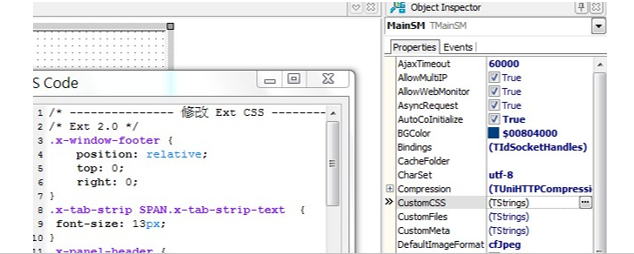
Modify the content of CustomCSS in UniSessionModule to change the font.
/* --------------- Modify Ext CSS -------------- */
/* Ext 2.0 */
.x-window-footer {
position: relative;
top: 0;
right: 0;
}
.x-tab-strip SPAN.x-tab-strip-text {
font-size: 13px;
}
.x-panel-header {
font-size: 13px;
}
.x-tree-node {
font-size: 13px;
}
.x-grid3-hd-row TD {
font-size: 13px;
}
.x-grid3-row TD {
font-size: 13px;
LINE-HEIGHT: 18px;
}
.x-tip .x-tip-bd {
font-size: 13px;
}
.x-tip h3{
font-size: 13px;
}
.x-tip .x-tip-bd-inner{
font-size:13px;
}
.x-panel-tl .x-panel-header {
FONT: normal 13px tahoma,arial,verdana,sans-serif;
}
.x-form-field {
FONT: 13px tahoma,arial,helvetica,sans-serif
}
.x-small-editor .x-form-field {
FONT: 13px tahoma,arial,helvetica,sans-serif
}
.x-combo-list-item {
FONT: 13px tahoma,arial,helvetica,sans-serif;
}
.x-btn button,x-toolbar .x-item {
FONT: 13px tahoma,arial,sans-serif;
}
.x-menu-list-item {
FONT: 13px tahoma,arial,sans-serif;
}
.x-window-tl .x-window-header {
FONT: bold 13px tahoma,arial,verdana,sans-serif;
}
.x-layout-split-west .x-layout-mini {
BACKGROUND-IMAGE: url(../images/mini-left.jpg);
}
.x-form-text {
margin-top:1px;
} / the textField missing bottom line /
.x-form-item {
FONT: 13px tahoma,arial,helvetica,sans-serif
}
.x-grid-group-hd DIV {
FONT: bold 13px tahoma,arial,helvetica,sans-serif;
}
/Add by extjs.org.cn /
.x-btn-text{
font: 12px tahoma,arial,sans-serif;
}
/ END /
3. SHOWMESSAGE() cannot be used on the browser side.
Function ShowMsg(AskString:String):Boolean;
begin
if MainForm.WebMode then
UniSession.AddJS('alert("' +AskString+ '"); ') //must uses uniGUIApplication
else
Showmessage(AskString);
end;
"ShowMessage" is not available for execution in the browser.
4. Modify the project file to compile the EXE program into a DLL.
Project->View Source
{$define UNIGUI_VCL} // Comment out this line to turn this project into an ISAPI module'
{$ifndef UNIGUI_VCL}
library
{$else}
program
{$endif}
Project1;
Change "{$define UNIGUI_VCL}" to "//{$define UNIGUI_VCL}" and recompile to create a DLL.
5. Setting up ADO in UniGui.
Set AutoCoInitialize to True in UniServerModule.
6. How can MAINMODULE retrieve the value of a JS variable?
MainForm.UniTrackBar1.setValue(sender.field.getValue());
7. What is the difference between TUniServerModule and TUniMainModule?
TUniServerModule is shared by all clients, only one is created globally. TUniMainModule is used for your connection, with one created for each connection.
8. What is typically placed in MainModule and ServerModule?
If a database is being used, ADOConnection1, ADOQuery1, and DataSource1 should be placed in the MainModule.
9. How to remove the title of the main form?
You can set the display mode of the main form in UniServerModule by using the property MainFormDisplayMode:
- mfPage: Main form without borders
- mfWindows: Standard form with borders
10. Using EXTEVENT to open links and download files.

This setting can achieve opening a link, and if it's a file, it will be downloaded.
11.WEBAPPLICATION displays a dialog box.
application.messagebox is not allowed; you must use WebApplication instead of application.
12.Adding and removing SERIES in UNICHART within UNI.
It seems that Unichart cannot dynamically add Series as there is no
AddSeries()method. Therefore, you can only create a few extra Series in advance and hide them as needed. Alternatively, you could consider drawing directly on the canvas. However, this has not been tested yet.
13.How to create a set of variables for each online user and immediately clear them when the user disconnects?
The demo's session example seems to only address timeout. How should the rest be handled?
Additionally, can an invisible label be used, similar to a hidden field?
For user-specific private variables, please define them as public in the MainModule.
public { Public declarations } // Define variables here as user-specific private variables
LocalCacheURL:String;
LocalCachePath:String;
StartPath:String;
ExtFullPath:String;
ServerRoot:String;
ServerIni:String;
StartFlagMainDm:Boolean; //
User,Test:String ;
Comp:array of TComponent; CompCount:integer;
A global variable means that USER1, USER2, and USER3 will see the same value.
14.The purpose of TUNIHIDDENPANEL.
Place a
TUNIHIDDENPANELon the form, and any components placed on it will be hidden. TheTUNIHIDDENPANELhas visual components at design time, but they are invisible at runtime. It functions similarly to a hidden field in ASP or theHIDDENattribute in HTML.
15.Can JavaScript access the values of Delphi controls?
Can the values written in JavaScript inside the htmlFrame be accessed in Delphi? Or in other words, can JavaScript access Delphi control values?
Yes, JavaScript can access Delphi control values. You can write JavaScript in the control's
ClientEvents.ExtEventorUniEvents. For examples, you can refer to the UniGUI forum forClientEvents.
16.Application of SENDFILE()
What are the parameters in
UniSession.SendFile()for downloading to the client-side storage?
UniSession.SendFile(MainSm.LocalCachePath+Fn, Fn);// The client downloads the file,fnis the file name (server-side file, client-side file name).Or:
LabDownLoad.Caption := '<a href="'+UniServerModule.TempFolderURL+FName+ '" target=new>Click here to download: ('+FName+')</a>';
17.Using the CANVAS in UniGUI
procedure TMainForm.UniImage1MouseUp(Sender: TObject; Button: TMouseButton;
Shift: TShiftState; X, Y: Integer);
begin
UniImage1.Picture.Bitmap.Canvas.Pen.Color := clWebred;
UniImage1.Picture.Bitmap.Canvas.Pen.Width := 1;
UniImage1.Picture.Bitmap.Transparent := true;
if Button = mbLeft then
begin
if x0 = '' then
begin
x0 := inttostr(x);
y0 := inttostr(y);
UniLabel2.Caption := x0 + ',' + y0 + ',';
end
else
begin
UniImage1.Picture.Bitmap.Canvas.MoveTo(strtoint(x0), strtoint(y0));
UniImage1.Picture.Bitmap.Canvas.LineTo(x,y);
x0 := inttostr(x);
y0 := inttostr(y);
UniLabel2.Caption:=UniLabel2.Caption+ x0 + ',' + y0 + ',';
end;
end;
end;
18.Dynamically create TTABSHEET or TUNITABSHEET
Function CreatePageControl(PageName,Caption:String;PageControl:TComponent):TControl;
var NewTabSheet: TTabSheet;
NewUniTabSheet:TUniTabSheet;
TabSheet: TControl;
Err:String;
begin
Err:='';
TabSheet:=Nil;
//----VCL Form
if PageControl.ClassType=TPageControl then
begin
TabSheet:=TPageControl(PageControl).FindChildControl(PageName);
if TabSheet<>Nil then
//Err:='Page: '+PageName+'Tab1'
else
begin
NewTabSheet:=TTabSheet.Create(PageControl); //abSheet
NewTabSheet.PageControl:=TPageControl(PageControl);
NewTabSheet.Name:=PageName;
NewTabSheet.Caption:=Caption;
TabSheet:= NewTabSheet;
end;
end;
//----Uni Web Form
if PageControl.ClassType=TUniPageControl then
begin
TabSheet:=TUniPageControl(PageControl).FindChildControl(PageName);
if TabSheet<>Nil then
//Err:='Page: '+PageName+'Tab1'
else
begin
NewUniTabSheet:=TUniTabSheet.Create(PageControl);
NewUniTabSheet.PageControl:=TUniPageControl(PageControl);
NewUniTabSheet.Name:=PageName;
NewUniTabSheet.Caption:=Caption;
TabSheet:= NewUniTabSheet;
end;
end;
Result:=TabSheet;
end;
19.How to get the SESSION status in UniGUI
In the ServerModule unit, there are the following properties that can be used:
ServerModule.UniServerModule.ServerStats.ActiveSessions
ServerModule.UniServerModule.ServerStats.MaxSessions
ServerModule.UniServerModule.ServerStats.BytesSent
ServerModule.UniServerModule.ServerStats.BytesReceived
20.How to prevent closing a new window in UniGUI?
Disable the system menu of the new window to remove the close button (X).
Add a new button to the form, with the click event as:
close;In the form's
OnCloseevent, add the following code:action := canone;// This line must be placed before the MessageDlg.MessageDlg(xxxxxxx);
21.Changes in control class names in UniGUI
Today, a friend encountered a problem while using UniGUI. He wanted to loop through the controls on a form and perform actions based on the class name.
The original code was:
procedure TMainForm.Fj_component;
var
  i: Integer;
begin
  for i := 0 to MainForm.ComponentCount - 1 do
  begin
    UniMemo1.Lines.Add(MainForm.Components[i].ClassName);
    if MainForm.Components[i] is TUniBitBtn then
    begin
      UniLabel1.Caption := 'found';
      (MainForm.Components[i] as TUniBitBtn).Enabled := false;
    end;
  end;
end;
This code didn't work, and after debugging, it was found that the class name of
TUniBitBtnin the web version had been changed toTUniExtBitBtn. This indicates that the class names in the web version are different from those in the Win32 application, and the controls are reclassified for the web environment.
22.UniGUI FUNC for SESSIONS
UniServerModule.ServerStats.FMaxSessions; // Maximum sessions
UniServerModule.ServerStats.FMaxRequests; // Maximum requests
UniServerModule.ServerStats.FActiveSessions; // Active sessions
UniServerModule.ServerStats.FActiveRequests; // Active requests

procedure TMainForm.IsConnect(var Message: TMessage);
begin
  UniLabel4.Caption := 'Current connections: ' + IntToStr(UniServerModule.ServerStats.MaxSessions);
  UniLabel5.Caption := 'Current requests: ' + IntToStr(UniServerModule.ServerStats.MaxRequests);
end;

procedure TMainForm.IsClose(var Message: TMessage);
begin
  IsConnect(Message);
end;
This code retrieves server statistics from
UniServerModule.ServerStatsand updates labels (UniLabel4andUniLabel5) with the current number of sessions and requests.
23.How to make Captcha in unigui?
unit UniCaptcha;
interface
uses
classes,
Graphics,
uniImage;
type TUniCaptcha=class(TUniImage)
private
FChallenge:ShortString;
procedure Render;
public
constructor create(Owner:TComponent);override;
procedure SetChallenge(aChallenge :ShortString);
published
property Challenge :ShortString read FChallenge write FChallenge;
end;
procedure Register;
implementation
constructor TUniCaptcha.Create(Owner:TComponent);
begin
inherited;
end;
procedure TUniCaptcha.SetChallenge(aChallenge:ShortString);
begin
FChallenge:= aChallenge;
Render;
end;
procedure TUniCaptcha.render;
Var
b :TBitmap;
i :Integer;
begin
b :=TBitmap.Create;
with b do
begin
b.Width :=self.Width;
b.height :=self.Height;
For i :=0 to 30dobegin
randomize;
canvas.Pen.Width := random(5)+5;
Canvas.Pen.Color := random(64738)+64738;
Canvas.Brush.Style := bsFDiagonal;
Canvas.Ellipse(random(width),random(Height),random(width),random(height));
end;
Canvas.Font.Color:= clBlue;
Canvas.Font.Size :=18;
Canvas.TextOut(10,trunc(self.height/2),FChallenge);
Canvas.Font.Color:= clRed;
Canvas.TextOut(8,trunc(self.height/2)-2,FChallenge);
end;
Picture.Assign(B);
b.Free;
end;
procedure Register;
begin
RegisterComponents('UniCustom',[TUniCaptcha]);
end;
end.
24.Operations between CLIENT JAVASCRIPT and DELPHI components in UniGUI
Operations between CLIENT JAVASCRIPT and DELPHI components in UniGUI:
UniLabel component:
function OnClick(sender, e) {
    MainForm.UniLabel1.setText('Click!');
}

function Onmousemove(sender, x, y) {
    MainForm.UniLabel1.setPosition(x, y);
}
UniButton component:
function OnMouseout(sender, e) {
    sender.setText('Out');
}
UniEdit component:
function form.Onmousemove(sender, x, y) {
    MainForm.UniEdit1.setValue(x + ' : ' + y);
    ss = MainForm.UniEdit1.getValue();
}
This example demonstrates how to interact between JavaScript (client-side) and Delphi components (server-side) in UniGUI. The JavaScript functions change the properties of UniGUI components, such as
UniLabel,UniButton, andUniEdit, by setting or getting values.