

A Practical Guide for Teams
Imagine working on a document, making changes, and then accidentally deleting a crucial paragraph. Or picture collaborating with a colleague on a project, only to have your changes overwritten. These scenarios are frustrating, time-consuming, and all too common in the world of software development and data science. This is where Git comes in.
Git is a powerful version control system (VCS) that tracks changes to your files over time. It’s like a time machine for your projects, allowing you to:
Revert to Previous States: Easily go back to earlier versions of your files if something goes wrong.
Track Changes: See who made what changes, when, and why.
Collaborate Effectively: Work with others on the same project without overwriting each other’s changes.
Experiment Safely: Try out new ideas without affecting the main codebase.
Maintain a History: Keep a complete record of your project’s evolution.
Whether you’re a software developer, data scientist, or anyone working on digital projects using code, Git is an essential tool that will save you time, reduce frustration, and improve your workflow.
1. Core Concepts
To effectively use Git, it’s important to understand its core concepts:
Repository (Repo): A repository is a directory containing all the files and the history of changes for a project. It can be local (on your computer) or remote (hosted on a platform like GitHub, GitLab, or Bitbucket).
Commit: A commit is a snapshot of your project at a specific point in time. It includes the changes you’ve made since the last commit, along with a message describing those changes.
Branch: A branch is a parallel version of your project. It allows you to work on new features or bug fixes without affecting the main codebase. The main branch is often called main or master.
Staging Area (Index): Before you commit changes, you need to add them to the staging area. This allows you to selectively choose which changes you want to include in your next commit.
Working Directory: This is the directory where you are actively working on your project. It contains the actual files that you are editing.
Remote: A remote is a pointer to a repository hosted on a server. This allows you to collaborate with others and back up your work.
2. Basic Git Commands
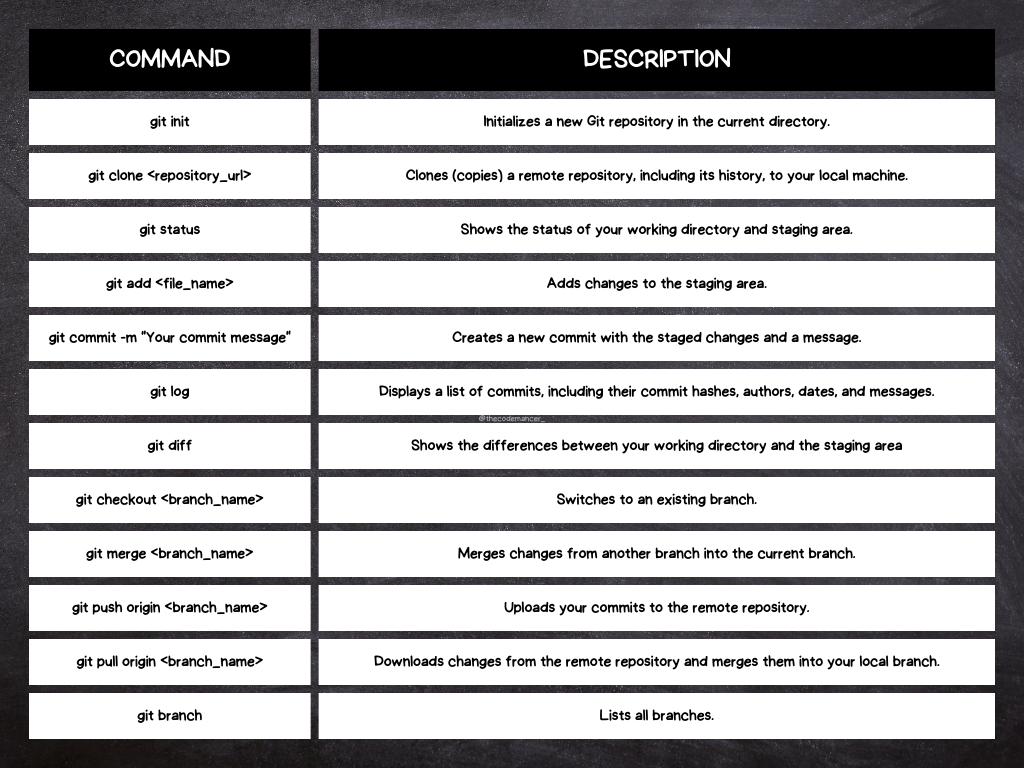
Git cheatsheet elaborated by the author.
Here are some essential Git commands that you’ll use regularly:
📚 Keep reading here: https://davidregalado255.medium.com/how-to-get-started-with-git-0dd1eeae2ad9