

In the ever-evolving landscape of digital marketing, the ability to manage and utilize data effectively is paramount. Salesforce Marketing Cloud (SFMC) stands at the forefront of this domain, offering robust solutions that empower marketers to craft personalized customer experiences. A key feature facilitating this is the REST API, which allows seamless integration of data into Data Extensions.
Data Extensions in SFMC serve as the foundation for storing and managing customer data. They are customizable tables that can hold vast amounts of information, from contact details to behavioral insights. REST API acts as a bridge between SFMC and external data sources, enabling marketers to add, update, and retrieve data programmatically.

The process of adding data into a Data Extension via REST API involves several steps, Let’s break it down:
Step 1: Establish an API Endpoint
Create an API endpoint by by configuring an Installed Package in SFMC
Verify that you possess the necessary read/write permissions for the targeted data extension you aim to access via the API.
Use the authorization endpoint to obtain the Bearer token, which is essential for inserting data rows into the Data Extension.
Step 2: Use the REST API Endpoint
There exist 2 APIs to perform the insert task
Async Insert method
Upsert method
To insert data into a Data Extension, you’ll use any one of the REST API endpoint of your choice.
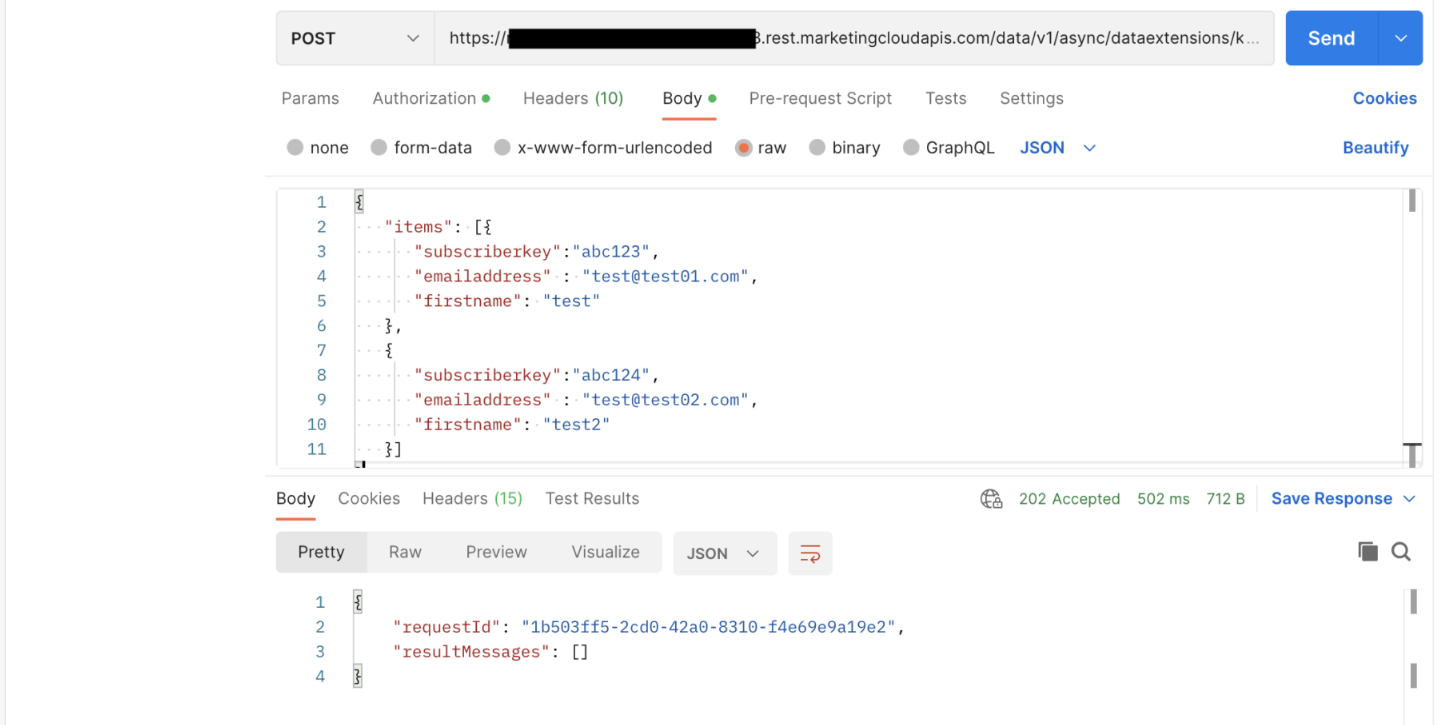
1. Async Insert method:
SFMC allows you to insert data into a Data Extension without a primary key using the Async Insert method
Format:
Host: https://YOUR_SUBDOMAIN.rest.marketingcloudapis.com
POST /data/v1/async/dataextensions/key:{{YourDECustomer_Key}}/rows
Content-Type: application/json
Authorization: Bearer YOURACCESSTOKEN
Body:
{
"items":
[
{
"FieldName": "value",
"fieldName": "value"
..
},
..
]
}
Replace placeholders like YOURSUBDOMAIN, YourDECustomerKey, and YOURACCESSTOKEN with actual values.
Ensure to include primary keys or non-nullable fields in the JSON body; omitting these will result in a failed operation.
2. Upsert method:
Primary Keys are crucial for employing this method; it updates an existing row upon finding a match or inserts a new one if no match is found.
Format
Host: https://YOUR_SUBDOMAIN.rest.marketingcloudapis.com
POST /hub/v1/dataevents/Key:{{YourDECustomer_Key}}/rowset
Content-Type: application/json
Authorization: Bearer YOURACCESSTOKEN
Body:
[
{
"keys":
{
"PrimaryFieldName": "value",
"PrimaryFieldName": "value"
..
},
"values":
{
"FieldName": "value",
"fieldName": "value"
..
}
},
..
]
Replace placeholders like YOURSUBDOMAIN, YourDECustomerKey, and YOURACCESSTOKEN with actual values.
In the JSON body, ensure that you include all primary keys in the ‘Keys’ object and all non-nullable fields in the ‘Values’ object; otherwise, the operation will fail

The integration of data into Data Extensions via SFMC’s REST API is a game-changer for data-driven marketing. It not only streamlines workflows but also enhances the accuracy and effectiveness of marketing campaigns.
Support for more similar contents by 'Buy Me a Coffee'
#happycoding!