
Diar: the top bar, the date ring, the fitness rings and complications
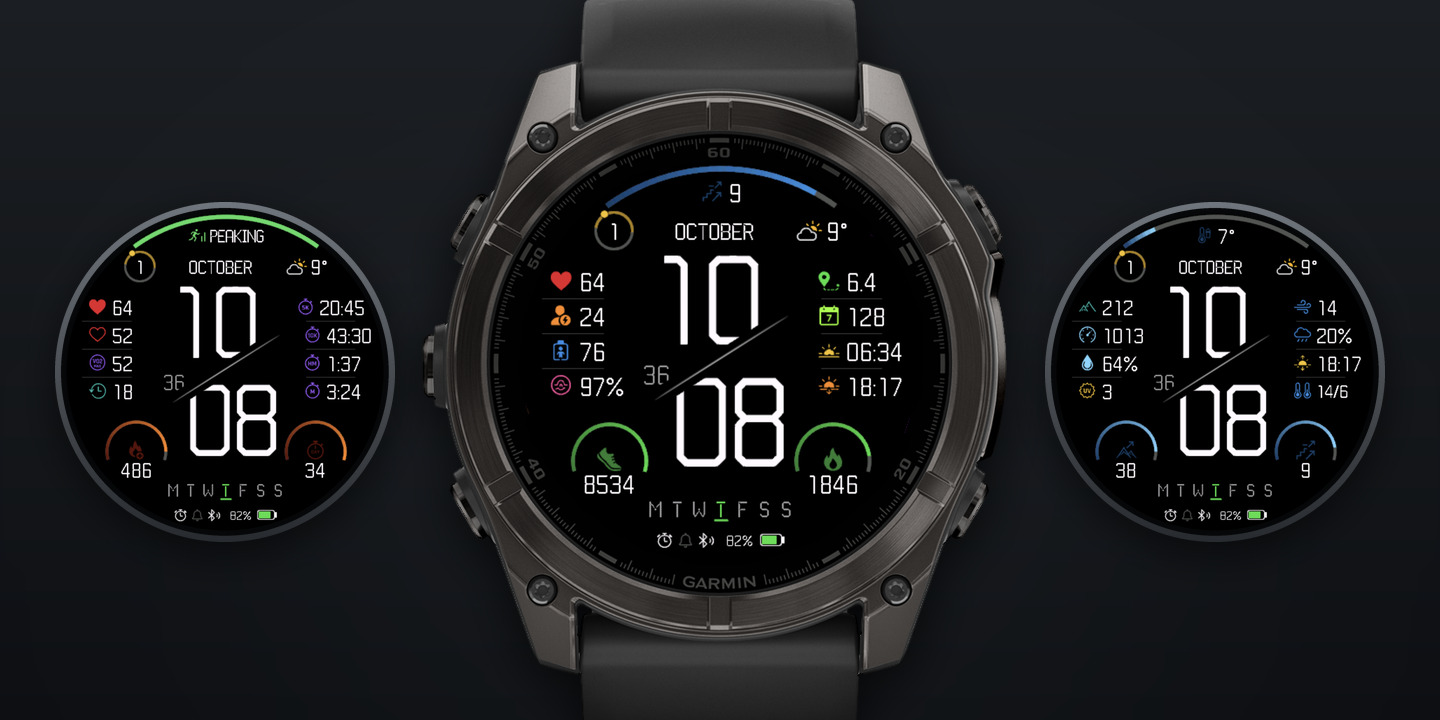
Diar is completely free. You can use it with no time limit.
Missing a parameter? If you'd like a parameter added to the bar or the rings, write to [email protected] or use the Contact Developer form on the Diar page in the Connect IQ Store.
Where to change the settings: open the Connect IQ app or Garmin Connect on your phone, then go to Diar → Settings.
---
1. The top bar
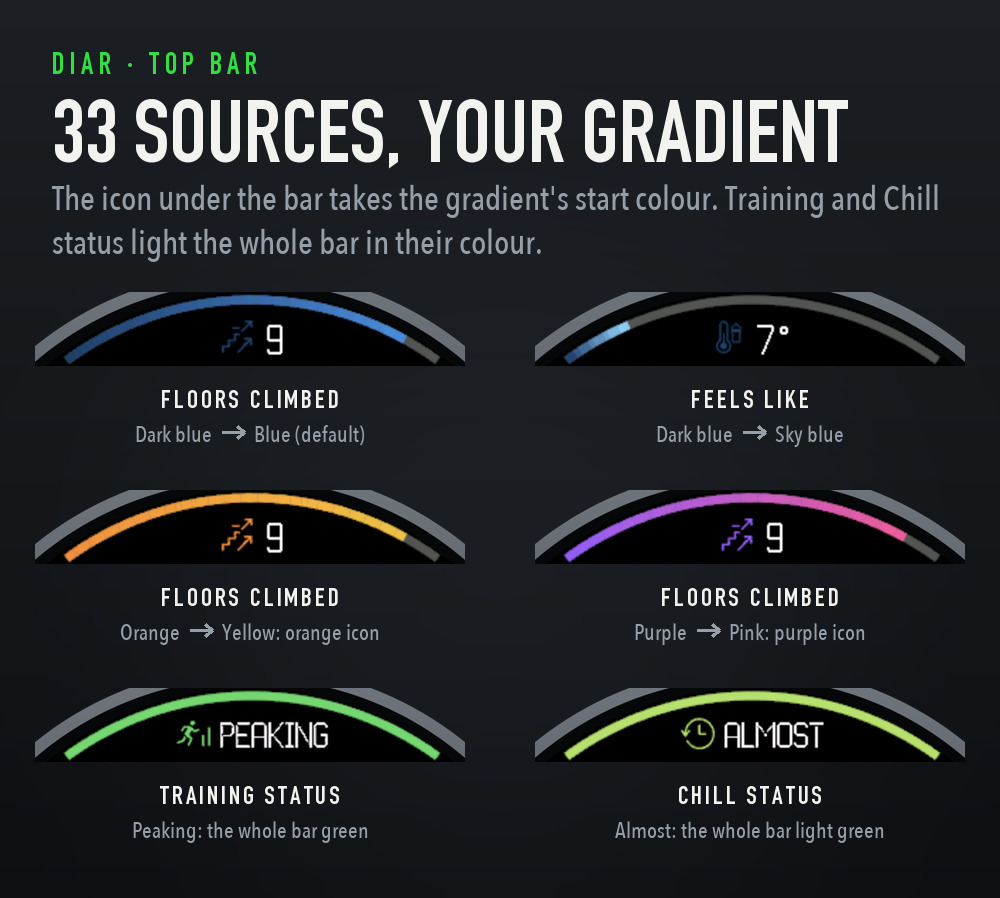
The top bar is the gradient arc along the top edge of the face. Its icon and value sit under the middle of the arc. The default is Floors climbed.
Parameters (33):
- Activity: Steps, Steps to goal, Calories (total), Active calories, Floors climbed, Floors descended, Meters climbed, Meters descended, Active minutes (day), Active minutes (week), Move bar, Wheelchair pushes
- Health and recovery: Heart rate, Stress, Body Battery, Pulse Ox (SpO2), Respiration rate, Hours to recovery, Hours to chill, Chill status
- Training: VO2 Max (run), VO2 Max (bike), Training status
- Weather: Feels like, Humidity, Precipitation chance, Wind speed, High temperature, Low temperature
- Sun: Sunrise, Sunset, Next sun event
- Watch: Battery
How the bar fills:
- Goals: Steps, Floors climbed, Active minutes (week) and Wheelchair pushes fill up to the goals you set in Garmin Connect. Active minutes (day) fills up to a seventh of the weekly goal. Without a goal the face uses 10,000 steps, 10 floors, 150 minutes and 10,000 pushes.
- Steps to goal works the other way: the bar starts full at midnight and empties as you walk.
- Fixed scales: Stress, Body Battery, Battery, Humidity and Precipitation chance fill 0–100; Pulse Ox 80–100%; Move bar its 5 levels; Respiration rate 0–40 breaths per minute.
- Heart rate: up to the top of your heart-rate zone 5 (or 220 minus your age).
- Temperatures (Feels like, High, Low): 0–40 °C, widening on very hot days; at 0 °C and below the bar is empty. Wind speed: 0–40 km/h, widening in strong wind.
- Hours to recovery / Hours to chill: 48 hours fills the bar; above 48 hours the scale doubles to 96.
- Calories (total), Active calories, Floors descended, Meters climbed, Meters descended fill toward a soft reference: steadily up to 70%, slower after that, and never quite full, so an open-ended total keeps moving all day.
- Calorie goal (setting): 0, the default, is the automatic scale above for Calories (total). Any other number is a hard goal, and the bar fills exactly at that many calories. The same setting applies to Calories (total) in the rings.
- Sunrise, Sunset, Next sun event: the bar is a 24-hour dial. Its left end is midnight, the middle is noon, and the fill ends at the event's time.
- VO2 Max (run and bike): by fitness category for your age and sex, a fifth of the bar per category, from Poor to Superior.
Status bars: Training status and Chill status have no amount to fill. They light the whole bar in the colour of the state and show the state as a word under the bar.
- Training status: Peaking and Productive green, Maintaining light green, Recovery yellow, Unproductive and Detraining orange, Overreaching and Strained red. Any other word uses the bar's gradient start colour.
- Chill status: CHILLED green, ALMOST light green (up to 12 h to chill), EASY DAY yellow (up to 24 h), REST orange (up to 48 h), WRECKED red (more than 48 h).
Colour: a gradient
- Two settings, Top bar: gradient start and Top bar: gradient end, each with any of 16 colours: Green, Blue, Red, Yellow, Orange, Teal, Lime, Purple, Pink, Sky blue, White, Gray, Dark green, Dark blue, Dark red, Charcoal.
- The default is Dark blue → Blue.
- The whole gradient fits into the filled part of the bar, so its front edge is always the end colour, at 20% just as at 100%. The unfilled part stays grey.
- Pick the same colour twice for a solid bar.
How the icon colour is chosen:
- The icon under the bar takes the gradient start colour, so it reads as the place where the fill begins.
- A dark start (Dark green, Dark blue, Dark red, Charcoal) gives a dark icon, as with the default Dark blue. For a brighter icon, pick a brighter start colour, for example Orange → Yellow gives an orange icon.
- On a status bar (Training status, Chill status) the icon takes the state's colour instead.
- The value is always white.
The bar is a complication: press and hold it to open the watch's screen for its source (section 4). Units follow your watch settings, and "--" means there is no reading yet.
2. The ring around the date
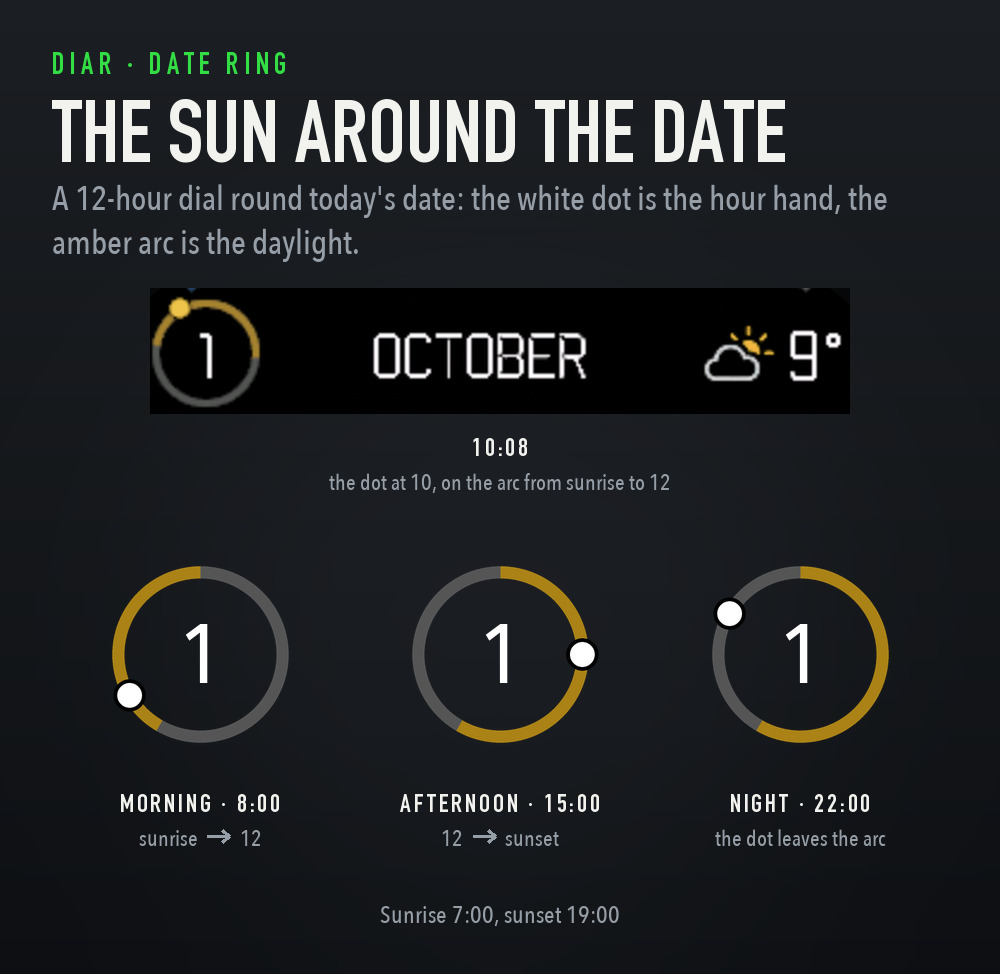
Today's date sits inside a small ring at the left end of the date line. The ring is a 12-hour clock face with 12 at the top:
- The white dot stands where the hour hand would point. At 10:08 it is just past 10.
- The amber arc is the daylight inside the current 12 hours: before noon it runs from sunrise to 12, after noon from 12 to sunset.
- So while the sun is up, the dot travels along the amber arc. In the morning the arc starts where the sun rose; in the afternoon it ends where the sun will set, and you can see how far the dot still has to go.
- After sunset the dot leaves the arc and moves over the grey part of the ring. Before sunrise it is on the grey part, heading for the start of the arc.
- The ring shows only the current 12 hours on purpose: a day longer than 12 hours would light the whole ring, and neither sunrise nor sunset would show.
- Sunrise and sunset are worked out on the watch for your last known location (from the weather, your last activity with GPS or the watch's last position) and refreshed every hour. The face never switches GPS on. Until a location is known, only the dot is shown.
Press and hold the ring or the month to open the calendar (section 4).
3. The fitness rings
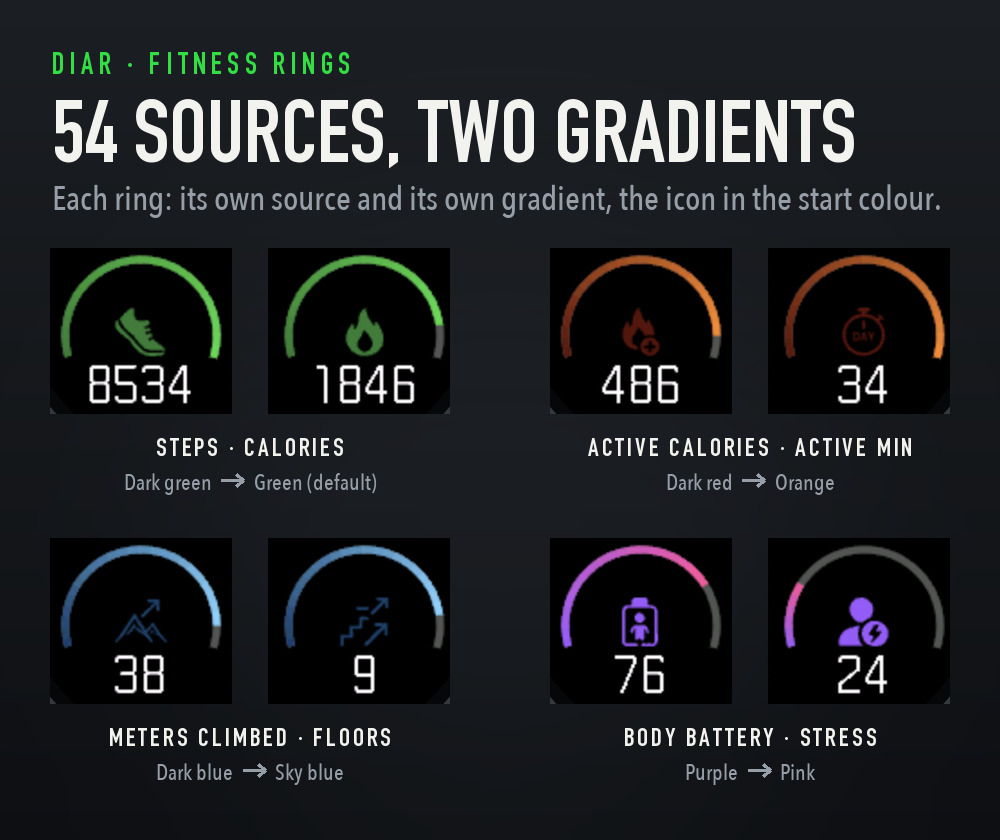
The two rings sit in the lower corners of the face. Each has a gradient arc, open at the bottom, with its icon inside and its value underneath.
Full version: changing the data source and the colours of the rings is a paid feature ($3, see the last section of the page how to pay for a full version). In the free version the left ring shows Steps and the right ring shows Calories (total), both in Dark green → Green.
Parameters (54):
- Activity: Steps, Steps to goal, Distance, Calories (total), Active calories, Floors climbed, Floors descended, Meters climbed, Meters descended, Active minutes (day), Active minutes (week), Move bar, Wheelchair pushes, Weekly run distance, Weekly bike distance
- Health and recovery: Heart rate, Resting heart rate, Stress, Body Battery, Pulse Ox (SpO2), Respiration rate, Hours to recovery, Hours to chill, Body weight
- Training: VO2 Max (run), VO2 Max (bike), Race predictor 5K / 10K / Half / Marathon, Race pace 5K / 10K / Half / Marathon
- Weather: Feels like, Humidity, Precipitation chance, Wind speed, UV index, Visibility, High temperature, Low temperature
- Sun: Sunrise, Sunset, Next sun event
- Outdoors and position: Altitude, Pressure, Latitude, Longitude
- Watch, phone and calendar: Battery, Battery in days, Alarm, Notifications, Week number
How the rings fill: the same way as the top bar (section 1), plus Pressure on a 970–1050 hPa scale. Calorie goal works here too.
Value only: 22 parameters have no natural maximum, so the ring shows its grey track, the icon and the value, with no fill: Distance, Resting heart rate, Body weight, Battery in days, Alarm, Notifications, Altitude, UV index, Visibility, Week number, Latitude, Longitude, the four Race predictors, the four Race paces, Weekly run distance and Weekly bike distance.
A few values to know:
- Race predictor: the predicted finish time (h:mm or m:ss). Race pace: the pace for that race, per km or per mile.
- Next sun event: today's sunrise before sunrise, today's sunset during the day, and tomorrow's sunrise after sunset. The icon changes with it.
- Alarm and Notifications: how many alarms are set and how many notifications are waiting.
- Week number: the ISO week.
Colour: a gradient for each ring
- Left ring: gradient start / gradient end and Right ring: gradient start / gradient end, each with any of the same 16 colours as the bar. The two rings can have different colours.
- The default for both is Dark green → Green.
- It works just like the bar: the gradient fits into the filled part, its front edge is the end colour, and the icon takes the gradient start colour. A dark start gives a dark icon (see Active minutes in the picture, with Dark red → Orange). The value is always white.
Each ring is a complication too: press and hold it to open the watch's screen for its source (section 4).
4. Complications: press and hold
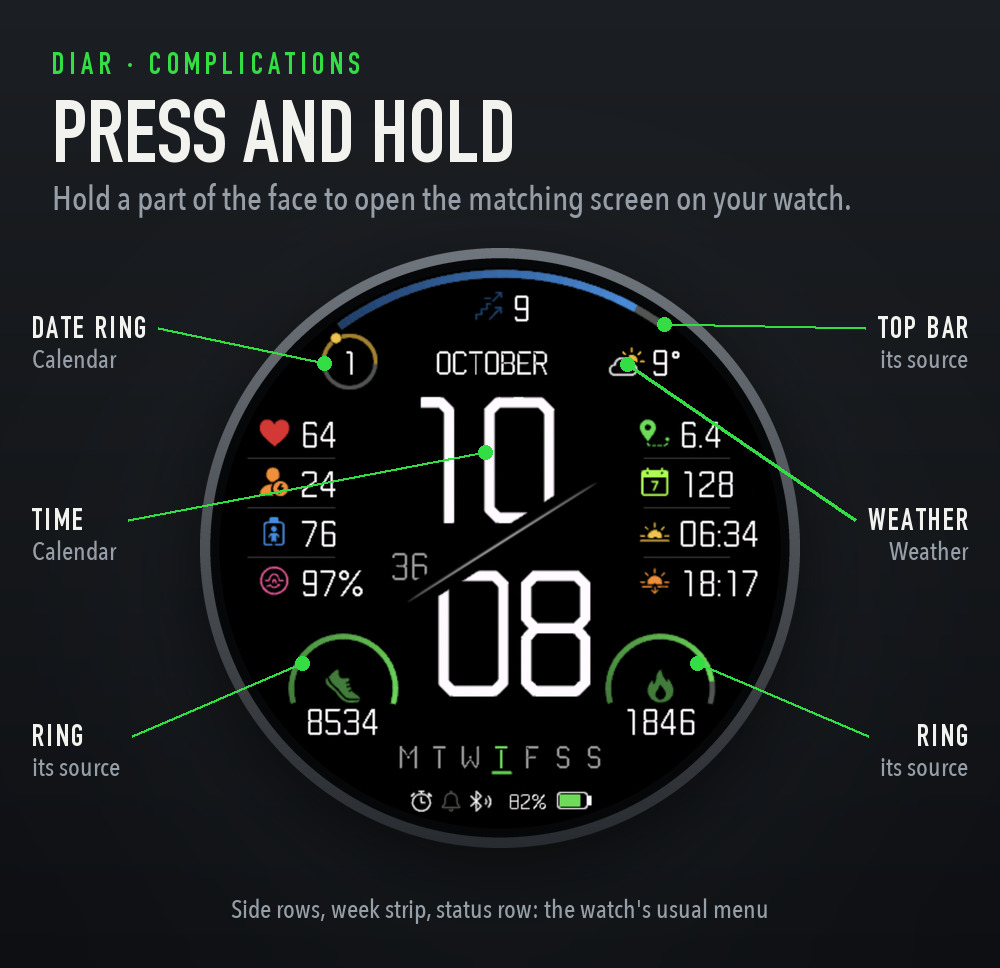
Diar's top bar, both rings, the date line and the time are complications. Press and hold one of them and the watch opens the matching screen:
- Time (the hours, minutes, seconds and the diagonal): Calendar
- Date ring and month: Calendar
- Weather icon and temperature: Weather
- Top bar, left ring, right ring: the screen for the source shown there, so it follows your settings. Switch the bar from Floors climbed to Body Battery, and holding it opens Body Battery.
What the bar and the rings open, source by source:
- Steps: Steps, Steps to goal, Distance, Move bar
- Calories: Calories (total), Active calories
- Floors: Floors climbed, Floors descended, Meters climbed, Meters descended
- Intensity minutes: Active minutes (day), Active minutes (week)
- Wheelchair pushes: Wheelchair pushes
- Heart rate: Heart rate, Resting heart rate
- Stress, Body Battery, Pulse Ox, Respiration: each opens its own screen
- Recovery time: Hours to recovery, Hours to chill, Chill status
- VO2 Max: VO2 Max (run), VO2 Max (bike), each its own
- Training status: Training status
- Race predictor: each Race predictor and Race pace opens its own distance
- Weekly run / bike distance: each its own
- Battery: Battery, Battery in days
- Notifications: Notifications
- Altitude, Pressure: each its own
- Weather: Feels like, Humidity, Precipitation chance, Wind speed, UV index, Visibility
- Forecast high / low: High temperature, Low temperature
- Sunrise / Sunset: Sunrise, Sunset, and Next sun event (whichever it shows)
- Calendar: Week number
- No screen: Body weight, Alarm, Latitude, Longitude
Good to know:
- Fallbacks: if your watch doesn't offer a screen, Diar tries the closest one. For example, in wheelchair mode Steps and Floors open Pushes, Sunrise opens Sunset when needed, and the high / low forecast falls back to the current weather. With no screen at all, the hold goes to the watch as usual.
- Which screens exist depends on your watch. Training status, the race predictors, VO2 Max (bike) and recovery time aren't on every model.
- The watch face menu still works: the side rows, the week strip and the status row aren't complications, so holding there brings up the watch's usual menu for changing or customising the face.
- Holds do nothing on the always-on screen.
## 5. Languages and supported watches
Language: Diar is in English on every watch language: the month names, the week strip, the status words (PEAKING, CHILLED, EASY DAY and so on) and the settings on the phone. Numbers and icons need no translation.
Supported watches (25):
- fēnix 8 (43 / 47 mm), fēnix 8 Pro 47 mm, fēnix E
- epix Gen 2, epix Pro (42 / 47 / 51 mm)
- Forerunner 165 Music, 265 / 265S, 570 (42 / 47 mm), 965, 970
- Venu 3 / 3S, Venu 4 (41 / 45 mm), vívoactive 5 / 6
- MARQ Gen 2, MARQ Aviator Gen 2, D2 Mach 1, D2 Mach 2
Screenshots are from the Connect IQ simulator (fēnix 8 47 mm) with demo data.
------------------------HOW TO UNLOCK------------------------
1. In Diar's settings on your phone, copy your Watch ID.
2. Buy the full version(click Support on this page - 3$) and put your Watch ID, email, watchface name in the note.
3. Within 2 hours you get an unlock code by email. Paste it into Unlock code in Diar's settings.
One code works on one watch and keeps working after you reinstall or update Diar.