

1. Please enable virtualization in BIOS
Before we begin, open up task manager, go to your performance tab, and check if you already have virtualization enabled. if it's enabled, skip this section. Before we begin, open up task manager, go to your performance tab, and check if you already have virtualization enabled. if it's enabled, skip this section.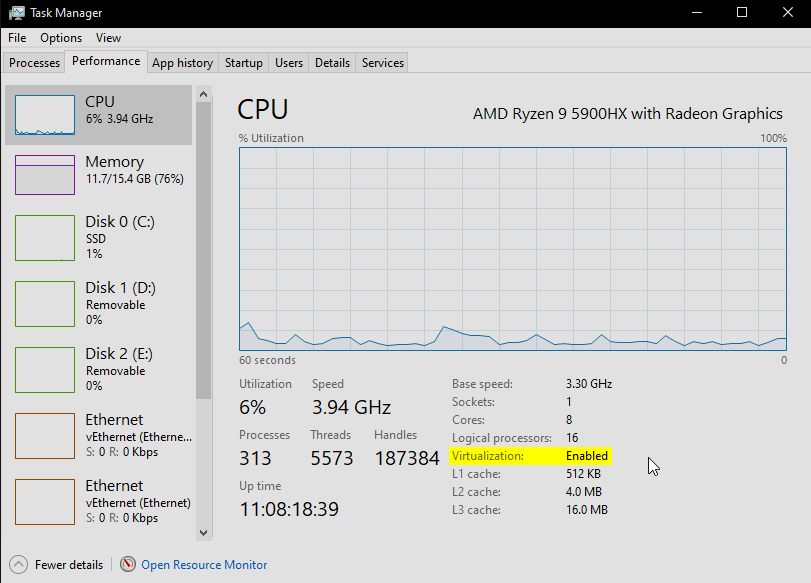
Entering Bios:
Depending on your motherboard, the "access-key" to enter your BIOS differs. Google your motherboard manufacturer to find out your "access-key".
Enter your BIOS by clicking, spamming your BIOS key when your PC is starting up.
Virtualization for Intel Users:
Once in your BIOS settings, head over to the advanced tab and select CPU configuration.
From there, go to Intel Virtualization Technology, and enabled it. Save changes and exit.
Your BIOS settings may differ depending on your manufacturer.
Virtualization for AMD Users:
Once in your BIOS settings, head over to the advanced tab and select CPU configuration.
From there, go to SVM Mode, and enabled it. Save changes and exit.
Your BIOS settings may differ depending on your manufacturer.
2. Run the following command as administrator in the console bcdedit /set hypervisorlaunchtype off