
The Vectrex core for MiSTer has had a major rebuild!
The Vectrex is one of the most distinctive home consoles ever made. It came complete with its own built-in vector screen, pairing bright, glowing graphics with analogue controls and colourful physical overlays. It was a little arcade machine for your home, with a character that still feels special today. More than forty years later, a remarkably active community continues to create games, build hardware, restore artwork and push the system in new directions.
This release brings a new HD vector engine, with carefully modelled beam brightness, bloom, halo and phosphor persistence, alongside full-resolution overlays. There are substantial improvements to hardware accuracy and sound, expanded support for modern homebrew cartridges and persistent saves, and display options for both modern screens and CRTs.
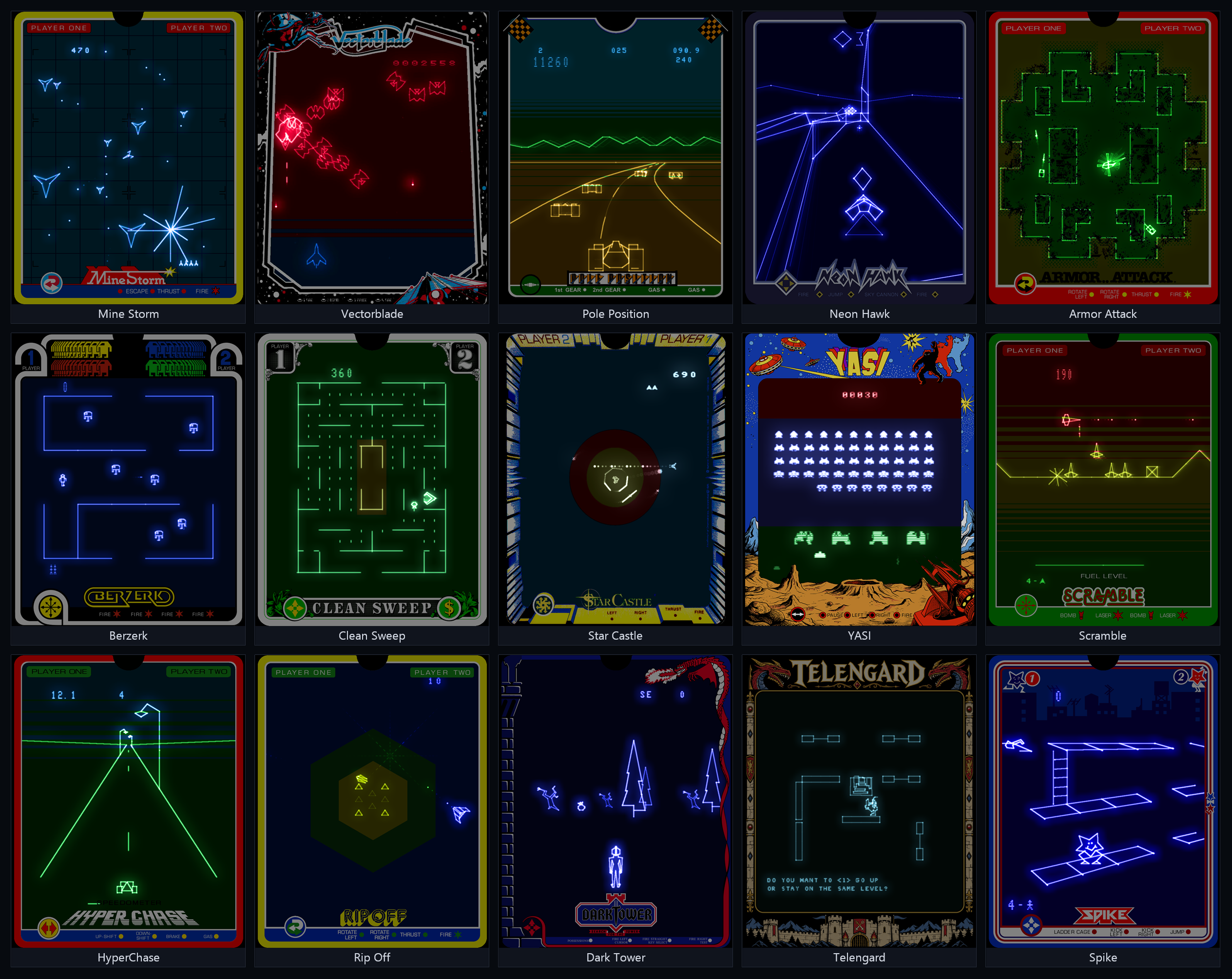
A very special thank-you goes to Vectrex legend Malban, who generously gave us permission to include two of his games: the arcade shooter Vectorblade and his Vectrex adaptation of the dungeon crawler Telengard. Having these two games included makes this release particularly special and gives everyone something substantial to explore straight away.
Compiling the artwork has been a substantial project in its own right. Huge thanks to Alan Steremberg (alanswx) for his contributions to this effort, including the Japanese Scramble Wars and Harmagedon overlays.
This release builds on the foundations laid by Dar, Sorgelig and alanswx, and the contributions of many others across the MiSTer and Vectrex communities. Thank you to everyone who tested builds, reported bugs, shared reference material, offered suggestions or supported the project. Your feedback and patience helped shape this release.
Whether you are returning to an old favourite or discovering Vectrex for the first time, I hope you enjoy it!Grab the new Vectrex core and the new Overlays here:
https://github.com/Videodr0me/Vectrex_MiSTer
The readme has detailed installation instructions (boot2.rom -> games/Vectrex) and don't forget to download the new overlays, the old .ovr files are no longer supported.
Thanks to all
## Enhanced Core Rebuild v1.0 [2026-10-18]
- Added a new 125 MHz HD rasterizer supporting multiple target resolutions,
including 1080p and 720p at 120 Hz, with optional HDR output and CRT-effects support.
- Added a CRT-effects pipeline with bloom, broad halo, beam modeling,
intra-frame and inter-frame decay, tone mapping, custom color options,
overlay tint, and phosphor accumulation.
- Added comprehensive CRT support: 480p, 480i, 240p, Direct Video at 15 kHz
and 31 kHz, CRT-friendly timings covering a broad range of displays,
and a vertical offset control for positioning the complete picture.
- Added a new beam model with dwell energy accumulation, line brightness
that responds to beam velocity, and energy accumulation at beam crossings.
Linear light processing preserves an extended brightness range, with
intense colored highlights gradually spilling toward white.
- Corrected MC6809 NMI arming, reset interrupt state, and SEX flag behavior.
- Replaced the VIA with Gideon Zweijtzer's more accurate 6522 model and
corrected Vectrex half-cycle timing, Timer 1 sequencing, interrupt readback,
and complete eight-bit shift output, restoring Clean Sweep characters and
complete bitmap glyphs.
- Modeled Q301 RAMP release and uniform CB2 beam-blanking timing, improving
the rendering of Clean Sweep's maze walls and eliminating clipped or
wobbly strokes in Spike's EEK, HELP, SPIKE, and MOLLY raster text.
- Modeled reference sample-and-hold acquisition, fixing Vectorblade's
calibration mode (Buzz model).
- Initialized the BIOS random-seed bytes from the HPS timestamp at cold start
while retaining RAM across warm resets, restoring natural variation in Mine
Storm's initial starfield.
- Modeled last-driven CPU open-bus behavior and correct no-cartridge decoding,
preventing the built-in Mine Storm malformed-vector display glitch.
- Reworked EOF detection around a dynamic model of Timer 2 activity that
learns redraw cadence, with a fallback mode if qualified reloads stop and
a replacement scheme during recurring fallback until reloads resume.
- Added HD digital overlays that recreate the Vectrex's physical screen
overlays, with automatic or manual loading, resolution-specific
1080p/720p/480p/240p planes, all three orientations, and independent Tint
Strength, Translucent Blend, and Opaque Brightness controls.
- Included 65 overlay designs in overlays/overlays.zip, with standard
artwork at the archive root and clockwise/counterclockwise versions in
Tate. The collection includes restored artwork, alternatives, and a full-width
Mine Storm strategy bezel as an example of a custom oversized overlay.
- Added documented host-side tools in Overlay Tools that build all resolutions and
orientations from one PNG, pack authored planes and extract PNGs from ART
packages, with palette reduction and package validation.
- Expanded display geometry with Normal, 90 CCW, and 90 CW orientations,
Overlay or Screen framing, and an Open Matte view that reveals geometry
drawn outside the normally visible area.
- Speech: corrected SP0256 speech saturation, idle output, and PSG Port A
serial decoding. Port 2 device isolation prevents retained 3D-imager traffic
in Narrow Escape 2D from triggering speech, with selectable Normal, Low,
and High speech levels.
- Sound: replaced AY-3-8912 emulation with JT49 and corrected direct CPU DAC
audio to signed samples matching the Vectrex MC1408 path.
- Calibrated PSG and direct-DAC balance against a real Vectrex line-out
recording.
- Added 64 KiB PB6 cartridge banking (e.g. Vector Patrol) and the 256 KiB
four-bank mapper used by Vectorblade and Telengard.
- Added SST39SF020A flash programming and sector erase, with per-ROM
persistent storage, automatic restore, default-on autosave, manual saving,
and ROM/sector checksum validation.
- Added resolution-specific CRT presets, with Cruise Control as the default.
Custom 1 and Custom 2 expose the effects controls and use the active
resolution's Cruise Control and Overdrive presets as their starting points.
- Added a remappable View button that cycles artwork, framing, and Open Matte
combinations, with an on-screen message and matching OSD settings.
- Added pause mode with screen dimming after 60 seconds and an option to
pause while the OSD is open.