
With the rise of Generative AI, we've seen incredible strides in code generation, content summarization, and smart assistants.
But what if LLMs could go one step further—beyond text—and perform real-world actions like driving a browser to test your app? 🤖
This is exactly where MCP (Model Context Protocol) enters the scene.
What is MCP? And Why Do We Need It?
MCP stands for Model Context Protocol — and it’s becoming a foundational concept in the world of AI + automation.
But before diving in, let’s step back and understand Let’s Understand: What Is an LLM — and What Can It (Not) Do?
What is LLM
A Large Language Model (LLM) is an advanced AI system trained to understand and generate human-like language. It works based on the context provided through a prompt.
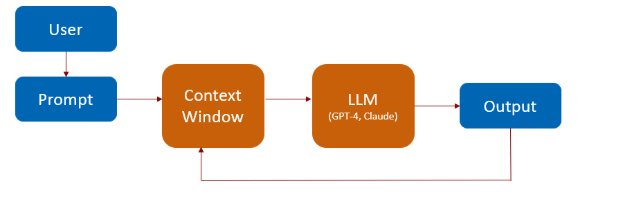
Here’s how it works at a high level:
A user submits a prompt — this could be a question, instruction, or command.
The prompt is added to the model’s context window (the model's working memory).
The LLM processes this context and generates a relevant response.
The response is also stored in the context window for follow-up interactions (conversational memory).
What LLMs Are Great At
LLMs are remarkably powerful for language-based tasks.
For example:
Developers use LLMs to generate code snippets, boilerplate templates, and technical documentation.
Customer support teams rely on them for drafting quick, accurate replies.
Writers and content creators use them to brainstorm ideas, generate articles, and summarize large texts.
What LLMs Cannot Do (Alone)
Despite their power, LLMs have a major limitation — they can’t perform real-world actions.
For example, LLMs cannot:
Click buttons on a webpage
Fill out and submit forms
Send an email or execute a script
Open and interact with an actual browser
That’s because LLMs generate instructions, but they can’t execute them on their own.
Introducing Agents (LLM + Tools)
This is where external tools come into the picture.
By integrating with external tools, LLMs can go beyond just generating instructions — they can also perform real-world actions, such as clicking elements on a web page or sending emails.
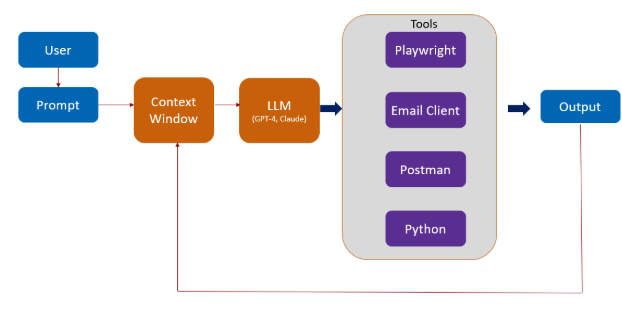
When you combine an LLM with tools like an email client, a web browser, or a testing framework such as Playwright, you create what’s known as an Agent.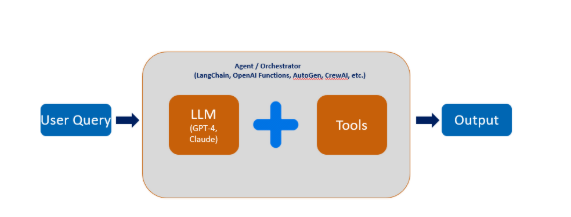
In simple terms: An Agent is an AI-powered assistant that not only understands what needs to be done — but also knows how to do it by using the right tools.
An LLM Agent is an autonomous (or semi-autonomous) system powered by a Large Language Model (LLM) that can:
Understand a natural language task : It interprets user intent from plain language.
Decide which tools to use: It selects from a set of available tools (APIs, functions, scripts, databases, etc.).
Execute those tools : It calls tools or APIs, such as running a SQL query or reading a file. Uses Playwright to open the browser, fill out the form, and verify the result
Interpret the results: It understands the output of the tool and uses it to inform next steps.
Continue the task until it's complete: It loops intelligently, performs reasoning, and finishes the task or provides an output.
The list of tools that LLM uses to perform the above agentic action are
Understand a natural language task : OpenAI GPT / Claude / Gemini
Decide which tools to use : Agent frameworks like LangChain / CrewAI
Execute actions : Toolkits (e.g., Python, SQL, Playwright, File API
Interpret the results : Handled by the LLM's reasoning
Continue the task until it's complete/Iterate : Planning modules like ReAct, AutoGPT
Example:
The LLM understands the task: “Test a login page.”
The Agent takes over: it launches Playwright, opens the browser, fills in the login form, clicks the button, and verifies the output.
The Challenge with Tool Integration
When building agents, we often need to integrate multiple tools.
Each tool might have:
Its own APIs
Custom connection patterns
Complex authentication
Different data formats
Managing these individual integrations manually can become cumbersome, time-consuming, and error-prone
This is where MCP comes in to picture
What is MCP
MCP — the Model Context Protocol.
Think of MCP like a USB-C standard for AI: Just like USB-C allows different devices to plug into your laptop easily, MCP provides a standardized way for LLMs or Agents to connect with tools.
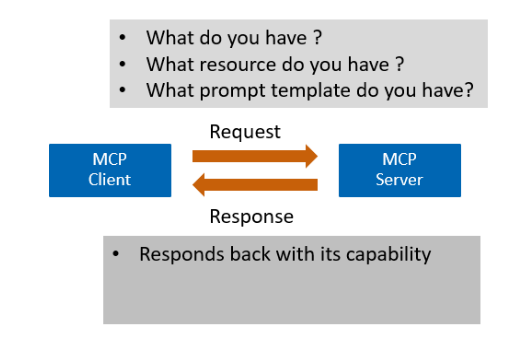 The Model Context Protocol (MCP) is built on a client-server architecture, with distinct roles for each:
The MCP Client is a library or service embedded within the LLM application or agent. It plays a crucial role in enabling intelligent interactions between the LLM and external tools by communicating with the MCP Server using JSON-RPC over HTTP or WebSocket.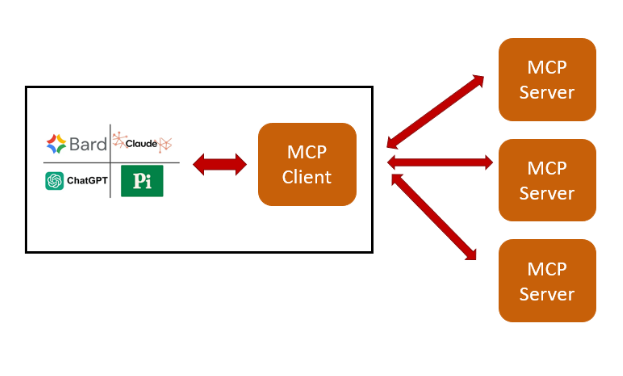
The MCP Server is a standalone backend service that exposes a unified interface for tools, resources, and prompt templates in a standardized format. It listens for incoming requests from the MCP Client, processes them, and sends back the appropriate responses.
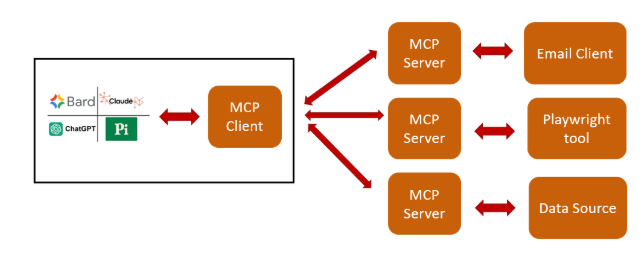
Communication Modes
The MCP Server can communicate with the MCP Client in two modes:
Local – Runs on the same machine or environment as the client (ideal for development or isolated environments).
Remote – Hosted externally and accessed over the network (suitable for distributed or production environments).
MCP E2E Workflow
Now that we’ve covered how the MCP Client and MCP Server interact, let’s walk through a real-world example of how an end-to-end (E2E) task — like performing a browser action using Playwright — is executed using MCP.
Scenario: Automate Login Test Using Playwright via MCP
Step 1: User Prompt to LLM
The user gives a natural language instruction to the LLM, for example:
“Test the login functionality of our website.”
Step 2: MCP Client Intercepts
The MCP Client (part of the LLM agent) processes the prompt and:
Sends a capabilities request to the MCP Server
Retrieves available tools (e.g., Playwright), resources (e.g., test credentials or URLs), and prompt templates
Step 3: LLM Decides & Plans
The LLM uses reasoning (possibly with a planning framework like ReAct or AutoGPT) to:
Select the Playwright tool for browser automation
Construct the right input parameters for tool execution (like username, password, URL, element selectors)
Step 4: Execute via MCP Server
The MCP Client sends a tool execution request (as a JSON-RPC call) to the MCP Server, asking it to run the Playwright script.
The MCP Server:
Launches Playwright
Opens the browser
Navigates to the login page
Inputs credentials
Clicks the login button
Verifies the result (e.g., success message or page redirection)
Step 5: Return the Result
The MCP Server sends the execution result back to the Client — e.g., “Login successful” or “Login failed: Invalid credentials”
Step 6: Iterate (Optional)
Based on the result, the LLM can decide to:
Retry with different inputs
Log the output
Generate a report
Chain another test step (e.g., validate dashboard