

As in June, July has brought with it some particularly strong weather for Europe. Here in the UK we have had a lot of warm weather, and in my little home office I have been relying on my fan to keep me cool as we do not have air conditioning. There are lots of things beginning to ramp up in my day job, and I can see the rest of the year being incredibly busy.
This month though, I have managed to achieve way more than I had envisaged would be possible. For the past few years I have been really struggling with my sleep and my energy levels. But this past month, maybe something changed. Maybe I just got tired of feeling tired all the time. But I have spent some of my evenings working on things. Not just my weekends. It has made a huge difference to how much I have got through this month, as I am sure you will see as you read this update for the past month.
 ThoughtAsylum
This month on my blog at thoughtasylum.com, I put out three posts about my personal digital assistant, and one about a new command line tool I created.
The digital assistant posts stem from my experimentation with Hermes Agent as a fully local LLM (large language model) powered assistant. Well, maybe not entirely as I do have a get out of jail free card for occasions where I need it, but you will be able to read about that in the posts. The first post is about choosing an AI brain for my digital assistant, not just selecting but also getting a local AI model working for my setup.
I also went on from there to talk about building a team, a way of honing my digital assistant to not just be a jack-of-all-trades, but to have access to specialists that have built out different experiences, have access to different skills, and have different guidance to make them operate in different ways from one another.
The third of the posts was about creating opportunities with AI. This is about a process I have set up whereby the digital assistant creates ideas each day about what it could help me with. I refer to this as “the opportunity engine”. This month I also created a command line utility that can generate simple sounds. I created it to use for creating sounds for audible notifications in my scripting. The script can export MP3 files, but it can also generate and play audio on the fly by using a seed number making it easy to regenerate sounds without having to store the MP3 files. You can read about this, and get a copy of this free utility when you read my Bleep My Mac post.
Podcasts
It has been a while since one of my projects was mentioned on a podcast, but Doctor Drafts, my Alfred workflow for Drafts got a brief mention on Mac Power Users episode 857.
Forums
I managed to spend a little time on my usual forums. Mainly reading and answering the odd minor request, but there are some that might warrant a look.
Drafts
Someone asked about appending a draft to a note in Standard Notes, but unfortunately, Standard Notes does not offer any automation hooks.
I helped on a query for using the x-callback-url and working with a result, or rather directed towards some previous help I gave on this several years back.
One user was having an issue where a theme was not being applied correctly.
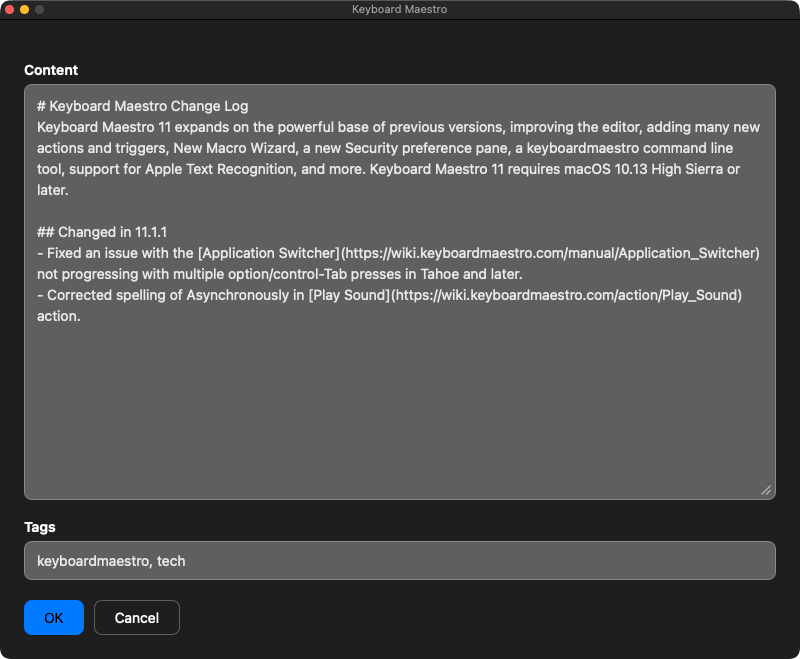
Finally, an old Keyboard Maestro Automation thread was resurrected. I am not sure if it was spam or not, but it was fun to put together a little custom Keyboard Maestro pop up for capturing a new Draft.
 Automators
Unfortunately this month there were no interesting conversations I took part in on the Automators forum.
Other
As well as writing several blogs this month, I have also been really busy with a lot of other projects that I have had running in the background and some that have popped up this month. A few bits of new hardware, some troubleshooting and support, and a whole heap of tinkering, writing, and developing.
Full Fibre Internet at Home
A big hardware change for me this month was the installation of my fibre internet connection. The UK is currently switching over from its copper-based telephony infrastructure, and so fibre connections are rolling out everywhere, including to the village that I live in. While I signed up relatively early after I saw the installation of the cabling going in, it still took three months to actually get the installation completed.
On my previous copper connection, I was using a DrayTek Vigor 167 modem and this was giving me a good connection, but I was limited to 22 Mbps. With the new connection, I opted for the fastest connection that I could find. Most people can get a connection of around 1 Gbps but there was one provider who was offering (up to) 1.6 Gbps. This was for about the same price as I was paying for my out of contract 22 Mbps connection. That was extortionate, but I was not going to sign up for a new contract when I knew fibre would be on my doorstep in less than a year.
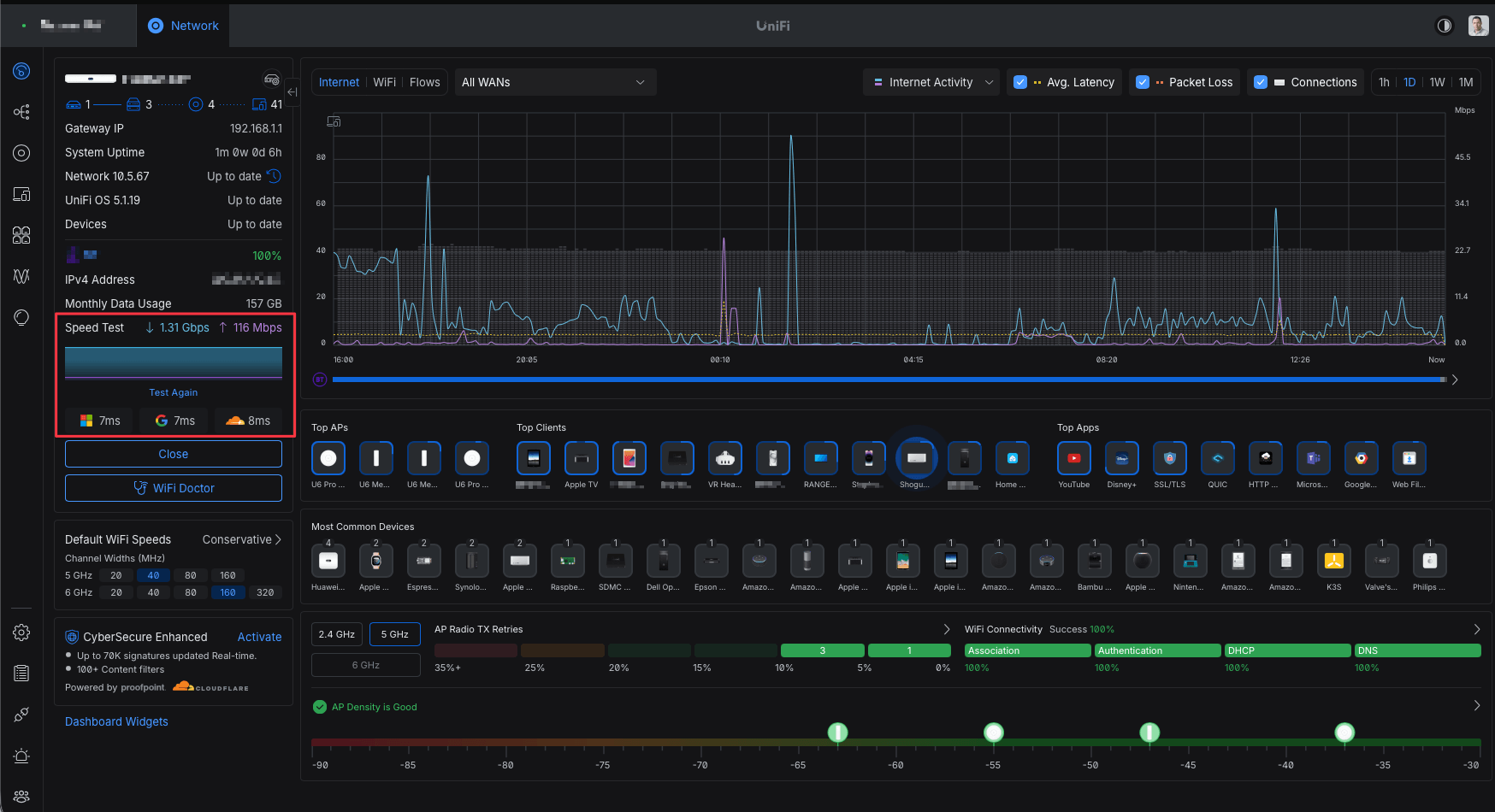 The fact is, I only have one machine on my home network that can take advantage of a network speed over 1 Gbps. My Wi-Fi is sub-gigabit and most of my cabling and switching is gigabit. However, my UbiQuiti UCG-FIBER gateway (which I am using along with my Ubiquiti Wi-Fi access points to manage the connection and connectivity rather than the equipment my ISP provided) connects out to my office (a small converted garage) via a CAT6 cable, and then into a 2.5 Gb switch and into my Mac Studio. 1 Gbps would have been plenty for my current needs, but if the speed is there I figured why not be able to make the most use of it on my primary machine? All I needed to do was to put a 2.5 Gb switch inline with my current connection and get a new short CAT6 cable to link my Mac to the switch.
The point, of course, was never to have a single high-speed connection for one of my devices, but more to have a consistent high-speed connection for multiple devices that my family may be using and address the contention and bottlenecks we were living with every day. My children and wife are keen gamers and we have had to actively manage bandwidth more and more as their gaming demands have increased. Multiple family members can now be downloading large game updates without affecting the bandwidth too heavily with other users on the network. We all get a fast, reliable internet connection, so critically my Teams calls for work are not interrupted during school holidays by mystery downloads hammering a slow drip connection.
New Audio
Around the middle of the month I travelled down to my company’s office in London. And I had to attend some meetings on Microsoft Teams. At home, I have a relatively nice setup at my desk, which generally works without any issues - more on that later. When I travel, I typically take my Bose noise-cancelling headphones and a small plug-in microphone that clips in line to the headphones and basically turns it into a headset. This worked fine for my first meeting of the day, but my second meeting was an absolute disaster. My Windows laptop refused to recognise the microphones that had been working only an hour or two earlier, and even with updates to Teams and restarting my PC, I spent the best part of an hour trying to join a call that my colleague sat next to me was on and was able to cover my absence. But it was, as I say, an absolute disaster. The headphones themselves worked, but the Bluetooth connection didn’t. My backup earbuds with an inline microphone didn’t work either. I get the feeling the problem was the 3.5 mm TRRS audio jack socket on the laptop motherboard.
This experience led to me spending some time on my journey back to York that evening thinking about my portable audio setup. I decided I needed something that would work more reliably with my laptop, and given the audio jack and Bluetooth issues, that just left USB, and that is exactly what my desk setup at home utilises. I deduced that this was also an opportunity to try and find a portable microphone that would provide me with some noise cancellation to filter out background noises.
If you take part in lots of work calls, then I would recommend you consider the quality of your audio. If people are struggling to make out what you are saying, then they are naturally going to tune you out a little and psychologically displace you from the conversation. Sounding good with crisp audio quality on a call actually lends some authority and gravitas to what you are saying, and I think overall, helps you present yourself as professional. This is why I have been using my nice microphones on my work calls for over a decade and a half now. I often get a lot of comments about being a radio DJ or a podcaster from people I am talking to, but I believe the audio quality as a result is very good. And in all honesty, if people associate me in some way as being a bit different on a call, showing up with what looks like professional equipment (it is only consumer equipment), that visual also helps them remember me and I think lends itself to having them pay attention to what I am saying. Whether I can do that with a portable office setup is definitely debatable.
My wife and one of my children both use nice Plantronics 8225 headsets at their own desks for calls, and whilst they are quite excellent at the noise cancelling microphones, I did not find them all that comfortable to wear. They also look quite fragile for something that I would potentially be repeatedly putting in a bag and carrying around with me, even if it was in a case.
As I thought about it more and looked at more and more options, I realised I could use this opportunity to see if I could find something that would solve some other audio challenges for me. Something I have been wanting to spend time trying more recently is writing through audio dictation. I have done it a long time ago when I was more or less bedridden due to a back injury and I purchased a copy of Dragon Naturally Speaking by Nuance, and it was good, but for me it was not great. These days, however, with all the amazing steps forward in artificial intelligence means that transcriptions and dictation is becoming massively more accurate, and that was particularly interesting to me. So perhaps I could find a microphone that I could use for dictation even when at home at my desk, as well as audio calls. From that, I also started to think about other things, and I already do some transcription work using Whisper Transcription (the App Store version of MacWhisper), but I decided that sometimes maybe rather than writing out a few notes in my phone when I am out on a walk and I have an idea for something, perhaps being able to dictate more of that idea and then transcribe it afterwards would be a useful thing to be able to do.
Microphone
Now I was considering finding a microphone that was small enough to travel with, could provide some audio direction and cancellation to clear out some of the background noise in a typical office. Something I could use for dictation on my Mac, and something that I could take with me, and it would have some capacity to record me talking in an outdoor environment so that I could bring it home and transcribe it. Does such a microphone exist? The answer is yes, more than one in fact. But the one that I selected was the DJI Mic 2.
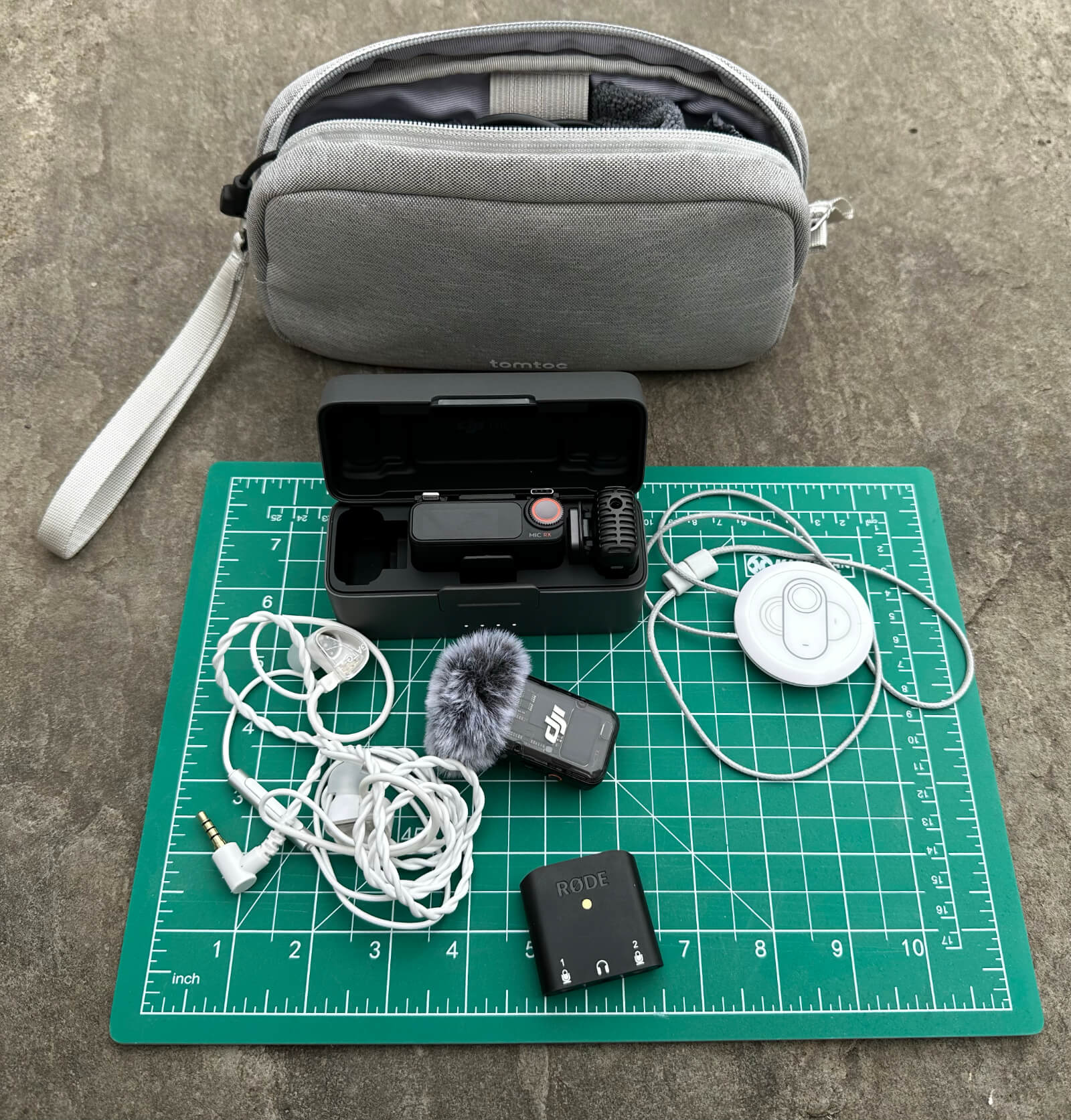
This is a microphone that is very popular amongst many content creators on YouTube. It is small, relatively easy to set up and the audio quality is good for me, while there are newer versions of the DJI microphones such as the Mic 3 and the Mini, the Mic 2 - it ticked all the boxes at a price and quality I could afford. The set I ended up purchasing is the two microphone set with receiver and charging case. The convenience of just having an all-in-one case which would provide protection as well as charging capabilities with a built-in battery was appealing. I also appreciate that this then gave me a fallback microphone should one of them run out of power. Which is unlikely but it is always good to have a backup plan.
Having read some reviews of the microphone and watched far too many YouTube videos of people explaining how to optimise the audio and use them effectively. One of the things that became apparent was that while you can clip with a spring-loaded clip, the microphones to a shirt, or even attach them using some small magnets that come with it. There was the suggestion that the best option was actually to use a magnetic pendant to hold the microphone more firmly and centrally. There was a recommendation to use an Insta360 pendant accessory for this and I decided to purchase it, and it is really comfortable, and does secure the microphone quite nicely. It also eliminates the chance of losing one of the small magnets, which are definitely small enough to be easily lost.
Portable Audio Interface
Because I wanted to have more control over that audio connection, I also purchased a RØDE AI-Micro USB audio interface, which allows me to plug in an audio connection for two microphones and headphones, but gives me a solid USB audio interface to my laptop - similar to what I get from my Focusrite Scarlett Solo audio interface on my home office desk. This one is definitely a wonderful small adapter for portable use. I have tested the DJI receiver output over an audio cable and it worked perfectly, but I may simply rely on a USB connection for the mic. Again, this is giving me flexibility and options.
While I will not be carrying a lot more equipment than I was before, I decided this was also a good opportunity to maybe see if I could slim down my headphones a little. Something smaller than the full over ear QC35s. To that end, I bought myself a new pair of TruthEar Gate monitor in-ear headphones that I could just drop in a case alongside the RØDE audio interface. While not noise cancelling, they do just bundle down into a case, and I made sure to get ones with a built in inline mic on the wire - yet another contingency for when I am on the road. It is worth noting that the RØDE AI-Micro also supports full mic and headphone TRRS connections on the microphone jacks, so lots of contingency options are available with this set.
I have not had the opportunity to travel with them yet, but I have everything stored in a small gadget bag with various spare USB and 3.5 mm audio cables so that all my audio is covered, and the bag is slightly smaller overall than my QC35 case (excluding the second boom mic case), so not bad. I will find out on my next office trip if it is worth me still brining my QC35s and wiring those into the USB interface.
 Dictation and Transcription
Being the school holidays at the moment, when I am going for walks, it tends to be with my family, so I have not had a chance to do any on-the-go transcription just yet. Dictation, on the other hand, I have been trying my hand at for a few weeks now. It is certainly a learned skill and I am definitely in the learning phase. Dictation does not come naturally to me, and I still find myself looking to the screen as I am dictating, so that I can draw inspiration from the words I am putting down on the page. But with the current dictation options on the Mac, other than the built-in dictation, everything is quite limited in terms of how much content you can see. So while I have my software set to display as much text as I can, I cannot read back to previous paragraphs to cross-reference so easily, for example.
The software I am using at the moment is a free piece of software called Fluid Voice. It works very well. While it would be entirely expected that at least some of the subscription services work better, this seems to be quick and accurate - my dictation skill level is absolutely the limiting factor. While much of my writing is probably quite technically focused with inserting scripts and technical elements, I am hoping that being able to dictate the details between such sections and on posts which are not as deep into the technical elements means that I will be able to create more content more quickly as a result and get my thoughts and insights out there more easily.
More Audio Woes
My desktop audio for my work PC, and several other work PCs before it, has been pretty solid. However, for the last few months one of my colleagues has been noting that there was sometimes a hum on my microphone. On these occasions, I would first try unplugging and plugging the USB connection for my audio interface back in. Most of the time this worked, but when it did not, I also have a small USB/Bluetooth Jabra conference phone on my desk, and I would switch to that. I always try and have a backup.
This was becoming a more and more frequent issue, and I did think at first it was to do with an XLR switch that I would added to my audio setup to allow me to temporarily mute the line by using my foot on a button. However, even disconnecting that switch made no difference.
Towards the end of the month I also started experiencing occasions where my microphone simply wouldn’t transmit any audio. It was very strange. Investigating this further, it seems that the issue was tied directly to Microsoft Teams. If I recorded sound on other applications within my computer, they would record just fine. The microphone would be recognised. There would be no humming noise. All good.
After a bit of digging I think I found the issue. Microsoft Teams has obviously become more sensitive to this in 2026, but I found that my USB audio interface mic was set for a sampling frequency of 44.1 kHz at the OS level. Teams is allegedly quite particular and expected 48kHz. I changed that setting and while it has not been all that long, the last few working days have been free from audio challenges, so I am optimistic about its longer term success.
Website Redesign
If you have checked out my website at thoughtasylum.com this month, then you might have noticed there has been quite the change. I have put in a lot of work this past month on redeveloping the website’s theme to be a little more modern. I had not touched the theming of the site since I implemented it in 2019, and it was not exactly dripping with style back then.
The new look and feel returns to a darker look, which was what the website used to have more of when it was hosted on Squarespace. Back in 2019, I converted the site to run on Jekyll on GitHub Pages as this gave me more direct control than Squarespace, which had slowly been putting more and more constraints in place versus what I originally signed up on their service for.
The new website includes:
A new card style has been applied site-wide.
Much more mobile friendly.
The search has been enhanced with a new look pop-over.
The home page layout has changed dramatically, but retains some familiar features.
Posts now include a hero/banner image at the start, which also shows for the latest content on the home page as well.
The list pages are now much more graphical too, pulling in post thumbnails.
There are estimated reading times.
I also made some changes to improve compatibility with social media services for resharing through things like OpenGraph.
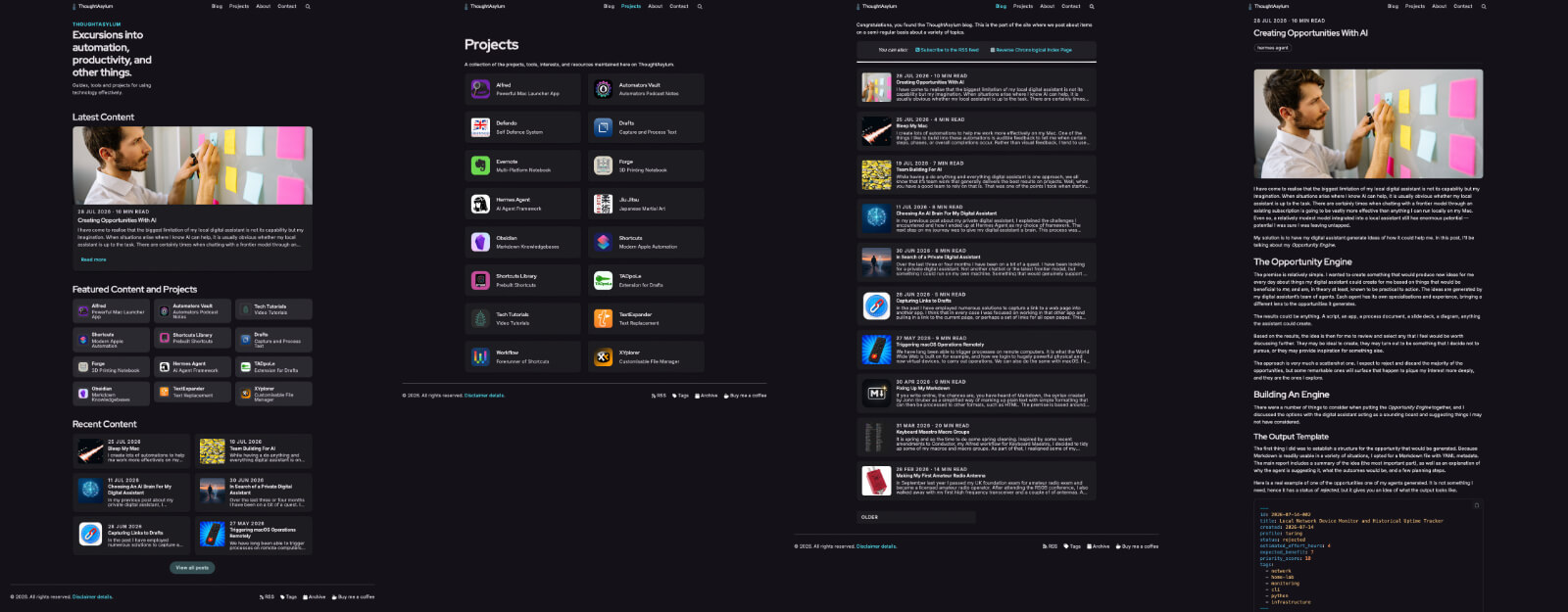 I like the new look, and it was on my list for this year to give the site a makeover, and I finally managed to get it done. Hopefully it makes the reading experience a little nicer too.
Obsidian Templater Repo
I added a couple of new Obsidian Templater plugin transformation entries to my Obsidian Templater Converters GitHub repository this past month. The first of these allows you to convert a text selection into a footnote. It inserts a sequenced numeric marker and places the note text at the end of the document.
The second transformation template takes text in a CSV format and converts it into a Markdown table format, even making the columns line up neatly in the raw Markdown.
New templates for transforming a selection into a footnote, and CSV content into a Markdown table.
Stream Deck Stash & Mac Automation
In July I had an interesting support request for Mac Automation, my macOS automation plug-in for the Elgato Stream Deck. The user was trying to utilise one of the shortcuts actions, which picks up the list of available shortcuts from the Apple Shortcuts app. However, for this user, the list was not being populated. When I did some investigation, I discovered that the approach that I am using, which uses the shortcuts IDs, allowing me to uniquely identify shortcuts with common names, and track shortcuts even after they have been renamed, actually came in with Sequoia and the user experiencing the problem was using Monterey, an earlier macOS version.
I explained the issue to the user, noted they could use the manual shortcuts action, and the underlying cause. I also explained I would add some pre-requisite information to the documentation about this, which I duly did. However, there continued to be a bit of back and forth as the user still wanted a solution for the issue they were experiencing. Even though I had provided the workaround and explained that they needed to update their hardware and software if they wanted to do this, they still somehow wanted me to provide a solution for them. In this particular instance, I was not willing to adopt a different approach on how I was managing the shortcuts launching. This would have been a notable change in the underlying way that the action works, and it would have led to a worse experience for most other users who are using it.
Given that I provided a detailed explanation of the cause, updated the documentation, and provided a workaround with their existing setup, I do not think there was anything more I could reasonably do for this user. What do you think?
Alfred Workflows
I have been tinkering with a couple of Alfred workflows this past month. One of the workflows is related to file management, and it is very much in an experimental phase at the moment. I have had some success with it, but also some outright failure. So I do not know when that one will get finished. It is yet another ongoing project.
The second workflow I have been working on is one I mentioned last month and is related to a new application I have been working on. The workflow will allow a broad range of interaction with the application, and the basics are all in there and working well. It is now about adding the polish for customisation and updates, some documentation, and making sure it meets my usual standards - particularly as it relates to a bigger thing I have been working on.
Mystery Application
The work on my new application is continuing apace. I have been making excellent progress this last month and have not only been working on the application but also its own website as well, which is coming along very nicely. I do not want to say too much at this point, but the application is a small utility, and I am trying to make it as automation friendly and as extensible as possible.
As usual, I have created this to meet one of my own needs, but I am hoping that others will find this a useful tool in their bag of software. It is not the only solution in the space, but hopefully I am bringing enough functionality and flexibility to it to make it an interesting alternative to other options.
Other Stuff
There was in fact more stuff still that I have been working on this past month. Some of them will hopefully make their way into the light before too long. I am sure I will have a few interesting new GitHub repositories to share and stories to tell. But right now they are in various states of partial planning and completion, and so not ready for me to explain just yet.
Links
This month on links I think you may find useful, I have one documentation related item that is multi-platform, a Mac file utility, and an old Mac OS feature I came across.
MkDocs
At work, at the moment, I am currently revising and updating a large set of documentation relating to systems that I look after. The documentation varies from being existing documentation from others, documentation I wrote, and filling in gaps in that combination of documentation. Some of the systems I am looking after are still relatively new to me and I still come across systems which are not in my remit, but touch upon these systems or might need to at some point in the future. So I am gathering information about those two, about processes, about all sorts of things.
Whilst I might gather things in Obsidian for my own convenience, sharing with others is trickier. For that I have used Microsoft OneNote in the past, but I find that challenging to work with.
My new approach is using Microsoft Visual Studio Code (VS Code) and MkDocs, which is a static site generator. I can run this from Python and convert some Markdown files in a folder structure into a locally hosted website. I have a small batch file script anyone can run and it will generate and host the documentation locally on their machine, and we can just synchronise the Markdown files centrally through a Microsoft Teams site. This allows us to have the documentation offline when we are travelling and also provides a very portable storage option for that information.
On top of MkDocs, I am also using a Material theme and a few tweaks and revisions to do things like allow an edit button to appear on the page, which will open the underlying markdown file in the default file editor. So VS Code for me.
MK Docs is providing a nice presentation layer for documentation that I am now able to write in what I find an easier, more logical format than Microsoft OneNote. I do wish Microsoft would embrace a proper knowledge management or wiki style platform somewhere in their suite as for me OneNote is a poor substitute for something that is a lot more portable. OneNote just seems to give me numerous problems over the years, particularly with taking the information in it and reusing that in other documents, mails, etc. It never turns out quite as one would hope.
Name Mangler
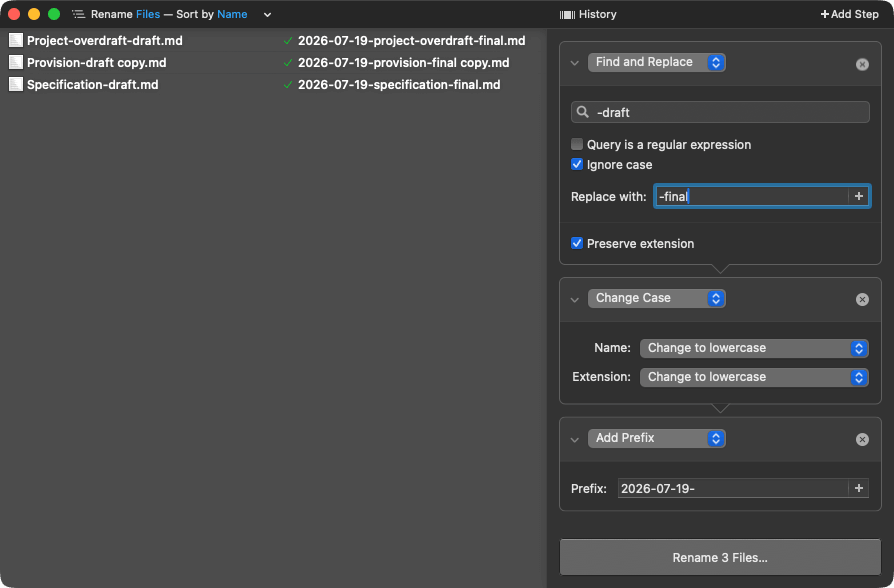
I have been using Name Mangler by Many Tricks for many years. It is my go-to tool on the Mac when I want to do multi-step batch renames. I do not do this every week, but every few months I find myself needing to manipulate file names in such a way that it is a multi-step process, often involving regular expressions, inserting text, changing character case, and things of that ilk. While I can do this through the terminal, Name Mangler makes it quicker, easier, more accessible. It gives me a visualisation of the results so I can confirm before I run, which gives me that extra peace of mind.
 Minimise in Slow Motion
When I purchased my first Mac laptop, I sat in an Apple store in Sheffield one evening with one of the staff. Even though I had used a Mac before, he spent some time showing me around the system, and one of the things he did that was honestly just quite delightful was he demonstrated a slow-motion minimisation of an app. It served no real purpose, but it hinted at some of the underlying difference between the Mac OS and Windows, which was certainly a more functionally focused user interface with relatively little style.
Currently, the Mac operating system does not include that any longer, but there is a behaviour that you can restore to allow you to do this slow-motion minimisation again. To that end, here is a link to an article on Daring Fireball which explains how you can set this and recapture a bit of that delight, and is something I enabled myself this past month.
Oh, and it works on restoring from the dock too.
Upcoming
For August, I think a lot of my focus will be on this new application and related development work around the website, the Alfred workflow, etc. I am enjoying working on that, and it seems to be coming together nicely. There are a few other things that I have been working on mentioned above that I would also like to progress, but if I do not get to them yet, then that is okay. I do not want to try and do too much in too little time. There is no rush.
Thanks for taking the time again this month to read along, and I hope you found the things I have shared interesting, and I do hope you will join me again next month to review everything I got up to in August. Thanks once again to everyone who has bought me a coffee. I really do appreciate it, and it really does help keep me caffeinated as I work on all these little projects of mine.