

Another month of variable weather in the UK draws us to the close on February, and we have already been seeing the signs of spring locally as snow drops and crocuses push their way into 2025. Work has as usual been very busy and things are starting to really ramp up as the organisation I work for begins a huge demerger and divestment process in earnest. With the mid-term break I had planned a week off however, so I had a variety of family plans and aspirations on progressing some of my personal projects. Unfortunately those plans went sideways as I put my back into spasm and spent the entire time (and in fact longer) recuperating and living on ibuprofen (think Advil for any American readers). As a result February is missing a lot of the updates to ongoing projects that I had planned to make. My apologies to anyone waiting on what is next on those, but I am afraid circumstances have been against me this past month.
But I think there’s plenty to cover in this month’s round up and there are definitely a couple of new interrelated sets of tech-based personal projects that received a somewhat unexpected amount of attention during February, mainly focused around the desk in my office.

ThoughtAsylum
This month I got out just the one blog post. It is a post about remote controlling the Logitech Litra Glow, a small USB powered (and controlled) light for streaming setups. While I am not a streamer, I am a predominantly remote worker, working with people from across the globe. As a result, I do spend a significant amount of time on video calls. After noting my lighting was getting worse recently (a time of the year thing I think), and still finding my ring light that sits above my monitor a little too intense at close range on its lowest setting in most conditions, I bought the Litra Glow. The reviews noted it was a pleasant soft tone effect without being too bright. There was a downside in that the button on the back was a bit awkward to manage on calls, but I figured I could manage that … but on practical use I decided it was indeed a bit awkward. This lead me down a rabbit hole of figuring out how to control the light over USB without using the Logitech software, and the results are in the blog post.
This post involved lots of research and experimentation, arguably far more than seems worthwhile than to press a button that is within arms reach. However, the result is something I have found myself using frequently and it save me waving my arm pit (as I reach up to the button) to people during meetings if I need to turn the light on or off as the lighting shifts.

Forums
As usual I have been dipping into my frequent access forums over the past month and seeing where I can help people out.
Drafts
There was some discussion on appending to a note in Bear that seems to suggest that there may be a problem with the Bear app’s URL scheme.
One Drafts user was getting a Run Action Error for a callback step that came down to some errors int he x-callback URL they had constructed.
A query on how to append bookmarks from Chrome on iOS to Drafts highlighted the difference to what Safari is permitted to do, but there are options.
A challenged a suggestion on syncing for Drafts using solutions like Proton Drive.
I provided one user with some advice on how I combine AppleScript and Javascript in a Drafts action.
Lastly, a question about automatically running an action when a draft is created came up again.
Automators
There was a query about setting a yellow flag when composing an email inApple Mail on the Mac. I suggested setting it on a draft, but I am not an Apple Mail user (I use Mailmate), so it was just a suggestion. Maybe you could provide a better answer?
A developer for a new mcOS file management app called 'tooc posted an introduction on the forum. I asked for a comparison to existing tools such as Hazel and Keyboard Maestro, for what the unique selling point was. The context menu seems to be the main thing, but to my mind you would be better off having a central processing folder and then having a way to move any files to that folder for processing. For direct actions, I use a combination of Keyboard Maestro and Drop Zone.
I pointed a Scriptable user to some resources for using JSON to populate a Scriptable widget.
A user having trouble using iBeacons with Pushcut got a few pointers that hopefully resolved their issues.
Curiously, that was not the only iBeacon question this month as someone else had been lead astray by ChatGPT on exactly how to use iBeacon as a trigger with Shortcuts on iOS.
A query on how to use AppleScript to navigate in Path Finder to a path on the clipboard had me digging about in AppleScript for a bit and I think I presented a couple of reasonable solutions.
Has anyone been experiencing“Frame Load Interrupted” in Shortcuts on iOS 18.1+?
Yet another WhatsApp error message question turned up on a long running thread. While “Unknown Error” is one of the more opaque error messages, I shared a few thoughts. Hopefully one day, we will get some actual useful error messages and debugging tools for Shortcuts (beyond Logger).
Do you know how to create Shortcuts shortcuts programmatically?
A new forum user resurrected a 2+ year old thread on iOS 16 Shortcuts breaking Find Notes, but the particular issue they had wasn’t an issue for me. Is it an issue for you?
Lastly, a request for help please with creating Shortcuts for blind/low vision users also gave me a reason to lay out a few points of guidance I provide when people have contacted me directly on the forum for 1–2–1 help.
Other
While I was out of action for a good chunk of the month, I did manage to make some progress on some physical technology-based projects as you’ll see below.
Desk
First of all, as relates to my only blog post of the month, I upgraded some of my desk gear for my video calling. The new Litra Glow lamp has been set up and sits just up and to the left on my desk behind my left monitor, mounted on a JEBUTU OS01 camera desk mount with an overhead boom arm. This gives it enough height to clear the monitor and to angle down slightly, which allegedly gives me a more flattering light.
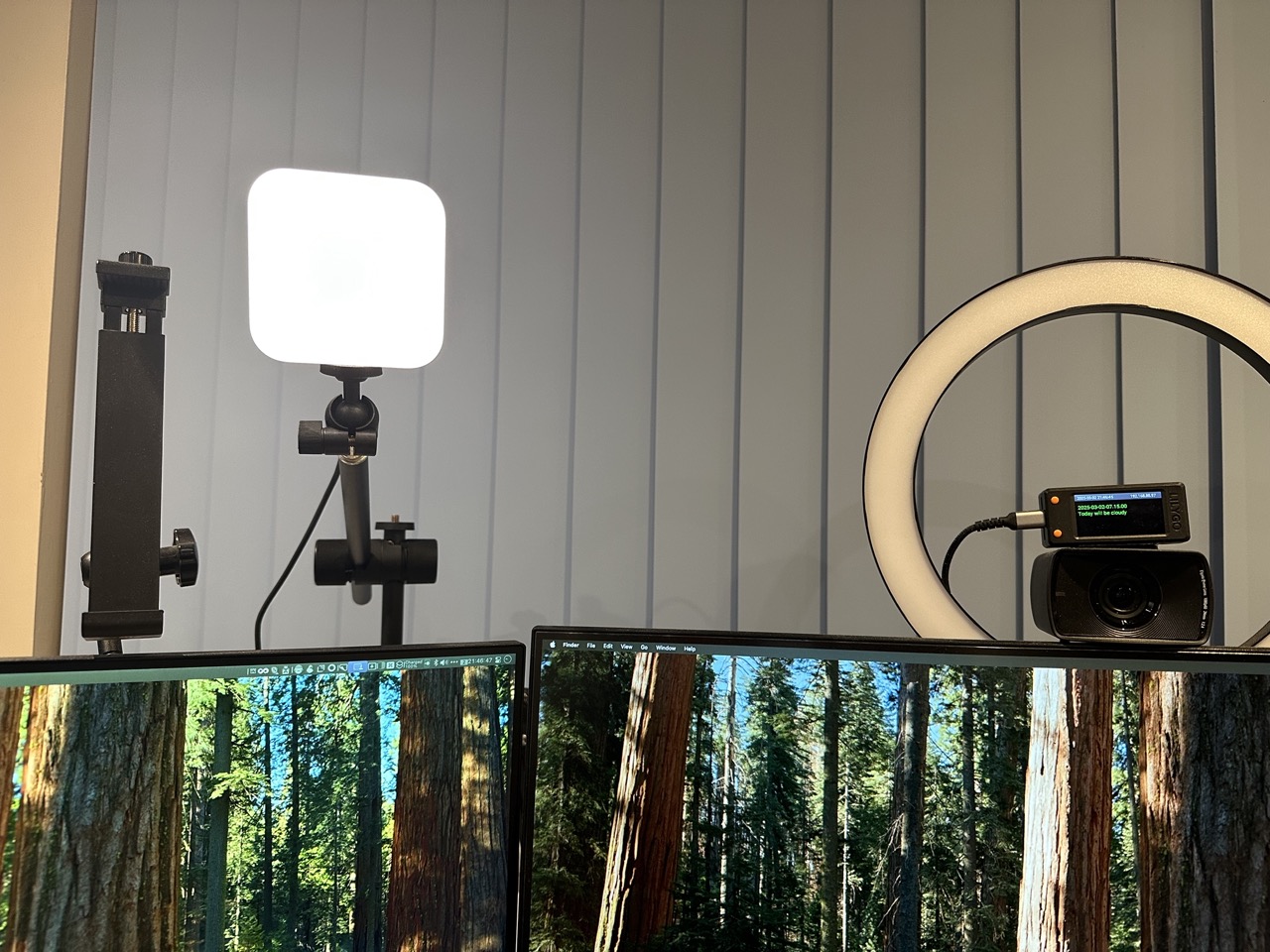
For reference, I’ve also used a micro USB to USB adapter to connect the Litra Glow to my Raspberry Pi Zero W.
For my Shure microphone, I also swapped out an 11 year old scissor arm with squeaky springs and a penchant for drooping on long calls for a new Sensic SA-30 boom arm, which is silent, non-sagging, and includes some built in cable management rather than me continuing to rely on velcro ties.
No one seems to have noted any difference from either, or at least hasn’t mentioned it. Everyone’s focus still seems to be surprise that I use a decent microphone on an arm at all on my calls.
Home Wifi
The next overhaul was my home wifi. I had been having some niggly wifi issues again this year with randomly dropping connections around the home, and commonly slow connections in the upstairs rooms at back of house. The slow connections I think was most likely happening because the rooms are more or less equidistant between the two TP-Link Deco X75 Pro AXE5400 access points I had in place, and I suspect devices were having trouble maintaining a connection with one over the other. Unfortunately the Decos really don’t let you make adjustments which means you are at their whim, and as I found out with letting them manage my network routing, that just resulted in all sorts of issues (see some of my previous round ups for that saga).
Having heard a lot of positive things about Ubiquiti and ruling out numerous other brands who were going to be too “let us manage things for you with AI - it’ll be fine, promise”, I decided to try out one of their UniFi access points. After all, if they were reliable enough for offices, schools, hospitals, and other power users, then that was a good sign they would be reliable enough for me, and let me adjust any settings I need to. I did of course read up on the management software, reviews, and watch various videos before splashing out, but splash out I did.
I was originally going to for the the UniFi 7 Pro access point, but given where my family technology stack is at right now, our slow Internet speed (full fibre to the door is due in my village next year), and the pace at which wifi standards are being developed and ratified, I figured a cheaper and well established Ubiquiti UniFi 6 Pro access point was a suitable option. I dropped the cash for that, a Mercusys MS108GP 8 port gigabit switch with 7 port PoE+ to power it and replace the old (maybe 15 or more years old!) 5-port Belkin gigabit switch I was using with my router in our hallway, and a nice new shielded CAT7 Ethernet cable.
I don’t have Ethernet cabling through my house, and being a UK home, putting in runs is something you ideally want to do during a renovation, not while you are living there - hence the popularity of Ethernet over power in many UK homes as an alternative. However I wanted to get it the access point as close to the router as I reasonably could and so I placed it in the hallway where our phone line comes in for our Internet connection.
I tried a few positions in the hallway including having the access point on the floor, flat on the top of my little stack of tech shelves, and on the wall. The wall gave me the best overall results, and so that is where it has ended up. While the recommendation is to place them on the ceiling rather than the wall, they can be wall mounted, and I needed it to broadcast to the floor above, and ceiling mounting it curtails that quite drastically.
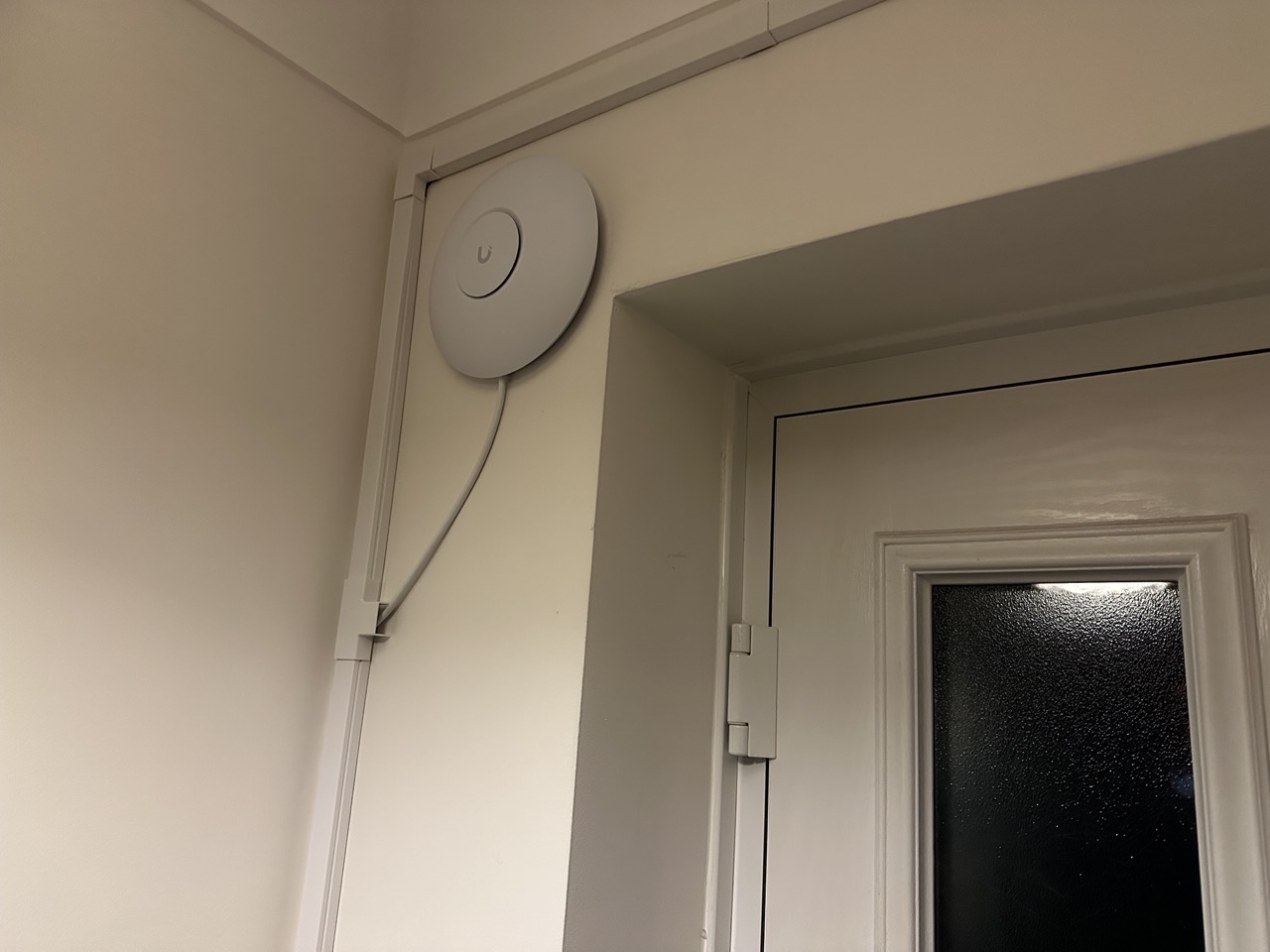
The result was the connectivity was good throughout the house on both floors all the way through to the back of the house, about 32 feet or just under 10 metres. Our video doorbell, which has only ever been a few feet from either the Deco now has a strong wifi connection rather than a weak one, and that’s even with the U6 access point facing in the opposite direction.
Things were definitely looking up. However, UK houses are brick, and there’s various kitchen appliances and the like to penetrate past, and the result is the wifi did not penetrate very far out into our small back garden or to the converted garage we use as a home office. That was a bit of a problem.
I increased the transmit power, but that was still not enough to give a strong signal.
Given we had a Deco in there previously, I ran with that for a couple of days until an identical set of AP, switch, and Ethernet cable arrived, along with some cable trunking. A second access point was added in the office, this time ceiling mounted as there is no upper floor to reach, and we now have two well behaved access points.
The most notable change is that my Panda PWR for my 3D printer seems to be retaining its IP address. That was something I couldn’t get to consistently work with the Deco. The only capitulation was I had to put it explicitly on my new IoT 2.4 GHz only network rather than my usual dual network as it was failing to connect at all. However, I think this may be because I set the preference option as 5 GHz for the access points. But no matter. That consistency alone shows the difference in the quality, and that new network is there to be used for such things - it just took me a little longer to realise than I would like to admit.
I am currently running the software to manage the access points on my Mac on an as needed basis. While it would be handy to run it all the time so I could use the mobile app to check in on things ad hoc, it is not critical to its operation. I know the manager can run on a Raspberry Pi, so I may look to see if it would be feasible to run it on one of my older Raspberry Pis that are not being actively used right now, but that’s low on my priority list. As long as things remain stable, I will be happy.
3D Printing
Over the festive break at the end of 2024 I started investigating some other options to improve my desk setup. This time custom made via my 3D printer. I spent a good chunk of February sending jobs to my printer and driving through numerous spools in pursuit of getting some flexible mounting set up.
Multiboard and Underware
The elements that had attracted my attention were Multiboard, a flexible hexagonal tile-based mounting system with too many options to make it easy to use without reading up on it and watching videos, plus a humorously named set of compatible items called Underware, for mounting cabling, power supplies, etc. under desks.
While my desk was the number one focus of this, it was actually two other areas that took priority in getting the treatment.
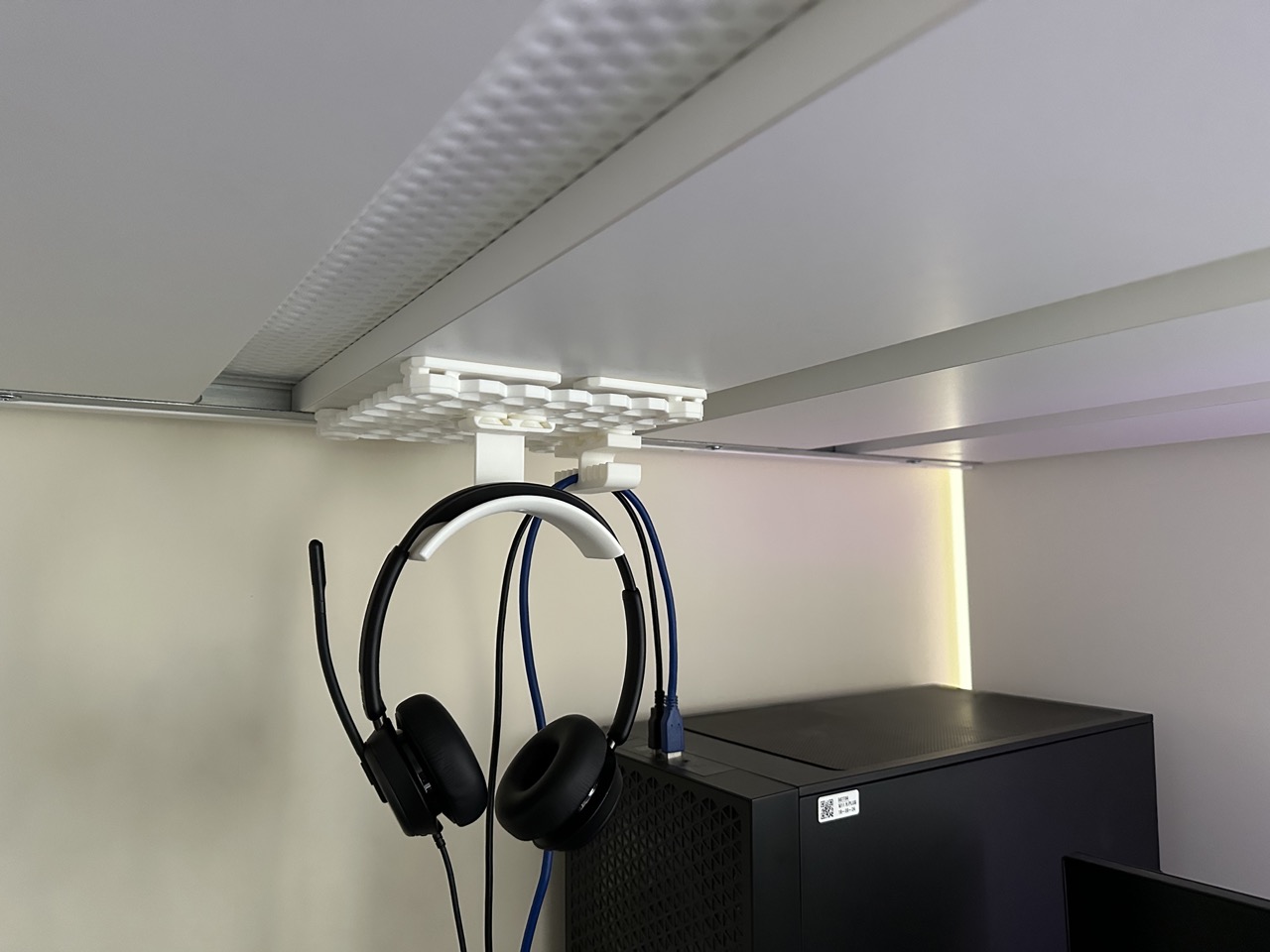
The first was my eldest son’s cabin bed. He does not have a lot of room and he has a computer and desk beneath his bed, but I noted the cabling he was using in the top USB ports of his PC were causing a lot of strain on the cable. Particularly for his noise cancelling headset, which was often being left strewn amongst other cables and dropped in various locations where they could be damaged.
My solution was to add a Multiboard tile underneath his bed using some 3M Ccommand Strip mounts and then add on some Underware elements to give him a headphone stand and some cable guides to relieve the strain on the connection points.
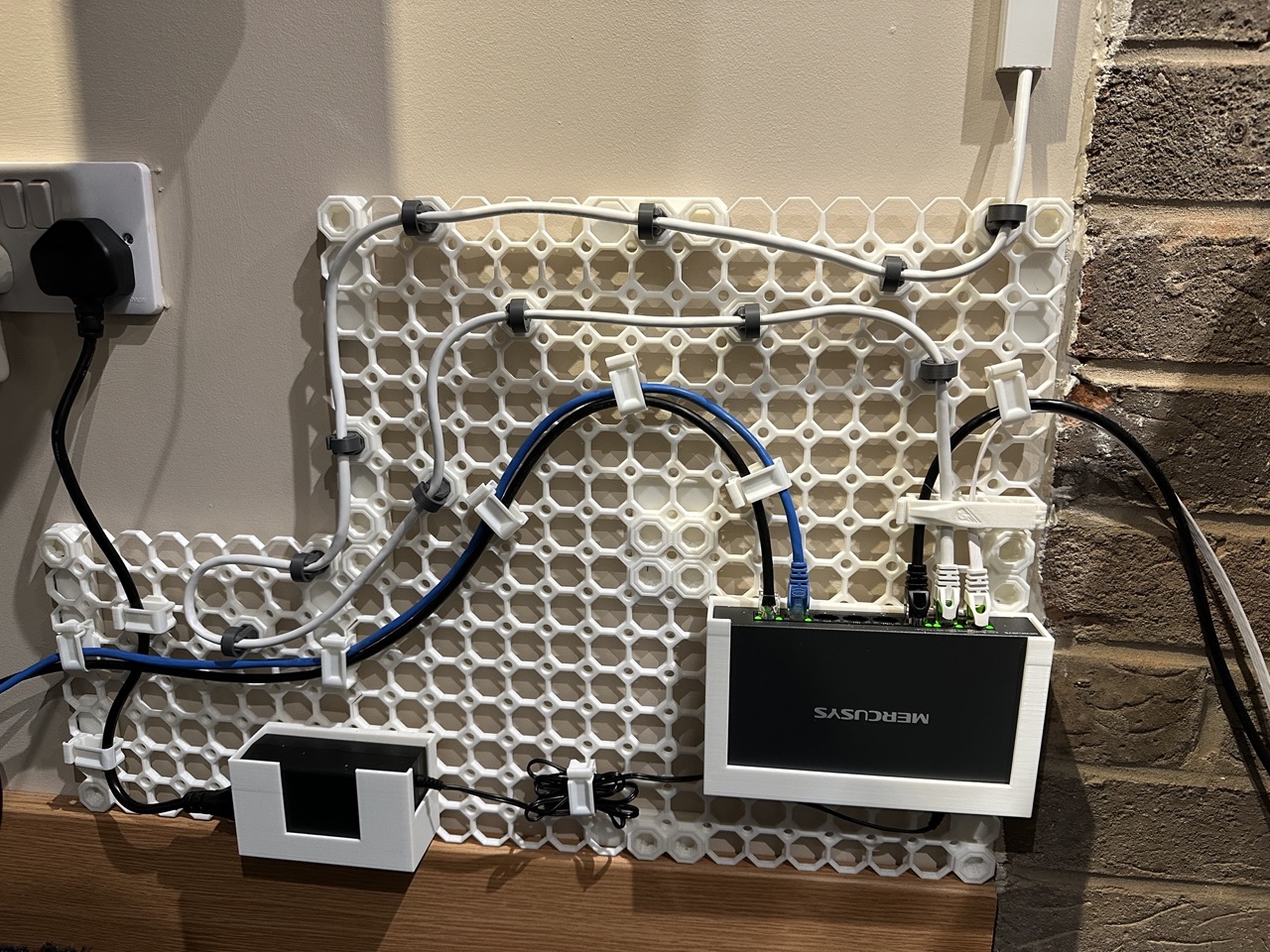
The second was the introduction of the access point in the office. Previously a switch was just lying on the floor behind my desk and I had planned to do something with it after I had addressed my desk cabling situation. However, the arrival of the new access point brought with it an opportunity to start sorting out the cabling that runs between my desk and my wife’s desk, as well as to the back of the office, to the house, and to the access point.
To that end I mounted several Multiboard tiles to the wall, once again using 3M Command Strips (I like easy removal if I change my mind), and I printed a custom holder for the PoE switch and numerous types of cable clips. Many of the clips were discarded in favour of others, and when I get around to adding all of the details into my 3D printing notes site, I will be noting the strengths and weaknesses I discovered; though I may return to some of these and see if I can improve upon some of the models to address some of the shortcomings.
Finally, my desk. All I got as far as doing was to put the Multiboard tiles in place with all the 3M Command Strips (I’ve spent so much on those recently), but this gives me a lot of space to experiment with and I need it given the amount of cabling and power supplies.
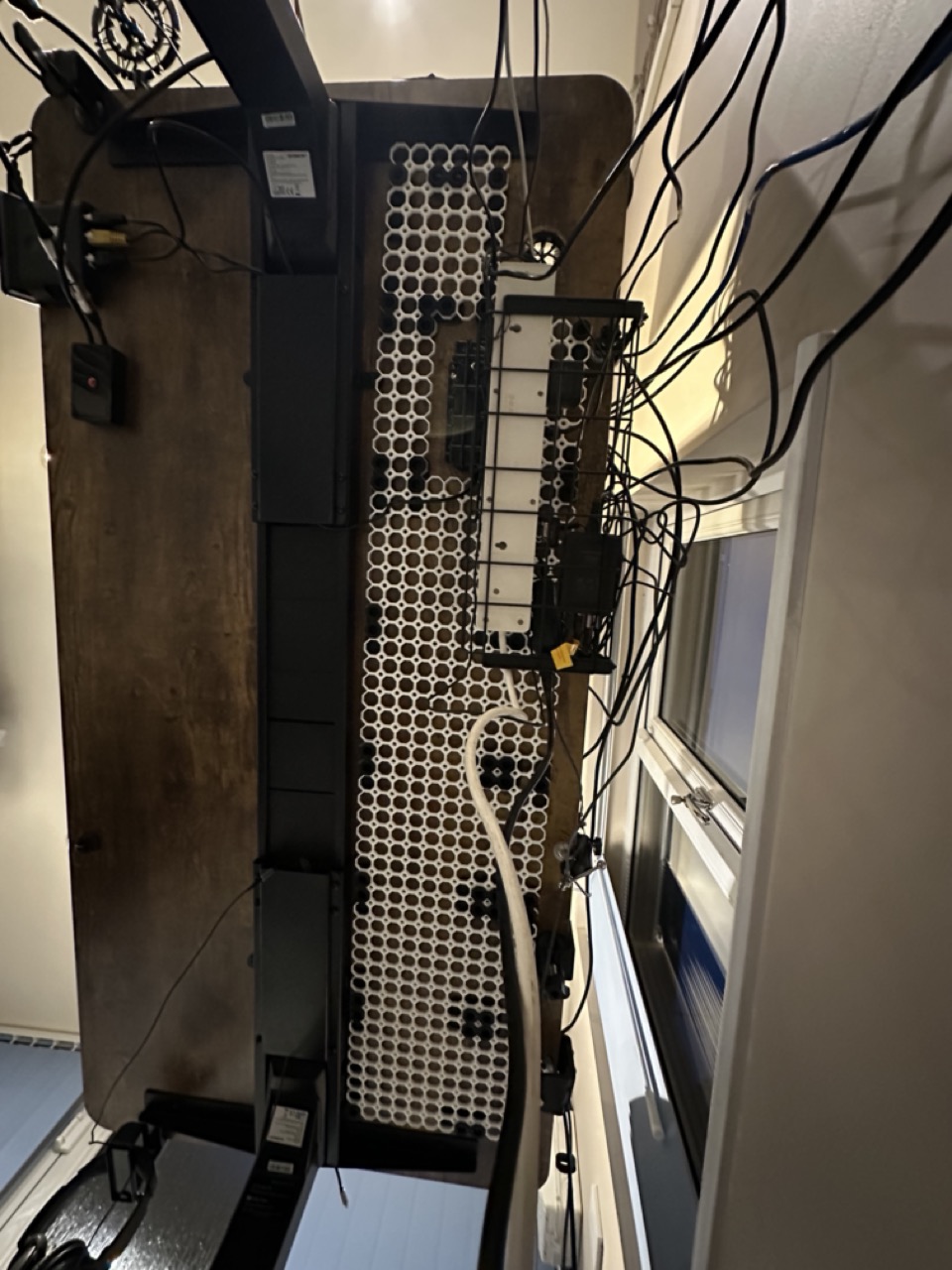
I did also print some simple plates to cover a gap between the two sets of legs for my sit/stand desk. The cable that links the motors on each side had a habit of drooping down, so I figured some simple slats to cover it should suffice, and it has. You can just make out the plates in the image above.
Wire Shelf Riser
Another 3D printing addition this month was I posted my first model to makerworld.com, a customisable wire shelf riser. It was something I created to lift up my AMS riser on my Ikea Omar wire shelving so as to be at the same height as the base board I have on the shelf for my 3D printer.
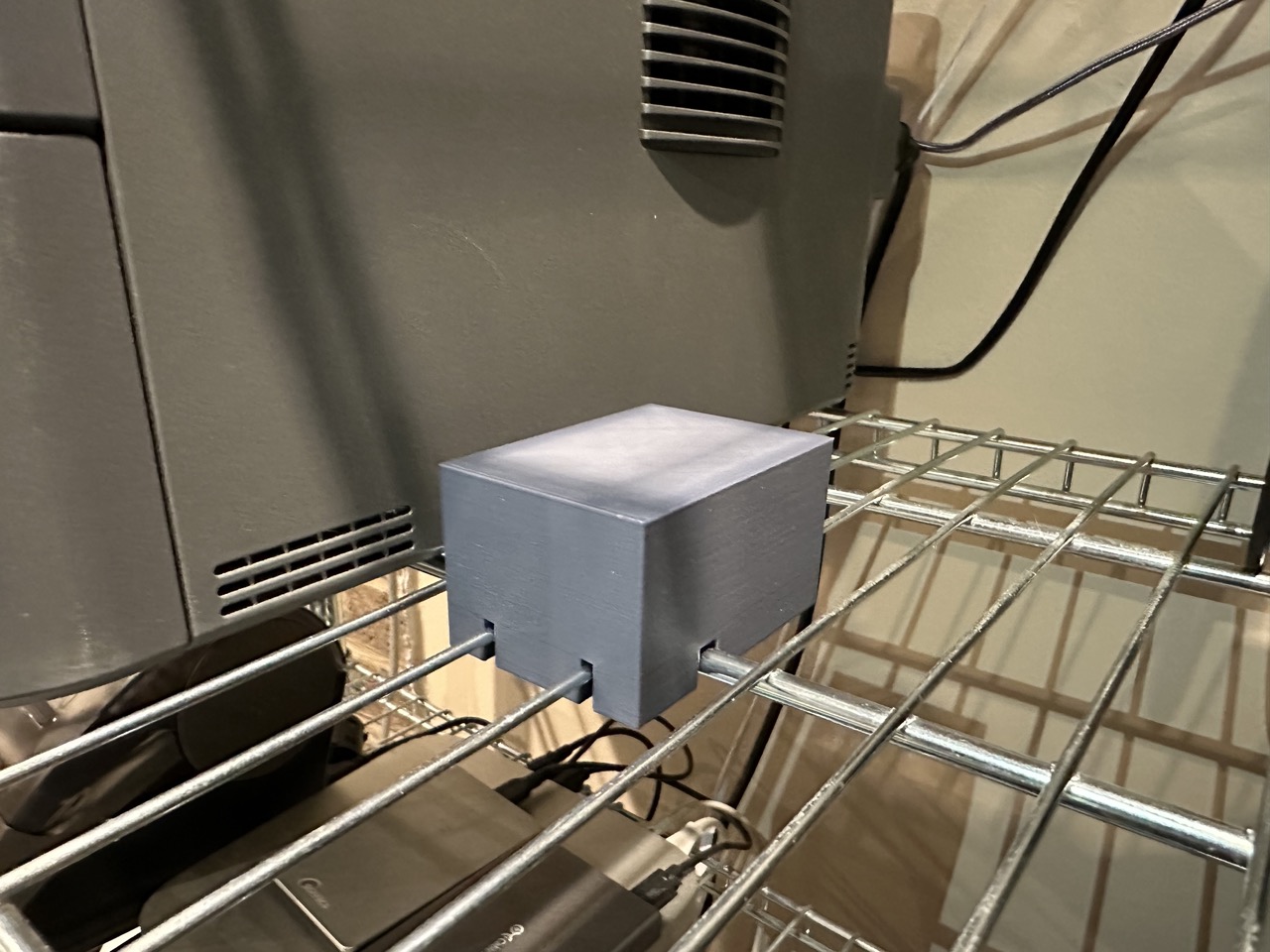
The model is defined in OpenSCAD meaning you can change a set of parameters and customise the size of the riser block, the spacing and diameter of the wires, etc. The block can then lock into place one the wire intersections and give you a stable and level base on top of a set of wire shelves.
Something niche, not overly sophisticated in model terms, but it was a simple enough model I had to get started with and try out uploading content, which was the main aim. I have a few more bits and pieces I’ll be tidying up and posting - hopefully in the coming months. But I must admit I am enjoying the power of OpenSCAD over just building content in other design tools. I guess the programming element speaks to me.
Forge
There are a few new pages from February on Forge, my 3D printing notes site, but as you might imagine, these relate to Multiboard, and there will certainly be more being added. I’ve got so many things I need to get out of my head and I just need the time and space to extract them.
Upcoming
My back is mostly recovered, so I hope that March will be more a return to business as usual. I really do want to spend some time on the Automators Podcast Vault and Forge, and I have a box of 3D printed cable channels (but no holders yet for power supplies, USB power blocks, etc.) that are going to need connecting up. So I think my time this coming month is already spent.
All that remains is to thank you for reading and once again thank all of the generous Internet citizens out there who have nudged a coffee my way. Thank you one and all, and I will be back in about a month with my next round up.