

I know time flies when you are having fun, but the days are full and flying, and I can’t say they are full of fun. It is the usual frenzy in the day job, but the interesting news is that the discussions I mentioned last month seem to have resulted in a new opportunity for me. Over the next few months I’ll transition into that, and whilst it isn’t a million miles away from the sort of things I do now, it will be different and I’m going to have to see how everything slots into place.
But it has not only been busy at work. I have been battling with technology all month long and have several new mental scars to prove it - so plenty to catch everyone up on this month.
 ThoughtAsylum
On the blog I only managed to get out one post in April, but frankly I’m glad to have even got one post published this month - I got a few hours the other day waiting in a London St. Pancras station coffee shop to write it up before catching my train back to York. In the post I explain about a Markdown formatting utility I became aware of, about configuring it for my own use, finding it didn’t quite do what I wanted, and subsequently how I was able to modify it so it did.
If you use Markdown, then make sure to catch up on how I am Fixing Up My Markdown.
 Forums
I spent a bit of time on the Drafts forum this month, and most of the queries of late seem to be ones I can’t pitch in on. Ones on MCP integrations, beta version questions, etc. But every now and then one will pop up where I can hopefully offer some useful insight.
The Automator’s forum however continues to be rather quiet. There is just one topic where I pitched in this past month.
Drafts
There was a discussion on creating an Apple Shortcuts shortcut to scan text into Drafts which highlights some differences in OCR options.
I helped out on a question about inserting images, but the discussion once again highlights gaps some new users hit when they don’t read the documentation.
Did you know that Drafts can be configured to capture your location? This is useful when you want to capture your location in a draft.
Lastly there was a bit of a discussion on enabling spell check in Drafts on macOS.
Automators
I created an Apple Shortcut to save photos from Files to Photos on an iPhone, but never got any feedback on if it worked for the original poster or not. They only gave a one-line request, so it can be hard to know if it is a good match or not.
Other
While I have not been writing lots of blog posts, or posting hard in my usual forum haunts, I have been busy with a variety of other things.
House Splash Screen
The first one is a small change to House, my diagnostics workflow for Alfred. The workflow can be run standalone, but I have begun including it in my other workflows. The originating workflow calls House, and when it does so, and in case others start including it in their workflows, I added a brief splash screen to inform the user they are being passed to a separate workflow.
 Most people won’t run diagnostics often in this way, but I found when I was testing the extra delay of the splash screen opening and staying on screen for a couple of seconds was a little frustrating. As a result, I added a configuration option in House where you can now disable the splash screen.
This one will probably be of no use to anyone else, but sometimes, you just add stuff like this for your own sanity.
AI Agent-Based Automation
I have been diving head-first this past month into AI tooling and frameworks to help do more “stuff” for me. I’m looking for something I can shape into a digital assistant that can take tasks from me and use AI and external tools to get things done. But I am looking for something primarily local.
I saw all the hype around Anthropic’s tools, and the monthly token expenditure price tag too. I bought my Mac Studio last year with enough horsepower to run at least some things locally, so that was the basic premise I set out with when I started looking at things.
The Haystack Problem
Let me start off by saying that while I appreciate the amount of content out there on YouTube to help people get started with this sort of tooling, I am absolutely horrified that well over 90% of it is utter garbage. The videos people post about getting started with these tools almost always focus on quick and easy setups. Pre-built templates on online virtual hosting providers, connecting to large expensive LLM models (even via openrouter.ai the costs rack up), and linking up to the easiest messaging platforms with questionable privacy options. Almost nothing for using things like Docker or local LLMs. After that there’s more noise as people focus in on new release notes and effectively just read the release notes to you with very little value add. In some cases people have their AI voices or AI video avatars read it to you.
Why is this relevant? Well most of us probably check out YouTube for recommendations and reviews, and at the moment, that just means trawling through a lot of noise. The obvious next option is to turn to written tutorials and the source documentation.
The documentation, unfortunately, is not always quite up to scratch. Again, the easy setup options are covered in detail. The path less trodden tends to have a few bumps and potholes to navigate. In reality, I hit a few of those and they stopped me after even more hours of trying to navigate around them. As for independent tutorials, well they are about as common as hen’s teeth right now.
Even the big LLM models are having trouble pulling something meaningful together. I tried to use some of these to help me get things up and running, and they kept hitting the same issues as me. Not enough information - which was brought up through explanations of no details being available, contradictory information, fixes sending us round in loops, and, of course, outright fabrication of “facts” for which references could not be cited.
It has been a very frustrating exploration these past weeks.
OpenClaw
My first foray was with OpenClaw, an open-source platform designed to allow you to interface to sets of tools, and to build up constraints and skill definitions to allow you to define agentic patterns for it to follow. You can describe what you want it to do, and within your defined framework, it will set forth on accomplishing the goal you set it.
 OpenClaw is known to have a number of security challenges, and really I was interested in trying out NemoClaw, but it simply wasn’t ready to run on my Mac when I started looking at this. Instead I set about getting this to run in Docker, where it is supported. It took me a few days to get it working, but I set up a stack of Docker containers that ran OpenClaw, some chat interface options, an Ollama instance, and even a separate segregated browser for it to control.
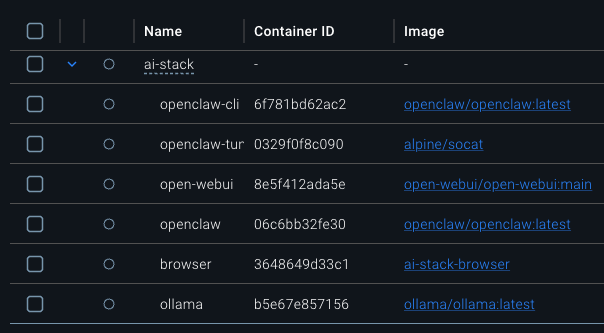 It even worked … except that no matter what I did, OpenClaw simply could not read the file system I had mounted for it to use. In fact it even seemed to struggle in using some of its standard tools. Putting it in Docker and keeping it all locked in place was not working. I am no Docker expert, and no OpenClaw expert, and so eventually I cut my losses with that.
But, I had one more option Atomic Bot, an app wrapper, or framework that sits around OpenClaw with the aim of making it easier and safer to run. While it worked, it simply wasn’t performant and it still struggled to work with local files using command line tools unless there was a script I had already created for it - in which case it mostly could run the script … but not always.
OpenClaw was too dangerous to simply be installed locally, and the Docker approach gave me only a partially functioning solution - and not the part I was looking for. I decided to cut my losses at this point.
Eigent
Next up was Eigent. Something a little different. More an orchestration tool, but it seemed more security minded and ready than OpenClaw. It focuses on automations which is right up my street, but when I tried this one out, while it was easy to get working, it was honestly just really “dumb”. Now, you might argue that it is the LLM model being used that determines how “smart” a tool like this is, but I actually downloaded and used the same model for each tool I tried, and this one just seems to have been “dumber”. Even when I explained things very precisely, and in detail, it would come back with the wrong result. Even giving it a script to run that I had created, it still ended up running it then not using the results and doing its own thing.
I was looking for a digital assistant that could follow my instructions, and I just couldn’t quite get Eigent to do that reliably.
Hermes-Agent
My third try was with Hermes-Agent, and this is the one that seemed to fit best. I did try using Docker and it worked okay, but still struggled with wider access. Again, this probably comes down to my very limited Docker experience, but maybe the nature is that to safely constrain it, you don’t get to give it the same set of basic tools a Mac gets; after all it is a very lightweight Linux under the hood of the Docker container.
 A few days later, the folks at Atomic Bot released Atomic Hermes. The experience was actually similar to Atomic Bot, and it was frustrating downloading duplicate models again to live within the app … but if you poke around it is possible to copy them between those two apps. Ultimately though, it fell flat.
Nothing Ventured….
At this point I took a deep breath and took a big leap, and a risk I am continuing to run. I installed Hermes-Agent directly on my Mac and hooked it up to Ollama for a local LLM. The result was, well, actually good.
My setup is nowhere near as performative as using one of the big hosted models (I did also set it up and try with some OpenRouter free models), but it worked.
I will reiterate that I am taking a notable risk running this on my daily driver Mac Studio. However, my private information is locked away in password managers and secure stores with no saved passwords, so I think I should be low risk on that front. Could it delete things from iCloud, yes, but I do have a backup on my NAS, so I have a fallback position there. Would I recommend this approach? No, but if you understand the risks, the choice is yours.
I am being very cautious and taking care to apply additional safeguards in my prompts, and I am slowly building out this personal experiment, but there is obvious potential. I will no doubt write more about this for my May summary, but as a tease, I have really started to see something “different” when I give it a research or optimisation task to carry out overnight. The relatively slow speed of the local LLM does not matter so much at that point, and the results exceeded my expectations.
HR & Learning Technologies - London 2026
At the end of April I spent a few days in London attending the HR Technologies and Learning Technologies events. This is a dual event, both taking place in the same hall at the ExCel in London’s Docklands. It is my fourth year attending this event, and this year rather than only being focused on learning technologies, I was also on the lookout for talent acquisition (recruiting) related technology, as this is an area I have been supporting this year.
 As usual, the event brought many vendors who were looking to provide a complete solution that does everything within it, and does not connect up to anything else, or if it does, not via a standard integration. Unfortunately, this was prevalent across both events, and does not really cater to people such as myself working in a large enterprise where it cannot be slotted into an existing embedded ecosystem. This is particularly frustrating when vendors have great solutions to specific problems, but ones that are siloed into weak overall solutions that simply can’t scale and integrate to that enterprise level.
There were definitely some themes that were coming through strong.
AI has been the hot topic for several years now, but this year “agentic” was all the rage. Now in many cases, this was pure marketing hokum, and there was nothing actually agentic about the solutions, but there were one or two who were actually using the term correctly. At least it made it easy to filter out those who were all talk.
Hyper-personalised learning appeared in various guises, but the applications were often overly limited and were missing the opportunity to have the learner guide the process. The human generally knows more about their own preferences than an AI construct that only has stats to draw upon. Both can offer useful, actionable insights.
Unlocking learning content was something a few providers were talking about this year. Opening it up more for reuse. Using it to feed into hyper-personalised learning, using it as sources of facts for AI systems.
This third one is one I find particularly interesting. In particular I think that there is content out there that is not learning content, but which could be brought together with the learning content. This would build a stronger core knowledge repository.
It was a busy couple of days and due to some scheduling challenges, I actually ended up staying in a hotel that was built from shipping containers. Definitely “cosy” in terms of room size, and not the most sound proof of rooms, but it was cheap and convenient for the DLR (Docklands Light Railway). So I think that was a win at the end of the day.
 Home Networking
Lastly, I was expecting this month to have switched over to a full fibre Internet connection. Alas when the initial inspection was done, they realised there were no existing conduits they could use to run the fibre from the nearest kerb connection point to the house. Openreeach, who manage the telecoms infrastructure, therefore need to dig a small trench to add a conduit so they can then safely run the fibre to the house. The bad news was that rather than having fibre connected by the end of April, it has now been pushed out into July! So I am now on the go slow to go fast, which is rather frustrating for my whole family who were expecting big things much sooner.
What I did manage to do was to do a few more simplifications and tidying up on the internal network. I switched over the Apple TV to use Wi-Fi, and it seems to have been fine; so the last Ethernet over power (PowerLine) connection has been consigned to a utility box, and I have modified some of the network connections in the home office.
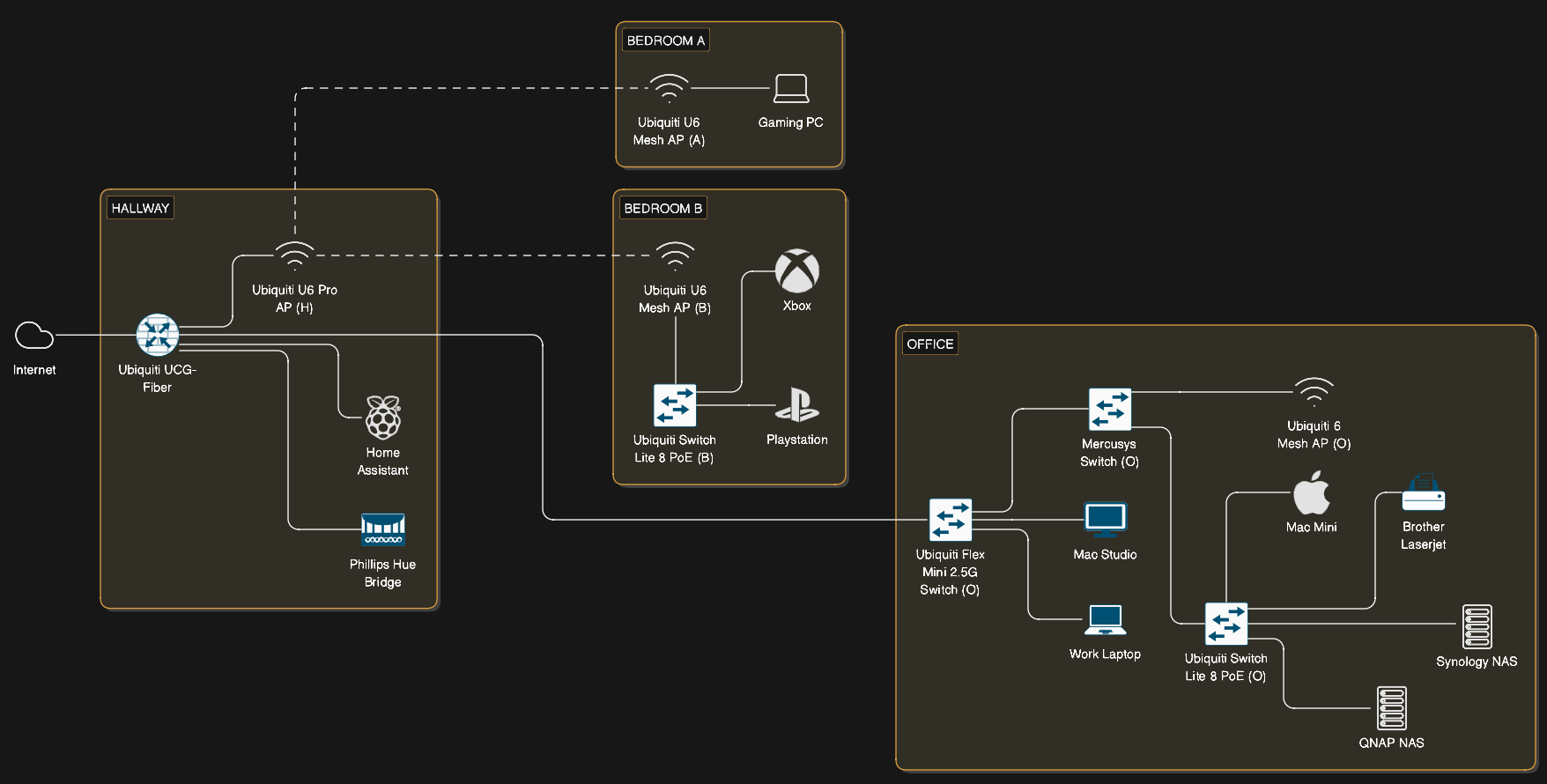 As well as taking a couple of Raspberry Pi offline that were not really doing anything much at the moment, I added a new Ubiquiti Flex Mini 2.5G switch. This is now connected directly to the Ubiquiti cloud gateway router over CAT6 cabling. This means that when my fibre connection is installed, my Mac Studio will actually be able to take full advantage of the connection when nothing else is monopolising it. The new connection should give me 1.3 - 1.6 Gbps. I don’t expect it will be a massive boost most of the time, as I won’t be filling the bandwidth, but I am sure there will be times when I can get the full pipe streaming in.
The addition of the new switch in the configuration I have now means I can monitor every device directly on the Ubiquiti software. Everything connects via a Ubiquiti switch, gateway, or wireless access point. Previously I had several devices connected into switches and then into one port on a Ubiquiti switch.
My new wired Ubiquiti network means that I was also able to effectively deal with what is an all too common issue at the moment on our slow copper-based Internet connection. One where bandwidth saturation is all too easily applied when one of us starts downloading a large volume of data. This could be a game update for one of the gaming devices, an OS update, a new LLM model to try out, etc. To mitigate this I created a new traffic rule in the policy engine that limits the bandwidth for the devices it is applied to.
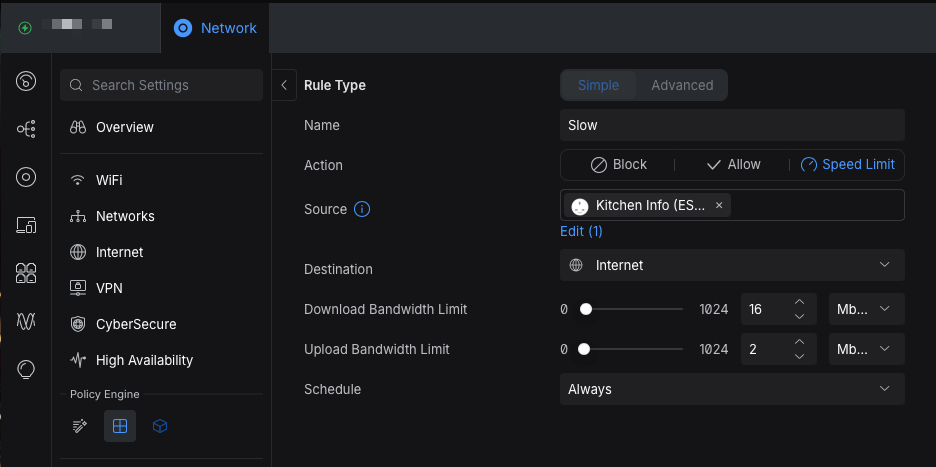 The screenshot above shows the Internet (only) bandwidth limits I applied on the rule, and that is actually about 70% of our full bandwidth - I really need full fibre. The rule has to apply to at least one device, so I added one of my ESP32 devices that I use with HomeAssistant that doesn’t access the Internet directly (it gets all its information from HomeAssistant), so is unaffected by this rule. Now when I need to throttle a device and leave bandwidth for everyone else, I can temporarily add it to this rule and we can coexist.
As a side note to my networking updates I also invested in a portable sticker printer. I have a trusty Brother QL-560 for larger labelling, but having a hand held labeller for labelling up power supplies, plugs, and cables was something I was finding hard to manage on. While my wife has one already, it was quite slow and I opted to get a SUPVAN E11 Bluetooth labeller, which not only had an app, but also a keyboard and space to keep a spare tape. It was on offer, and so far it has been ideal for my on the go network labelling needs.
 Links
Links
This month I’ve got a useful browser plugin and a couple of command line utilities to share.
PrintFriendly
First up is the browser extension (Chrome, Firefox, and Safari), whose base functionality is also available via the web - PrintFriendly. It allows you to turn web pages into nicer formats for exporting to cleaner print versions. It strips out all the background images, ads, etc. and applies some formatting to make the page easier to save out to an image or PDF.
 There are many browser extensions that do this, but PrintFriendly notably allows you to remove sections that the default pass leaves in. This can be extremely useful and I was using it this month to create some PDF copies of some documentation to share with colleagues who would not be able to access it directly. Being able to cut out irrelevant sections and filler elements meant I could share exactly what was necessary with minimal effort.
Remote Sync (rsync)
I had been using the command line utility lftp, in a script to help me download and keep in sync files from a remote SFTP server. I got this working last year, but when I came to run an update recently, it failed. After a while, I discovered that the fingerprint of the server had changed, but my script wasn’t flagging that - just failing silently. I confirmed the server identity - it had changed - and then updated the fingerprint. Unfortunately, the script continued to fail.
After many hours of investigation I concluded that the server had been updated in such a way that lftp was no longer able to do the sync it had been doing previously. While this is not common, it does happen. This left me with no choice but to try and find an alternative tool.
The challenge was I needed to get one specific file from every directory in a folder tree on the server. Many thousands of them. That is something most SFTP clients are poor at and even fewer are able to compare to a local store and sync only files not already copied down.
Enter rsync. I honestly don’t know how I didn’t look at this the first time around, but sufficed to say my short lftp script is a one line command for rsync.
You can of course download and install this via Homebrew.
For completeness, once the files are available, I use some PowerShell scripts to build a mapping file from a couple of system exports, and then review the content of the files and any file that can be mapped gets copied to a new location and the content updated to apply the new mapping. A nice automated solution to a migration of learning data - any brave soul who understands the statement “migrating SAP SuccessFactors Learning content hosted on a content system that utilises stub SCORM packages on iContent” might get a deeper understanding of what this is all about.
Terminal Multiplexer (tmux)
The last thing this month is tmux - a terminal multiplexer - or an extremely useful way for you to run multiple terminal sessions. I don’t generally use the option to lay out multiple terminal sessions in a single window - I tend to open multiple app windows for that, but I do use it to run persistent sessions in the background.
The idea is that you create tmux sessions, set something running or leave it in a state you want to preserve, and then detach from the session. Rather than just running a process in the background, running it within a tmux session means that you can log back into it again. This is incredibly useful if you want to work from multiple computers because it is a much quicker option to just connect to a terminal session than say a full graphical interface. It also means that if your connection drops out you can connect right back to exactly the same session and nothing will have changed.
I have found it very useful for running Hermes Agent sessions this past month.
I’d recommend the Taming the Terminal episodes on tmux to learn more about using this, and again, you can download and install this via Homebrew.
Upcoming
This coming month is a seriously busy month. One that we have been building up to for the past year and a half as we undertake a huge go-live covering hundreds of systems simultaneously. I am only involved with a handful of the systems, but while everything is frenetic right now, I can imagine May will be even busier.
I am really not planning on doing anything this coming month. I am sure I will, but my time will be very limited and my brain will be full of other thoughts. I’m going to see where things go and I expect most of it will be poking around at Hermes-Agent to see what I can safely get it doing.
Thanks for sticking with me through to the end of this past month’s update and I hope you will join me again next month. Finally, a special thank you to everyone who has bought me a coffee; I really appreciate it.