

Welcome to this RabbitMQ crash course for beginners! In this guide, we'll cover the fundamentals of RabbitMQ, including key concepts, installation steps, and examples to get you started with message queuing systems.
1. What is RabbitMQ?
RabbitMQ is an open-source message broker software that facilitates communication between different applications or components by transmitting messages. It supports multiple messaging protocols, including AMQP (Advanced Message Queuing Protocol), which is the protocol commonly used by RabbitMQ.
RabbitMQ allows you to create a robust and scalable system where applications can communicate asynchronously, improving performance and reliability.
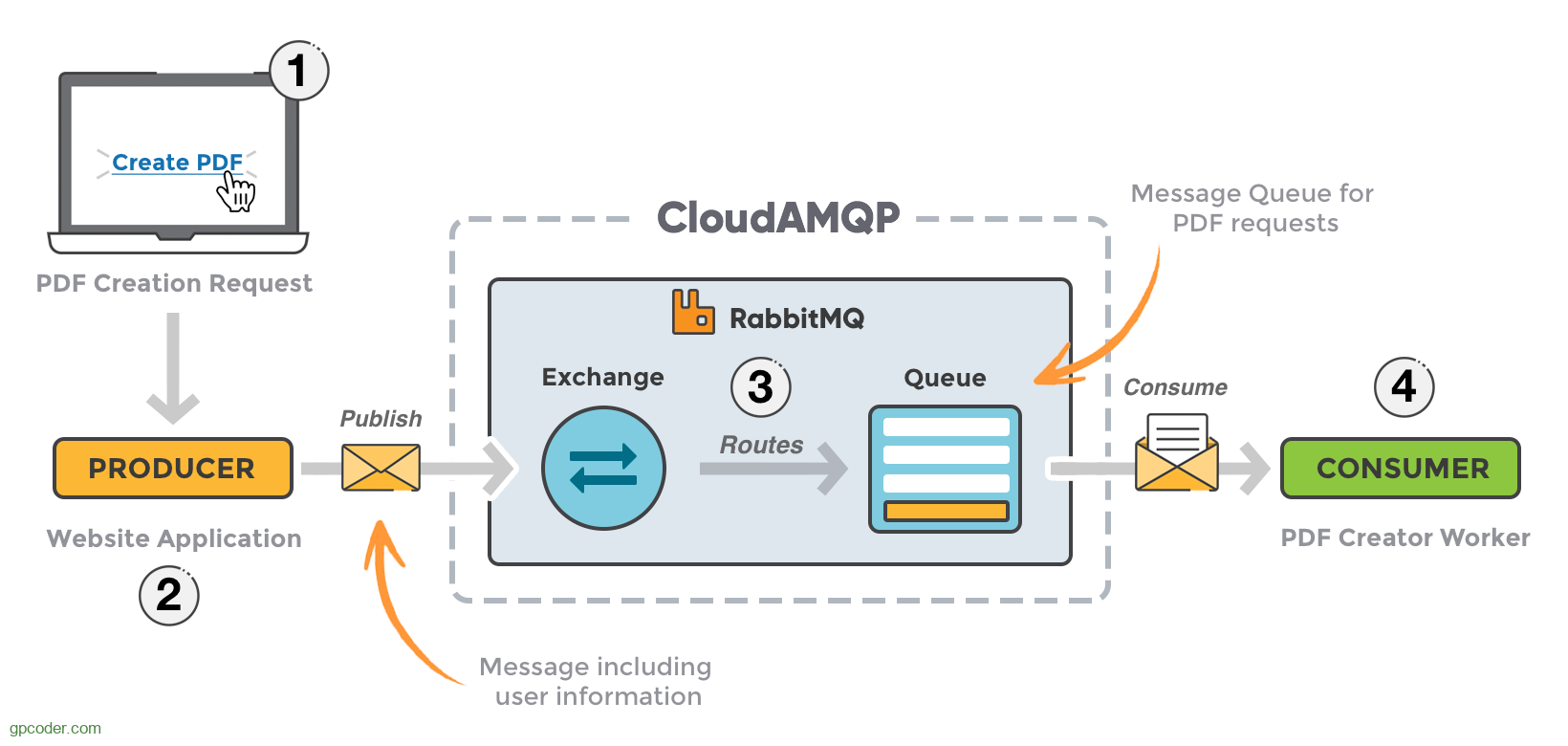
2. Key Concepts
Before jumping into code, let's take a look at the key RabbitMQ concepts you should know:
2.1 Producer: a producer is an application or component that sends messages to a message queue. It is a key part of the message-oriented middleware architecture. The producer’s role is to send messages to a specified queue, which can then be consumed by consumers (other applications or components).
How RabbitMQ Works in a Producer-Consumer Scenario:
Producer: It sends messages to the RabbitMQ broker (server) for processing.
RabbitMQ Broker: The message broker receives and holds the messages, sending them to the appropriate queues.
Consumer: The consumer retrieves and processes the messages from the queue.
Example Use Case:
Imagine an e-commerce platform where customers can place orders. When a customer places an order, the order service (producer) sends the order data to a RabbitMQ queue. Then, different components (like inventory service, payment service, and shipping service) act as consumers and process the order asynchronously.
2.2 Consumer: a consumer is an application or component that reads and processes messages from a message queue. Once a producer sends a message to a queue, a consumer retrieves the message and performs some action based on its content. Consumers typically run continuously or for a specific duration, processing messages as they arrive in the queue.
How RabbitMQ Works in a Producer-Consumer Scenario:
Producer: Sends messages to a queue.
RabbitMQ Broker: Stores the messages in queues.
Consumer: Reads and processes messages from the queue.
Example Use Case:
Imagine an e-commerce system where customers place orders. The order service (producer) sends the order details to a RabbitMQ queue. The payment service (consumer) processes the payment by reading the order details from the queue. Similarly, the shipping service can act as a consumer that handles the order fulfillment process.
2.3 Queue: a queue is a temporary storage buffer where messages are held until they are consumed by a consumer. Queues are the backbone of the messaging system, as they manage how messages are delivered from producers to consumers.
Queues can be configured with several properties:
Durable: Ensures that the queue will survive server restarts, meaning the messages in it won’t be lost if RabbitMQ crashes.
Exclusive: Limits the queue to be used only by the current connection. Once the connection is closed, the queue is deleted.
Auto-delete: The queue will automatically delete itself when no consumers are connected and it is empty.
Arguments: You can set additional parameters for fine-grained control over the queue behavior, such as message TTL (time-to-live), maximum length, etc.
Key Concepts:
Producers send messages to queues.
Consumers retrieve and process messages from queues.
Queues act as buffers between producers and consumers, ensuring messages are not lost and that consumers can process them asynchronously.
Example Use Case:
Imagine an online food delivery system:
When a customer places an order, the order service (producer) places the order details in a queue.
The payment service (consumer) will consume messages from the queue to process the payment for the order.
The delivery service (another consumer) processes the order and schedules the delivery.
2.4 Exchange: an exchange is a message routing mechanism that receives messages from a producer and routes them to one or more queues based on routing rules. The exchange is responsible for deciding how messages should be forwarded to the appropriate queue(s). It plays a key role in defining how messages are distributed across consumers.
Types of Exchanges in RabbitMQ:
Direct Exchange:
A message is routed to the queue whose routing key exactly matches the message's routing key.
Use case: Direct routing of messages (e.g., an order service that sends messages to a payment queue).
Fanout Exchange:
A message is broadcast to all queues bound to the exchange, without considering the routing key.
Use case: Broadcasting messages to multiple consumers (e.g., logging or event notification systems).
Topic Exchange:
A message is routed to queues based on wildcard patterns in the routing key.
Use case: Routing messages with complex routing patterns (e.g., notifications for different types of events, like "order.created" or "order.shipped").
Headers Exchange:
Routing is based on message header attributes instead of the routing key.
Use case: Routing messages based on custom attributes (e.g., sending messages only for specific regions or customer types).
How Exchanges Work:
Producer sends messages to an exchange.
The exchange uses routing logic to determine which queue(s) should receive the message.
The queue(s) receive the message and hold it until a consumer retrieves it.
Example Use Case:
Let’s imagine an order processing system:
Producer (Order Service): Sends messages about new orders.
Exchange: Routes messages to specific queues based on the message type, such as
payment_queuefor payment processing orshipping_queuefor shipment processing.Consumers: The
payment_serviceconsumes messages related to payments, and theshipping_serviceconsumes messages related to shipping.
2.5 Binding: is the mechanism that connects an exchange to a queue. A binding defines the relationship between an exchange and a queue, which determines how messages from the exchange are routed to the queue. The binding also specifies routing criteria such as a routing key (in direct and topic exchanges) or matching criteria (in the case of headers exchanges).
When you bind a queue to an exchange:
The exchange knows which queue to route messages to based on the binding configuration.
Depending on the exchange type, the binding can have different rules for determining which messages will be routed to the queue.
Types of Bindings:
Direct Binding (in a direct exchange): Binds a queue to an exchange with a specific routing key.
Example: A queue might be bound to an exchange with the routing key
payment, so only messages with this key will be routed to that queue.
Wildcard Binding (in a topic exchange): Binds a queue to an exchange with a routing key pattern (using
*and#wildcards).Example: A queue might be bound to an exchange with the routing key
order.*, meaning it will receive messages for all routing keys that matchorder.*(e.g.,order.created,order.shipped).
Binding with Headers (in a headers exchange): Binds a queue to an exchange with message headers that match specific criteria.
Example: A queue might be bound to an exchange with a header
region=US, meaning it will receive messages with that header.
Why Use Bindings?
Routing: Bindings determine how messages are routed from exchanges to queues.
Flexibility: Bindings provide flexibility in routing logic by allowing multiple queues to be bound to the same exchange with different routing keys.
Decoupling: Producers can publish messages to exchanges without worrying about which queues will consume the messages. The binding defines the relationship between queues and exchanges.
Example Use Case: Order Processing System
Let’s consider an order processing system where:
The order service sends messages related to orders.
We use an exchange to route these messages to different queues based on message types (e.g.,
payment,shipping).
2.6 ACK
ACK (Acknowledgment) is a mechanism that RabbitMQ uses to confirm whether a message has been successfully processed by a consumer. In simple terms, it is a way for the consumer to inform RabbitMQ that it has successfully handled a message and that RabbitMQ can safely remove the message from the queue.
ACK ensures that RabbitMQ does not delete messages prematurely and guarantees that messages are not lost in case of failures. Without ACKs, messages would be lost if a consumer crashes before completing its work or if there’s a network issue.
Why is ACK Important?
ACK plays a vital role in RabbitMQ for the following reasons:
Reliability:
Without ACKs, RabbitMQ would assume that messages are successfully consumed as soon as they are delivered to the consumer. This could lead to message loss if the consumer crashes before processing the message.
ACKs ensure that messages are only removed from the queue once they have been successfully processed, improving the reliability of message delivery.
Message Re-delivery:
If a consumer fails to acknowledge a message, RabbitMQ can requeue that message and deliver it to another consumer for processing.
This guarantees that no messages are lost, even in case of consumer failures.
Control Over Message Processing:
Consumers have control over when messages are acknowledged, which is helpful in managing how long they take to process messages and ensuring the system doesn't overload a single consumer.
Fault Tolerance:
If a message is not acknowledged (e.g., due to a consumer crash), RabbitMQ can reassign the message to another consumer, allowing the system to keep processing without missing any messages.
Types of ACK in RabbitMQ
There are two primary types of ACKs in RabbitMQ:
Automatic Acknowledgment (Auto-ACK):
In automatic acknowledgment mode, RabbitMQ assumes that the message has been successfully processed as soon as it is delivered to the consumer. No explicit acknowledgment is required.
Caution: This is risky because if the consumer crashes before it finishes processing, the message will be lost.
Manual Acknowledgment:
In manual acknowledgment mode, the consumer is required to explicitly acknowledge each message after it has been successfully processed.
Recommended for production environments as it ensures that messages are not lost in case of failures.
3. Step-by-Step Workflow in RabbitMQ
Producer Sends a Message
Role: The producer is responsible for creating and sending messages.
Action: The producer connects to the RabbitMQ broker and publishes messages to an exchange.
Example: The producer can be a microservice that processes user orders. When a user places an order, the service sends a message about the order to RabbitMQ.
pythonCopyimport pika

# Create connection to RabbitMQ broker
connection = pika.BlockingConnection(pika.ConnectionParameters('localhost'))
channel = connection.channel()

# Declare an exchange of type 'direct'
channel.exchange_declare(exchange='order_exchange', exchange_type='direct')

# Publish a message to the exchange with a routing key 'payment'
message = "New Order #12345"
channel.basic_publish(exchange='order_exchange', routing_key='payment', body=message)

print(f" [x] Sent message: '{message}'")

# Close the connection
connection.close()
In this example:
The exchange
order_exchangeis where the message is sent.The routing key
paymentindicates the type of message (e.g., payment-related).
This message is not directly sent to a queue; it's routed through the exchange based on certain routing rules.
2. Exchange Routes the Message
Role: The exchange receives the message from the producer and routes it to the appropriate queue(s).
Action: The exchange routes the message based on the type of exchange and the routing key.
Exchange Types:
Direct Exchange: Routes messages to queues based on an exact match between the routing key and the queue binding.
Fanout Exchange: Routes messages to all queues bound to the exchange, regardless of the routing key.
Topic Exchange: Routes messages to queues based on matching patterns of the routing key.
Headers Exchange: Routes messages based on matching header attributes.
Example with direct exchange:
The
order_exchangeis a direct exchange.The routing key used is
payment, and the exchange routes it to the queue bound topayment.
pythonCopychannel.queue_declare(queue='payment_queue', durable=True)
channel.queue_bind(exchange='order_exchange', queue='payment_queue', routing_key='payment')
3. Queue Holds the Message
Role: The queue is where the message waits to be consumed by the consumer.
Action: The message is stored in the queue until a consumer retrieves it. Multiple queues can be bound to the same exchange, and each queue can receive messages based on the exchange type and routing rules.
Example:
The
payment_queueis bound to the exchange with the routing keypayment. The message with that key will be stored in this queue.
Note: The queue retains the message until it is acknowledged by a consumer or until the message expires.
4. Consumer Retrieves the Message from the Queue
Role: The consumer is responsible for receiving and processing messages from the queue.
Action: The consumer connects to the RabbitMQ broker and starts consuming messages from the queue. As the consumer retrieves a message, the message is removed from the queue.
Example:
A payment service is the consumer that consumes messages related to payments from the
payment_queue.The consumer processes the message (e.g., charging the user’s payment method) and acknowledges receipt of the message.
pythonCopydef callback(ch, method, properties, body):
    print(f" [x] Processing Payment: {body.decode()}")
    ch.basic_ack(delivery_tag=method.delivery_tag)

# Create connection to RabbitMQ broker
connection = pika.BlockingConnection(pika.ConnectionParameters('localhost'))
channel = connection.channel()

# Declare and bind the queue as the producer does
channel.queue_declare(queue='payment_queue', durable=True)
channel.exchange_declare(exchange='order_exchange', exchange_type='direct')
channel.queue_bind(exchange='order_exchange', queue='payment_queue', routing_key='payment')

# Consume messages from the queue
channel.basic_consume(queue='payment_queue', on_message_callback=callback)

print(' [*] Waiting for messages. To exit press CTRL+C')
channel.start_consuming()
The consumer calls
channel.basic_consume()to begin consuming messages from thepayment_queue.The callback function is executed when a message is received, processing the payment and acknowledging it.
5. Message Acknowledgment
Role: The consumer acknowledges the message after it has been successfully processed.
Action: The consumer calls
basic_ack()to tell RabbitMQ that the message has been processed and can be removed from the queue.
This ensures that the message is not lost and the consumer has successfully handled it. If a message is not acknowledged, RabbitMQ can re-deliver it to another consumer.
pythonCopych.basic_ack(delivery_tag=method.delivery_tag)Acknowledgments are important for ensuring reliable message delivery. RabbitMQ uses acknowledgments to manage message delivery and ensure that messages are not lost or processed multiple times.
6. Consumer Processing and Task Completion
Role: The consumer completes the task after processing the message.
Action: After the consumer processes the message (e.g., charging the user’s credit card), the task is considered complete.
The consumer can choose to send a follow-up message (e.g., to update the user about the order status) or simply acknowledge that the task has been completed.
Summary of Workflow Steps
Here’s a summary of the step-by-step process from producer to consumer:
Step 1: Producer Sends MessageThe producer creates and sends a message to an exchange with a routing key.
Step 2: Exchange Routes MessageThe exchange receives the message and routes it to the appropriate queue(s) based on the routing key.
Step 3: Queue Holds MessageThe message is stored in the queue(s) until consumed by a consumer.
Step 4: Consumer Retrieves MessageThe consumer consumes messages from the queue, processes them, and acknowledges the message.
Step 5: Message AcknowledgmentThe consumer sends an acknowledgment to RabbitMQ, signaling successful processing.
Step 6: Consumer Processing CompleteThe consumer completes the task (e.g., payment processed) and can move on to the next task or message.
Real-World Use Case Example:
Let’s put this together in a real-world scenario:
Order Service (Producer): When a user places an order, the Order Service sends a message to the
order_exchangewith a routing keypayment.Payment Service (Consumer): The Payment Service listens to the
payment_queue, processes the payment, and acknowledges the message.Shipping Service (Consumer): The Shipping Service listens to the
shipping_queue(separate routing keys) and processes the shipment once the payment is confirmed.
Best Practices
In this section of the RabbitMQ crash course, we will dive into best practices for using RabbitMQ in real-world applications. We will explore step-by-step recommendations that enhance the reliability, scalability, and maintainability of a message-driven architecture, from the producer sending messages to the consumer receiving and processing them.
By the end of this section, you will be able to build production-ready RabbitMQ systems that handle high traffic and complex workflows with reliability.
1. Producer Best Practices
The producer sends messages to the exchange in RabbitMQ. It’s essential to follow best practices to ensure message reliability, consistency, and avoid message loss.
1.1. Use Durable Exchanges and Queues
What It Means: Ensuring that both exchanges and queues survive broker restarts.
Why It Matters: Durable exchanges and queues preserve messages in case RabbitMQ crashes or is restarted, preventing message loss.
1.2. Use Persistent Messages
What It Means: Messages should be marked as persistent so they are saved to disk and survive crashes.
Why It Matters: By default, messages are stored in memory, which can result in data loss in case of a RabbitMQ crash.
1.3. Handle Connection Failures
What It Means: Gracefully handle connection interruptions and retries.
Why It Matters: In a production environment, network issues and RabbitMQ downtime can cause temporary failures. It's essential to implement a retry mechanism for robust systems.
2. Exchange and Queue Configuration Best Practices
2.1. Use Appropriate Exchange Types
What It Means: Different types of exchanges are suited to different use cases (direct, fanout, topic, headers).
Why It Matters: Choosing the wrong exchange type can result in inefficient routing and unnecessary message delivery overhead.
2.2. Use Multiple Queues for Different Workloads
What It Means: Divide your workload into logical queues based on message types.
Why It Matters: Different consumers may need to process different types of messages, and separating them into different queues ensures that processing is efficient and decoupled.
3. Consumer Best Practices
Consumers are responsible for processing the messages in the queue. Proper consumer design ensures that your system scales efficiently, can handle failures, and remains responsive.
3.1. Enable Message Acknowledgment
What It Means: Consumers should acknowledge messages after successfully processing them.
Why It Matters: By acknowledging a message, you signal to RabbitMQ that the message can be safely removed from the queue. If you don't acknowledge, RabbitMQ will re-deliver the message.
3.2. Use Prefetch Count to Control Consumer Load
What It Means: The prefetch count limits the number of messages a consumer will fetch at once.
Why It Matters: This prevents overloading a consumer and ensures messages are processed evenly across consumers. If one consumer is slower, it won't block others.
3.3. Gracefully Handle Failures and Retries
What It Means: If a consumer fails to process a message, it should either:
Retry the message after a delay or,
Move the message to a dead-letter queue (DLQ) for further inspection.
Why It Matters: Retry mechanisms or dead-letter queues help prevent lost messages and ensure that your system can recover from temporary failures.
3.4. Use Multiple Consumers for Scalability
What It Means: Use multiple consumers for a single queue to handle high throughput and scale horizontally.
Why It Matters: If one consumer cannot handle the message load, multiple consumers allow the system to scale and balance the load dynamically.
4. Monitoring and Management
4.1. Use RabbitMQ Management Plugin
What It Means: The RabbitMQ Management Plugin provides a web-based interface to monitor exchanges, queues, bindings, and consumers in real-time.
Why It Matters: It’s essential to monitor message flow, queue lengths, consumer health, and error rates to ensure system reliability.
4.2. Log Metrics for Troubleshooting
What It Means: Enable logging of message-related events and failures.
Why It Matters: Logging message activity, failures, and acknowledgments is crucial for troubleshooting in production environments.
5. Security Best Practices
5.1. Use SSL/TLS for Secure Connections
What It Means: Secure your RabbitMQ connections using SSL/TLS to protect message integrity and confidentiality.
Why It Matters: In production, especially over a public network, encrypting your RabbitMQ communication helps prevent eavesdropping and tampering with messages.
5.2. Limit Permissions and Use Virtual Hosts
What It Means: Use virtual hosts to logically separate your RabbitMQ environment and limit access using permissions.
Why It Matters: It’s important to restrict which producers and consumers can access specific queues and exchanges.
Conclusion
In this crash course, we covered the basics of RabbitMQ, including key concepts like producers, consumers, queues, and exchanges. We also walked through a simple producer-consumer example to get you started with message queuing.
RabbitMQ is a powerful tool for building scalable and reliable applications, and as you grow your understanding of message-driven architectures, you'll find many more advanced features and patterns to explore.
Happy coding with RabbitMQ!