

Moderation Assist Is Here
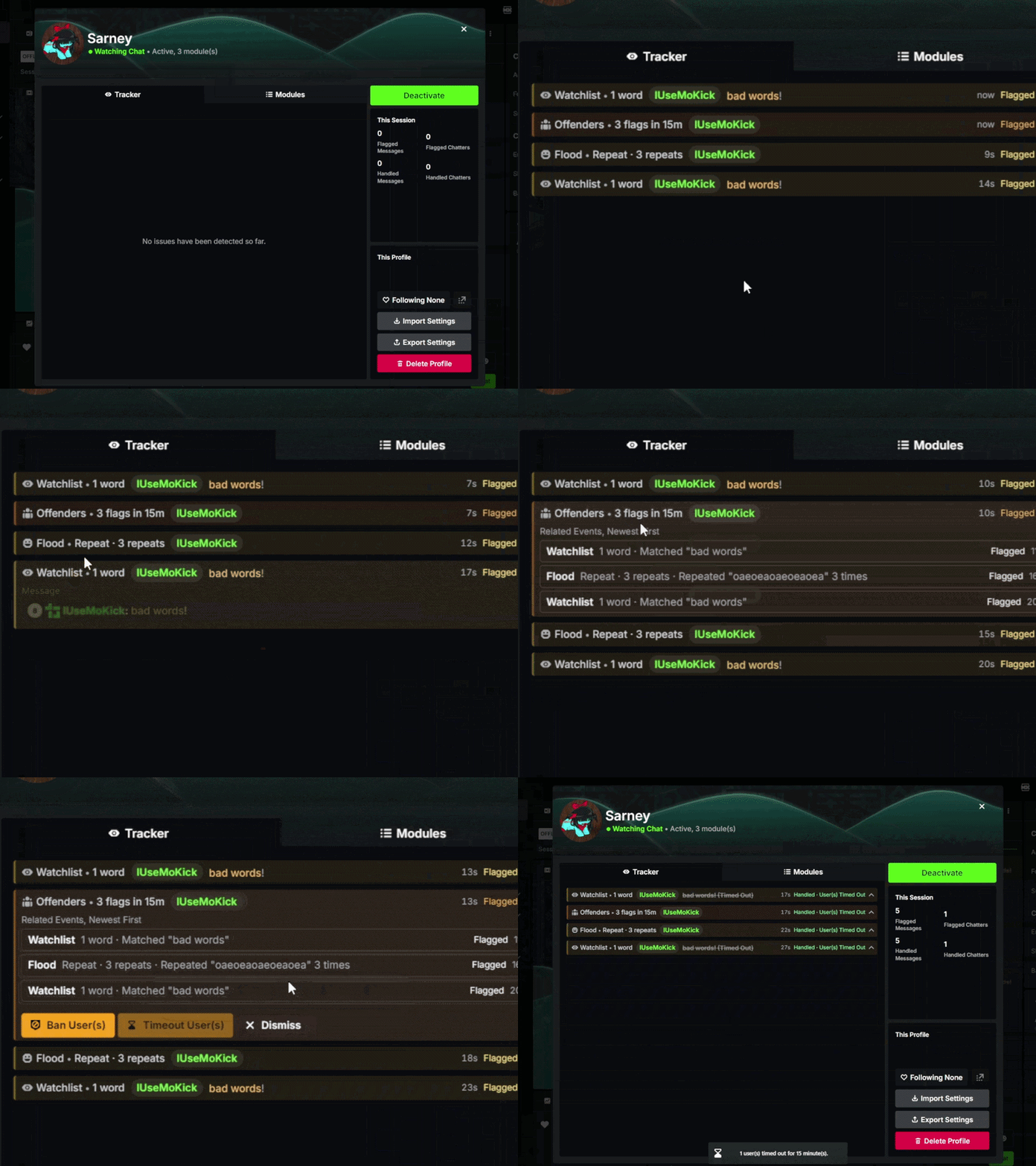
Moderation Assist has been completely reworked from its previously limited state and now comes with 3 different features that will make your head spin while exploring and fine-tuning them, making moderating Kick genuinely easier
New Chat Connection Method
Mo'Kick now uses Kick's own chat connection, which nearly eliminates disconnection issues and ensures you receive exactly the same data as Kick
Major Message Storage Optimizations
The way Mo'Kick stores messages has been heavily optimized, greatly reducing the CPU and memory load it creates
Keyboard Shortcuts
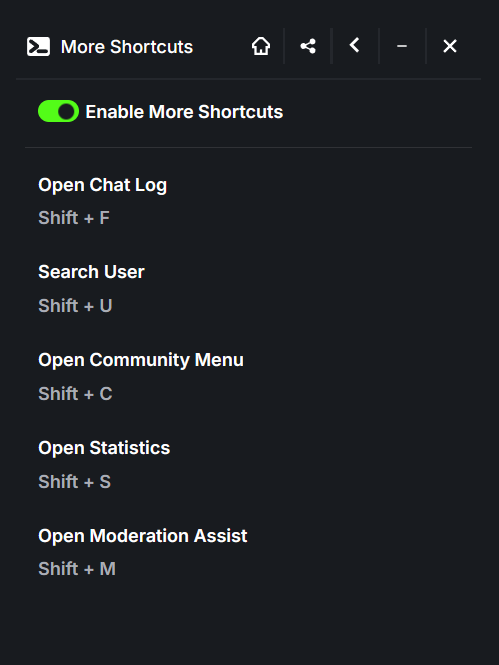
Many menus can now be accessed with keyboard shortcuts, making navigation between interfaces much easier
Chat Name Suggestions in User Search
The user search box now suggests names from the chat, just like in the chat log
User Card History in User Search
The user search box now keeps a history of user cards you opened on the page, letting you reopen them in just two clicks
Data Stability Indicator for Chat Statistics
An indicator has been added to chat statistics to show when data is still being collected and is not yet stable
Easter Eggs
Mo'Kick is more than just making Kick look better for you, you may now come across easter eggs that require attention while using Mo'Kick, and whether you find them or not is entirely up to you
Session Saving Optimizations
Session saving has been optimized and sped up, so your session is now saved more instantly and efficiently
Remaining Timeout Duration on Hover
When the detailed timeout info in the chat bottom panel is minimized, hovering over its button now shows how many minutes are left
Deleted Messages in User Cards
A user's deleted messages are now also shown in their user card
Mo'Kick Birthday Marker
A special day marker has been added for Mo'Kick's birthday
First Message in Session Out of Beta
The First Message in Session feature is no longer in beta
Followed Channels Interface Updated
The followed channels interface has been updated to match the new design
AI Mod Deleted Messages Improvements
Style updates and fixes have been made to messages deleted by AI mod
Session Storage Issues Fixed
Storage issues that caused session inconsistencies have been resolved
User Search Interface Fix
An interface issue in user search has been fixed, and the interface now closes when you press Escape
Watermark-Free Clip Download Error Fixed
The error that occurred when trying to download a clip without a watermark from the menu of clips shared in chat has been fixed
Clip Upload Compatibility Fixed
Downloaded clips can now be uploaded to platforms with restrictive video processing such as X
User Card Button Shifting Fixed
The issue causing buttons in user cards to shift has been resolved
Context Menu Visibility Fixed
The issue causing context menus not to appear has been resolved
Category Menu Hide Button Fixed
The issue where the hide button in the category menu did not appear has been resolved
Missing Channel Actions Fixed
The issue where some channel actions did not appear in the buttons of certain channels has been resolved
Message Shifting Fixed
The issue where extra boxes added to messages caused messages to shift has been resolved
Adaptive Playback Speed Interface Fixed
Interface issues with adaptive playback speed have been resolved
Chat Size Slider Visibility Fixed
The issue where the chat size slider did not appear in the chat appearance settings menu has been resolved
Own Message Features Fixed
The issue where some message features did not appear on messages sent by the user has been resolved
v3.3 is now available on Firefox, and will be coming to Chrome very soon. Enjoy the improvements, and stay tuned for more!
Posts about updates that have not yet been released will be shared exclusively for Mo'Kick Buddy members. ✨