

Have you ever wondered how Medium and other publications might be detecting the text if it is AI generated content or not?
Well, worry not. This article would help you build a basic AI text analyzer after which you can modify this code with yours to make it advanced analyzer.
Author’s note:
Author assumes you understand python and know how to use JupyterLab
Now, let’s get started!
Prerequisites
Python
Command Prompt
JupyterLab
Run JupyterLab
Create a new folder.
Open command prompt in this folder.
Type the following command to open JupyterLab
C:\Users\MyProgram\Files\Jupyter> jupyter labImport Libraries
The first step here is to import necessary libraries
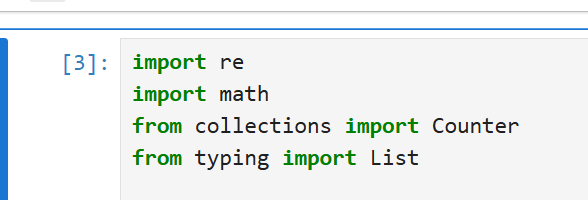
We are import
remodule for regular expressions andmathmodule to perform certain calculations.The
Counterclass is imported fromcollectionsmodule to count the number of elements in a collection.Finally, we have imported
Listfromtypingmodule to indicate that a variable is expected to be a list.
Calculate Entropy
Entropy, in ML, means identifying the randomness or unpredictability in a dataset.
This has two values: Low and High.
Low entropy means the text is more predictable, often with repeated patterns.
High entropy means the text is more unpredictable, with a more random texts.
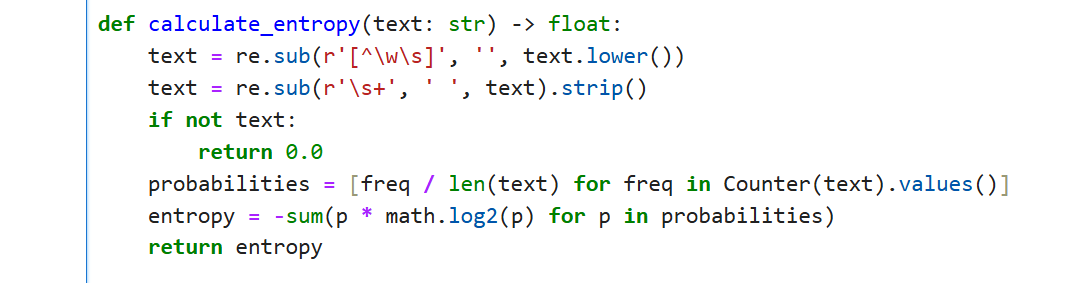
We define a method
calculate_entropywhich will be used to predict if the text entered has low or high entropy.In this method, we have done some cleaning work like replacing spaces, tabs, or newlines with a single space, removing leading/trailing whitespace and remove punctuation.
If the inputted text is not the type of text, the entropy would be 0.
We then proceed to calculate the probability of each character by dividing its frequency by the total length of the text. We count the occurrences of each character in the text.
We then specify the unpredictability or randomness in the text by summing the product of each character’s probability and the log base 2 of that probability, then multiplies by -1 to get the entropy value.
We then finally return the value of entropy.
Detect AI Patterns
Since we are building a basic analyzer, we would use some static text and see if our code detects the text and labels it as AI generated or not.
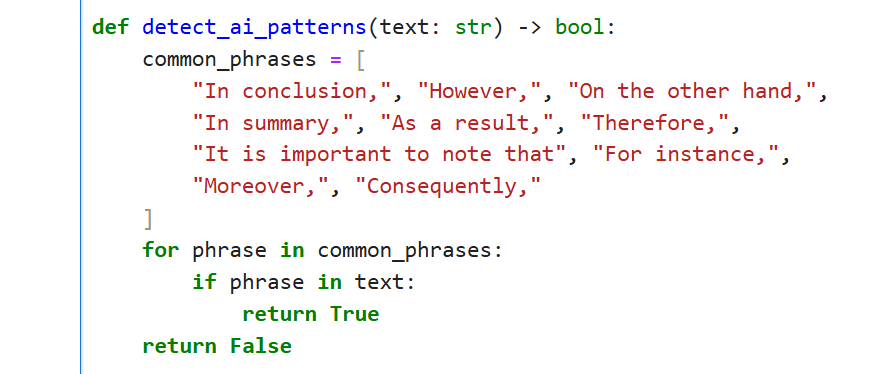
Defined an array
common_phrases.Based on the text inputted, we loop through each
common_phrases. True if found, false otherwise.
Identify AI-Generated Content
By using the above two methods, we would define if the text entered is AI generated or not.
For this we need to set the entropy threshold to 3.5.
Entropy between 3 and 4 is often considered to be a threshold entropy value.
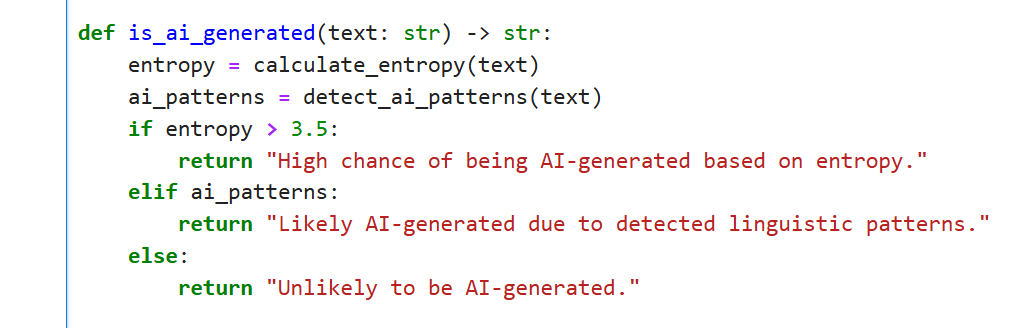
Higher the entropy, higer the change of a text being AI-generated.
If any common phrases detected then it is likely to be AI-generated. In such cases, it has less entropy.
If both the above cases fail, it is not AI-generated text.
Call Our Methods!
It’s time to call our methods.
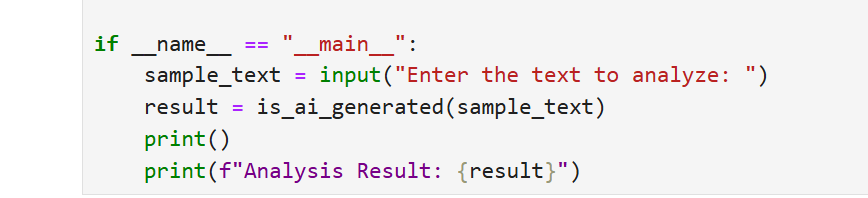
Use
inputto get the input from user.Find out if it is ai generated from the above process.
Print the result.
Output
To check if our model is working, we would first go to ChatGPT, ask him to generate a sentence for us and then paste that in our example.
Here is the prompt:

Go to your JupyterLab run your code.
It will ask you to enter a prompt to check if it is AI-generated:

Paste the prompt from ChatGPT and see what you get.


Did you get this answer!? Isn’t that great!
Now, try typing something on your own, and see what output it gives.
Remember, your input may match AI input. In that case it would detect as AI-generated. Try to use some alternative words for it in such cases.

If you get this output pat yourself on your back because we have just created our own basic AI analyzer! Woohoo!! 🙌
You might need to change the entropy value based on your text complexity. It can be higher than 4 as well.
You can try testing with whatever value you like just if you are curious to know what happens if you set higher entropy value.