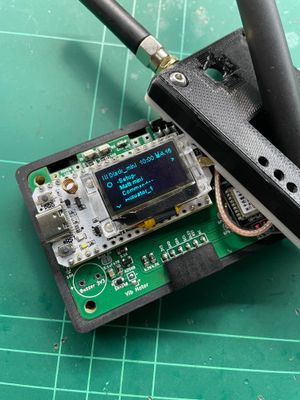


I have just released the ESP-NOW edition firmware for the T-Display S3 Pro. This can turn a stock device into a MeshCore pager, utilising just the WiFi radio to form a mesh. NOTE: you can also use this with a MeshCore ESP-NOW Bridge node to extend the reach into a wider LoRa mesh.
Flash the Firmware
First thing you need to do is flash the firmware. Download from here, then follow this guide on how to flash to the device. (you can use any ESP32 flashing method, but this is one of the easier ways). There are two firmware .bin files:
For new devices, flash the -merged.bin to offset 0. -OR-
To update from prev ver (not possible at this stage), flash the other .bin to offset (hex)10000.
Initial Setup
You should see the Ripple splash screen, then some initial help screens that outline the 4-way tap navigation for the UI. (You tap in the 4 different quadrants of the screen to nav back, forward, up and down). Tap on the orange silk-screened circle on the display for the ENTER key:

You will initially be prompted to create the initial network profile, like with the T-Deck firmware. For this special ESP-NOW edition, it only supports MeshCore over ESP-NOW. So, the only thing you need to enter is a name for the profile (defaults to 'ESPNOW').
From the home screen, navigate into the network profile menu (the top item should be selected, then nav right). You should see these menu items:

The main thing to do is set your display name. Nav into the Identity menu, then enter a name, then press ENTER. A new public key will have automatically been generated for this profile.
It's probably advisable to reboot the device at this stage, and also to get the clock properly set. Either power off with the switch or press the reset button (on under side). When it powers back up you should see the Clock Sync screen:

NOTE: unfortunately, the T-Display doesn't have a built-in RTC clock module, so the clock is reset on reboot. You either have to manually enter the epoch time or connect a GPS module.
Connecting a GPS
The serial port is neatly exposed with a Quiic connector (the one near the power switch):

(the pin order on the T-Display side should be: TX, RX, 3.3V, GND)
Discover Contacts
The rest of the UI is the same as with the T-Deck. Typically, you will go into the Discover screen to discover other devices, then select and use the Add to Home menu in the node details screen. Then, when you have contacts on your home screen, you can just nav into the different conversation screens.
Wrap Up
I will hopefully get the time to do a more general guide for the MeshCore network profiles (so is applicable to T-Deck and other devices).
Also, unfortunately, the T-Display doesn't seem to have any way to alert on incoming messages (no sound or LED's to flash). The screen should come on with a preview of message, though.
So, it's not exactly a perfect device, but these could be very useful to have around the house or a property, especially when combined with an ESP-NOW <-> LoRa Bridge node (coming soon).