

In today’s fast-paced digital world, launching a robust online store doesn’t have to be complicated or time-consuming. Enter ShopCart Pro, a complete e-commerce platform designed for businesses and developers looking to create a professional, high-performance online shopping experience. Built using cutting-edge technologies like Next.js 16, React 19, TypeScript, and Tailwind CSS, ShopCart Pro combines speed, security, and scalability into one powerful package.
Whether you’re a startup owner, a freelance developer, or an established brand, this platform offers everything you need to get your store up and running quickly. In this blog post, we’ll dive deep into what makes ShopCart Pro stand out, its core features, premium upgrades, technology stack, setup instructions, and much more. Let’s explore how you can transform your e-commerce ideas into reality.
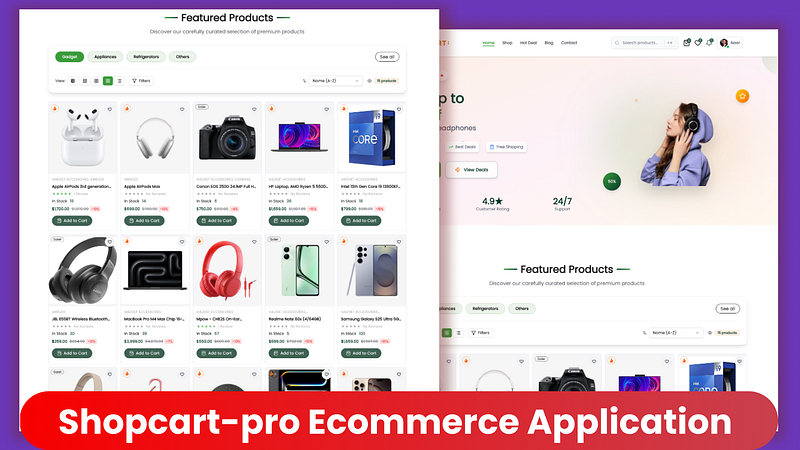
Shopcartpro Ecommerce
Why Choose ShopCart Pro?
ShopCart Pro isn’t just another e-commerce template — it’s a production-ready solution that’s been tested in real-world scenarios. Here’s what sets it apart:
Lightning-Fast Performance: Powered by Next.js 16 with Turbopack, it ensures instant page loads and seamless navigation.
Stunning Design: A modern UI crafted with Tailwind CSS and enhanced by Framer Motion for smooth animations.
Secure and Scalable: Features enterprise-grade authentication via Clerk and secure payments through Stripe.
Mobile-First Approach: Fully responsive design that shines on desktops, tablets, and smartphones.
Easy Customization: Clean, well-documented code makes it simple to tailor to your brand.
Proven Reliability: Deployed and optimized for real businesses.
If you’re tired of clunky platforms or starting from scratch, ShopCart Pro provides a solid foundation to build upon. Check out the live demo to see it in action, or head to the setup guide for more details. For premium features, upgrade here.
Core Features of the Free Version
The free version of ShopCart Pro is packed with essential tools to launch a fully functional online store. Let’s break them down by category.
Product Management
Manage your inventory effortlessly:
Showcase products with multiple images, detailed descriptions, and specifications.
Organize items into categories and subcategories for easy browsing.
Filter products by brands and manage variations like sizes and colors.
Track real-time stock levels and mark products as New, Hot, Featured, or On Sale.
Smart Search and Discovery
Help customers find what they need quickly:
Advanced search with autocomplete suggestions.
Display popular and trending searches.
Comprehensive filtering by price, category, brand, rating, and more.
Sorting options including price, popularity, newest arrivals, and ratings.
AI-powered recommendations for related products.
Shopping Experience
Deliver a smooth, user-friendly cart system:
Persistent cart that saves items across sessions.
Real-time updates for totals, taxes, shipping, and discounts.
Easy quantity adjustments and quick cart previews.
Wishlist functionality to save favorites.
Automatic price calculations for a hassle-free checkout.
Flexible Payments
Support multiple payment methods securely:
Integrate Stripe for card payments.
Use Clerk Payments as an alternative gateway.
Offer Cash on Delivery (COD) for local buyers.
Track orders in real-time and maintain payment history.
User Features
Enhance customer engagement:
Secure authentication with Clerk for email sign-up and sign-in.
User profiles to manage info, addresses, and order history.
Wallet system for credits and refunds.
Loyalty points earned on purchases.
Review system for writing and reading product feedback.
Communication Tools
Keep users informed:
Email notifications for orders via Nodemailer.
Status updates and newsletters.
Contact forms for support inquiries.
Modern UI/UX
Enjoy a polished interface:
Tailwind CSS for responsive styling.
Framer Motion for animations and transitions.
Dark mode support and skeleton loaders.
Toast notifications and breadcrumb navigation.
Mobile Optimization
Perfect for on-the-go shopping:
Bottom tab bar for easy navigation.
Touch gestures and optimized images.
Responsive grids for all screen sizes.
These features make the free version ideal for small to medium-sized stores. If you need more advanced tools, consider the premium upgrade.
Premium Features: Elevate Your Business
For growing businesses, the paid version unlocks powerful tools to scale and optimize. With a one-time payment, you get lifetime access and all future updates.
Advanced Analytics Dashboard
Gain deep insights:
Track sales trends, customer behavior, and product performance.
Monitor traffic, conversions, and revenue with visual charts.
Generate daily, weekly, monthly, and yearly reports.
Employee Management System
Streamline team operations:
Assign roles like Admin, Manager, Staff, or Support.
Dedicated dashboards, task assignments, and performance tracking.
Activity logs and granular permissions.
Review Management Tools
Handle feedback efficiently:
Moderate, edit, or reject reviews in bulk.
Analyze ratings, sentiment, and trends.
Auto-moderation and response management.
Subscription & Email Management
Boost marketing:
Build newsletters and segment subscribers.
Automate emails for cart abandonment and promotions.
Track campaign performance with A/B testing.
Customer Insights & Reports
Understand your audience:
Segment customers and calculate lifetime value.
Analyze retention, churn, and RFM metrics.
Export data as Excel or CSV.
Custom Admin Branding
Make it your own:
White-label the platform and add custom logos/themes.
Use your domain and branded emails.
Advanced Features
Extra capabilities:
Bulk import/export, API access, and webhooks.
Multi-currency support and tax automation.
Inventory alerts.
Priority Support
Get help fast:
24-hour responses, dedicated chat, and setup assistance.
Early access to betas and free updates.
Upgrade today via Buy Me a Coffee for these game-changing features.
Technology Stack
ShopCart Pro leverages a modern, full-stack setup for reliability and efficiency. Let me break it down for you in a straightforward way, category by category, so it’s easy to follow.
Starting with the frontend: It uses Next.js 16 for the core framework, React 19 for building interactive components, and TypeScript 5.7 to ensure type safety throughout the code.
For styling, the platform relies on Tailwind CSS 4.1 for responsive and customizable designs, paired with Framer Motion 12.23 to add those smooth animations and transitions that make the user experience feel polished.
When it comes to content management, Sanity CMS 4.12 with its Studio handles everything, making it simple to manage and update site content without hassle.
Authentication is secured through Clerk 6.34, which supports email and OAuth options for user sign-ins.
On the payments side, Stripe 19.2 takes care of secure transactions, with Clerk Payments as an additional gateway for flexibility.
For the database, it combines Firebase Firestore for real-time data handling with Sanity Backend to store and query content efficiently.
Email functionality is powered by Nodemailer with Gmail OAuth2, ensuring reliable notifications and communications.
State management is kept lightweight using Zustand 5.0 alongside React Context for handling app-wide data.
Forms are managed with React Hook Form for efficient building and Zod for robust validation to catch errors early.
The UI components draw from Shadcn UI, Radix UI, and Lucide Icons to create reusable, accessible elements that look great out of the box.
Finally, for development tools, Turbopack speeds up builds, while ESLint and Prettier enforce code quality and consistent formatting.
This stack ensures top-notch performance, with Next.js handling server-side rendering and React powering interactive components.
Quick Start: Setting Up ShopCart Pro
Getting started is straightforward. Follow these steps to have your store running locally.
Prerequisites
Node.js 18.0+ (download from nodejs.org)
A package manager like npm, yarn, or pnpm
Git (download from git-scm.com)
Installation Steps
Clone the repository:
git clone https://github.com/noorjsdivs/shopcartpro-yt.git cd shopcartpro-yt2. Install dependencies:
pnpm install # or npm install / yarn install3. Set up environment variables:
cp .env.example .env4. Edit .env with your credentials (e.g., Sanity project ID, Clerk keys, Stripe secrets). See the .env.example for the template.
5. Run the development server:
pnpm dev6. Open your browser and visit http://localhost:3000.
For detailed configuration, including setting up Sanity CMS, Clerk, Stripe, Firebase, and email services, refer to the comprehensive SETUP.md guide. There’s also a video tutorial for visual guidance.
Project Structure Overview
The codebase is organized for maintainability:
app/: Next.js App Router, including client pages (e.g., shop, cart), admin panel, employee portal (premium), auth routes, API endpoints, and Sanity Studio.
components/: Reusable React components for admin, cart, checkout, products, and UI.
lib/: Utilities for Sanity, Stripe, and helpers.
actions/: Server actions for users, orders, wallets, and reviews.
types/: TypeScript definitions.
hooks/: Custom React hooks.
sanity/: Schemas for content types.
public/: Static assets like images.
Premium features are marked with ⭐ in the structure.
Design, Security, and Performance Highlights
Design Features
Beautiful product cards with gradients and hover effects.
Smooth animations for carts, modals, and loading states.
Responsive layouts with mobile-optimized navigation.
Security Features
Clerk for secure auth with 2FA.
Stripe for PCI-compliant payments.
Validation with Zod, XSS/CSRF protection.
Performance Optimizations
Lighthouse scores of 95+.
Fast loading with image optimization, code splitting, and caching.
ShopCart Pro also supports PWA installation, offline basics, and is ready for internationalization and SEO with dynamic meta tags, sitemaps, and structured data.
Testing, Quality, and Roadmap
Built with TypeScript for type safety, ESLint for quality, and Prettier for formatting. Error boundaries ensure smooth user experiences.
Upcoming features include product comparisons (free) and multi-vendor support (premium). Check the roadmap in the README for more.
Documentation and Support
SETUP.md: Step-by-step setup.
YouTube Channel: Tutorials.
Free support via GitHub issues, Discord, or email ([email protected]).
Premium users get priority help, chat, and custom assistance.
The free version is MIT-licensed; premium comes with a commercial license. See LICENSE.
About the Author
Developed by Noor Mohammad, a full-stack developer and instructor. Visit reactbd.com, follow on YouTube, GitHub @noorjsdivs, or email [email protected].
If ShopCart Pro excites you, star it on GitHub ⭐ and share your thoughts!
Thanks to the Next.js team, Vercel, Sanity, Clerk, Stripe, and all supporters.
Ready to launch? Start with the free setup, upgrade to premium, or watch the tutorial.
© 2025 ShopCart Pro. All rights reserved. Made with ❤️ by Noor Mohammad.